How to Humanize AI Content at Scale for Blogs and CMS
32 min read
To humanize AI content at scale, stop treating it as a rewrite button and run it as a seven-step pipeline: software handles batch drafting, humanizer passes, and CMS pushes, while people own voice, facts, first-hand experience and the publish decision.
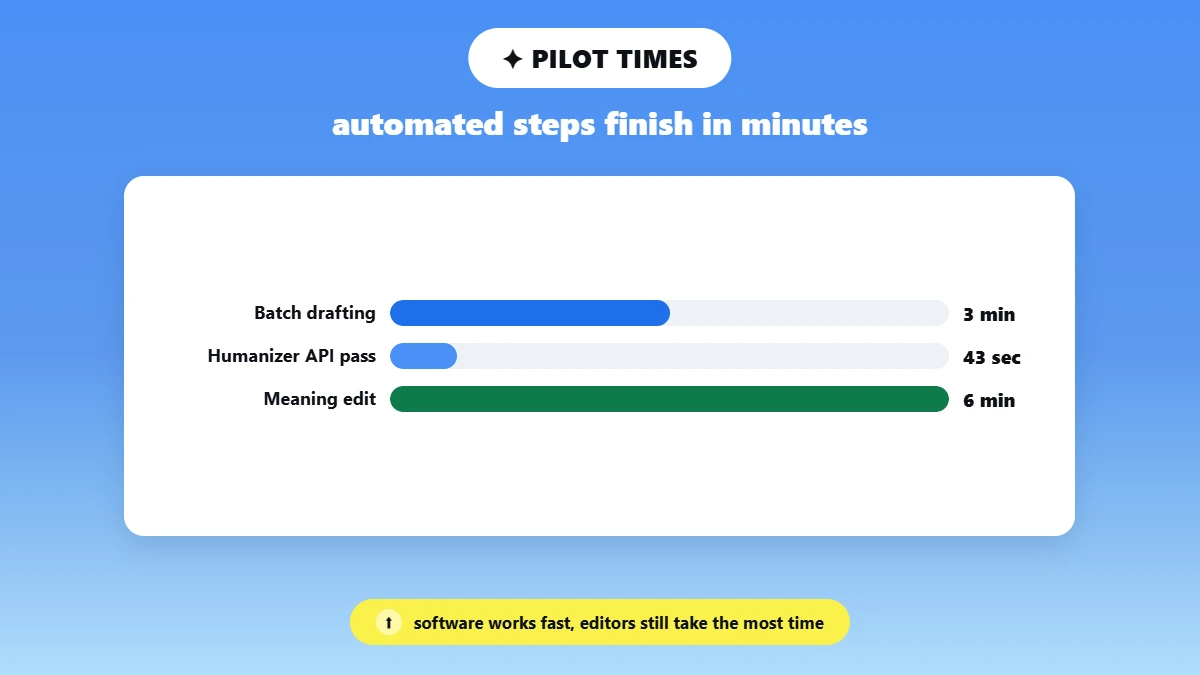
We ran one client-style draft, 1,441 words for a fictional dental clinic, through Steps 2 to 4 of this workflow on 16 November 2026, with AI help on the edit. Every logged number in this guide comes from that pilot, and by-hand times are labelled as our writer's earlier manual edits.
Below, you get a voice profile template, API batch steps, WordPress and Webflow walkthroughs, and a pre-publish detector check.
Humanizing a full content calendar? Run your batch through the Phrasly AI Humanizer API.
Humanizing AI Content at Scale, in One Pipeline
To humanize AI content at scale, run it as a staged pipeline. AI drafts from a per-client voice profile. A humanizer API processes drafts in batches. Editors check meaning, facts, and first-hand experience. An AI detector flags passages for a second look. Approved posts go to WordPress or Webflow as drafts for final review.
Step | Owner (automated or human) | Tool type | Output | Time in our pilot (one 1,441-word draft) |
1. Voice profile and brief | Human (account lead or editor) | Doc or spreadsheet template | One voice profile per client, one brief per article | Not timed |
2. Batch drafting | Automated (human-set prompts) | LLM with prompt chaining | Raw drafts, each with an article ID | 3 min (GPT-6) |
3. Humanizer API pass | Automated (set up once by ops or dev) | AI humanizer API, or a web humanizer for small batches | Input and output pairs stored side by side | 43 sec (web humanizer) |
4. Meaning and experience edit | Human (editor) | Diff checker plus voice profile checklist | Edited draft with facts, numbers and CTAs verified | About 6 min AI-assisted; roughly 2 h 45 min to 4 h by hand* |
5. AI detector check | Automated signal, human override | AI detector | Score logged per article, override reason if used | Not run in pilot |
6. CMS push as drafts | Automated | WordPress or Webflow API, Zapier or Make | Unpublished CMS drafts matched by ID | Not tested |
7. Sample and publish | Human (managing editor) | CMS preview and QA checklist | Scheduled posts | Not tested |
By-hand range from our writer's earlier manual edits, not timed in this pilot. The AI-assisted edit added no first-hand experience; see Step 4.
This batch processing workflow is built for an agency team choosing an AI humanizer for agencies rather than a single-post tool. It suits teams publishing 20 or more AI-assisted posts a month on WordPress or Webflow.
It also assumes someone on the team can run a script or a Zapier or Make scenario. Non-developers can swap the API call for a vendor's bulk upload or web tool, and Step 3 covers that route.
The seven steps work because each one has a single owner and a single output. A draft never waits in someone's inbox without a status, and nobody rewrites a post that another editor already approved.
One article ID ties the whole chain together. It starts in the Step 1 brief, rides through the drafts, the humanizer pairs and the detector log, and ends as the CMS draft ID, so any problem traces back to the step that caused it.
For agencies, every step also runs per client. Each client has its own voice profile, its own batch and its own log, so one client's banned phrases never leak into another client's posts.
Which steps should you automate, and which should stay human? Automate what moves files, and keep human what judges them.
Automate:
Outlining: briefs become outlines automatically.
First drafts: prompts run per brief, in batches.
Batch humanizer calls: many requests per run.
Matching files by article ID: one ID from brief to CMS.
Creating CMS drafts: approved posts land unpublished.
Keep human, through human-in-the-loop editing:
Voice approval: client sign-off before drafting.
Meaning-drift check: numbers, names, and claims match the input.
First-hand examples: scripts have no experience to add.
Fact-checking: every claim traces to a source.
Detector overrides: a score is a flag. Not a verdict.
Publish decision: made against a quality control checklist.
This is a workflow guide, not a tool roundup. Step 3 covers how to choose a humanizer.
Does Google penalize AI Content You Publish at Scale?
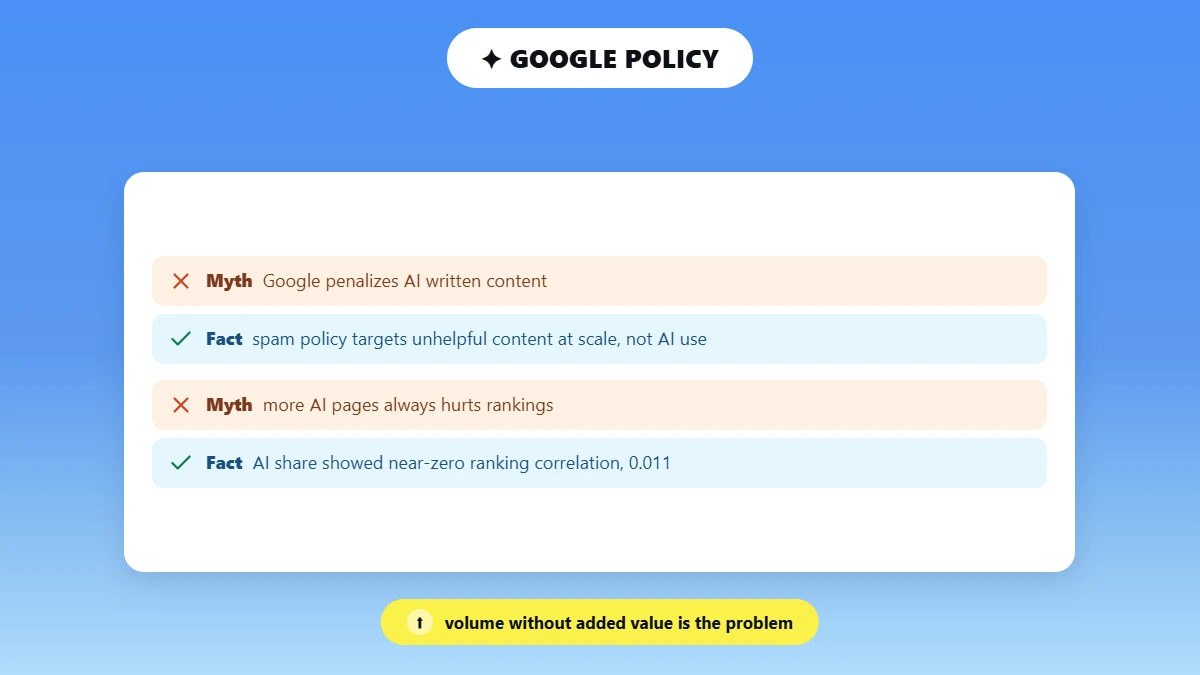
No, not for using AI: Google's spam policies target unhelpful content produced at scale mainly to manipulate rankings, not the fact that AI helped write it. Volume on its own is not the problem. Volume without added value is.
The ranking data points the same way.
An Ahrefs study of 600,000 top-ranking pages (July 2025) found 86.5% contained some AI-generated content, and the correlation between a page's AI share and its ranking position was 0.011, effectively zero.
Google's own guidance now puts the burden on review. On 1 October 2026, it rewrote the accuracy section of its guidance on using generative AI content, explaining that "generative models don't retrieve facts, but predict a likely sequence of words based on their training data."
The updated page says it is critical to "manually factcheck and review all AI-generated content for accuracy and trustworthiness before publishing." It extends that review to titles, meta descriptions, structured data and image alt text, because those can appear in Search results too.
That is why this pipeline has human gates: they add value a reader can see, which no rewrite can do.
What the Scaled Content Abuse Policy Covers
Google names this "scaled content abuse" on its spam policies page. It was introduced in March 2024, alongside that month's core update.
Google defines it as: "Scaled content abuse is when many pages are generated for the primary purpose of manipulating search rankings and not helping users."
In plain terms, volume publishing starts to look like abuse when three things meet: many pages, little added value, and a purpose built around rankings rather than readers. Google also says the policy applies however the content is created, so AI, templates, and human writers are all judged the same way.
Google's Search Quality Rater Guidelines (January 2025 update) name generative AI as one low-effort way to produce many low-value pages.
The fix is never the tool you drop. It is the value you add.
We built each step so that no page ships simply because it was drafted:
Step | Safeguard | What a person adds |
1. Voice profile and brief | Angle and sources set first | Reader-first purpose |
2. Batch drafting | [EXPERIENCE] slots left open | Gaps flagged, not filled |
3. Humanizer API pass | Readability only | Nothing on its own |
4. Meaning and experience edit | Drift diff, real detail, author | Verified facts, examples |
5. AI detector check | Uniform passages reread | A second human look |
6. CMS push as drafts | Nothing goes live automatically | A hold point |
7. Sample and publish | A person decides if it ships | Final approval |
Step mapping is our own workflow design, not Google's. Policy wording checked on 16 Nov 2026.
Step 3 is the row to watch. Humanizing changes how a page reads, not what it offers, so it gives no protection under this policy by itself.
Google's helpful content guidance points the same way.
In a February 8, 2023 Search Central post, Google said its focus is "on the quality of content, rather than how content is produced," and that using automation, including AI, mainly to manipulate rankings breaks its spam policies.
What E-E-A-T Looks Like in a Humanized Post
E-E-A-T shows up as things a reader can check, and a rewrite supplies none of them. The question behind most "humanize AI content E-E-A-T" searches is whether an edited AI draft can still meet Google's expectations. It can, if each signal comes from a named step:
First-hand experience: real examples or SME quotes fill the placeholders in Step 4.
Original data: client-supplied numbers go in during Step 4.
Named author with a bio: attributed in Step 4, then confirmed on the Step 7 checklist.
Accurate, sourced claims: Step 1 lists the required sources, and Step 4 does the fact-checking.
Consistent brand voice: defined in the Step 1 voice profile.
None of the five is a detector score. A low AI reading from Turnitin or any other tool says nothing about experience or accuracy.
Decision rule: a post missing any of the five goes back to Step 4, not to the humanizer. It is an editing gap, not a rewrite job.
For the ranking side of the rewrite itself, see how to humanize AI SEO content without hurting rankings.
Step 1: Build a Voice Profile and Brief for Every Client
Owner: human (account lead or editor).
Input: the client's style guide plus 3 approved past posts.
Output: one voice profile per client and one brief per article.
Time in our pilot: not timed; we reused the voice profile template below.
You cannot humanize AI content at scale across many clients with one generic prompt, so this is the first stage of any AI-assisted production workflow.
Every later prompt, edit pass, and QA check reads from the profile. Without it, the humanizer and the editor have no target voice.
The Voice Profile Template
The profile turns a client's brand voice guidelines and editorial style guide into fields a prompt and an editor can both use.
Field | What to capture | Example (fictional client: Brightline Dental Group) |
Audience | Who reads, what they already know, what they worry about | Adults 30 to 55 comparing local dental clinics, nervous about cost |
POV and person | First, second or third person, singular or plural brand voice | "We" for the clinic, "you" for the patient |
Tone sliders | Formal to casual (1 to 5), plain to technical (1 to 5) | Casual 4, plain 2 |
Words we use / banned phrases | Preferred terms and phrases the client never wants | Use "checkup", not "prophylaxis"; ban "cutting-edge", "state-of-the-art", "in conclusion" |
Sentence-length range | Typical and maximum sentence length | Mostly 8 to 18 words, none over 25 |
Approved sample paragraph / claims that need a source | One signed-off paragraph, plus claim types that always need a citation | Sample: paste one approved paragraph. Sourced claims: pricing, treatment outcomes, insurance coverage |
CTA rules | Allowed CTAs | "Book a checkup" |
Illustrative example. Not a real client.
The profile gives editors a fixed standard for rewriting AI drafts without losing your voice.
In Step 2, you paste it into the drafting prompt. In Step 4, the editor uses it as a line-by-line checklist.
Build the first version from the 3 approved posts, not from a blank form. Highlight phrases that repeat across them, count the words in a handful of typical sentences, and note whether the client writes "we" or names the company.
Then add what the posts cannot show: claims that need a source, competitors the client never names, and CTAs legal has approved. Send the draft profile to the client with the sample paragraph filled in, because a real paragraph gets clearer feedback than a list of adjectives.
Have the client approve it once? Then review it every quarter, or whenever their positioning changes.
Govern the profiles so clients never mix:
Storage: one folder per client, never a shared prompt doc.
Versioning: version number and approval date in the file name; archive old versions instead of overwriting them.
Separation: every brief carries a client ID, so a draft pulls only its own client's profile.
What Gen AI and an LLM Actually Do in this Pipeline
What is gen AI? Generative AI is software that produces new text, images, or code from a prompt.
What is an LLM in AI? A large language model (LLM) is the text version: it predicts likely next words from patterns in its training data.
That is how an AI works when it drafts, and it explains why raw drafts sound uniform. A UCC study found AI models produce tightly clustered writing styles, covered in Step 4.
Which task is a generative AI task here? Drafting and outlining are. Verifying facts and adding lived experience are not, so both stay human in Step 4.
In this workflow, how to use AI means drafting inside fixed guardrails, the profile and the brief, not handing over judgment.
Every content brief needs:
Article ID: tracks the post through every later step.
Focus keyword and angle.
Target reader
Required sources: one for every claim type the profile flags.
First-hand detail: one example, figure, or quote the client or a subject expert must supply.
Internal links and CTA
Warning: No first-hand detail, no draft
If the client supplies nothing for that field, the brief is not ready, and the article does not enter Step 2.
Step 2: Draft in Batches with Prompt Chaining
Owner: automated, using prompts a person on your team writes and maintains.
Input: the article brief plus the client's voice profile.
Output: raw drafts, each tagged with a unique article ID.
Time in our pilot: 3 minutes for a 1,441-word draft with GPT-6, about 2 minutes per 1,000 words.
Drafting is the only job here. Facts, voice, and approval stay with people.
How the Three-Link Prompt Chain Works
Prompt chaining splits one big request into three linked prompts, and each output feeds the next. Each job is smaller, so the model has less room to wander.
A single "write the whole post" prompt mixes structure, voice, and self-checking into one pass, and errors in one bury the others. Splitting them lets you see which link failed when a draft comes back wrong, and fix that prompt alone.
Link 1 builds an outline from the brief. Link 2 drafts each section with the voice profile pasted in. Link 3 checks the draft against the banned-phrase list and the sentence-length range, then revises it.
Prompt 1: Outline
Using [brief], write an H2 and H3 outline for [focus keyword] aimed at [target reader]. Under each heading, add [EXPERIENCE: what the client or SME should supply] wherever first-hand detail belongs. Return the outline only.
Prompt 2: Draft
Write the full article from [outline], about [target length] words. Follow [voice profile] exactly, including audience, POV, tone, preferred and banned terms, sentence-length range, and claims that need a source. Leave every [EXPERIENCE: ...] placeholder unfilled. Do not invent statistics, quotes, or examples. Output in [plain text, Markdown or HTML], starting with the line [article ID].
Prompt 3: Self-critique
Check [draft] against [banned phrases] and [sentence-length range]. List every violation with its sentence. Then return a revised draft in the same format, keeping all [EXPERIENCE: ...] placeholders and the [article ID] line.
These are the versions that worked in our pilot (GPT-6, 16 November 2026). Link 2 drafted the whole article in one call; per-section calls suit longer posts.
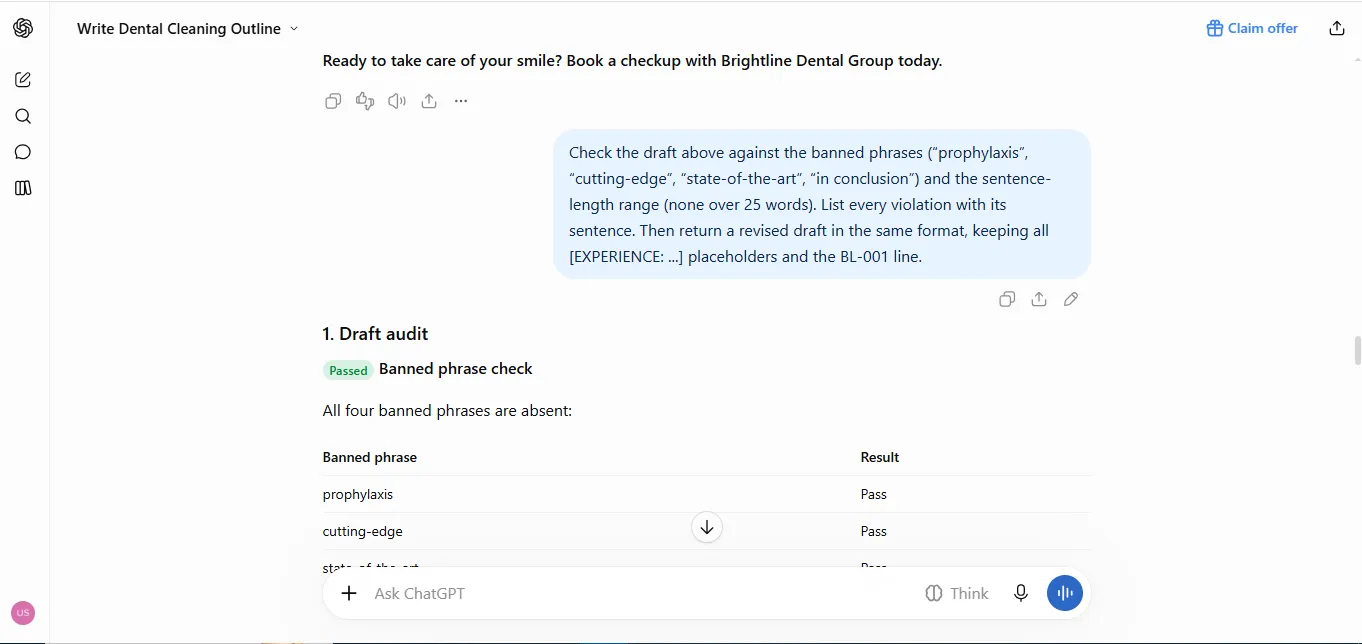
Link 3 of the prompt chain in our pilot: GPT-6 audits draft BL-001 against the banned phrases before revising it, 16 November 2026.
How Do You Keep a Consistent Voice When AI Drafts at Scale?
Paste the same voice profile into every Link 2 call, and never let the model guess your brand voice guidelines. Fixed inputs give you a consistent voice. Clever wording does not.
Leave the [EXPERIENCE] placeholders visible in the draft. A model asked to fill them in with invented anecdotes, and an invented anecdote is harder to catch in Step 4 than an empty bracket.
When Link 3 keeps flagging the same violation across a batch, fix the profile or the Link 2 prompt, not each draft. Log the model name with every batch too, because a model update can change rhythm and length overnight.
These batching rules keep each batch processing workflow run clean:
Group: batch drafts by client and content type.
One profile per run: never mix clients in a batch.
Fixed format: pick Markdown or HTML and keep it for the whole run.
Unique IDs: give every article one, so Step 3 and Step 6 can match files.
Batch log: record the model name and date for each run.
Tip: Name files so Step 3 can find them
Save each draft to a shared sheet or folder keyed by article ID, using one naming pattern such as [client]_ [article ID] _draft (illustrative example). If the filename and the ID line inside the file disagree, fix the mismatch before the humanizer pass.
Uniform rhythm and tidy transitions are expected at this stage. Steps 3 and 4 fix them.
Step 3: Run Drafts through an AI Humanizer API in Batches
Owner: automated, set up once by a developer or ops lead.
Input: drafts tagged with article IDs.
Output: input and output pairs stored side by side.
Time in our pilot: 43 seconds for one 1,441-word pass.
This is how to humanize AI content in volume without pasting drafts into a box one at a time. The humanizer reduces uniform rhythm and stock phrasing as a first pass. It is never the final step, and it does not add original data, enforce your editorial style guide, or make a post helpful.
What Any Humanizer API Needs for Agency Work
Check these criteria before you look at any brand, and compare humanizer APIs for developers against them before you write code.
Requirement | Why agencies need it | Ask the vendor |
Batch or concurrent requests | 50 posts cannot go one paste at a time | Parallel calls per key? |
Word limit per call | Sets your chunk size | Max words per request |
Tone or mode settings | Must match each voice profile | Settable per request? |
Data retention and privacy | Client drafts are confidential | Stored? Used for training? |
Usage logs per client | You bill clients by volume | Per-key or per-tag usage reports? |
Error handling and retries | A failed call must not drop an article | Error codes, rate-limit signals |
Map each client's voice profile to one tone or mode setting before the first run, and store that mapping with the profile. If a client's posts are formal and technical, the lightest setting usually leaves the least meaning drift for Step 4 to repair.
Read the retention terms before you send a single client draft. If the vendor stores submitted text or trains on it, your client contract may forbid that, and the answer belongs in writing.
Single-box web tools are not built for batches. Reviews of consumer humanizers report per-check caps of a few hundred words or a couple of thousand characters, which turns a 50-post month into hundreds of manual pastes.
Send a Batch Through the API
Export: pull drafts from the Step 2 folder with their article IDs.
Chunk: split any draft over the per-call word limit at H2 breaks, never mid-paragraph.
Send: one request per article or chunk, through a queue.
Retry: back off on rate-limit errors and log the ID after repeated failures.
Store: save each input and output pair under the same ID.
Log: record word counts in and out for the Step 4 drift check.
Pseudocode. Take the real request and response format from your vendor's official API docs.
Chunk at H2 breaks because a humanizer rewrites what it sees, and a split mid-paragraph produces two halves that no longer join cleanly. Rejoin the chunks in their original order before you store the output.
Use a queue rather than firing every request at once. A queue respects rate limits, keeps a clear record of which article IDs are done, and lets a failed call retry without resending the whole batch.
Track word counts per client as well as per article. Those totals become your usage report for client billing, and a sudden jump in output length is an early sign of drift.
Our pilot run: Phrasly's web humanizer (Ultra engine, Balanced mode), one pass, 43 seconds for 1,441 words, output 1,347 words. We used the web tool, not the API, so we have no API throughput figure.
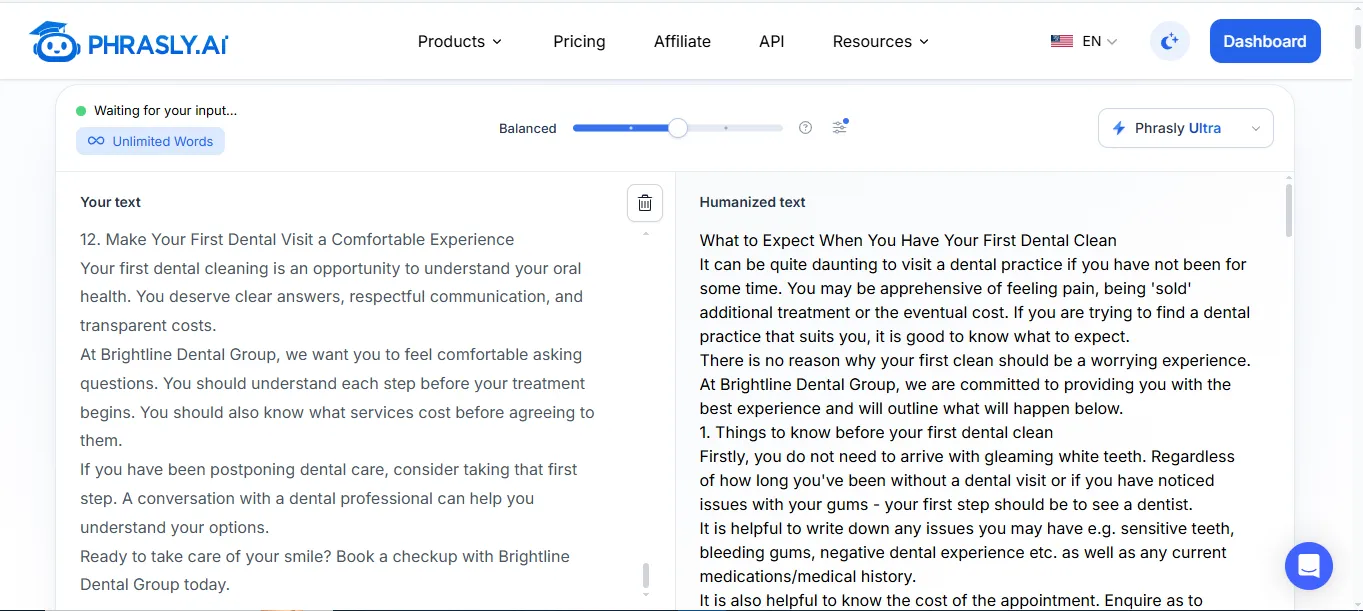
Our pilot humanizer pass: Phrasly Ultra in Balanced mode, one run on the 1,441-word draft, 16 November 2026. The output dropped the BL-001 line and reworded the CTA; two of the 19 drift items were caught in Step 4.
Disclosure: Phrasly makes the humanizer API and the web humanizer used as worked examples in this step. Alternatives are linked above.
Batching client drafts? Send them through the Phrasly AI Humanizer API.
Plans and API keys are on Phrasly for business. Check current pricing there before you commit a client budget.
No Developer? Use a Bulk Upload or Web Tool
If your humanizer offers a bulk CSV upload, use it; if not, a web humanizer works for small batches, as in our pilot. Phrasly for business, for example, has a Bulk processing feature: its dashboard accepts a CSV of up to 100 documents in one upload. Either way, the flow has three moves:
Upload: a CSV with an article ID column and a text column.
Download: the processed CSV once the batch finishes.
Keep IDs unchanged: Step 4 and Step 6 match files on them.
Prepare the CSV with one row per article, save it as UTF-8 so quotes and accented names survive, and keep the article ID in its own column. For a month of more than 100 posts, split the file by client so each upload stays under the limit. Spot-check three rows of the processed file against the originals before anything moves on.
A Zapier or Make scenario can watch the folder where you save the downloaded CSV and pass each row to the Step 6 sheet.
How do you humanize 50 AI-written posts a month without burning out your team? Move the repetitive passes into this step, and spend editor time only where Step 4 needs judgment.
Step 4: Edit for Meaning, Voice and First-Hand Experience
Owner: human editor.
Input: the stored input and output pair from Step 3, tagged with the article ID.
Output: an approved draft ready for detector QA in Step 5.
Fix meaning drift before any style edit. A polished sentence that carries a wrong number is still wrong.
At 20 or more posts a month, one changed price or altered CTA in a client post becomes a client escalation. The editor's first job is to protect facts. The second is to improve voice.
Stage | What the editor does | Our pilot (one 1,347-word draft) |
Meaning check | Diff input vs output, restore drifted facts, numbers, links and CTAs | About 1 min AI-assisted, 19 drift items; roughly 30 to 45 min by hand |
Voice edit | Apply the voice profile, vary rhythm, cut stock transitions | About 1.5 min AI-assisted; roughly 45 to 60 min by hand |
Experience insert | Add an observation, client data, client example or brand opinion | About 1.5 min AI-assisted, 0 first-hand details; roughly 30 to 45 min by hand |
Fact-check | Trace claims to primary sources, date every stat, read aloud | About 2 min AI-assisted, 17 claims (9 sourced, 8 cut or softened); roughly 60 to 90 min by hand |
Total | Sum of the four stages | About 6 min AI-assisted; roughly 2 h 45 min to 4 h by hand |
AI-assisted times logged 16 November 2026 on one 1,347-word humanized draft. By-hand ranges are from our writer's earlier manual edits and were not timed in this pilot. One draft, so treat this as a pilot, not a benchmark.
What our one-draft pilot found
One humanizer pass changed meaning 19 times. It deleted the article ID line, rewrote the CTA and dropped the client name from it, added a "best" claim the client never made, and turned "we believe you should never feel rushed" into "we will ensure you are not rushed".
AI tools handled the checks in about 6 minutes, but the meaning check missed one drift ("may take longer" had become "is likely to take longer"), which the fact-check caught. The AI could fill placeholders only with general tips and deleted the two that needed real client facts, so first-hand experience still has to come from people.
How long should you budget per 1,000-word draft? Budget the total from the logged run above, then add a buffer for drafts that need source hunting.
Run a Meaning-Drift Check First
Open the pair in a side-by-side diff before you edit a single sentence.
Any diff tool works, and so does Google Docs: Tools > Compare documents.
What to compare | How to check | Action if changed |
Numbers, prices, percentages, dates | Scripted | Restore original |
People, brands, products, places | Scripted, then by eye | Restore original |
Direct quotes | Scripted exact match | Restore word for word |
Claims and qualifiers ("up to", "about") | By eye | Restore qualifier |
Links and anchor text | Scripted | Restore both |
CTAs and offer wording | By eye | Restore, tell account lead |
Legal, medical, financial wording | By eye | Restore, escalate |
Automate the scripted rows. A short script can use regular expressions to pull every number, URL, and quoted string from both versions, and an NLP library can flag named entities that appear in one list but not the other.
The editor then reviews only the flagged lines and the by-eye rows, and logs each drift type in the batch sheet. If more items drift than the threshold your team sets in advance, reject the humanized version and rerun the original through Step 3 at a lighter setting.
Add What AI Cannot Write
This is the part of how to humanize AI content that no tool covers.
For rhythm, apply these AI content humanization techniques: vary sentence length on purpose, cut stock transitions such as "Moreover" and "Additionally", and break symmetrical lists.
Rhythm matters because it is measurable.
A University College Cork study (December 2025), which UCC calls the first to use literary stylometry on human and AI creative writing, found that GPT-3.5, GPT-4 and Llama 70B "produce tightly grouped clusters," while "human texts show far greater variation and individuality."
Next, fill every [EXPERIENCE] placeholder from Step 2 and set a named author. This is where humanize AI content E-E-A-T work happens: each post needs at least one of these first-hand experience or original data elements before it leaves Step 4. Illustrative examples:
First-hand observation: what the account lead saw while testing the client's onboarding flow.
Original client data: the client's own conversion rate or ticket volume, used with permission.
Client-specific example: a named customer case approved for publication.
Defensible opinion: a stance the client signs off on in writing.
Fact-Check and Read Aloud
Fact-checking means tracing every claim to its primary source, such as the study, the official docs, or the client's own data. Never stop at a blog that quotes it. Date every stat in the copy ("in a 2025 study") so readers can judge freshness.
Cut any stat with no traceable source. Do not soften it with "studies show".
Read the full draft aloud once and check readability against the profile's targets: the sentence-length range, banned phrases, and any reading-grade target the client set. The approved draft and its diff log move to Step 5 together.
Step 5: Check Every Post with an AI Detector Before Publishing
A detector does not prove who wrote a post, and Google does not use third-party detector scores to rank pages. Its job here is narrower: it points editors to passages that read as predictable, so those passages get a second human look.
That matches Google's February 2023 guidance, which judges content by its quality rather than how it was produced.
Owner: human editor (the detector run can be automated).
Input: approved drafts from Step 4.
Output: drafts marked "passed" or "overridden with note".
Time in our pilot: not run. Time your own detector passes per 1,000 words.
What AI Detectors Look For
If your editors ask what AI detectors look for, the answer is patterns, not authorship. AI content detectors mostly weigh perplexity and burstiness:
Perplexity: how predictable each word choice is. Very predictable text scores as more likely AI.
Burstiness: how much sentence length and structure vary across a passage. Human writing swings between short and long sentences, while raw AI output stays even.
Repetition: the same sentence frames and stock phrases recurring across a passage.
"Is it AI-generated?" is the question people type into these tools, and the score answers only that question. It is not a verdict on whether the post is accurate or useful.
How Turnitin Detects AI and Why Scores Disagree
How does Turnitin detect AI? According to Turnitin’s AI writing detection model guide, it scores text in segments, highlights the passages it flags, and requires submissions of at least 300 words; it now covers English, Spanish, and Japanese.
Turnitin says false positives are possible, and it shows scores below 20% only as an asterisk because they are less reliable.
Turnitin also says the model "may misidentify both human and AI-generated text," and that scores from 1 to 20 show a higher incidence of false positives.
Detectors score the same text differently because they use different training data, different flagging thresholds, and different text-length minimums. Short sections and lists are judged on less evidence.
Human writing gets flagged too.
A 2026 University of Notre Dame study found GPTZero and Pangram flagged 0% of human-written research abstracts from 2013 to 2015, but 8.9% and 14.9% of abstracts from 2023 to 2025, though the authors note some recent abstracts may include AI help.
That is why your team should read up on AI detector false positives before it sets any rules.
Run the Batch Through an AI Detector
Use the detector your team or client already trusts, and run every post in the batch through that same tool so scores are comparable.
Can you make sure a batch never gets flagged by detectors like Turnitin? No workflow can promise that, because detectors disagree. What you control is that a person reviews every flagged passage and every decision is logged. Use these rules on your quality control checklist:
Score every post: the full batch, not a sample.
Send flags back to Step 4: a human rewrite, not another humanizer pass.
Log overrides: editor name, date, and reason in the batch sheet, once the passage is verified as original and accurate.
Never chase a target score: each extra humanizer pass adds meaning drift.
Score band | Action | Who decides | What to log |
No passages flagged | Mark "passed" | Editor | Detector, date |
Some passages flagged | Human review of each | Editor | Passages, outcome |
Flagged, facts verified, experience added | Override allowed | Editor | Name, date, reason |
Most of post flagged | Return to Step 4 | Managing editor | Reason, reassigned editor |
Bands are qualitative. Set no numeric pass line unless your chosen detector publishes one.
Posts marked "passed" or "overridden with note" move to Step 6.
Step 6: Push Approved Posts to WordPress and Webflow
Owner: automated, triggered by human approval.
Input: approved drafts with article IDs from Step 5.
Output: WordPress drafts or staged Webflow items, never live posts.
Time in our pilot: not tested. The examples below come from the official docs.
When you humanize AI content at scale, this is the step where volume can slip past review, and content pushed live at volume with no human check is the pattern Google's scaled content abuse policy targets.
So the rule is fixed: always push as drafts or staged items.
Field | WordPress (REST API posts endpoint) | Webflow (Data API v2 collection item) |
Title and slug | title, slug | name and slug inside fieldData (both required) |
Body HTML | content (HTML string) | Rich text field defined in your collection; use its field slug |
Excerpt or meta description | excerpt (core). SEO plugin meta fields are not writable by default: custom meta keys must be registered with show_in_rest before the REST API can read or write them (WordPress REST API Handbook). This applies to Yoast and Rank Math fields. | Plain text field defined in the collection |
Author and categories | author (user ID); categories, tags (term IDs) | Reference or option fields defined in the collection |
Featured image | featured_media (media ID; upload the image first) | Image field: an object with a public url and optional alt; files up to 4MB (field types) |
Status | status: "draft" (other values: publish, future, pending, private) | isDraft (defaults to true), then a separate publish call |
Field names checked on 16 Nov 2026 in the WordPress REST API reference and Webflow Data API reference. Custom fields vary by site and collection.
WordPress: Create Posts Through the REST API
Authenticate with application passwords, which joined WordPress core in version 5.6. Each user creates them on their own user screen, and the REST API Handbook sends them with Basic authentication over HTTPS.
Create a dedicated user with the Author or Editor role for the integration. Every pushed post then traces back to the pipeline, not to a colleague's account.
To create a post, send a POST request to /wp/v2/posts with title, content, and status only. A minimal request, adapted from the posts reference:
curl -X POST "https://example.com/wp-json/wp/v2/posts" \
--user "pipeline-user:APPLICATION_PASSWORD" \
-H "Content-Type: application/json" \
-d '{"title": "Article title", "content": "<p>Approved HTML body</p>", "status": "draft"}'
Send Every Post with Draft Status
A draft gives an editor the chance to open the post in the WordPress editor, check formatting, images, and links, then schedule it. The pipeline never sets a publish date.
Retries are where duplicates appear. Store the returned post ID against the article ID in the batch sheet, and before any create call, check for a stored ID. If one exists, update that post instead of creating a new one.
Log the HTTP response for every call so failed pushes show up in the log instead of failing silently.
Webflow: Add Items to a CMS Collection
Webflow's Data API v2 creates staged items with POST /v2/collections/{collection_id}/items, using a token with the CMS:write scope (Webflow API reference). New items default to isDraft: true, so nothing goes live on the next site publish.
curl -X POST "https://api.webflow.com/v2/collections/COLLECTION_ID/items" \
-H "Authorization: Bearer YOUR_TOKEN" \
-H "Content-Type: application/json" \
-d '{"isDraft": true, "isArchived": false, "fieldData": {"name": "Article title", "slug": "article-slug"} }'
A person reviews the item in the Webflow Designer or Editor, and only then does a separate call to POST /v2/collections/{collection_id}/items/publish run with the item ID (publish reference).
Store the returned item ID against the article ID, using the same retry rule as WordPress.
No-Code Option for Non-Developers
A Zapier or Make scenario covers the same path without code. Zapier lists WordPress "Create Post" and Webflow "Create Item" actions, and Make lists WordPress "Create a Post" and Webflow "Create an Item" modules:
Trigger: a row in the processed CSV or Google Sheet is marked "approved".
Action: create a WordPress draft post, or a Webflow CMS item as a draft.
Follow-up action: write the returned post or item ID back to the same row.
Filter: skip rows that already have an ID, so retries never create duplicates.
How do you batch-process content without losing quality? Make the approval click in the sheet the trigger, so human-in-the-loop editing holds even in a fully wired batch processing workflow: a person still decides what moves.
Step 7: Sample, Publish and Measure Each Batch
Owner: human (editor or account lead).
Input: CMS drafts from Step 6.
Output: scheduled posts plus a batch log.
Time in our pilot: not tested. Time your own sample read per post.
Nothing gets scheduled until a second editor has read a sample of the batch and the batch log is complete.
Use a Quality Control Checklist Before Scheduling
Drift diff: meaning check passed, diff log attached.
Fact-checking: every fact traced to a primary source, every stat dated.
Experience: at least one first-hand element, such as an observation, client data, a client example, or a brand opinion.
Voice: no banned phrases from the voice profile.
Detector log: flagged passages reviewed, or overridden with a note.
Links and schema: internal links work. Article and BreadcrumbList schema are set, plus FAQPage where the post has an FAQ.
Author and CTA: author bio attached, CTA matches the brief.
Preview: formatting and readability checked in the CMS preview.
Sampling rule: a second editor reads at least one post per client in each batch in full, plus every post with a detector override. Set the share and the selection method before the batch starts, and write both in the batch log.
If a sampled post shows drift that the diff missed, escalate. The whole batch gets a full read.
Log five things per batch: rankings, engagement, edit time, drift incidents, and detector overrides. When the same phrase pattern keeps causing drift or overrides, add it to the voice profile as a banned phrase.
Review rankings and engagement after a full search cycle, not the week a post goes live. Compare each batch with the client's earlier posts on similar topics, so you judge the pipeline against the client's own baseline rather than an industry average.
Plan Throughput for a Small Team
How many articles can a small team produce when you humanize AI content at scale? A small team's monthly output is capped by human edit minutes, not drafting speed.
Articles per month = (editing hours available per editor per month × 60 × number of editors) ÷ (logged Step 4 minutes per 1,000 words × average article length in thousands of words).
Plug in your own hours and article length. The tables below use our one-draft pilot and our writer's by-hand range, so treat them as a starting point and time your own batch the same way.
How we timed it, and how to time yours:
Samples: 3 to 5 client drafts of about 1,000 words each, from one batch.
Settings: record the humanizer mode and version, one run per draft, and the detector name and version.
Timing: start and stop a timer for each stage, and log automated time and human time in separate columns.
Date: log the test date with every batch.
Stage | Automated min per 1,000 words | Human min per 1,000 words | |||
Step 2 drafting | 2.1 (GPT-6) | Not timed | |||
Step 3 humanizer pass | 0.5 (web humanizer) | Not timed | |||
Step 4 edit | 4.5 (AI-assisted) | About 120 to 180* | |||
Step 5 detector check | Not tested | Not tested | |||
Step 6 CMS push | Not tested | Not tested | |||
Step 7 sample read | Not tested | Not tested | |||
Team size | Editing hours (example: 40 per editor) | Step 4 min per 1,000 words (by hand*) | 1,000-word articles | ||
1 editor | 40 | 120 to 180 | About 13 to 19 | ||
2 editors | 80 | 120 to 180 | About 27 to 39 | ||
3 editors | 120 | 120 to 180 | About 40 to 58 | ||
Pilot draft: 1,441 words drafted, 1,347 humanized, 16 November 2026. By-hand Step 4 minutes come from our writer's earlier manual edits (roughly 2 h 45 min to 4 h on a 1,347-word draft), not timed in this pilot. The 40 editing hours per editor are an example input; swap in your own. Not a benchmark for other teams.
Compare Tools Before You Commit
Other humanizer APIs and detectors can run this same workflow. Judge each one on three things: batch or API support, data retention and training terms for client content, and how well it keeps meaning intact in the Step 4 diff.
Run the same 3 client drafts through every tool on your shortlist and compare the drift counts.
For a side-by-side starting list, see our guide to the best AI humanizer for SEO content teams.
Run your first batch through Phrasly.
If you need to humanize AI content at scale for several clients, Phrasly offers an AI humanizer for agencies through its AI Humanizer API, the route in Step 3. Plans and API keys are available on Phrasly for business.
Check current pricing there before you commit a client budget.
Frequently Asked Questions
How do I prevent AI detection when publishing content at scale?
Aim for content that reads as human because a person shaped it, since no method guarantees zero detection. Build a voice profile per client, cut stock AI phrasing, add real examples, then spot-check each batch with one detector.
Treat a high score as a prompt to review the passage (Steps 4 and 5).
How do you batch-process content without losing quality?
Let software move the files and let people judge them. Draft and humanize in batches keyed by article ID, then have an editor check meaning, facts, and experience before anything reaches WordPress or Webflow as a draft.
Make the approval click the trigger for every CMS push (Steps 2 and 6).
How many articles per month can a small team produce with AI and humanization?
There is no fixed number, because editing and fact-checking set the ceiling, not drafting speed. Time one pilot batch, then divide your editors' monthly minutes by the logged edit minutes per article.
The Step 7 formula and table show the calculation, using only your own logged numbers.
How long does it actually take to properly humanize a 1,000-word article?
It depends on topic and draft quality, and the humanizer pass is the fastest stage. In our pilot, AI-assisted checks took about 6 minutes on a 1,347-word draft but added no first-hand experience, while our writer's earlier manual edits took roughly 2 hours 45 minutes to 4 hours per draft (Step 4).
How can I keep a consistent voice if I use AI?
Give every client one approved voice profile and paste it into every drafting call, so the model never guesses. Then have editors check each draft against the same profile, line by line. Review the profile quarterly or when the client's positioning changes (Step 1).
Can a bypass AI detection humanizer guarantee a pass?
No: detectors give probability scores, not proof, and results vary between tools and versions, so no humanizer can promise a pass. Use humanizing to improve readability and voice, and judge success by helpfulness, which is what Google ranks.
See What Pangram Detects and Why Many AI Humanizers Fall Short.
Is it okay to mix AI-written and human-written sections?
Yes, as long as the finished page is accurate, helpful, and reads in one consistent voice. Have people write sections that need first-hand experience, opinions, or original data, then have an editor smooth the joins.
Disclose AI use if your client contract or publication policy requires it.
How does Turnitin detect AI?
Turnitin scores individual sentences in long-form English prose and needs at least 300 words, according to its own guide. It says the model can misidentify human and AI text and should not be the sole basis for action.
Step 5 explains why scores differ between detectors.

Written by
Muhammad Usman Ali
Pakistan
Muhammad Usman Ali is an experienced SEO content writer with 3+ years of professional writing experience. He specializes in AI tools, AI detection technologies, and search engine optimized content.