Formalizer for Work: Why It Helps and How to Use One
9 min read
A formalizer converts a draft that you've written into professional wording without changing your intended meaning.
If you're curious how this category of tool has evolved, Superhuman's take on AI tone rewriters is a useful outside perspective.
Useful at work for cleaning up an emailed rant, softening a blunt chat message, tightening up a report, or customizing a single message for a client, boss, or peer. It helps you reduce the effort of changing tone.
It doesn't override your decision-making. You should always proofread before sending. This post will explain why having a formalizer for work is a useful step for most groups. And how you can utilize one without losing your message.
💪 Have a message open right now? Paste it into the Phrasly formalizer and compare tones before you send.
What Is an AI Formalizer for Work?
AI formalizer for work, or a professional tone rewriter, doesn't mean it writes from scratch. Whether you call it an AI email formalizer or a workplace tone tool, it starts off with what you wrote, and then reformats how it reads.
If you're expecting a magic AI that writes on a blank page for you, then think again. Here's how it really works:
It starts from your existing draft rather than inventing the message.
It changes tone, phrasing, and structure, not the underlying facts.
✅ It is designed to preserve names, dates, requests, and commitments, though you should still verify this yourself.
It differs from a grammar checker, which mainly fixes correctness rather than tone.
It differs from a message enhancer. A message enhancer focuses on broader flow and readability rather than tone alone.
It differs from a general chatbot, which usually needs a detailed prompt to get a usable result.
See the formalizer vs ChatGPT comparison for more.
Why Workplace Writing Tone Is Harder Than It Looks
Don’t think of moving toward a workplace writing tone tool as fear of bad grammar. There are four stresses that combine to make tone tricky to nail down on draft one.
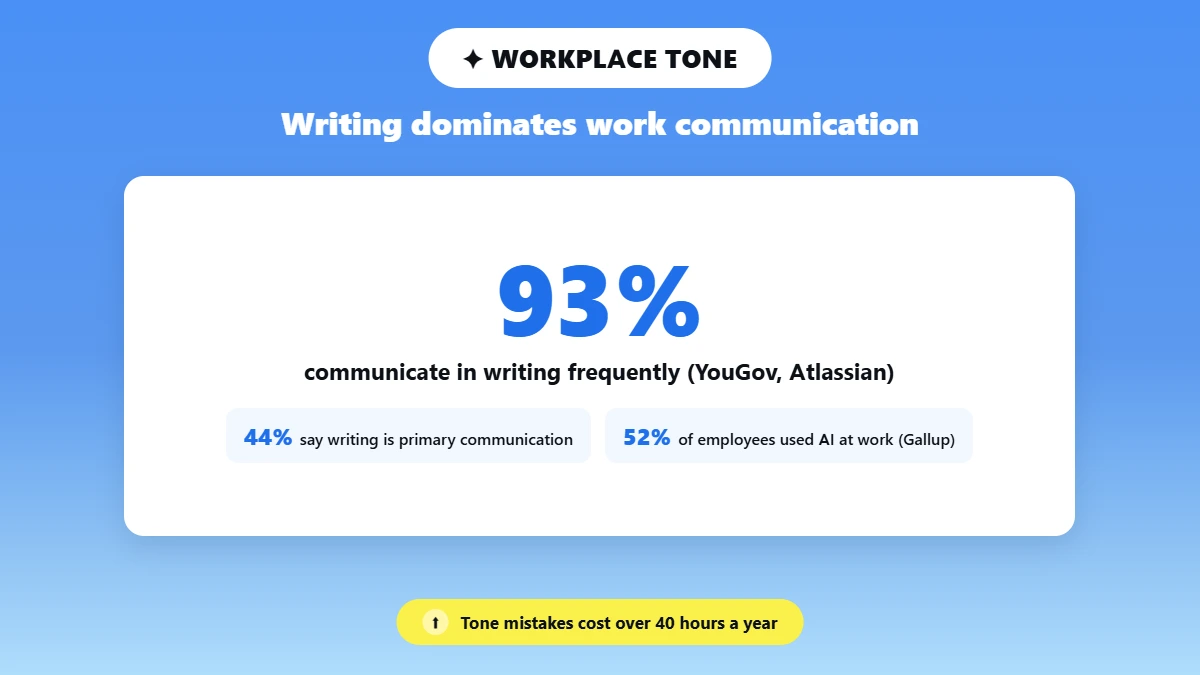
Most communication at work is written. YouGov and Atlassian's Teamwork Lab surveyed 10,000 knowledge workers from five countries.
They found that nearly 93% communicate in writing frequently and 44% ranked writing as their primary form of communication.
Tone can easily be misunderstood.
According to that same study, over one-third of employees waste more than 40 hours per year on ambiguous written communications, referred to by researchers as “emotional overhead.”
Writing with AI is now mainstream.
In Gallup's July 2026 Workforce Survey, 52% of U.S. employees reported they used artificial intelligence (AI) as part of their job.
Of those who use AI, the most common way they are using it is for writing and editing assignments (51%). And of those using AI for writing and editing, 68% said it made them more productive.
Write for multiple audiences.
Whether it’s a client update, Slack note, performance praise, or executive summary, tailor how warm, direct, and detailed your language is.
The takeaway: A formalizer reduces the expense of shifting tone among these audiences. It doesn't replace good judgment, and every number above should be verified with the original source before being propagated further.
Should Every Workplace Message Sound Formal? Professional Does Not Always Mean More Formal
The correct professional tone is the appropriate tone, not the most formal one you can find. A formalizer deserves its spot on this list when it helps align the writer with the recipient, channel, stakes, and desired action, without distorting the facts.
Use this table as a quick decision guide. Confirm the tone names against the live selector before you rely on it.
Situation | Suggested Phrasly Tone | Why |
New client, proposal, or executive request | Professional | Adds structure and respectful distance |
Teammate update, collaboration, routine feedback | Friendly | Keeps warmth while removing bluntness |
Busy manager, status note, deadline reminder | Concise | Surfaces the request and next step quickly |
Disciplinary, legal, medical, financial, or crisis message | ❌ Human review required | Automation cannot weigh policy, liability, or human impact |
How to Make a Work Email Sound Professional: Using a Formalizer Without Losing Your Meaning?
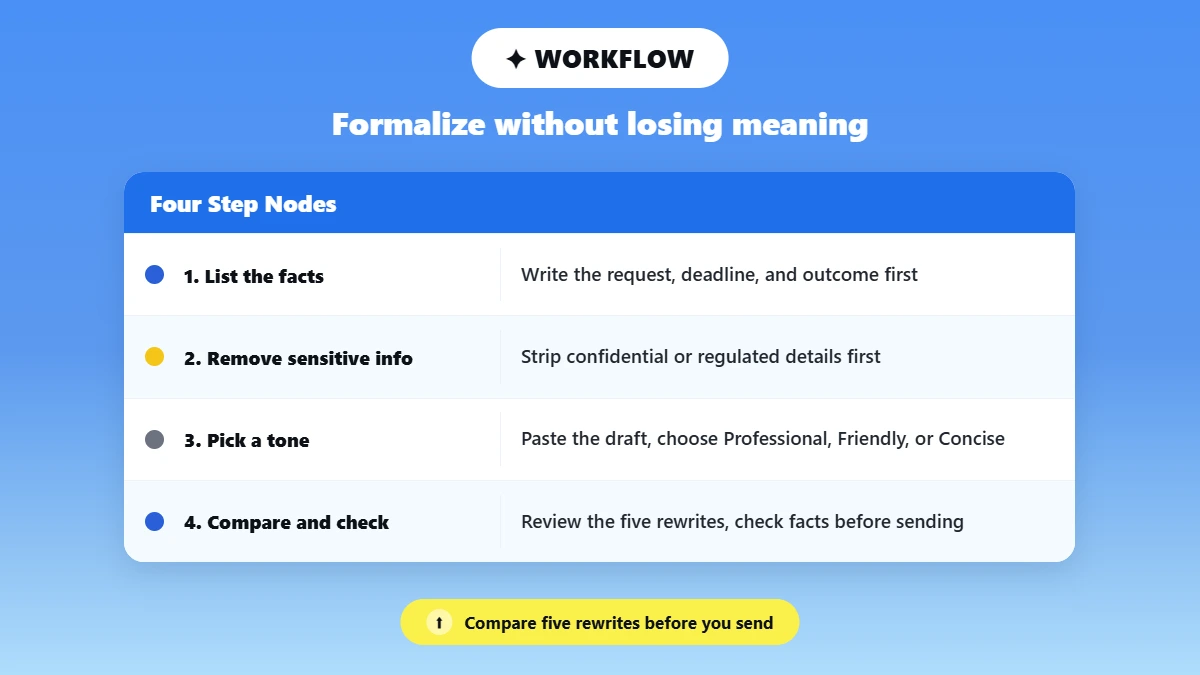
Want to know how to make a work email sound professional? The safest way is always to formalize from your own draft instead of rewriting. This Phrasly formalizer has 3 tone presets:
Professional, Friendly, Concise. It also returns 5 rewrites per conversion so you can compare options instead of blindly accepting the first suggestion.
Before You Open the Tool:
Get facts, action needed, due date, and desired result clear first. Remove sensitive info that doesn't belong in an unauthorized tool. Pick which of the three voices suits your recipient and channel prior to pasting anything.
The Five-Step Workflow:
Write the facts, the request, the deadline, and the outcome you want first.
❌ Remove confidential or regulated details that should not enter an unapproved tool.
Paste the draft into the AI formalizer and pick the tone that fits the situation: Professional, Friendly, or Concise.
Compare the five rewrites you get back instead of accepting the first phrasing.
✅ Check names, numbers, dates, commitments, tone, and next steps before you send.
Paste your own draft into the AI formalizer and check it against your original meaning before you send. Ready to test it on your own draft?
Two Quick Before-and-After Examples
Here is one generated live example using the Phrasly formalizer written with a Professional tone.
For the full library of workplace message types, see the workplace message examples spoke article, which covers messages meant to make this email sound professional across seven to ten more scenarios.
Situation: A deadline request that reads as abrupt.
Original: "hey can you send the updated numbers, kinda need them today if possible thx"
Formalized (Professional): "Hi, could you send over the updated numbers today, if possible? Thank you.”
What improved: The request and urgency are identical, but the wording now sounds thought-through instead of thrown together.
Check: Confirm the deadline word (“today”) still matches what you meant since a formalizer can occasionally soften a hard deadline into a softer suggestion.
If this kind of nudge is a recurring situation for you chasing someone for something they already owe you, this guide on how to write a follow-up email walks through structure and timing in more detail.
Situation: A Slack update that lacks context for a busy manager.
Original: "Still waiting on design, will loop back when I hear something"
Formalized (Concise): "Design review is still pending. I will follow up and share an update as soon as I hear back."
What worked: The update clearly identifies who is blocking you ("Design review") and provides an explicit next action.
This is precisely the level of clarity needed from a professional Slack message when your manager is skimming through your team's hectic channel.
What to check: Ensure that “design review” accurately reflects what you are waiting on. The tool inferred that label from context rather than copying it from your original wording.
What the Research Supports About AI-Assisted Workplace Writing, and What It Does Not?
Two studies from independent sources lend credence to the broad argument that writers can benefit from AI assistance. Neither study experimented with Phrasly, which is important to keep in mind. Also, they both had limits.
Brynjolfsson, Li, and Raymond (Quarterly Journal of Economics 2025) analyzed 5172 customer-support agents and discovered that access to a generative AI conversational assistant increased problems resolved per hour by 15% on average, the biggest for the least experienced agents.
Limit: This was measuring one company's conversational assistant. It was not measuring a formalizer. It was not testing Phrasly.
This Science (2023) study from Noy and Zhang had 453 college-educated professionals perform a writing task.
ChatGPT access reduced time spent on the task by 40% and increased self-rated output quality by 18%.
Limit: It broadly supports AI-assisted editing. We can't infer that all tone rewriting tools will have identical results.
Is It Safe to Paste Confidential Work Messages into an AI Tool? When Not to Use a Formalizer.
Phrasly's Terms of Service, as of today, include language that says its service "is not designed specifically for regulated industries such as HIPAA or FISMA environments."
It also says that you should not use it in ways that violate the Gramm-Leach-Bliley Act. You should follow your employer's policy in addition to this. Don't paste or auto-send:
❌Passwords, credentials, private customer records, or trade secrets.
❌Regulated health, financial, legal, or government information unless your employer has approved the workflow.
❌ Disciplinary notices, layoffs, crisis statements, or binding commitments without qualified human review.
❌A message where a call or a video would resolve ambiguity more safely.
❌Text you have not checked for changed facts or softened accountability.
Review the Phrasly terms directly for the current language, since terms of service can change.
Formalizer vs Grammar Checker vs Text Enhancer vs Chatbot
A frequently asked question is what the difference is between a formalizer and a grammar checker.
Briefly: Formalizer alters tone while grammar checker addresses correctness. The table below explains where each belongs.
Tool | Best For | Input | Main Output |
Formalizer | Matching tone to a workplace situation | A message you have | A Professional, Friendly, or Concise rewrite |
Grammar Checker | Correctness | Existing text | Spelling, punctuation, and grammar fixes |
Text Enhancer | Broader quality | Paragraphs or documents | Better flow, readability, and structure |
General Chatbot | Drafting and open-ended edits | A prompt or notes | New or revised content from instructions |
For a longer walkthrough, see the full formalizer vs ChatGPT comparison, and the make text professional guide for longer documents.
A Pre-Send Checklist for Workplace Messages
✅ Run through this list before you hit send on any rewritten message.
✅ Is every fact unchanged?
✅ Is the request or next step obvious?
✅ Does the tone fit the recipient and the channel?
✅ Has confidential information been removed?
💪 Run your next message through the formalizer, then use this checklist before you send.
Frequently Asked Questions
What is a formalizer for work?
Formalizer for work is a tool that transforms your already written message to make the tone appropriate for professional purposes.
It will alter the wording and structure of your message while trying to keep the integrity of your facts, names, dates, and requests intact. Review recommended before sending.
How do I make a work email sound more professional?
Submit your facts and request. Delete confidential information, and then copy edit using a tone tool on a professional setting. Review the rewritten text you receive back and ensure initials, dates, and deadlines remain the same.
Can a formalizer make a message sound less rude?
Yes, rewriting messages for politeness is one of the most popular reasons for using these tools. If you're wondering how to sound less rude in an email, the fix usually isn't more words, it's softer framing around the same request.
If your message comes off as blunt or short, a formal email rewriter will rephrase things more gently while maintaining your original request and level of urgency.
What is the difference between a formalizer and a grammar checker?
A grammar checker fixes spelling, punctuation, and grammar errors in existing prose. A formalizer shifts tone and delivery so that a message reads more formal, friendly, or concise (but doesn't necessarily grammatically correct itself).
Is it safe to paste confidential work messages into an AI tool?
Not always! Passwords, trade secrets, regulated health/financial/legal information, etc. should not be pasted into a general-purpose AI tool unless your employer has approved that workflow. Review that tool's terms and your employer’s policy first.
Can a formalizer help non-native English speakers at work?
It can provide optional assistance with register and phrasing for individuals writing in English as a second language. This is about confidence and tone, not that writing by non-natives is deficient, and your judgment is still valued above all.
Should every workplace message sound formal?
No! The ideal professional Slack message or email varies based on your audience, channel, and what's on the line. An update to a teammate should be friendlier than a client proposal even though both can be professional.
For more on how tone shifts by context, see Purdue OWL's guide to tone in business writing.
The Bottom Line
A work formalizer is for those who find themselves rewriting the same message three or four times before sending it. It's not an essential fix for every writer.
💪 It's most effective when the facts are already settled, and you just need to shift the tone for a different audience.
Got a message that needs a second pass?
Consider it a second pair of eyes on your phrasing, not a replacement for reading your message yourself one last time before hitting send.

Written by
Muhammad Usman Ali
Pakistan
Muhammad Usman Ali is an experienced SEO content writer with 3+ years of professional writing experience. He specializes in AI tools, AI detection technologies, and search engine optimized content.