Can Turnitin Detect AI in PowerPoint? What It Actually Checks
9 min read
You finished the deck at midnight, and now you're wondering whether Turnitin can detect AI in your PowerPoint. The answer depends on which report your instructor opens, because Turnitin runs two separate checks and a PowerPoint presentation moves through them differently.
Turnitin can check your slides for similarity, and a .pptx on its own will not produce an AI writing score. A PDF version changes the answer, though only when the file meets every requirement. Here is what happens to your slides, notes, and images.
Check the Text From Your PowerPoint for AI Patterns 👇
Can Turnitin Detect AI in a PowerPoint? The Short Answer
Turnitin accepts a .pptx and builds a Similarity Report from the slide text it can extract, and .pptx is not currently an accepted file type for its AI Writing Report. The two reports follow separate file rules, which is why one flat yes or no answer keeps going wrong in Reddit threads.
Submission method | Similarity Report | AI Writing Report | Speaker notes |
|---|---|---|---|
Direct .pptx upload | ✅ With enough readable text | ❌ Not a currently accepted AI Writing Report format | ❌ Removed in conversion |
PowerPoint exported as PDF | ✅ If the text is selectable | ⚠️ Only if every requirement is met | ✅ Only if you export Notes Pages |
Text pasted into a separate document | ✅ Depends on the format | ⚠️ If that document qualifies | ✅ Only if you paste them in |
Sources: Turnitin, File requirements for submitting your assignment and AI Writing Report requirements. Checked September 2026. Turnitin updates these rules over time, so re-check before you submit.
Slide text is enough for a Similarity Report whenever Turnitin can extract it. The AI Writing Report accepts only .docx, .pdf, .txt, and .rtf, so a deck qualifies once you export into one of those. Your instructor sees both results together, and how to check plagiarism in Turnitin covers the submission side.
⚖️ Similarity Checking and AI Detection Are Not the Same Thing
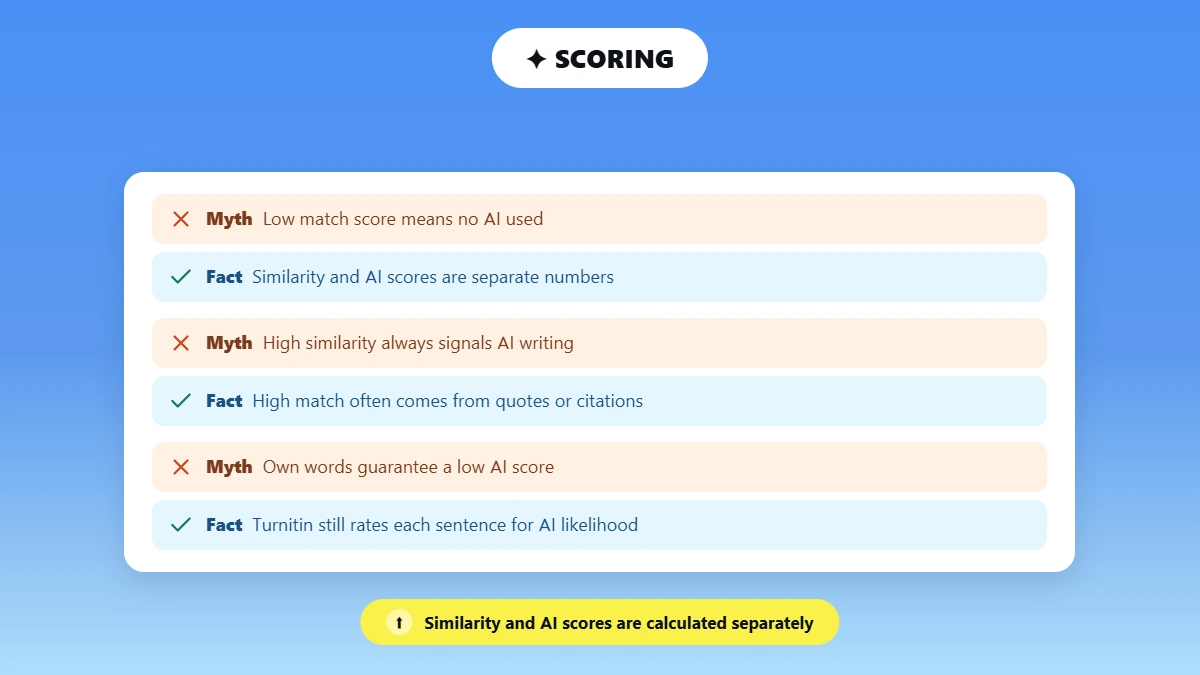
The Similarity Report matches your text against Turnitin's databases, and the AI Writing Report estimates how much of your qualifying prose was likely AI-generated or AI-modified. Turnitin states that the two percentages are independent, and AI highlights never appear in the Similarity Report, as its guide on using the AI Writing Report sets out.
💡 A low similarity score and a high AI score can appear on the same submission, because Turnitin calculates the two numbers separately and neither one feeds the other.
A low match percentage proves nothing about AI use on its own, and a high one often comes from quoted or referenced material. How AI detectors work covers how those estimates are produced.
A deck written in your own words can still score, because Turnitin rates each sentence for how likely it is to be AI-generated. How Turnitin detects ChatGPT takes up that question for prose.
📂 What Does Turnitin Read in a PowerPoint File?
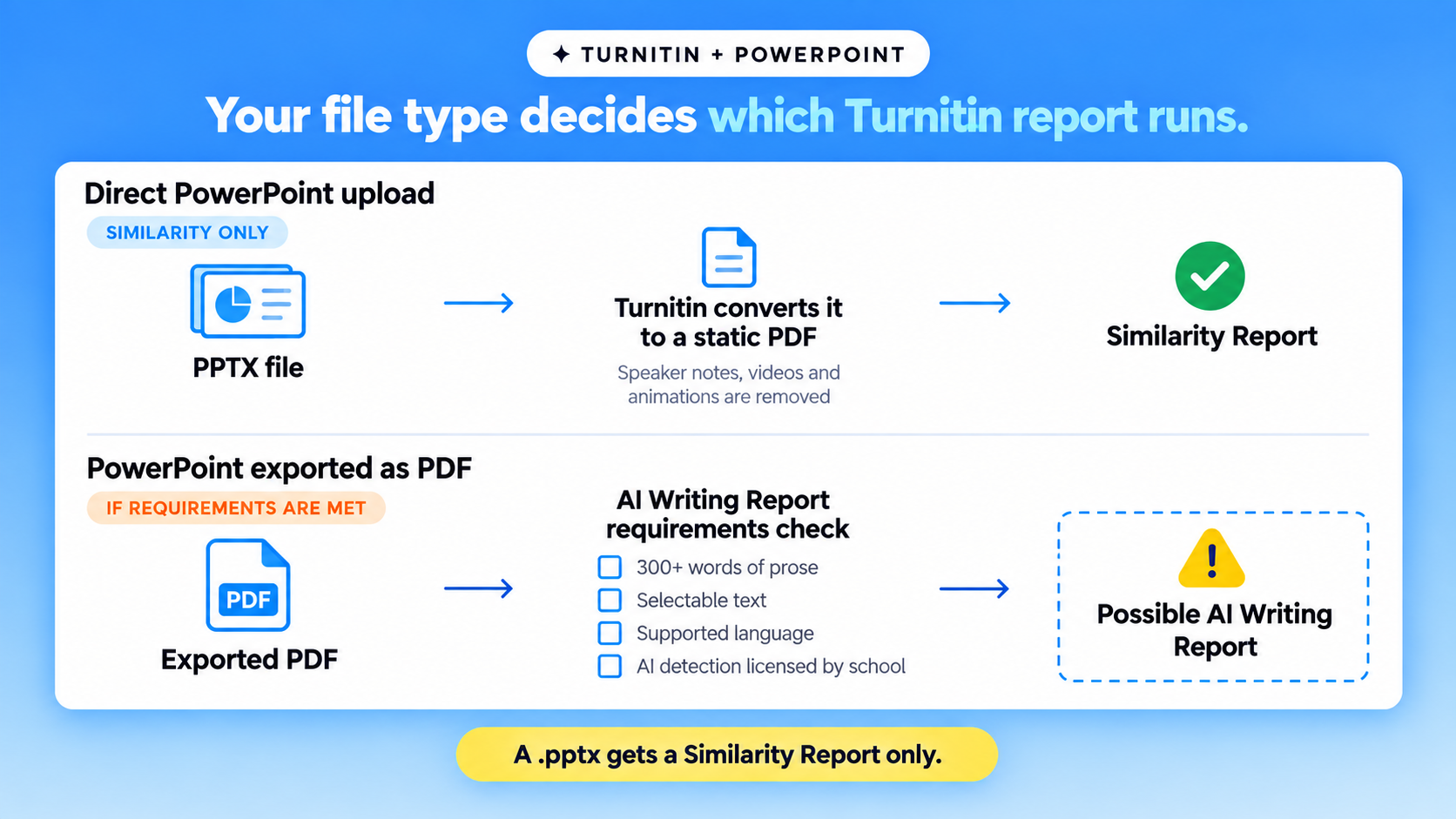
Turnitin converts your PowerPoint into a static PDF and reads the text and images that survive. The conversion strips presenter notes, videos, and animations, so none reach the Similarity Report.
Turnitin can process | Turnitin removes or cannot read |
|---|---|
Ordinary editable slide text | Presenter notes in a .pptx upload |
Images kept in the conversion | Text that exists only inside an image |
Standard text boxes and titles | Videos and animations |
At least 20 readable words | Text with shadows, WordArt or 3D effects |
Sources: Turnitin's guide on why a PowerPoint Similarity Report fails, plus its student submission requirements. Verified September 2026. Details change, so confirm on Turnitin's pages before you submit.
Shadows and 3D formatting stop Turnitin from extracting the words underneath, so a heavily styled deck can come back with no report. Slides built almost entirely from images fail for a different reason: Turnitin needs at least 20 words of typed text before any Similarity Report appears. Checkers other than Turnitin read presentation files by their own rules, and Turnitin alternatives covers the main ones.
📄 Can Turnitin Detect AI If the PowerPoint Is Saved as a PDF?
A PDF export can make an AI Writing Report possible, and it never guarantees one. Turnitin applies a separate checklist the file has to clear.
📦 Under 100 MB in file size.
📝 At least 300 words of prose text in a long-form writing format.
📏 No more than 30,000 words in total.
🌐 A supported language. Turnitin's file-requirements page lists English, Spanish, and Japanese.
🔍 Selectable text, not text flattened into an image.
🏫 An institution that licenses AI detection, since Turnitin only processes submissions where the feature is enabled.
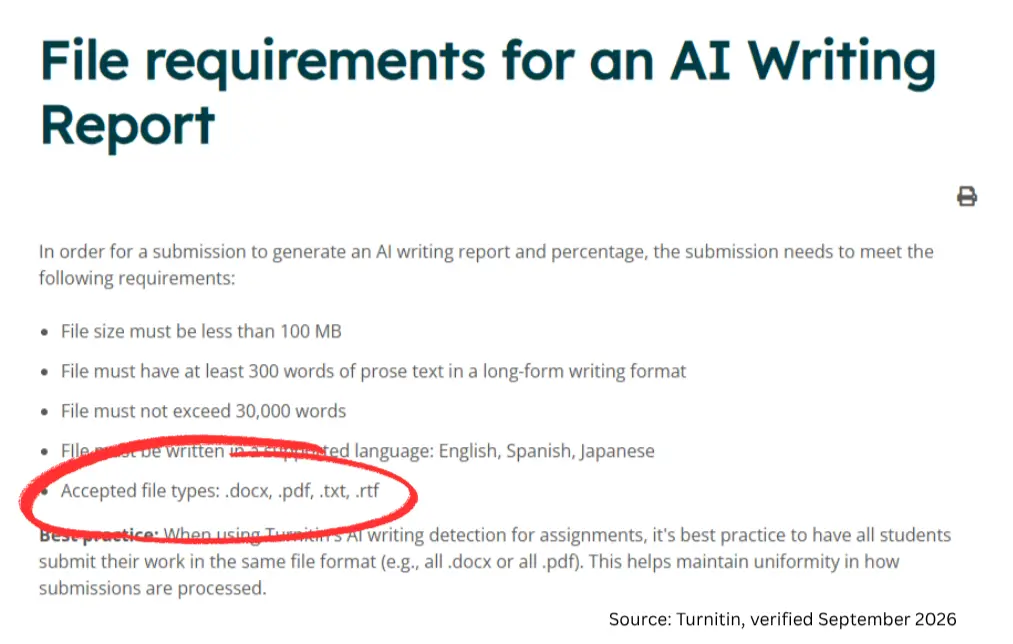
Source: Turnitin's AI Writing Report file requirements. Verified September 2026. These limits change, so confirm them on Turnitin's page before you rely on them.
What counts as qualifying prose?
Turnitin defines qualifying prose as full sentences inside paragraphs that build a longer piece of writing, such as an essay. Its model does not reliably read non-prose such as bullet points and tables, so those parts of a deck stay outside the percentage.
Do slide bullet points count?
Short slide bullets usually do not count toward the AI writing percentage, because Turnitin analyzes prose sentences and treats short non-sentence structures as outside its scope. A deck of headings and fragments can fall under the 300-word prose minimum even when the slide count looks high.
An independent scan shows which lines in your deck read as machine-written. 👇
Different detectors return different results on the same text, and we tested ZeroGPT's accuracy on 37,874 human-written essays with 26.4% falsely flagged as AI.
🗒️ Does Turnitin Check PowerPoint Speaker Notes?
Turnitin drops your speaker notes when it processes a direct .pptx submission, so nothing typed in the notes pane reaches the Similarity Report.
⚠️ Several ranking pages claim speaker notes are scanned in a direct PowerPoint upload. Turnitin's own submission guide states the opposite, and lists presenter notes among what the conversion removes.
Notes travel with the file only when you export them yourself. In PowerPoint, open File, Export, Create PDF/XPS Document, then Options, and choose Notes pages under Publish what. The University of Reading's guidance shows the same settings. The exported PDF still has to clear Turnitin's AI Writing Report requirements.
👩🏫 Can Teachers Still Identify AI Use in PowerPoint Slides?
Teachers can still judge AI use in a presentation without any report, because the deck itself carries evidence no file scan reads. Your professor learns more from one follow-up question than from a percentage, and the points below are signals rather than proof.
📊 57% of U.S. college students use AI in their coursework at least weekly, and about one in five use it daily, per the Lumina Foundation-Gallup 2026 study. Your instructor is reading slides against that backdrop.
🗣️ Whether you can explain and defend the material live.
📚 Citations that do not resolve to a real source.
✍️ Shifts in voice, depth, or terminology across slides.
🔄 Gaps between the slides and what you say out loud.
🕘 Drafts, research notes, and the file's version history.
📋 The AI-disclosure rules written into your course.
No single signal confirms authorship on its own, and can professors detect ChatGPT takes up the question for written assignments.
✅ How to Review a PowerPoint Before Submitting It
A pre-submission review runs in five checks, from your course's rules to the wording you can defend.
Read the AI-use policy for the course, including anything you must disclose.
Confirm the format your instructor wants: the .pptx, a PDF, the speaker notes, or a written script.
Check your citations so quotations and data carry a source, images included.
Run the prose through an AI detector. Copy the meaningful sentences from your slides and notes into the Phrasly AI Detector, which gives three checks before a free account unlocks unlimited use.
Revise whatever reads as generic, and treat the score as a signal rather than a verdict.
📁 Keep these until the grade is final: your source notes, earlier versions of the deck, the file's version history, any AI-use disclosure you filed, and a copy of exactly what you submitted.
None of this involves hiding text or turning slides into screenshots. Both tactics remove the text Turnitin reads and break most course policies.
🚩 What If Your Instructor Says the PowerPoint Was Flagged?
Ask which report produced the flag before you answer anything else. A similarity flag and an AI flag rest on different evidence.
❓ Was it the Similarity Report or the AI Writing Report?
🗂️ Which file was processed?
🔁 Was the deck converted by Turnitin, or submitted as a PDF?
🔦 Which passages were highlighted?
📤 Can your instructor share the report?
No single AI writing percentage counts as a pass or a fail, because each school sets its own limit, and how much AI detection is acceptable takes that up.
🚫 Turnitin states its AI writing model may misidentify human-written, AI-generated, and AI-paraphrased text, so the score should not be the sole basis for adverse action against a student.
Turnitin's AI detection FAQs report a false positive rate under 1% for documents scoring above 20% AI, tested against more than 700,000 pre-ChatGPT papers. In Turnitin's own wording, that is about one wrongly flagged paper per hundred fully human ones. Turnitin flags human writing as AI covers what to do if yours turns out to be one of them.
Check the exact wording your instructor highlighted, then line it up against your drafts and version history. 👇
A second detector does not prove authorship, though it gives you something concrete for a fair review.
Your file format decides which check your deck can go through, and your course policy decides what you may submit. Slide text alone gets you a similarity check and nothing more, because Turnitin does not currently run AI writing detection on a .pptx. An exported PDF may qualify for one once it clears every requirement. Speaker notes reach Turnitin only if you export them on purpose. Whatever number appears, it starts a conversation about your work rather than settling one.
Frequently Asked Questions
Does Turnitin check text in PowerPoint slides?
Turnitin reads ordinary editable slide text and uses it to generate a Similarity Report. Titles and standard text boxes both count, as long as the words are typed rather than flattened into an image and carry no visual effects.
Why did Turnitin not generate a Similarity Report for my PowerPoint?
The deck most likely holds fewer than 20 words of extractable text, or its text is locked inside images. Shadows and 3D formatting block extraction, and so does the Slate theme. A plain Office theme fixes it.
Does a low Turnitin similarity score mean my PowerPoint is not AI-generated?
A low similarity score does not rule out AI use. Similarity counts how much of your text matches existing sources, and a separate model produces the AI writing percentage. Detectors get this wrong in both directions, which can AI detectors be wrong covers in full.
Can students see Turnitin's AI score?
Students cannot see the AI writing indicator or report. Turnitin shows both to instructors and administrators only, though an instructor can download the report as a PDF and share it. Ask for that copy before you respond to a flag.
Can Turnitin detect ChatGPT in PowerPoint speaker notes?
Turnitin discards the notes pane on a direct .pptx upload, so nothing written there is processed. Notes you deliberately export into a PDF, or paste into a separate document, do get processed once that file qualifies for an AI Writing Report.
Does saving a PowerPoint as a PDF guarantee an AI Writing Report?
A PDF export guarantees nothing on its own. The file still needs 300 words of qualifying prose plus selectable text, and your institution has to license AI detection. Where you submit matters too, since AI detection inside Canvas follows its own rules.

Written by
Alina Shah
SEO Content Specialist · Karachi, Pakistan
She writes about AI so you don't have to guess. 8+ years in content strategy and editing. Now she puts AI writing tools and detection systems through real tests and shares what actually works.