How to Improve Professional Message with AI (with Before and After Examples)
16 min read
If you need to improve a message before you send it, you're not alone. It's one of the most common things professionals search for in 2026.
Whether you're refining a rough note you typed yourself or fixing a draft that GPT-5.3 or Gemini in Gmail already generated, the challenge is the same: it sounds like a template, not like you.
That's where an AI message enhancer makes the difference. Instead of starting over, you paste what you have, and Phrasly's AI Message Enhancer gives you a polished versions in under 30 seconds. It preserves your meaning while improving the tone, clarity, and flow of your message.
Enhance Your Next Message Before You Send It 👇
How to Improve the Following Message with AI?
To improve a specific message with AI, paste it into Phrasly's AI message enhancer. Choose your enhancement level, and get your message improved with clear meaning, better flow and tone. It takes under 30 seconds.
The workflow is straightforward:
1. Draft: write or paste your message as-is.
2. Enhance: Phrasly refines tone, structure, and clarity.
3. Send: choose the version that fits your intent.
Whether you're asking 'can you improve this message?' or searching for a tool to help you improve the following message before a critical send. This is the step most professionals skip and the one that makes the biggest difference.
The same process works whether you're improving a work email or a message to a friend or family member.
Why Your Professional Messages Matter More Than You Think?
At work, every message you send leaves a micro-impression. Your written communication directly affects:
Your professional credibility
Response rates
Your career reputation
Business outcomes
When someone reads what you write, they’re not only judging your ideas but how professional and articulate you are when presenting them.
Also, most people don’t realize there’s so much on the line.
According to Notta.AI, 79% of business leaders say they find it difficult to discern tone when reading written communication and 62% of knowledge workers are more likely to respond quickly if the message they receive has a positive tone.
The ability to enhance the message is now a core professional skill. Enhancing my message before I send it is one of the most searched phrases by professionals.
In 2026, most professionals aren't starting from a blank page. They're refining what GPT-5.3 or Copilot in Outlook already drafted. The problem shifted from a blank page to the wrong tone.
Think of it this way: Others' opinions about your competence and reliability are significantly affected by your business emails tone, structure, and clarity.
Being able to write well is a basic professional skill in a society where most correspondence at work is written.
The key distinction is that AI can help deliver your message in the clearest, most effective and professional manner possible, but it doesn’t replace your voice or thought process.
Because oftentimes how your message sounds is the difference between being dismissed or heard.
10 Types of Messages to Improve with AI
Client Emails
Client emails are the highest-stakes messages most professionals send. They're also where AI drafts are most likely to get the tone wrong.
Even if you used Gemini in Gmail's Help Me Write to get a first draft, client emails almost always need a second pass on tone before sending.
If your message sounds too casual, Phrasly AI text enhancer can instantly refine the tone, structure, and clarity to make it more professional.
Even at the sentence level, knowing how to rewrite a sentence for better clarity and impact can completely change how your message lands.
Example 1: Project Update
Before: Hey, just wanted to check in about the project. We’re making good progress and should have something soon. Let me know what you think.
After: Just a quick update on the project. Things are going well and we'll have the next iteration ready soon. Let me know if there's anything specific you'd like feedback on.
Observation: The enhanced version replaces vague phrasing with clear updates and a defined next step, improving client communication.
Expert Tip: Always include a status update plus a clear invitation for feedback.
Example 2: Deliverable Delay
Before: Hi, the timeline might shift a bit because we’re still waiting on a few things. Will update soon.
After: I wanted to inform you that the timeline may shift slightly as we are currently awaiting a few final inputs. I will keep you updated and share a revised timeline shortly.
Observation: Your tone is more accountable and transparent, which helps build your professional credibility.
Expert Tip: When communicating delays, acknowledge the issue and proactively mention next steps.
Example 3: Proposal Confirmation
Before: Just checking if you’re okay with the proposal we sent over.
After: I wanted to follow up to confirm whether the proposal aligns with your expectations. Please let me know if you’d like to discuss any adjustments.
Observation: The improved version sounds more confident and client-focused rather than uncertain.
Expert Tip: Frame questions around alignment and collaboration, not uncertainty.
Follow-Up Emails
Email follow-ups can be tricky. Be too pushy and you risk becoming annoying. Apologize too much and you come off as insincere.
You can improve your follow up emails with AI Message Enhancer and make their tone more confident, polite, and purposeful.
Example 1: Checking on a Proposal
Before: Hey, just checking in again. Any thoughts on the proposal?
After: I wanted to follow up regarding the proposal I sent last week. Please let me know if you have any feedback or questions so we can proceed smoothly.
Observation: The enhanced version replaces casual and uncertain phrasing with polite, action-oriented language.
Expert Tip: Reference the original email and offer a next step for clarity.
Example 2: Reminder for Response
Before: Sorry to bother you, but any update?
After: I’m following up to see if there are any updates regarding our previous discussion. I’d be happy to provide any additional information if needed.
Observation: The AI-enhanced version removes over-apologizing and reinforces professionalism while remaining friendly.
Expert Tip: Avoid over-apologizing; focus on helpfulness and clarity.
Example 3: Scheduling a Meeting
Before: Just checking if you’re free for a meeting this week.
After: I wanted to follow up on scheduling a meeting this week. Please let me know which day and time works best for you.
Observation: The improved message is clear, polite, and actionable, increasing the likelihood of a positive response.
Expert Tip: Include a clear request with options to simplify decision-making.
Slack/Teams Messages to Your Manager
It's easy to send short messages over Teams or Slack, but careless tone mistakes can hurt your professional reputation.
Make sure your workplace messaging is clear and friendly by using an AI text enhancer to maintain a professional Slack message tone while still sounding like yourself.
Use it equally for the team's message tone. Whether you’re messaging a colleague on Slack or Microsoft Teams, a polished communication style builds trust.
Example 1: Project Update
Before: Hey, I finished that task, let me know if it’s okay.
After: Hi [Manager’s Name], I’ve completed the task and would appreciate your review when you have a moment.
Observation: The AI-enhanced version turns a casual, uncertain note into a concise and professional update.
Expert Tip: Always include a polite call-to-action without over-explaining.
Example 2: Requesting Guidance
Before: Not sure what to do next, any advice?
After: Hi [Manager’s Name], I’d like your guidance on the next steps for this project. Could you please advise when convenient?
Observation: The AI-refined message keeps the tone respectful and professional while preserving personality and urgency.
Expert Tip: Frame questions clearly and politely to encourage actionable feedback.
Meeting Request Messages
Vague meeting requests get ignored. An AI Message Enhancer helps you write meeting requests that are direct, have a clear intent, and are correctly worded for the situation.
Meeting request messages benefit most from formal language. An AI tool for work emails ensures your meeting requests strike the right tone without sounding robotic.
Copilot in Outlook can draft a meeting request in seconds but it tends to over-formalise the tone or lose the clear agenda item.
Example 1: Project Discussion
Before: Can we chat sometime this week about the project?
After: Hi [Recipient’s Name], I’d like to schedule a 30-minute meeting this week to review the project milestones and discuss next steps. I’m available Tuesday or Thursday afternoon. Please let me know what works best.
Observation: The AI-enhanced version adds specificity, a clear agenda, and proposed times, making it actionable.
Expert Tip: Always include purpose + proposed times to make scheduling easy.
Example 2: Feedback Review
Before: Let’s meet soon to talk about the feedback.
After: Hi [Recipient’s Name], I’d like to schedule a meeting to review the feedback you provided on the recent deliverable. Are you available Wednesday at 2 PM or Thursday at 10 AM?
Observation: The refined message clearly communicates intent, provides options, and maintains professional tone.
Expert Tip: Mention the topic explicitly and offer time options to streamline scheduling.
Job Application/Cover Letter Emails
Your first written impression matters. Casual or vague language can disqualify you before an interview. Transform your emails into polished, executive-level communication with the help of AI Message Enhancer.
Example 1: General Job Application
Before: Hi, I’m applying for the marketing position.
After: Dear [Hiring Manager’s Name], I am writing to express my interest in the Marketing Specialist position at [Company Name]. I would welcome the opportunity to contribute my skills and experience to your team.
Observation: The AI-enhanced version uses a formal greeting, clear intent, and confident phrasing, improving professional credibility.
Expert Tip: Always address the recipient by name and clearly state the position you are applying for.
Example 2: Cover Letter Submission
Before: Attached is my resume. Hope it works for you.
After: Please find my resume attached for your consideration. I am enthusiastic about the opportunity to bring my experience in [specific skill/role] to [Company Name] and would welcome the chance to discuss how I can contribute to your team.
Observation: The AI version elevates tone, adds specificity, and communicates enthusiasm professionally.
Expert Tip: Pair your attachment with a brief, compelling statement about your qualifications and interest.
Don't let weak phrasing cost you the opportunity. Enhance your message before it goes out 👇
Proposal or Pitch Messages
Each word in your proposal or pitch message conveys how capable and professional you are. An AI Message Enhancer elevates your business email tone and communication effectiveness.
According to Grammarly, 43% of business leaders say they have gained new business directly because of effective communication and 45% credit it with improving their brand reputation.
Create winning pitches that are clear, compelling, and professionally polished.
Example 1: New Project Proposal
Before: Hi, here’s our proposal for the project. Let me know what you think.
After: Dear [Recipient’s Name], Please find attached our detailed proposal for [Project Name]. We have outlined key objectives, timelines, and deliverables to ensure a successful outcome. I would be happy to discuss any questions or adjustments at your convenience.
Observation: The AI-enhanced version adds structure, professionalism, and clarity, increasing the likelihood of engagement.
Expert Tip: Clearly outline deliverables and next steps to make your proposal actionable.
Example 2: Sales Pitch Message
Before: Thought you might be interested in our services.
After: Hi [Recipient’s Name], I wanted to share how our services can help [Company Name] achieve [specific goal]. We specialize in [key benefit] and would welcome the opportunity to demonstrate value through a brief discussion.
Observation: The AI-refined message is more targeted, confident, and persuasive, improving communication effectiveness.
Expert Tip: Highlight the specific benefit to the recipient rather than making a generic pitch.
Feedback or Performance Messages
Providing feedback or performance-related messages is sensitive. A poorly worded note can damage relationships permanently.
The right words make all the difference. AI Message Enhancer ensures your feedback is direct without being harsh, and kind without losing impact.
Example 1: Team Member Performance Feedback
Before: You didn’t meet the targets this month.
After: I noticed that this month’s targets were not fully met. Let’s discuss what challenges you faced and explore ways to support your progress moving forward.
Observation: The AI-enhanced version turns blunt criticism into constructive guidance, encouraging improvement while preserving professional respect.
Expert Tip: Focus on solutions and support rather than solely highlighting shortcomings.
Example 2: Peer Review Feedback
Before: Your report was confusing and hard to follow.
After: Thank you for your report. I noticed a few sections could be clearer; perhaps restructuring the data visuals and adding brief summaries would help improve readability.
Observation: The AI-enhanced message provides actionable suggestions rather than criticism, improving communication effectiveness.
Expert Tip: Always pair critique with specific, actionable advice.
Example 3: Performance Recognition with Suggestions
Before: Good job, but try harder next time.
After: Great work on completing the project ahead of schedule. To enhance future outcomes even further, consider adding more detailed documentation for each step. It will make the process easier for the team to follow.
Observation: The AI-enhanced version balances recognition with constructive guidance, maintaining a supportive tone.
Expert Tip: Combine praise with actionable feedback to motivate and guide simultaneously.
Apology or Error Acknowledgement Messages
Casual apologies like “Hey, my bad on that!” damage trust and credibility. An AI text enhancer, helps you sound accountable, professional and clear when you apologize without losing sincerity.
Apology messages are one of the highest-stakes message types to enhance. The right AI tool for work emails can turn a clumsy sorry into a clear, accountable message that rebuilds trust.
Example 1: Missed Deadline
Before: Sorry I missed the deadline, got caught up with other stuff.
After: I apologize for missing the deadline on [Project/Task]. I take full responsibility and have implemented steps to ensure the remaining work is completed promptly. Please let me know if there’s anything additional you’d like me to address.
Observation: The AI-enhanced version communicates accountability, professionalism, and a clear plan of action.
Expert Tip: Always acknowledge the issue, take responsibility, and outline next steps.
Example 2: Incorrect Information Sent to a Client
Before: Oops, sent the wrong info earlier. My bad.
After: I apologize for the incorrect information sent earlier. I’ve attached the corrected details and will ensure that future communications are accurate. Thank you for your understanding.
Observation: The refined message turns a casual, careless note into a professional, accountable communication that preserves client trust.
Expert Tip: Correct mistakes promptly and provide accurate information immediately.
Cold Outreach Messages
Cold outreach written by GPT-5.3 often lands with a recognisable corporate pattern. Polite, structured, and forgettable. An AI message enhancer fixes the tone without gutting the content.
Polished communication in cold outreach is the difference between getting ignored and getting a reply. The goal isn’t to sound formal. It’s to use formal language where it counts while keeping your personality intact.
That’s exactly where enhancing work messages with AI makes the biggest difference.
If you're starting from scratch and need inspiration, exploring AI creative writing prompts can help you craft outreach messages that actually get replies.
Example 1: Sales Outreach
Before: Hi, we offer marketing services. Let me know if you’re interested.
After: Hi [Recipient’s Name], I noticed that [Company Name] recently launched [specific product/service]. Our team specializes in helping companies like yours increase engagement through targeted marketing strategies. I’d love to schedule a brief call to explore how we could support your goals.
Observation: The AI-enhanced version replaces a generic message with a personalized, professional outreach that clearly demonstrates value.
Expert Tip: Reference specific details about the recipient or company to make your message feel tailored.
Example 2: Networking/Introduction Outreach
Before: Hi, I wanted to connect and chat sometime.
After: Hi [Recipient’s Name], I’m reaching out to connect and learn more about your work in [industry/field]. I admire your experience with [specific project or role] and would appreciate the opportunity to discuss insights and potential collaboration.
Observation: The AI-refined message is professional, purposeful, and shows genuine interest, increasing the likelihood of a response.
Expert Tip: Be specific about why you’re reaching out and what value or insight you hope to exchange.
If you want to go deeper, this guide on Enhance Your Sentences with AI walks you through practical techniques.
Internal Escalation/Complaint Messages
An internal escalation is one of the hardest messages to get right. Too emotional and you lose credibility, too vague and nothing gets done.
Internal escalations are not the place for guesswork. An AI Message Enhancer helps you present your case with precision, professionalism, and the kind of clarity that gets taken seriously.
Example 1: Escalating a Project Delay
Before: I’m really frustrated that the project keeps getting delayed. This is unacceptable and everyone needs to do better.
After: I’d like to escalate the issue regarding repeated project delays. The timeline for [Project Name] has been extended multiple times, impacting [specific deliverables]. I recommend reviewing the current workflow and identifying bottlenecks to get the project back on track.
Observation: The AI-enhanced version removes emotional language, adds specificity, and presents actionable suggestions, strengthening professional credibility.
Expert Tip: Focus on facts and propose solutions rather than expressing frustration.
Example 2: Reporting a Workplace Issue
Before: I’m upset that this keeps happening. Something needs to be done about it.
After: I am reporting a recurring issue with [specific situation]. The pattern has caused [specific impact]. I recommend scheduling a meeting to discuss potential solutions and prevent future occurrences.
Observation: The refined message communicates the problem clearly and professionally, ensuring it is taken seriously without emotional bias.
Expert Tip: Structure your message around the issue, its impact, and recommended next steps for maximum effectiveness.
How Phrasly's AI Message Enhancer Works for All 10 Types?
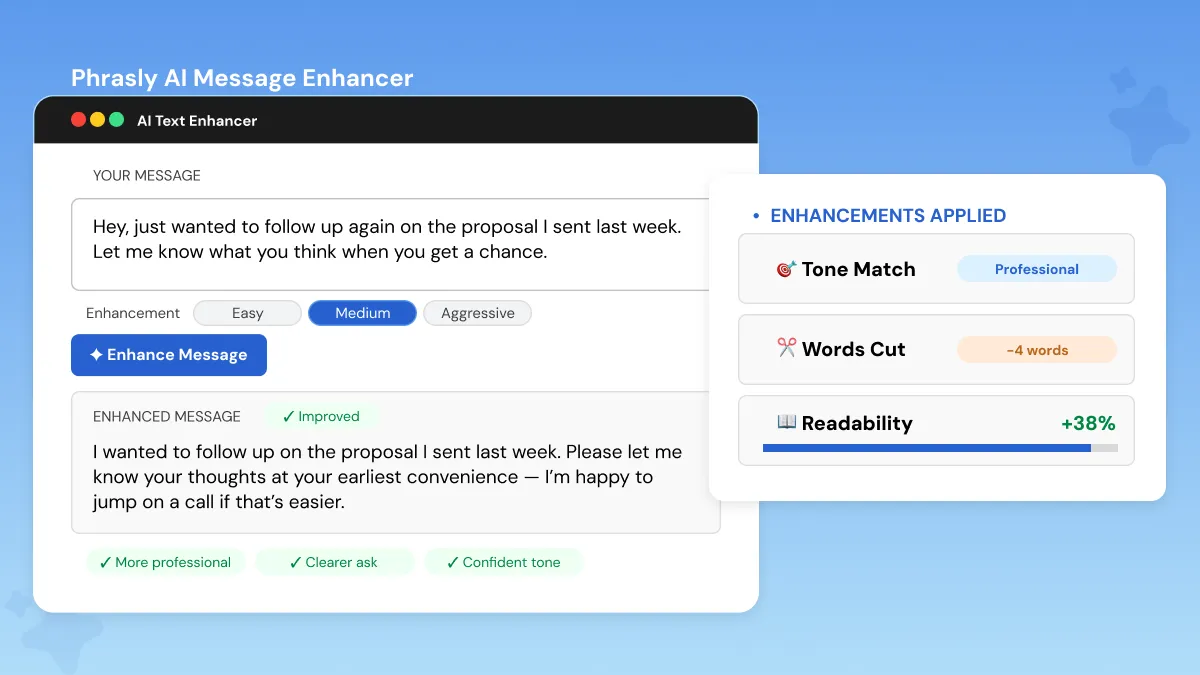
Each example above was optimized using Phrasly’s AI Text enhancer. From client emails to cold outreach, see how Phrasly AI Message Enhancer transforms your everyday professional messages into something worth reading.
According to SEO Sherpa, 83% of employees using generative AI say it boosts their productivity and over half describe that boost as substantial.
The process is simple and designed for real-world professional communication:
Paste your message into the editor
Choose your enhancement level (Medium for subtle refinement, Aggressive for stronger upgrades)
Review up to 5 enhanced versions
Pick the one that best fits your intent
Whether you're starting from a rough note you typed yourself or cleaning up a draft that GPT-5.5 already generated, the process is exactly the same.
The most common use is the simplest. You have a specific message to improve before you send it. Paste it in. Done. Phrasly works equally well for personal messages. Texts to friends, messages to family, not just professional communication.
By running it once, the AI text enhancer enhances all aspects of your message through natural language processing:
Refines tone to match the situation
Upgrades vocabulary without sounding unnatural
Restructures sentences for better clarity
Fixes grammar and flow issues
What's really useful about it is how flexible it is. It applies to all 10 message types we cover in this guide: not just email. Whether you're writing a feedback, an apology or an escalation, the same framework adapts to meet your needs.
Think of Phrasly as your AI writing assistant for professional communication. Whether you need work email enhancement before a critical client send or want to improve messages across every channel, it handles the full spectrum.
It’s the best AI message improver for professionals who already use AI to draft but need a human-quality final pass.
Crucially, Phrasly does not alter your message. You can say whatever you want how you want. Phrasly just helps you say it better. For a deeper dive, check out these AI Content Humanization Techniques to make your messages sound more natural.
Before you send your next important message, run it through Phrasly AI Text Enhancer first 👇
FAQs
What is an AI message enhancer?
An AI message enhancer is a tool that analyses and rewrites your messages to improve tone, clarity, and structure using natural language processing. When you need to improve this message before a high-stakes send, it gives you multiple polished versions instantly.
You can choose the one that sounds most like you.
How do I use AI to write better Slack messages?
Paste your Slack message into the AI text enhancer to improve the tone of your message. Choose an enhancement level, and select a version that sounds professional but still natural. You don't want your Slack messages to sound too robotic.
What types of work messages should I always proofread before sending?
High-stakes messages should always be reviewed, including:
Client emails
Cold outreach messages
Feedback or performance notes
Apology or escalation messages
These directly impact your professional credibility.
Can AI enhance tone in business communication?
Yes, AI can help enhance tone through formalizing language, removing ambiguity, and matching your intended context. It ensures your tone is appropriate for whomever you're emailing, whether that be a client, manager or coworker.
For anyone looking to take it a step further, this guide on how to humanize AI text covers it in depth.
Can I use Gemini in Gmail or Copilot in Outlook as a message enhancer?
Yes, both generate drafts. But they're general AI assistants, not dedicated message enhancers. They don't specialize in refining tone, fixing over-apologetic phrasing, or polishing cold outreach for a specific professional context.
Phrasly's AI text enhancer does that in one pass, giving you better text with improved readability and flow.

Written by
Muhammad Usman Ali
Pakistan
Muhammad Usman Ali is an experienced SEO content writer with 3+ years of professional writing experience. He specializes in AI tools, AI detection technologies, and search engine optimized content.