AI Sentence Enhancer: Enhance Any Sentence in Seconds
10 min read
An AI sentence enhancer helps close the gap between what you mean to say and what your reader actually understands. Your research is solid. Your argument makes sense. But the sentences still aren't hitting the way they should.
That gap between what you meant and what the reader actually receives is where good writing gets lost. Not because you lack the ideas, but because the phrasing is getting in the way.
That is exactly what an AI sentence enhancer is built for: Not to rewrite your work. Not to change your voice.
Just to clear the friction between what you mean and what your reader understands.
This guide walks through real-world situations where a sentence enhancer AI makes the biggest difference, with before-and-after examples so you can see exactly how it works.
Rather skip the guide and improve your sentences right away? 👇
Why Your Sentences Aren't Landing (And It's Not Your Fault)
Grammar tools fix errors but they do not fix rhythm, flow, or tone.
That is why your writing can be technically correct and still feel robotic to read.
Sentences written with ChatGPT, Claude, Gemini and other LLM-based tools are grammatically correct but they follow a fixed, predictable pattern.
They lack natural flow, depth, and the kind of readability that keeps someone engaged. As a result your paragraph sounds robotic even when the content itself is solid.
The same problem shows up in self-written work too.
Sometimes the ideas are there but the words are not. Writer's block, limited vocabulary, or just an off day can leave you with sentences that need serious sentence structure improvement.
That is the real reason your writing falls flat, not the research, not the effort.
The gap is almost never about what you know. It is about how clearly that knowledge is coming through on the page.
When you improve sentence structure with AI, you fix the one thing getting between your ideas and your reader.
What Is a Sentence Enhancer?
A sentence enhancer is an AI tool that improves a sentence's clarity, tone, flow, and readability without changing its original meaning. Instead of rewriting everything from scratch, it helps you express the same idea in a clearer and more natural way.
Paste a Sentence or Statement and Enhance It Instantly
Unlike a grammar checker that mainly fixes spelling and punctuation, a sentence enhancer improves clarity, flow, tone, and readability. It helps your writing sound more natural without changing the message you're trying to communicate.
Enhancing a sentence does not change its meaning. It only changes how clearly that meaning comes across.
Think of it as sentence structure improvement that preserves your voice while improving the flow.
To understand this, let me show you a quick example:
A Weak Sentence: "I am writing this email to let you know that the meeting that was originally scheduled for tomorrow has been postponed to a later date due to some unforeseen circumstances."
Enhanced Sentence: "Tomorrow's meeting is postponed. We'll confirm the new time shortly."
That is what happens when you rewrite sentences with AI.
The unnecessary weight disappears, your actual point breathes, and the clarity improves instantly.
Make Sentences Sound Better with AI, 5 Real Situations
Whether you want to improve a sentence, make it sound better, or simply rewrite awkward wording, the right approach depends on the situation. Here are five real examples where an AI sentence enhancer makes the biggest difference.
When Your Email Comes Across Too Stiff
You hit send and immediately re-read the email. That split-second feeling. You already know something is off before you can even name it.
It wasn't rude. It wasn't wrong. It just sounded... cold and the reader will feel that before they even finish the first line.
This happens more than most people admit, especially when writing to clients, new contacts, or senior stakeholders.
The problem isn't your intent. It's your sentence structure.
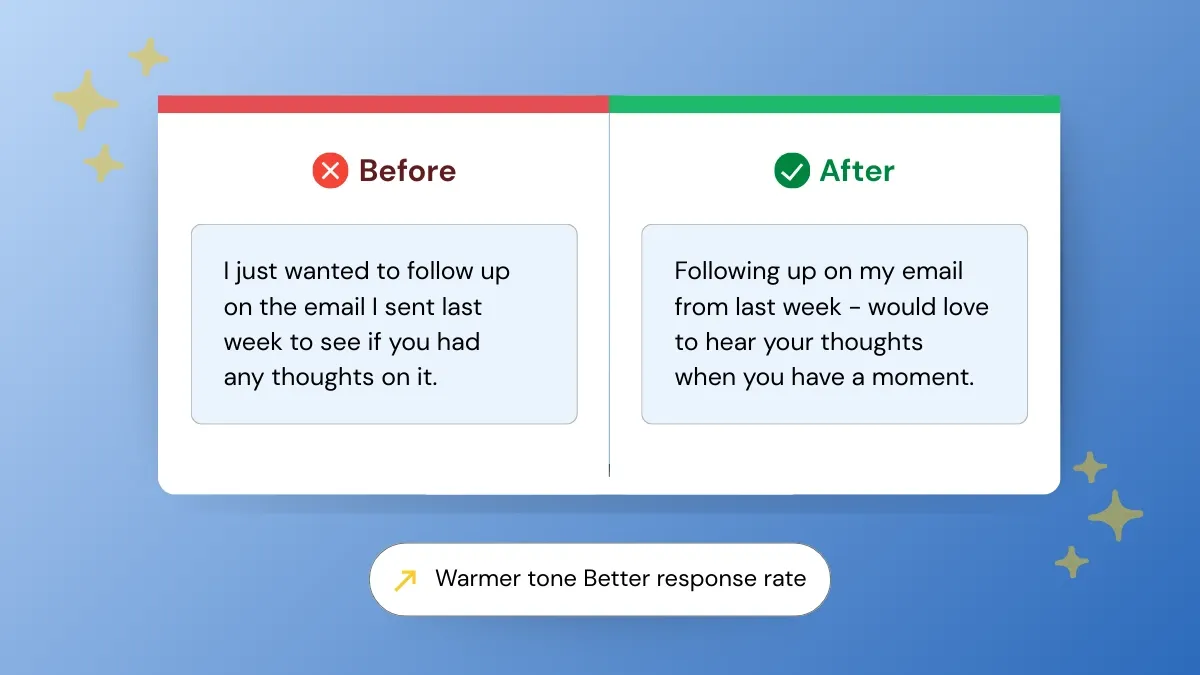
A simple tone adjustment can be the difference between a reply and an archive. Formal phrasing creates distance, and distance kills replies.
Here's what that looks like in practice:
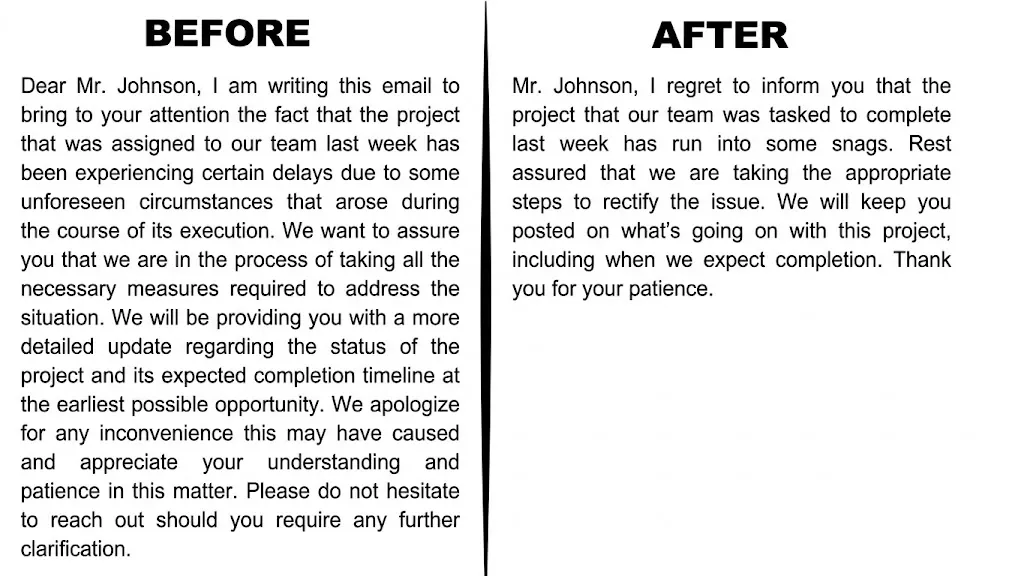
Notice how the enhanced version cuts the word count in half but actually says more. It's direct, warm, and respects the reader's time.
When Your AI Draft Sounds Robotic
You used ChatGPT, Claude, or Gemini to speed things up. Smart move.
But when you read the draft back, something feels off. The sentences are correct, but they're lifeless.
That's the pattern AI-generated drafts fall into.
Every sentence is roughly the same length. The transitions are predictable. Ideas that should build on each other just sit next to each other instead. It reads like a list of correct statements.
The logic is there, but the content flow isn't.
Running it through an AI sentence cleaner before you publish closes that gap. Same ideas, just written the way a person would actually say them.
See the difference:
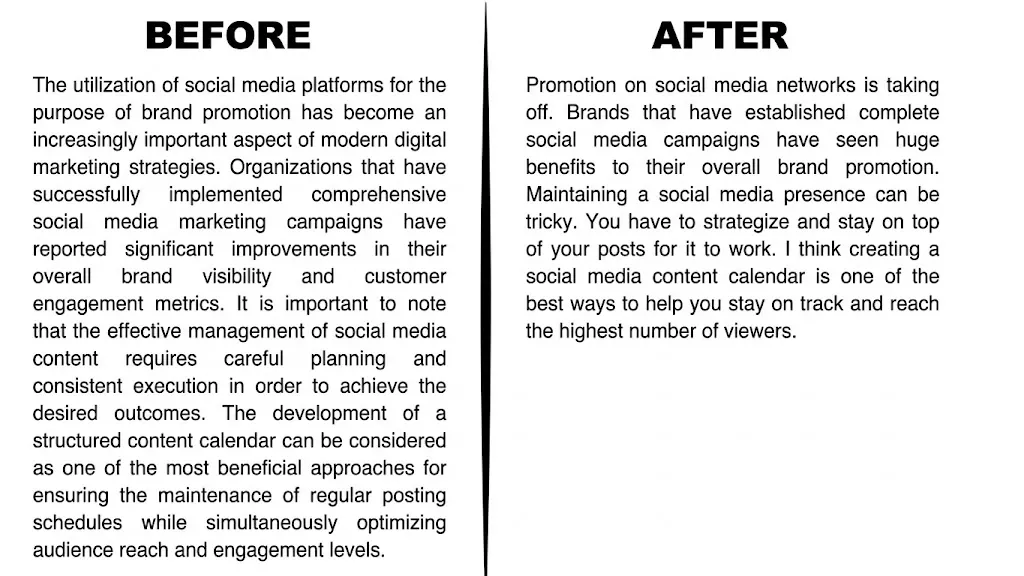
The enhanced version keeps every idea from the original but reads like an actual person wrote it. The passive constructions are gone, the sentences breathe, and the point lands faster.
When Your Essay or Report Feels Clunky
You've done the research. The argument makes sense in your head.
But the sentences keep getting in the way, too long, too passive, or just awkward when read out loud.
This is one of the most common struggles for students and professionals who write reports.
The ideas are solid. The writing doesn't reflect that.
And that gap is exactly where marks get lost and feedback like "unclear" or "hard to follow" starts showing up.
A 2025 survey by the Higher Education Policy Institute found that 88% of undergraduates use generative AI tools for assignments. AI is quickly becoming part of everyday writing, especially when students need help refining clarity rather than rewriting ideas.
Here's the same argument, before and after:
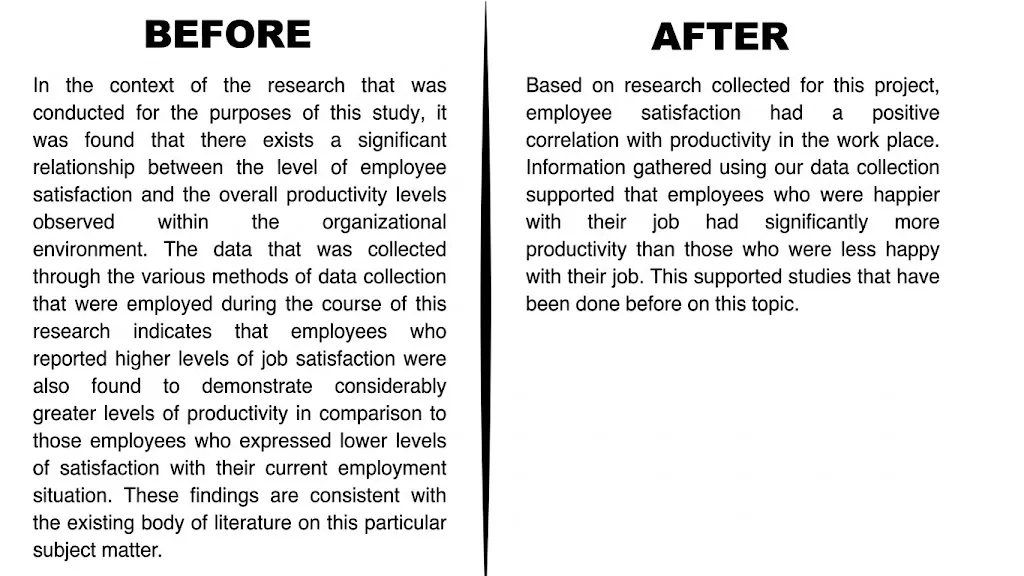
Same findings, same argument. But the enhanced version is direct enough that a reader can actually absorb it.
If you're not sure where your writing stands, checking your readability score is a good place to start.
When Your Marketing Copy Isn't Converting
Your headline is there. The CTA is visible.
The page looks clean.
But the numbers aren't moving, and you can't figure out why. More often than not, it comes down to a sentence that's trying to do too much and saying too little.
An AI sentence optimizer strips the filler and sharpens your message so your offer does the talking.
A 2025 SEMrush study shows that combining AI with human editing delivers the best results: 73% of marketers use this approach, boosting SEO and engagement, while AI alone performs nearly as well.
Here's what tighter copy looks like:
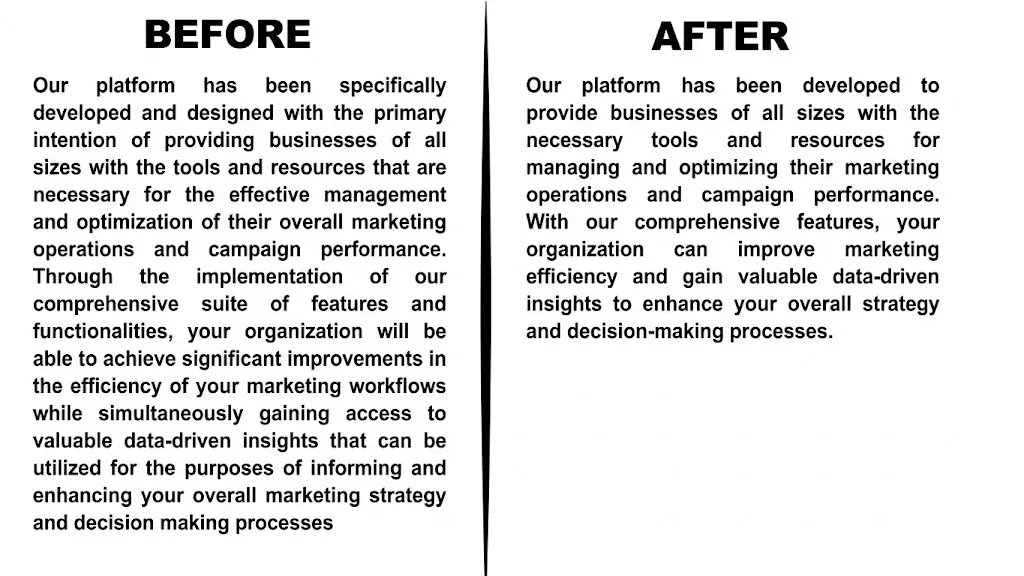
The enhanced version removes the filler and gets to the point. When your copy is this clean, the reader's attention goes to your offer.
When Your Social Caption Falls Flat
You posted. You waited. The engagement wasn't there. Social media captions live or die in the first line.
If it doesn't pull someone in immediately, the algorithm buries it and your audience never sees the rest.
The difference between a caption that gets saved and shared versus one that gets ignored is almost always the sentence quality.
Here's how much a single rewrite can shift the energy:
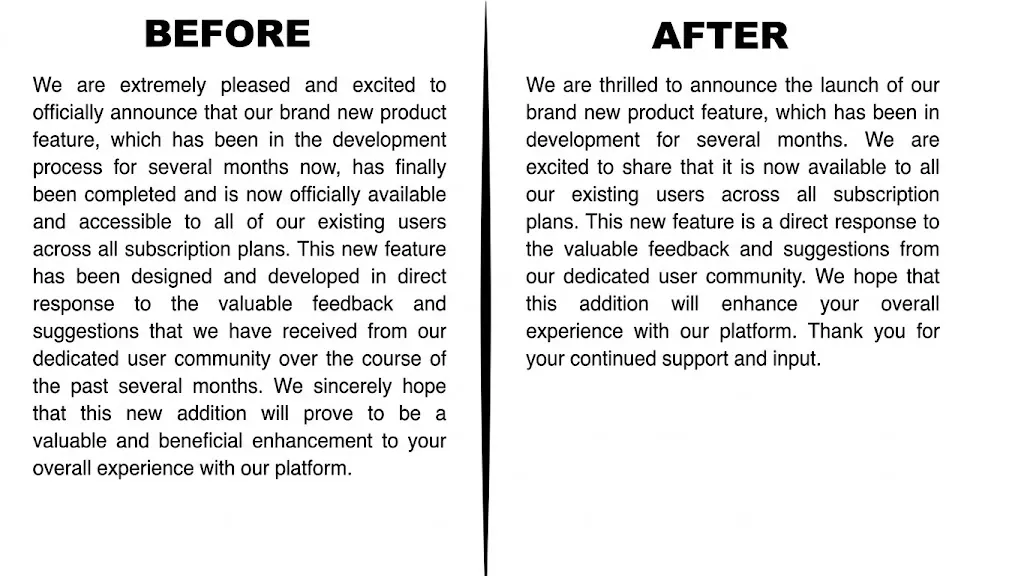
The enhanced caption is tighter, warmer, and actually builds to something. That shift in energy is what stops the scroll and what the original version was quietly missing.
See what your own sentences look like after AI enhancement no editing needed 👇
Sentence Enhancer vs. Sentence Improver vs. Sentence Rewriter
The terms sentence enhancer, sentence improver, and sentence rewriter are often used interchangeably, but they aren't always the same. All three aim to improve your writing, yet they focus on slightly different goals.
A sentence enhancer improves clarity, tone, flow, and readability while preserving your original meaning. A sentence improver focuses on making a sentence sound stronger or more natural, while a sentence rewriter may completely rewrite the sentence using different wording or structure.
If you're trying to improve a sentence or make your sentence sound better without changing your original message, an AI sentence enhancer is usually the better choice.
Phrasly's AI Sentence Enhancer is designed to improve your writing without changing your voice. Instead of rewriting everything from scratch, it gives you cleaner, more natural alternatives that keep your original message intact.
If you're comparing different tools, our guide on Phrasly AI vs. QuillBot explains how the two approaches differ.
Who Gets the Most Out of an AI Sentence Enhancer
An AI sentence enhancer delivers the most value for:
Students: Your ideas deserve better than "unclear" written in the margins. This AI text improver helps your arguments hit the way they were meant to. When your sentences are clean and direct, your thinking comes across clearly.
Non-native English speakers: Your knowledge is not the problem, the language barrier is. Think of it as a writing fluency tool that closes that gap without changing your voice.
Content creators: You publish every day, and quality has to stay consistent. In fact, a 2025 SurveyMonkey study found that 88% of marketers rely on AI in their daily work. This AI writing enhancer keeps your writing sharp even when your energy doesn’t.
Business professionals: Every email, report, and proposal represents you. In a professional setting, how you write is often how people decide how seriously to take you.
Sentence Enhancer AI vs Just Editing It Yourself
The simplest way to make your sentences sound more natural without changing what you are saying is to stop editing them yourself and let AI do it.
Most people think they can just re-read their writing and fix it. And sometimes you can.
But there is a real problem with editing your own work. You already know what you meant to say, so your brain fills in the gaps your sentences are actually leaving.
That is how clunky writing slips through even after three rounds of editing.
AI doesn't know what you meant to say. It only sees what you actually wrote and gives you cleaner options in seconds, not twenty minutes
How to Use the Phrasly AI Sentence Enhancer in 3 Steps
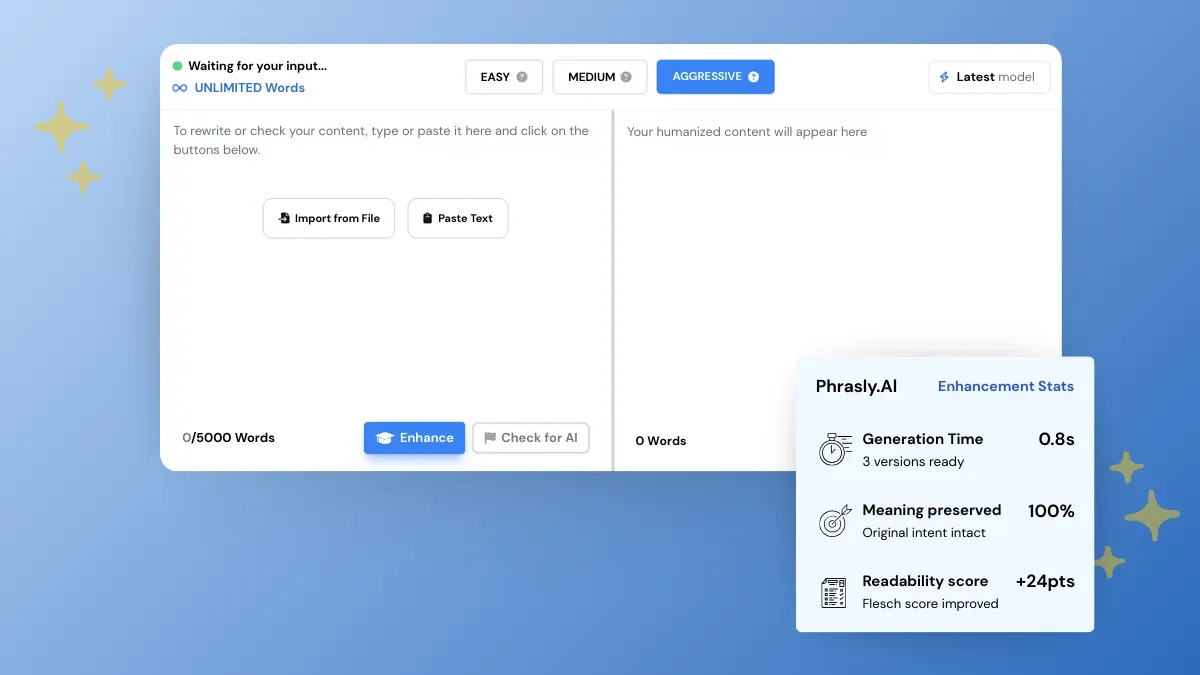
It is simpler than it sounds. Here is exactly how it works.
Step 1: Paste your sentence: Go to Phrasly AI Text Enhancer and paste the content you want to improve. No account needed to get started.
Step 2: Choose your enhancement level: This AI-powered sentence improvement tool gives you three modes depending on what your content needs:
Easy: best for SEO-focused content and readability
Medium: balanced output, works for most use cases
Aggressive: highest humanization rate, great for bypassing AI detection
Step 3: Pick your best version: Phrasly instantly gives you multiple enhanced versions to choose from.
With a single click you get a clean rephrased version ready to use. This content readability enhancement process is as simple as read, compare, and pick.
That is genuinely it. The whole process takes less time than re-reading your sentence twice.
Ready to see it work on your own writing? Try AI Enhancer for Free 👇
That is everything you need to know about enhancing your sentences with AI.
Your sentences just need a little room to breathe.
Most writing problems are not about the idea. They are about the phrasing sitting on top of it.
Too long, too passive, or just slightly off in tone. Those small friction points are what lose a reader before they ever reach your actual point.
The fix is almost always smaller than it feels. One sentence. One cleaner phrasing. That is often all it takes.
Whether you are cleaning up an AI draft, tightening a marketing headline, or just making sure your email lands the right way, the difference shows up the moment you read it back!
FAQs
What is the best AI sentence enhancer for marketing content?
The best AI sentence enhancer depends on your needs. For marketing content, look for a tool that improves clarity, keeps your brand voice consistent, and offers multiple rewriting options instead of replacing your message completely.
What's the difference between a sentence enhancer and a sentence rewriter?
A sentence enhancer improves clarity and flow while preserving your original meaning. A sentence rewriter may change the wording and sentence structure more significantly, depending on how much rewriting is needed.
Is there a free AI sentence enhancer?
Yes. You can use Phrasly's free AI Sentence Enhancer to improve clarity, tone, and readability in seconds. Paste your sentence, review the suggestions, and choose the version that best matches your writing style.
What is a sentence enhancer?
An AI sentence enhancer improves a sentence's clarity, tone, flow, and readability without changing its original meaning. It helps you express the same idea more naturally while preserving your voice.
What's the fastest way to improve a sentence using AI?
Paste the sentence into a sentence-enhancer, pick a focused mode (concise/humanize), and choose the best short option; most tools return 2-4 improved versions in seconds so you can copy the one that fits.
How is an AI text enhancer different from just asking ChatGPT to rewrite my sentence?
Enhancers are tuned for sentence-level polish: they preserve meaning, offer multiple modes (e.g., easy/medium/aggressive), and produce short, directly comparable tweaks.
Asking a general chatbot can rewrite broadly and change tone unless you give very specific prompts.
Will the enhanced version still sound like me?
Yes. enhancers change wording and structure, not your ideas; always pick the version that matches your voice and tweak small parts if needed.
Which is the best AI tool to improve sentence clarity and readability instantly
For one-click polish, try Phrasly. It is built for fast humanization and multi-option output. General assistants work too, but dedicated enhancers need less prompting.
How do I fix awkward sentences quickly?
Read the sentence aloud to find the clumsy part, cut filler, convert passive to active, then run it through an enhancer and pick the tightest version. Repeat once more if a line still feels off, two passes is usually all it takes.

Written by
Obaid Ahsan
Content Lead · Pakistan
Obaid Ahsan is a Content Lead with 5+ years of experience in SEO, content strategy, and AI-focused publishing. At Phrasly, he leads content development with a focus on accurate research, search performance, and useful, trustworthy information for readers.