iThenticate vs Turnitin for Research Papers: Which Should You Use?
14 min read
Turnitin and iThenticate are not the same tool. Both are products of Turnitin, yet they are designed for different users and workflows. Turnitin is primarily used by educational institutions for coursework, assignments, grading, and feedback, while iThenticate is designed for researchers, authors, publishers, and other research-focused documents.
They use related similarity-checking technology, but that does not make them interchangeable or guarantee identical similarity results. The right choice depends on your document and the workflow you need. This guide compares their access, repository handling, AI detection, pricing, and best use cases.
If you simply need a quick first-pass check before your official submission, you can use the Phrasly plagiarism checker.
iThenticate vs Turnitin: Quick Comparison
Turnitin is mainly designed for students and instructors within educational institutions, while iThenticate is built for researchers, authors, and publishers checking research manuscripts. Turnitin requires institutional access, whereas iThenticate offers individual credits and organizational plans. Their similarity reports may also differ because repository coverage, settings, and account types can vary.
Factor | Turnitin | iThenticate |
Primary users | Students and instructors | Researchers, authors, and publishers |
Main purpose | Coursework, academic integrity, grading, and feedback | Pre-publication and professional manuscript screening |
Access | Academic institutions only | Individual credits or organizational access |
Individual price | Not available | |
Repository | Instructors or institutions can choose whether submissions are saved | Individual submissions are not added to a repository; organizations can purchase a private repository |
AI detection | Requires an eligible license and activation | Available to licensed organizations; not included with individual credits |
Typical workflow | LMS or institutional platform | Standalone research and manuscript workflow |
Best fit | Assignments and institutional assessment | Manuscripts, publications, proposals, and research documents |
Pricing note: The iThenticate individual price shown above is exclusive of taxes. Pricing is accurate as of the date this article was written and is subject to change. Confirm the current price on the tool's official pricing page before purchasing.
Are iThenticate and Turnitin the Same?
No, iThenticate and Turnitin are separate products, even though both are owned by Turnitin and have overlapping source coverage. They use related matching infrastructure, but their access models, workflows, and repository handling are different. As a result, the same document can produce different similarity reports depending on the platform, settings, and sources available to it.
The two platforms also do not generally treat submissions as one shared repository. A document submitted through one platform is not automatically treated as a submission in the other platform's repository. So, while their databases may overlap, that does not mean they will produce identical similarity scores or reports.
Who Is Each Plagiarism Checker Designed For?
Turnitin is the better fit for institution-managed coursework, including assignments, grading, instructor feedback, and submissions through an LMS such as Canvas, Moodle, or Blackboard. iThenticate is better suited to publication-focused work such as journal manuscripts, research papers, grant proposals, and publisher screening. If your university or journal requires a specific platform, that requirement should determine which tool you use.
When Turnitin Is the Better Fit
If you are completing undergraduate or postgraduate coursework, Turnitin is usually the relevant choice when your university manages plagiarism checking as part of the assignment process. It fits institution-managed submissions where instructors need access to similarity reports, feedback, and grading tools.
Turnitin can also be useful when an institution allows submissions to be compared against previous student work. The institution’s repository settings determine whether those submissions are stored and included in future comparisons.
For a practical walkthrough, see how to check plagiarism in Turnitin.
When iThenticate Is the Better Fit
iThenticate is generally more appropriate when the document is being prepared for publication or professional research review. This includes journal manuscripts, research papers, grant proposals, book chapters, and conference papers. Publishers and editorial teams can also use it as part of their research-integrity screening process.
It also suits independent researchers who need legitimate individual access to check a manuscript before submitting it to a journal, publisher, or other organization. Unlike institution-managed coursework, this workflow does not depend on a university assignment system.
For a broader comparison of how the two tools differ in audience, access, databases, and submission indexing, see the University of Tennessee’s iThenticate vs Turnitin comparison.
Do iThenticate and Turnitin Use the Same Database?
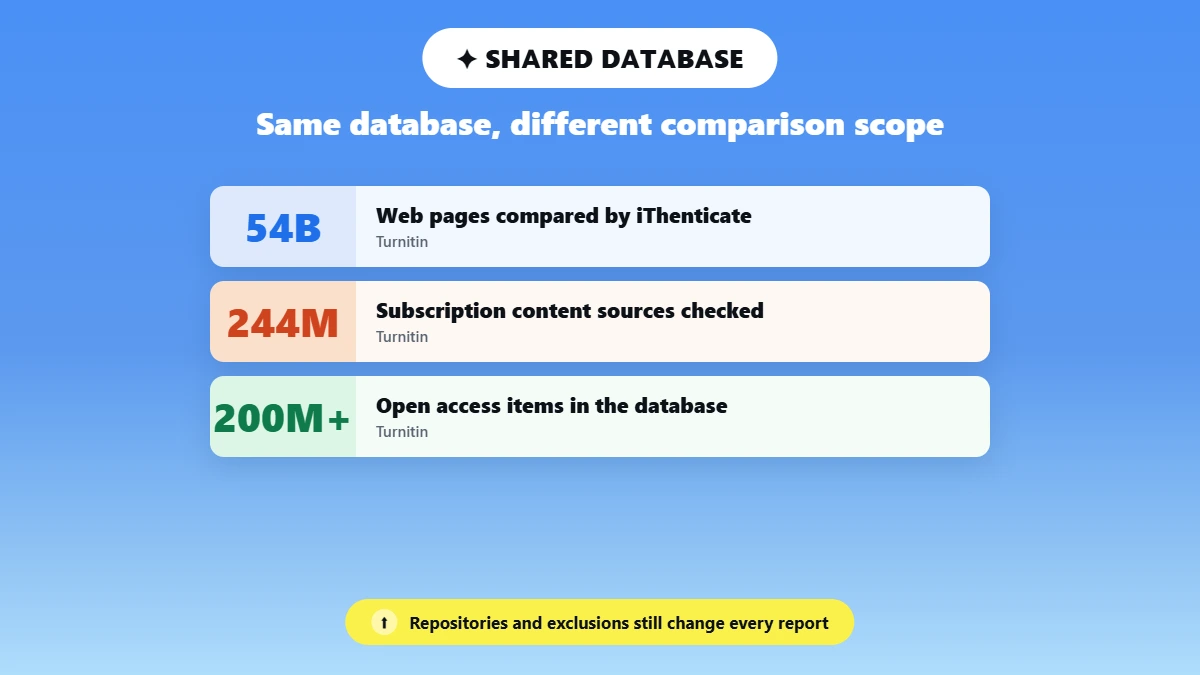
Partly. Turnitin says both products use the same industry-leading matching database, so their web and scholarly coverage overlaps. However, the actual comparison scope can vary based on enabled repositories, exclusions, account type, and when sources were indexed. As a result, the same paper can produce different similarity results in each tool.
Turnitin coursework can include student-paper repositories when those repositories are enabled, while iThenticate focuses heavily on scholarly, publisher, and open-access content. The sources available to each account, along with repository settings and exclusion rules, can therefore affect which matches appear in a report.
Indexing timing can also matter. A source that has recently been added to the database may not be available to both tools at exactly the same time. For this reason, having a largely shared underlying database does not mean that iThenticate and Turnitin will always return the same similarity percentage or matching sources.
According to Turnitin, iThenticate compares submissions against 54 billion current and archived web pages, 244 million subscription content sources, and more than 200 million Open Access items. These figures are based on Turnitin's current published database information and may change as its content coverage expands.
Will iThenticate and Turnitin Show the Same Percentage?
Not necessarily. iThenticate and Turnitin can produce different similarity percentages for the same paper because repositories, account settings, exclusions, filters, and indexing timing can vary. A similarity score shows how much text matches other sources, but it does not determine whether plagiarism occurred. A high or low score alone is not proof of misconduct or originality.
Several factors can cause the percentage to differ between the two tools. Enabled repositories and account settings can change which sources are included in the comparison. Quotation and bibliography exclusions can also affect the reported percentage, as can filters that remove small matches from the results.
Previously submitted student work and private organizational repositories can also affect the comparison when they are available to the account and included in its settings.
It is also important to interpret the percentage correctly. A similarity score measures matched text, not plagiarism. A higher percentage does not automatically mean academic misconduct, because legitimate quotations, references, and commonly used language can produce matches. A 0% score does not prove that a paper is completely original either.
There is no universal similarity percentage that is considered acceptable in every situation. Institutions, instructors, journals, and publishers can apply different standards depending on the document and context. Turnitin also notes that properly cited quotations can still appear as matches, so the individual sources and context behind a similarity score matter more than the number alone.
iThenticate vs Turnitin Pricing and Access
Turnitin is not available as an individual subscription, while iThenticate lets individuals purchase credits for manuscript checks. Organizations can use separate licensing plans, and individual iThenticate credits have some feature limitations. Current pricing can change, so check the official pricing page before purchasing.
Turnitin
Turnitin does not offer individual license purchases to students or researchers. Access normally comes through a school, university, or other institution. What students can see and use depends on how their institution configures its license, assignments, and reporting features.
iThenticate
iThenticate lets individual users purchase credits for manuscript checks. After signing in through your iThenticate login, you can choose the available submission package for your document.
The current individual iThenticate price is $125 for one manuscript of up to 25,000 words. The credit includes five revisions. A multiple-credit package costs $300 and covers up to three manuscripts, or one document of up to 75,000 words, with five revisions included. Both prices are exclusive of taxes.
iThenticate individual package | Current price | What you get |
Single | $125 | 1 manuscript up to 25,000 words, with 5 revisions |
Multiple | $300 | Up to 3 manuscripts, or 1 document up to 75,000 words, with 5 revisions |
Pricing is accurate as of the date this article was written and is subject to change. Confirm the current price on iThenticate's official pricing page before purchasing.
If you are wondering if iThenticate software is free, the individual checking service is not free. You can create an account, but submitting a manuscript for a Similarity Report requires purchased credits. Individual credits do not include AI Writing Reports or document-to-document comparison.
iThenticate vs Turnitin AI Detection
AI writing detection is separate from the similarity score in both tools. Turnitin requires an eligible Originality license with AI detection enabled, while iThenticate offers AI writing detection to customers with the feature licensed and enabled. Individual iThenticate credits do not include the AI Writing Report, so access depends on the type of account and license you use.
Similarity checking and AI writing detection answer different questions. A Similarity score shows how much text matches material in the available sources, while AI writing detection estimates whether qualifying text may have been generated or modified using AI. Turnitin states that its AI percentage is different from and independent of the Similarity score.
Turnitin AI Detection
Turnitin's AI writing detection requires an eligible Originality license and must be enabled for the account.
The AI report is designed to help educators identify text that may have been prepared with generative AI tools, but Turnitin warns that the model may misidentify human-written, AI-generated, and AI-paraphrased text. It therefore should not be used as the sole basis for adverse action against a student.
Turnitin currently supports AI writing detection for English, Spanish, Japanese, and Arabic submissions. Arabic support was added on August 18, 2026, and is available to customers with Turnitin Originality or iThenticate 2.0 AI writing detection licensed and enabled.
The AI detection model also has limitations around very low scores. Turnitin says there is a higher incidence of false positives when the detected percentage falls between 0% and 19%. To reduce the risk of misinterpretation, scores above 0% and below 20% are not displayed as a numerical percentage and instead appear with an asterisk.
Only the English AI detector currently includes AI paraphrasing and AI bypasser detection. The Spanish and Japanese detectors do not include those capabilities.
For more context on why legitimate writing can sometimes receive an AI signal, see why Turnitin flags human work as AI.
iThenticate AI Detection
iThenticate also offers AI writing detection, but access depends on the account and license. The feature is available to iThenticate 2.0 customers who license AI writing detection and have it enabled. Individual credit purchases are separate from this organizational AI writing detection access.
Documents submitted for an AI Writing Report must meet specific requirements. The file must be under 100 MB, contain at least 300 words of qualifying prose in a long-form format, and not exceed 30,000 words. Supported languages currently include English, Spanish, Japanese, and Arabic, with accepted file types including DOCX, PDF, TXT, and RTF.
If you want to check for AI signals separately from plagiarism or similarity, you can check writing for AI signals with Phrasly's AI detector. A separate AI check should not be treated as a replacement for reviewing sources, citations, or the context of a Similarity Report.
Does iThenticate Store Your Research Paper?
It depends on the account and repository settings. Individual iThenticate submissions are generally not added to a searchable repository, while organizations can purchase a private repository for storing submitted documents. Turnitin also gives instructors control over repository storage through assignment settings. Check the relevant settings before uploading unpublished research or academic work.
iThenticate Individual Accounts
Individual iThenticate submissions are generally not saved as searchable repository sources. This means an individual manuscript checked through iThenticate is not automatically added to a database that can be matched against future submissions.
iThenticate Organizational Accounts
Organizations can purchase a private repository for storing submitted documents. This can be useful for publishers, research organizations, and other teams that need to compare new submissions against their own previously submitted material.
Turnitin Repository Settings
Turnitin works differently because instructors can choose how an assignment handles submitted papers. Depending on the assignment and repository settings, submissions can be stored in a repository or handled without being added to that repository. You should not assume that every Turnitin submission is permanently stored by default. Turnitin's guidance on iThenticate and Turnitin repositories explains how repository handling differs between the two services.
If you are submitting an unpublished manuscript, research proposal, or thesis draft, check your institution's Turnitin settings and submission policy before uploading it. The storage option can affect how your document is treated in future similarity comparisons.
Which Is Better: iThenticate or Turnitin?
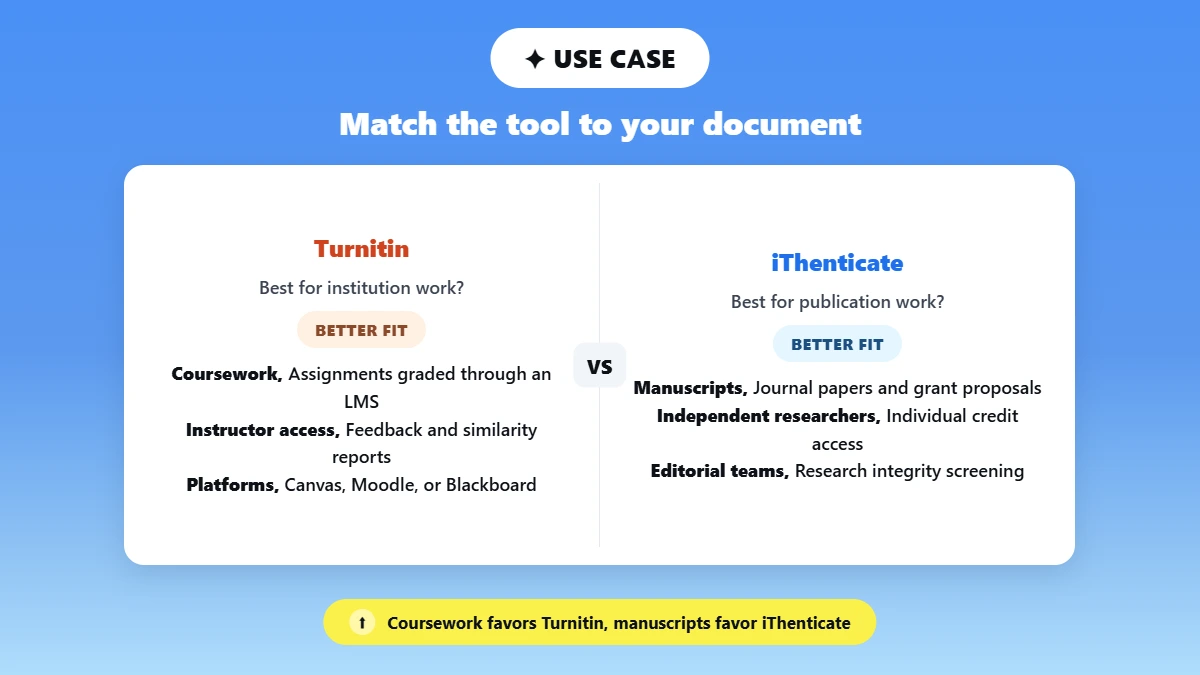
Neither iThenticate nor Turnitin is better for every situation. Turnitin is generally the better fit for institutional coursework, grading, and instructor feedback, while iThenticate is better suited to publication-focused research such as journal manuscripts and grant proposals. If a university, journal, or publisher requires a specific platform, follow that requirement.
Use case | Recommendation |
Regular course assignment | Turnitin |
Instructor grading and feedback | Turnitin |
Journal manuscript | iThenticate |
Independent scholarly author | iThenticate |
Publisher screening submissions | iThenticate organizational account |
Thesis submitted through an LMS | Institution-required Turnitin workflow |
Thesis checked by a research office | Often iThenticate, but follow local policy |
Preliminary self-check without institutional access | An accessible independent checker such as Phrasly |
The best choice depends on the document and the workflow around it. Turnitin makes more sense when your university uses it for assignments, instructor review, grading, and academic-integrity processes. iThenticate is more appropriate for research and publication workflows where authors, publishers, or research teams need to screen manuscripts before publication.
For a thesis or dissertation, the required workflow matters more than a general recommendation. A university may require Turnitin through its learning management system, while a research office may use iThenticate for publication-focused screening.
The honest verdict is that neither tool is universally better. Match the checker to the document and its purpose, and let any requirement from your university, journal, or publisher override a general recommendation.
What If You Cannot Access Turnitin or iThenticate?
If you cannot access Turnitin or are not ready to purchase an iThenticate credit, you can still run a preliminary plagiarism check. An independent checker can highlight matching text and source links, helping you add missing citations and improve close paraphrases before submission. Its score uses a different index, so it should not be treated as a Turnitin or iThenticate prediction.
If you do not have institutional Turnitin access and are not ready to buy an iThenticate credit, run a preliminary scan with the Phrasly plagiarism checker. Review the highlighted matches and source links, add any missing citations, and rewrite paraphrases that are too close to the original source. Because Phrasly uses its own index, treat the percentage as a first-pass signal rather than a predicted Turnitin or iThenticate score.
A preliminary check can be useful before you submit your paper through the platform required by your university, journal, or publisher. It gives you an opportunity to review potential matches and make citation or paraphrasing changes before the official check.
If you want to compare different tools before choosing one, see our guide to the best plagiarism checkers or explore Turniin alternatives.
Phrasly's plagiarism checker currently offers one free trial, after which pricing applies. Check the live Phrasly page for the current access and pricing details before using the service.
Turnitin is generally the better choice for institutional coursework, assignments, grading, and instructor feedback, while iThenticate is better suited to publication-focused research such as journal manuscripts, grant proposals, and other research documents. If your university, journal, or publisher requires a specific platform, that requirement should take priority.
If you do not have access to the required platform and want to review your paper before submission, you can start with a preliminary scan to identify potential matches and review your citations before running the official check.
FAQs
Is iThenticate the same as Turnitin?
No. iThenticate and Turnitin are separate products from the same company, with related similarity-checking technology. Turnitin is designed for institution-managed coursework and is not sold directly to individuals, while iThenticate serves researchers, authors, and publishers through individual credits or organizational access. Their repositories, settings, and workflows can differ, so the two tools are not guaranteed to produce identical reports.
Is iThenticate better than Turnitin for research papers?
For publication-oriented work, iThenticate is usually the better fit. It is designed for manuscripts, grant proposals, and other pre-publication research documents, while Turnitin focuses on institutional coursework, grading, and feedback. If your journal, publisher, or research office requires a particular tool, follow that requirement rather than choosing based on a general preference. For students dealing with AI-related Turnitin flags, see Turnitin says I used AI but I didn't.
Will iThenticate and Turnitin give the same similarity percentage?
Not necessarily. The two tools can return different percentages for the same paper because enabled repositories, account settings, quotation and bibliography exclusions, small-match filters, and comparison scope can vary. A similarity score measures matched text, not plagiarism, so treat the percentage as a starting point for reviewing sources and citations rather than as a verdict.
Is there a free iThenticate plagiarism checker?
Not really. You can create an individual iThenticate account, but generating a Similarity Report requires purchased credits, so the individual service is not a free plagiarism checker. If you need an accessible first-pass scan without buying an iThenticate credit, an independent checker can help identify potential matches and sources before you submit your paper.
Does iThenticate detect AI-generated writing?
It can, but access depends on the account and license. AI writing detection is separate from the Similarity score, and individual iThenticate credits generally do not include an AI Writing Report. If you are using AI detection for academic work, it is also worth understanding do colleges check for AI and how individual institutions apply their policies.
Can students buy iThenticate?
Yes. An individual can create an iThenticate account and purchase credits, so students can technically buy access. However, iThenticate is intended for research and publication workflows rather than routine coursework. Students usually submit assignments through the Turnitin system provided by their institution. For a preliminary self-check, an accessible independent checker can be a simpler option.
Does iThenticate store uploaded papers?
Usually not for individual submissions. Individual iThenticate uploads are generally not added as searchable repository sources, while organizations can purchase a private repository. Turnitin gives instructors control over repository storage through assignment settings, so you should not assume every submission is stored by default. Check your account or institution's settings before uploading unpublished manuscripts or thesis drafts.
What is an acceptable iThenticate similarity score?
There is no universal safe number. What is considered acceptable can depend on the field, journal, institution, and type of document, and properly cited quotations can still appear as matches. Instead of targeting a specific percentage, review the individual highlighted matches and their context. When a journal or research office provides a specific requirement, follow its policy.

Written by
Hasnain
Karachi, Pakistan
I help businesses grow with SEO-friendly blog posts, landing pages, and long-form content. With 3+ years of experience, I deliver clear, original, and well-researched writing that drives results.