How to Write a YouTube Script: Hook, Bridge, Body, CTA Template
16 min read
Learning how to write a YouTube script comes down to one repeatable framework: Hook, Bridge, Body, CTA. The Hook earns attention, the Bridge earns trust, the Body earns watch time, and the CTA earns the next action.
This guide breaks down each part, then gives you a fill-in-the-blank template, a sample script built from it, and an AI prompt we tested in ChatGPT and Phrasly. Copy the template, fill in the blanks, and you have a YouTube script format for beginners that works for any topic.
If you already have a video idea, turn it into a rough first draft now and shape it with each step as you read.
What Is a YouTube Script (and How Is It Different From an Outline)?
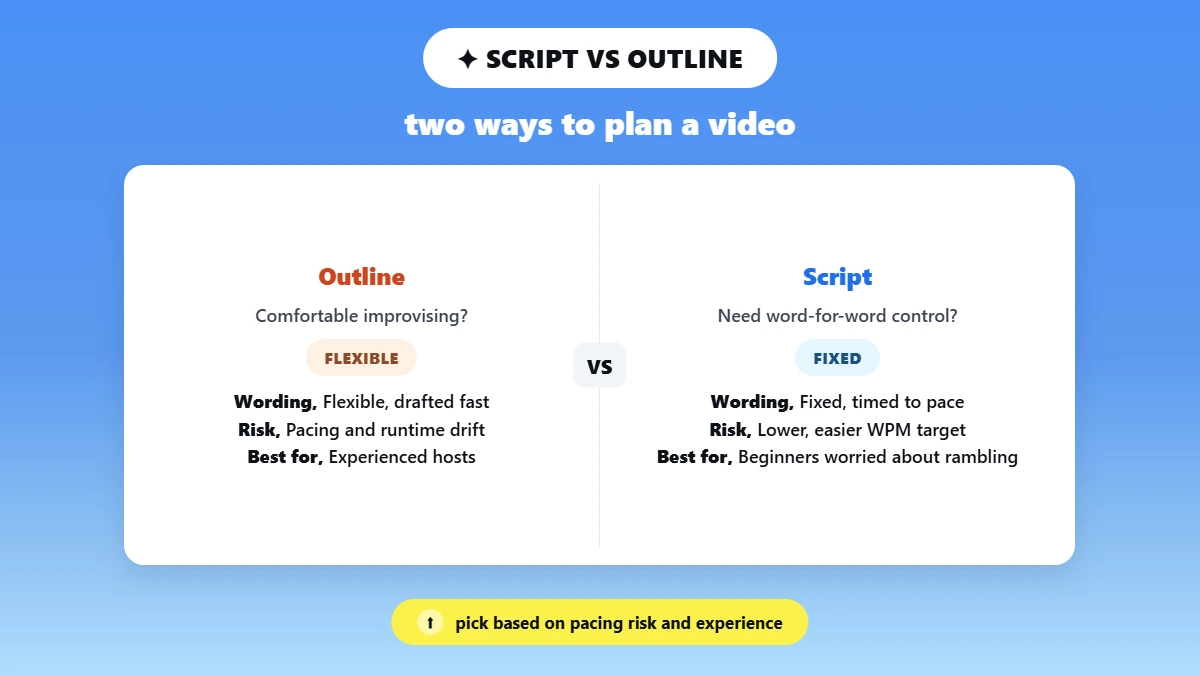
A YouTube script is the word-for-word (or near word-for-word) text you read or closely follow on camera, timed to your speaking pace. An outline is a bullet list of talking points with no fixed wording. In short, a script locks the words, while an outline locks only the ideas.
A script tells you exactly what to say, in what order, and roughly how long each part takes, while an outline suits creators who prefer to speak off the cuff. Both map out the same video structure.
That makes a full script the best YouTube script format for beginners: when every line is written out, you can count the words, predict the runtime, and stay on topic.
Here is a quick example. A 5-minute tutorial outline says “explain tool setup.” The matching script spells out the exact sentence: “Open the settings menu and turn on auto-captions first, because you’ll need them later.”
💡 Your video title and script should promise the same thing, so pick the topic before you write either one. If you are stuck for ideas, see our guide to the content idea generator first.
Script vs. Outline: A Quick Comparison
Script: fixed wording and predictable length, so it is easier to hit a words-per-minute target.
Outline: flexible wording and faster to draft, but riskier for pacing and runtime.
Script: better for beginners worried about rambling or missing a key point.
Outline: better for experienced hosts who are comfortable improvising on camera.
The Hook, Bridge, Body, CTA Framework: Your Script Blueprint
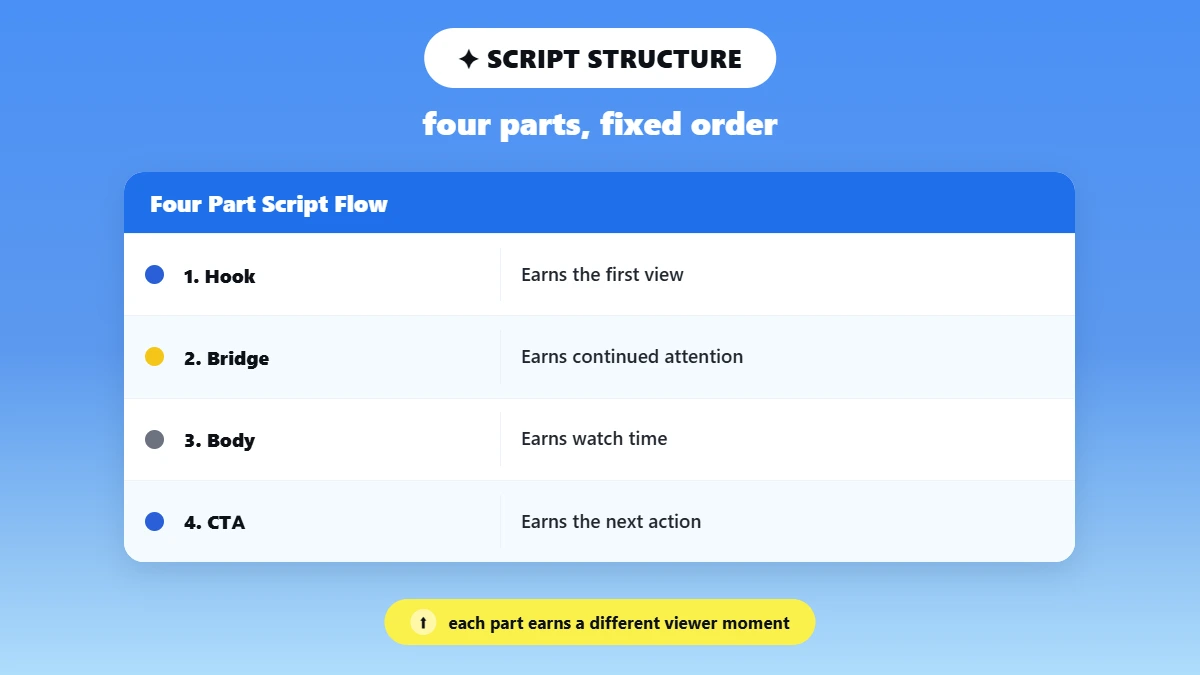
The best structure for a YouTube video script is four parts in a fixed order: Hook, Bridge, Body, CTA. Each part is built for a point where viewers usually click away: the opening seconds, the moment after the hook, the long middle and the very end. Get all four right and the script outline almost writes itself.
Hook: the first few seconds that stop the scroll and state the payoff. It stops the early drop-off.
Bridge: one or two sentences that connect the hook to the content. It sets expectations, so viewers know why to stay.
Body: the main content, split into short, paced sections. It keeps average view duration up.
CTA: one clear ask at the end. It turns watch time into a subscriber, comment or click.
This is how to structure a YouTube script so every line has a job. YouTube’s help page, Measure key moments for audience retention, explains that its Intro metric shows what share of viewers are still watching after the first 30 seconds. Your Hook and Bridge decide that number.
📌 Each part gets its own step-by-step section below, and the template, sample script and AI prompt all follow this same order. If you plan visuals, sketch a simple storyboard beside each part as you go.
Hook, Bridge, Body, CTA at a Glance
Part | Typical Length | What It Earns |
|---|---|---|
Hook | 5 to 15 seconds | The first view |
Bridge | 1 to 2 sentences | Continued attention |
Body | Most of the script | Watch time |
CTA | Final 10 to 20 seconds | The next action |
Step 1: Write a Hook That Stops the Scroll
The rule for how to write a hook for a YouTube video is simple: state the payoff or the problem in your first sentence, before any greeting. Viewers judge a video in its opening seconds, and YouTube counts how many are still watching after the first 30. That makes the hook, and the bridge right after it, the highest-stakes lines in your script.
So how do you write a hook that keeps people watching? Write it last, using one of these techniques:
Lead with the outcome: "By the end of this video, you'll be able to..."
Ask the question they already have: open with the exact problem that made them click.
Show the result first: start on the finished edit, recipe or setup, then explain how.
Make a surprising claim: say something specific that challenges what viewers assume.
Skip "Hey guys, welcome back to my channel." It spends your best seconds on something viewers did not click for.
Speed is not the fix either. Prepublish reports that across 1,290 videos in two hook studies, hit and flop openings were spoken at nearly the same pace: 181 versus 180 words per minute on larger channels, and 169 versus 170 on smaller ones. So wording, not pacing, decides whether a video hook works.
Why the First Seconds Decide Retention
YouTube’s audience retention report shows the share of viewers still watching after the first 30 seconds.
YouTube links a strong intro to content that matches the title and thumbnail, so a weak hook lowers that number before the Body starts.
YouTube Hook Examples You Can Adapt
“If you’ve ever struggled with [problem], this video fixes that in under [X] minutes.”
“I tested [claim] so you don’t have to. Here’s what actually happened.”
“Stop doing [common mistake]. Here’s what to do instead.”
“By the end of this video, you’ll know exactly how to [outcome].”
Step 2: Build a Bridge That Keeps Viewers Watching
The Bridge is the sentence or two right after the Hook that tells viewers what they will get and why it is worth their time. Most guides fold it into the intro, but it does a different job. The Hook earns attention, and the Bridge earns a commitment to keep watching.
Skipping it is a common beginner mistake. Jump straight from Hook to Body and viewers never get a reason to stay, so watch time drops early.
So how do you structure a YouTube script around the Bridge? Put it right after the Hook, let it promise what the Body will cover, then deliver the Body in that exact order before the CTA.
Use a simple formula to write it: problem, promise, proof.
Problem: name what the viewer is struggling with.
Promise: say what they will have by the end.
Proof: give one reason to trust you on this topic.
Example: “In this video, I’ll walk you through the exact three steps, and show you the mistake that cost me a week of wasted work.”
How the Bridge Connects the Hook to the Body
Keep it to 2 or 3 sentences at most, because a long bridge starts losing the retention rate the hook just earned.
Preview the Body’s structure, such as “three steps,” so viewers know what is coming and stay to see it delivered.
Finish the hook’s thought instead of starting a new topic.
Step 3: Structure the Body for Pacing and Length
The Body holds most of your script, so build it in short sections with a reset every 30 to 60 seconds. This is how to write a YouTube script that keeps viewers watching after the intro ends. How much you explain depends on your target audience and your b-roll: beginners need more words, while a step you can show on screen needs fewer.
For varied phrasing in longer sections, borrow ideas from our guide to AI creative writing prompts.
Mid-Video Retention Tactics: Pattern Interrupts and Open Loops
Pattern interrupts: change the camera angle, add a graphic, cut to b-roll or shift tone every 30 to 60 seconds to reset attention.
Open loops: tease a later point, like “I’ll show you the biggest mistake in a minute,” to carry viewers through slower parts.
Use open loops sparingly: one or two per video, so the payoff still feels earned.
Write cues into the script: pair each pattern interrupt with a planned b-roll note.
Pacing and Words Per Minute
StudioBinder’s Script Writing on YouTube Examples puts most creators’ speaking pace at 130 to 160 words per minute. Divide your word count by that range to estimate runtime, so a 700-word script runs about 4.4 to 5.4 minutes.
Faster pacing suits high-energy topics like news or gaming.
Slower pacing suits tutorials, where viewers need time to process each step.
Read the script aloud once before filming to check the estimate against your real delivery.
How Long Should a YouTube Script Be?
A YouTube script should be as long as your topic needs, sized to your speaking pace. So how many words do you need for a 10-minute YouTube video? Plan 1,300 to 1,600 words of narration.
Finished videos run a little higher. According to Prepublish reports, the median 10-minute video across 3,923 English YouTube videos held about 1,810 words. That is because real delivery runs faster than the planning range: in Prepublish’s 349-video hook study, creators spoke at a median of 181 words per minute.
For length itself, Wistia’s study of more than 564,000 videos found engagement holds best under 2 minutes, with a second sweet spot between 6 and 12 minutes. Backlinko’s study of 1.3 million videos put the average top-ranked video near 14 minutes 50 seconds, so match length to topic depth rather than forcing a round number.
Target Video Length | Approx. Word Count (at 130 to 160 wpm) | Notes |
|---|---|---|
2 minutes (short-form) | 260 to 320 words | Wistia’s recommended length for short videos |
5 minutes | 650 to 800 words | Good fit for quick tutorials or explainers |
10 minutes | 1,300 to 1,600 words | Finished videos hold about 1,810 words (Prepublish median) |
12 minutes | 1,560 to 1,920 words | Upper end of Wistia’s longer-content range |
14 minutes 50 seconds | 1,930 to 2,370 words | Average top-ranked video length in Backlinko’s study |
Step 4: Write a CTA That Converts Without Sounding Pushy
A good call to action asks for one specific thing, after the value is delivered, in the same voice as the rest of the script. Use the formula Acknowledge + Ask + Reason: name what viewers just got, ask for one action, and give a quick reason it helps them or the channel.
One clear ask beats a list. Beginners often stack “like, comment, subscribe, and check the link” into one breathless line, which weakens all four and hurts audience engagement.
Subscribe ask: “If this saved you time, subscribing helps more creators like you find this channel.”
Comment ask: “Drop your biggest takeaway in the comments. I read every one and reply.”
Product or link ask: “The template I used is linked below if you want to skip the guesswork.”
Match the CTA to the tone. A casual tutorial can use a casual CTA, while a documentary-style video should keep it understated and place it after the emotional beat, not before it.
Your CTA should also pay off the Bridge’s promise: if you promised three steps, ask viewers to try them.
Drafting several versions to test? Pull structured phrasing from 50+ AI Prompts for Marketing That Drive Real Results.
The CTA is part of the script, not an afterthought bolted on in editing, so write and time it in the same draft as the Hook, Bridge and Body. So what should a YouTube script include? A hook, a bridge, a paced body and one clear CTA, all written before you hit record.
Writing a CTA That Feels Natural
Keep it to one sentence in your normal voice, not a shift into “sales mode.”
Place it after the payoff, never before, so it reads as a bonus rather than a toll.
Read it aloud. If it sounds like an ad read, cut it to the single clearest ask.
Copy This Fill-in-the-Blank YouTube Script Template
Yes, here is a free YouTube script template you can follow: copy the plain-text block below into Google Docs, Notion or a teleprompter app and fill in each labeled blank.
It follows the same four parts, so it is the fastest way to learn how to write a YouTube script without starting from a blank page. It is plain text on purpose, so the formatting will not break when you paste it.
Fill every blank before you record, not during.
YOUTUBE SCRIPT TEMPLATE
Title: [Video title]
Target length: [X] minutes (about [X × 130 to 160] words)
HOOK (5 to 15 seconds)
[State the problem or a surprising claim in one sentence.]
BRIDGE (1 to 2 sentences)
[Problem: what the viewer is stuck on.] [Promise: what they will have by the end.] [Proof: why they should trust you.]
BODY
Point 1: [Main point] [B-roll or graphic cue]
Point 2: [Main point] [Open loop: tease Point 3]
Point 3: [Main point] [Pattern interrupt]
CTA (10 to 20 seconds)
[Acknowledge what they got.] [Ask for one action.] [Give one reason.]
Part | Blank to Fill | Example Filled-In Blank |
|---|---|---|
Hook | [State the problem or surprising claim in one sentence] | "Most new creators lose viewers in the first few seconds. Here's the fix." |
Bridge | [Say what they will get and why they should trust you] | “I’ll show you the four-part structure I use on every script, so you never start from a blank page.” |
Body | [List 3 to 5 steps or points] | “Step 1: Write the hook last. Step 2: Keep sentences under 12 words. Step 3: Cut the intro music.” |
CTA | [One ask tied to the video's value] | “If this saved you a rewrite, subscribe for more scripting breakdowns.” |
YouTube Script Template Free: Copy and Fill In
Fill in the Hook first, since it sets the pace for everything after it.
Make the Bridge finish the Hook’s claim instead of starting a new topic.
Write the Body as a numbered list, which also makes on-screen text and b-roll planning easier.
Time one read-aloud before you record and check it against your target length.
Want a YouTube script example PDF? Paste the filled template into a doc and export it as a PDF for your teleprompter app or a client. Then do one script revision: read it aloud, time it, and cut any sentence that does not serve the Hook, Bridge, Body or CTA.
See the Template in Action: A Sample YouTube Script
Here is a short sample script that follows the template line by line. Each line is labeled so you can trace the structure. At about 108 spoken words, it runs 40 to 50 seconds at 130 to 160 words per minute, a good size for a Short or an intro segment.
Sample Script: Hook, Bridge, Body, CTA in Action
(Hook) "You've probably opened five tabs trying to write one script, and you still have nothing."
(Bridge) "I used to do the same thing, until I started using one simple four-part structure. In the next minute, I'll show you all four parts."
(Body) "First, write your hook last, once you know what the video delivers. Second, keep your bridge to one or two sentences. Third, outline your body as three points before you script full sentences."
[B-roll: the three points appearing on screen]
(CTA) "Try this on your next script, and tell me in the comments how much faster it felt."
The lines are written to be spoken, not read silently, so they work as a voiceover or on a teleprompter. Export this sample next to your filled template as a YouTube script example PDF, and you have a reference ready for your next draft.
Adapting the Sample for a Documentary or Tutorial Video
How do you write a YouTube script for a documentary? Keep the same four parts, but change the pacing and the video format around them.
Documentary: slow the hook and open on a moment, such as “[Date], [person] made a choice that changed [outcome].” Let the bridge carry the emotion before the body moves into facts or a timeline.
Tutorial: keep the sample’s brisk pace and number every step out loud, so viewers can follow along.
The same rule holds in celebrity and entertainment news scripts: open on the moment, then explain why it matters.
Use This AI Prompt to Write Your Script Fast
Here is how to write a YouTube script fast with AI: give the tool your topic, audience, length and tone, and ask for the same four labeled parts. Fill in the brackets below and paste the prompt into ChatGPT or any AI YouTube script generator.
You get back a draft split into Hook, Bridge, Body and CTA, ready to edit rather than rewrite, which is the quickest way to write your first YouTube script as a beginner.
The Ready-to-Use AI YouTube Script Prompt
Write a YouTube script for [topic] aimed at [audience]. The video is [X] minutes long and the tone is [casual, tutorial or documentary]. Structure it as Hook (one sentence, [X] seconds), Bridge (one sentence connecting the hook to the topic), Body ([3 to 5] main points), and CTA (one sentence asking viewers to [action]).
Set the length: pacing differs for a 2-minute Short and a 6 to 12 minute video, so always fill in the minutes.
Set the tone: casual, documentary and tutorial videos need different phrasing from the same structure.
Keep the four labels: they make the output line up with the template, so nothing gets dropped.
📢 For more varied Body wording, use the creative writing prompts from Step 3. For product videos, refine the CTA line with the marketing prompts from Step 4.
What Happened When We Tested This Prompt
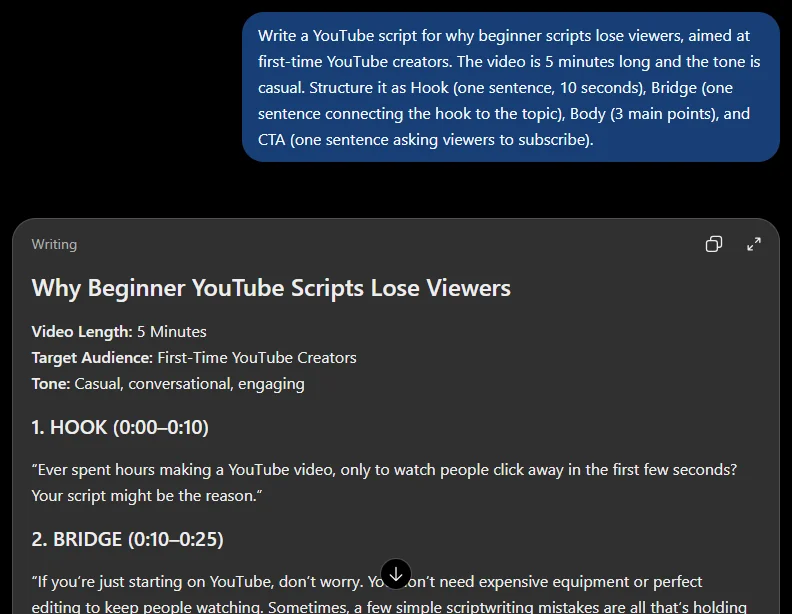
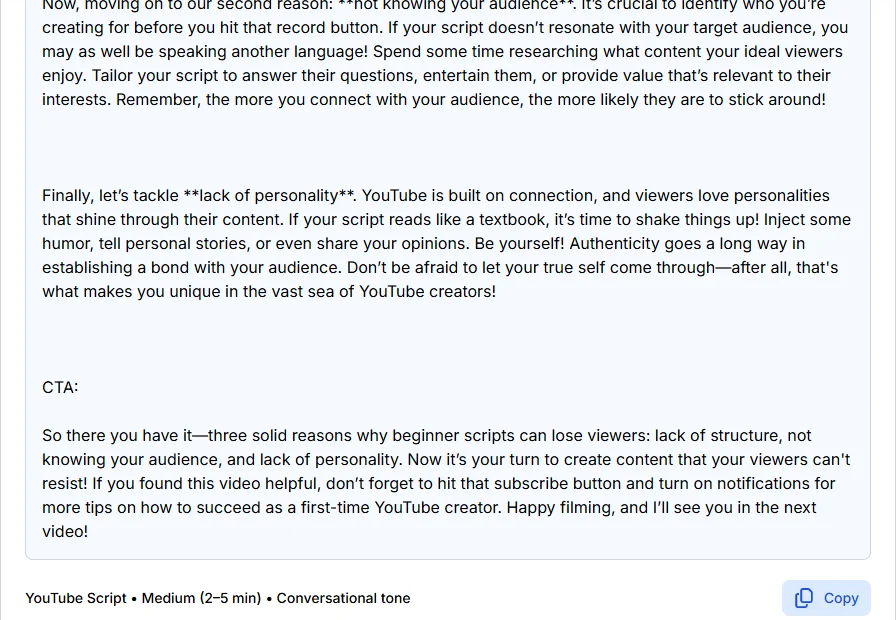
On October 21, 2026, we ran this prompt once in ChatGPT and a shortened version once in Phrasly AI Script Generator, for a 5-minute video on why beginner scripts lose viewers.
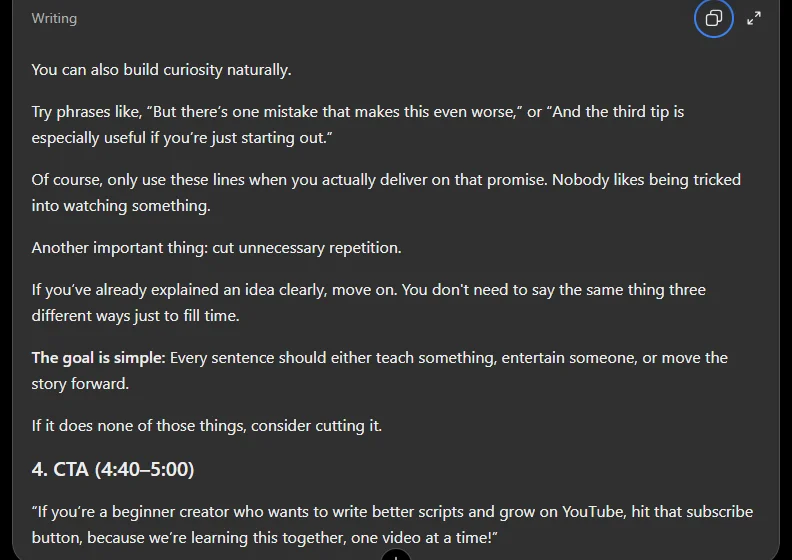
ChatGPT followed the structure and the length. It returned all four labeled parts and about 695 spoken words, which fits 5 minutes at 130 to 160 wpm, but stretched the hook and bridge past one sentence.
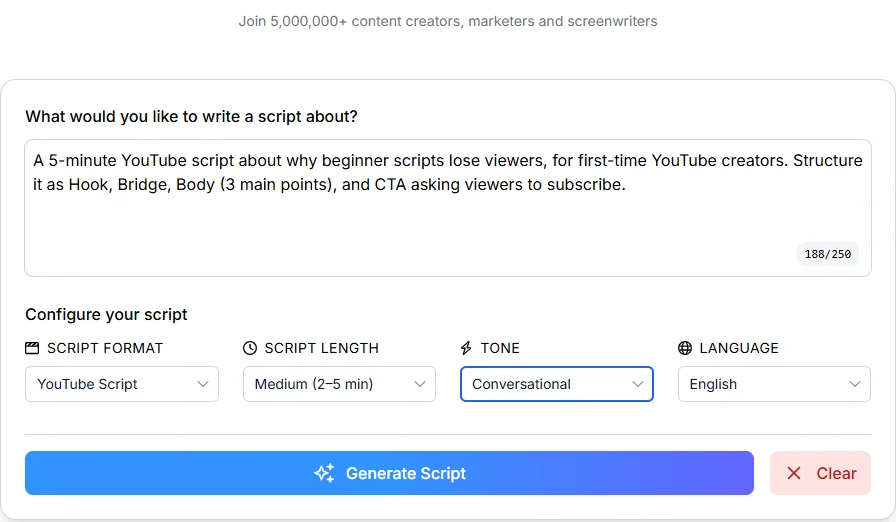
Phrasly AI Script Generator gave a fast conversational draft. Its input box takes up to 250 characters, so we typed a short request and chose YouTube Script, Medium (2 to 5 min) and Conversational. It returned 398 words with three clear body points, but folded the Bridge into a four-sentence hook and asked for two actions in the CTA.
Disclosure: Phrasly publishes this article and makes one of the two tools tested. Each tool was run once, so this is a spot check, not a ranking.
⚠️ AI output is a first draft, not a finished script. Results change from run to run, and both tools in our test needed edits. Check every draft against the template.
Turning the Prompt Output Into a Full Script
Check the output against the fill-in-the-blank template and add any missing part, most often the Bridge.
Cut the hook to one sentence and the CTA to one ask.
Time the final script against your target length before recording.
Start Your Next Script Today
Now you know how to write a YouTube script that holds attention from the first line to the last ask.
✅ Before you hit record:
The Hook states the payoff in one sentence.
The Bridge promises what viewers will get.
The Body resets every 30 to 60 seconds.
The CTA asks for one thing, and you have timed a read-aloud.
Want different prompt styles? Build your own prompt with a free AI prompt generator.
FAQs
How Long Should a YouTube Script Be?
A YouTube script should match your video length, topic and niche, not a fixed number. Plan on 130 to 160 words per minute of narration, then adjust for your own pacing and pauses. Real delivery often runs faster than that range, so time one practice read-aloud instead of relying on word count alone.
How Many Words Is a 10-Minute YouTube Video Script?
Plan about 1,300 to 1,600 words of narration for a 10-minute video at 130 to 160 words per minute, and fewer if b-roll and pauses fill part of the runtime. Prepublish’s sample of 3,923 videos found a median of about 1,810 words, because many creators speak faster than that range. Read your draft aloud with a timer to confirm.
What Is the Best Format for a YouTube Script?
There are two common formats. A single-column conversational script suits talking-head and voiceover videos, while a two-column A/V script separates spoken audio from visual cues for tutorials and heavily edited videos. Choose based on how much visual direction your editor needs, and keep the Hook, Bridge, Body, CTA order in both.
How Do YouTubers Write Scripts?
Most creators outline their points, write to one viewer, then revise by reading aloud. They write the hook last and plan upcoming videos in a content calendar. For help planning that calendar or getting better AI drafts, see our guide to ready-to-use AI prompt examples.
How Do You Structure a YouTube Script?
Use four parts in order: a Hook that states the payoff, a Bridge that promises what viewers will get, a Body of short paced sections, and a CTA with one clear ask. Add b-roll notes, rough timestamps and a re-hook every few minutes, then follow the fill-in-the-blank template above.

Written by
Hasnain
Karachi, Pakistan
I help businesses grow with SEO-friendly blog posts, landing pages, and long-form content. With 3+ years of experience, I deliver clear, original, and well-researched writing that drives results.