How to Scan Any Text for AI for Free: Step-by-Step Guide
11 min read
To scan any text for AI, paste or upload it into an AI detector such as Phrasly. You can start with a free scan, then review the overall AI score and highlighted sentences. Remember that an AI score is a signal, not proof of authorship.
Different detectors can also produce different results. In this article, we tested the AI detector with human-written, AI-generated, and mixed human-AI text to see how it responds to each type of content.
Want to test your own writing? Run a free scan in the detector below
How to Scan Text for AI for Free
To scan writing for AI for free, open a free AI detector, paste or upload your text, start the scan, and read the overall score plus the highlighted sentences. Phrasly’s AI Writing Detector offers unlimited free scans after signup, with up to 10,000 words per scan. Aim for a longer passage, since detectors may be less reliable on very short snippets.
Step 1: Open a Free AI Text Scanner
Open Phrasly's free AI detector. Follow the prompts to start your scan.
Step 2: Paste or Upload the Text You Want to Check
Paste your text into an AI text checker or upload your file. Phrasly currently recommends at least 30 words. For short snippets, add surrounding text when possible.
Turnitin recommends at least 300 words of qualifying prose for more accurate AI-writing detection, but that does not mean Phrasly requires 300 words.
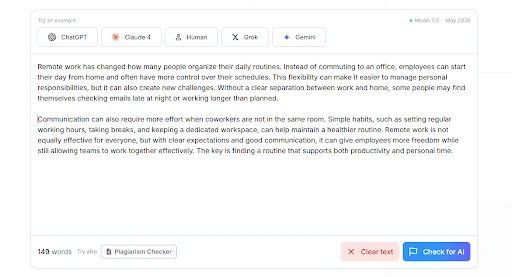
Step 3: Start the Scan (Click "Check for AI")
After you paste or upload your text, click “Check for AI” to start the scan. The detector will analyze your text and generate your AI detection result.
Step 4: Read the AI Detection Score
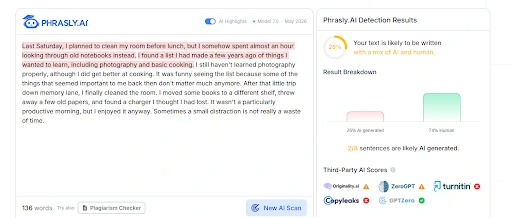
After the scan, you will see an overall result, an AI probability, a human/AI read, and highlighted passages. In this case, the result is 26% AI and 74% human. That does not mean 26% of the text was written by AI.
Turnitin describes its AI percentage as the share of qualifying prose it believes may be AI-generated or AI-modified and says the score should not be the sole basis for taking action.
Treat an AI score as a signal to review, not proof of authorship.
Step 5: Review the Highlighted Sentences
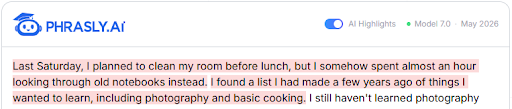
Review the highlighted sentences instead of relying only on the overall score.
Ask whether the passage was AI-generated, AI-edited, formulaic, or simply written in a predictable style. Quotations and standard definitions can also be highlighted, so read each passage in context.
Step 6: Decide What the Result Actually Means
Once you check text for AI, Also check if AI use is allowed and verify its facts, citations, and claims. For AI-assisted writing, follow the relevant school, workplace, or client policy.
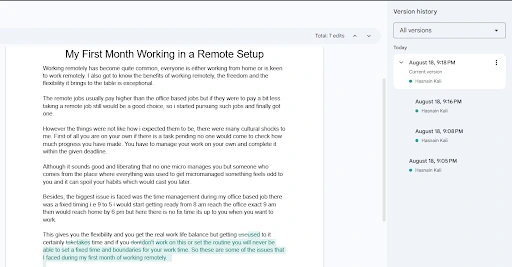
If you wrote the text yourself, keep drafts, notes, and version history as evidence of your writing process.
Phrasly’s AI writing Detector is free, and shows a sentence-by-sentence breakdown, so you can run the same scan on your own text.
We Tested It: Human vs AI vs Mixed Text
To see how a scan performs in practice, we ran three known samples through Phrasly: one we wrote ourselves, one was AI generated text, and one that mixed both. We recorded the scores, the highlighted sections, the test date, and the detector version, and we published the unedited results below.
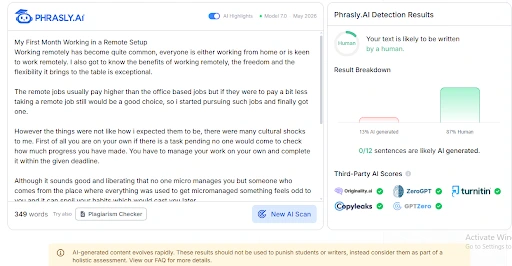
Sample A: Human-Written Text
We wrote a roughly 350-word text by hand and ran it through Phrasly. It received an AI score of 13% and a human score of 87%. We kept its version history as evidence of the writing process.
Sample B: AI-Generated Text
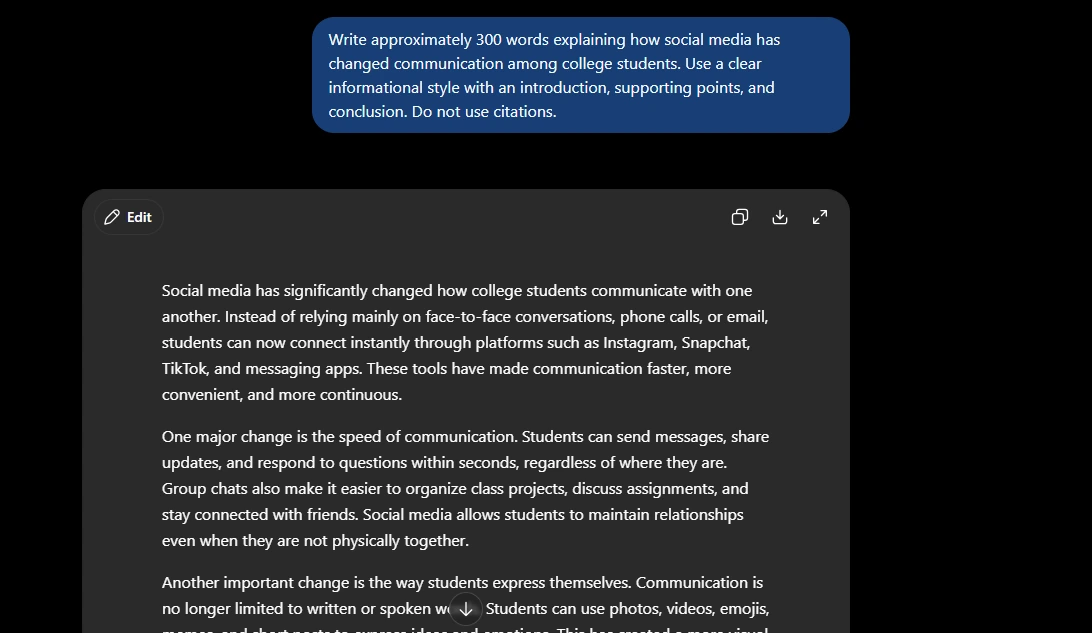
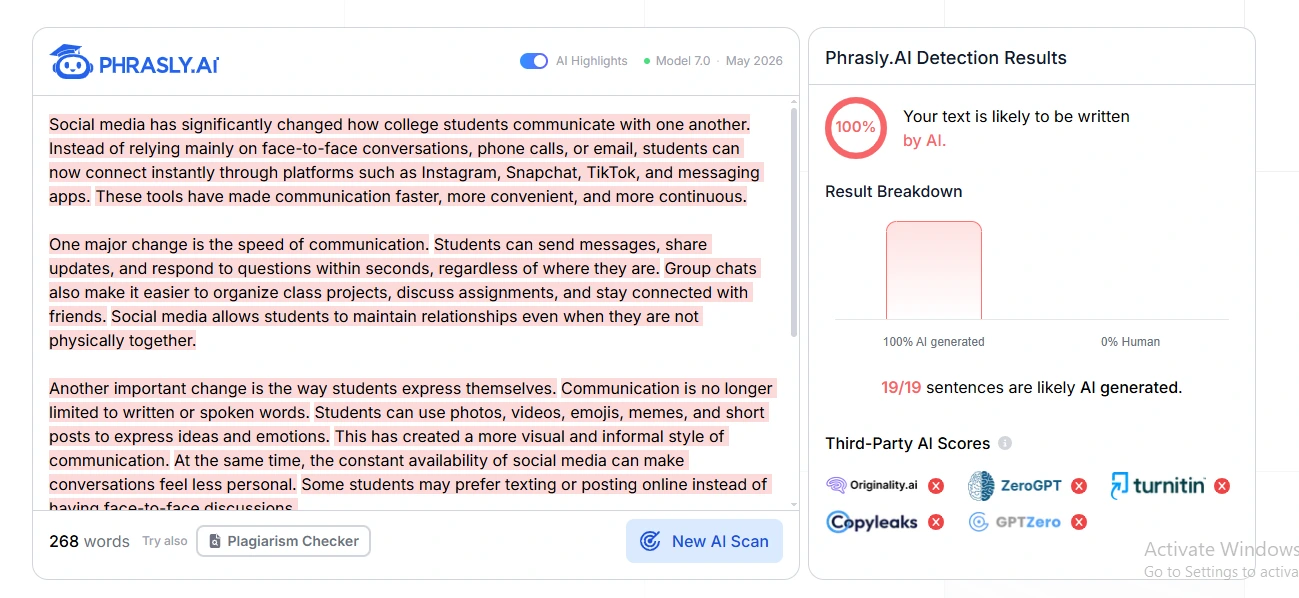
We asked ChatGPT to generate approximately 300 words using the test prompt, recorded the model, date, prompt, and word count, and ran the text through Phrasly without changes.
Phrasly returned a 100% AI score for this sample.
Test details:
AI model: GPT-5.6 Luna
Test date: August 18, 2026
Word count: 300
Prompt: “Write approximately 300 words explaining how social media has changed communication among college students. Use a clear informational style with an introduction, supporting points, and conclusion. Do not use citations.”
Sample C: Mixed Text
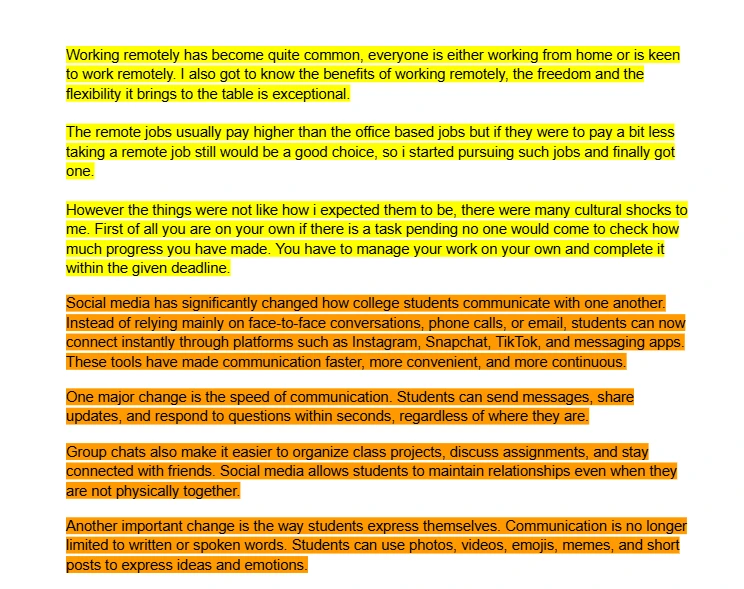
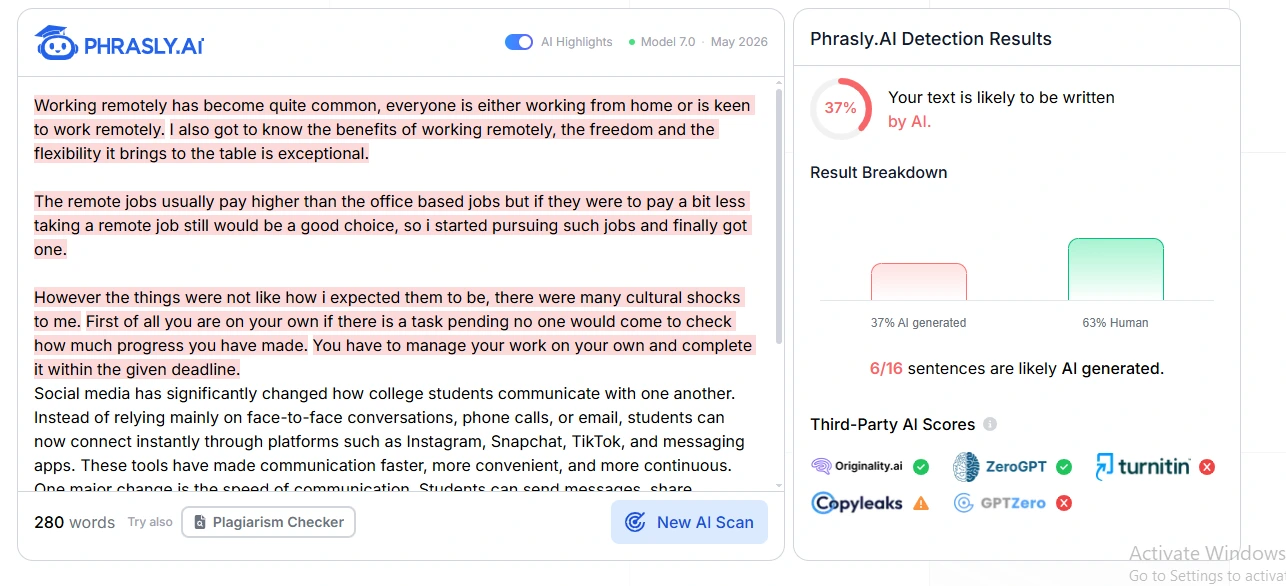
We took approximately 150 words from the human-written sample and approximately 150 words from the AI-generated sample and combined them without changing either part.
The human-written portion is highlighted in yellow, and the AI-generated portion in orange. We then ran the complete text through the Phrasly AI Detector.
The detector returned an AI score of 37% and a human score of 63%. Interestingly, some of the highlighted sentences came from the human-written portion, showing why an AI detection score should be treated as a signal rather than proof of authorship.
AI Detection Results: Human vs. AI vs. Mixed Text
Sample | Source | Words | AI Score | Flagged Sections | Result |
|---|---|---|---|---|---|
Human-written | Writer | 350 | 13% | None | Human |
AI-generated | GPT-5.6 Luna | 300 | 100% | Entire text | AI |
Mixed | Human + AI | 300 | 37% | Some human-written sentences | Mixed |
What Does Your AI Scan Result Actually Mean?
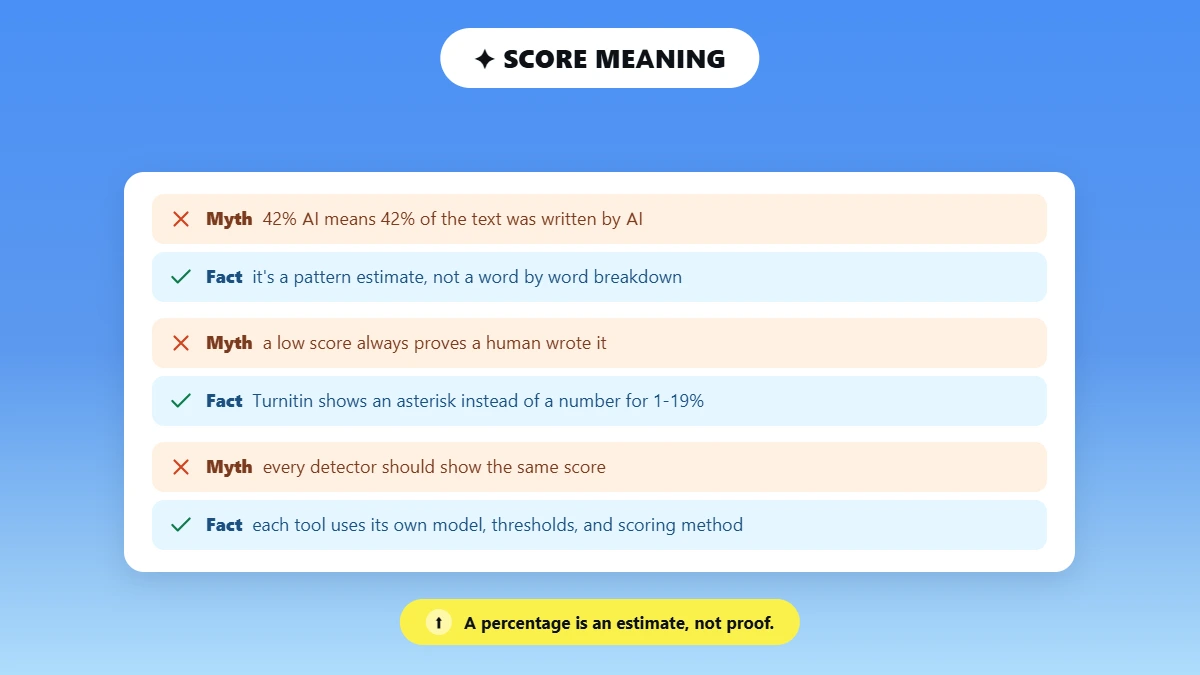
An AI detection percentage is that detector’s estimate of how much of your text matches patterns linked to AI writing, under its own model and threshold. It is not a measure of exactly how many words a person or a model wrote, and it does not prove authorship. Different tools define and display the number differently.
For example, 42% AI does not mean 42% of the text was written by ChatGPT. A score can vary between tools because each detector uses its own model, thresholds, and scoring method.
Turnitin now displays an asterisk instead of a specific percentage for results between 1% and 19% because it considers that range more prone to false positives.
This shows why low scores should not be treated as precise measurements.
What Types of Text Can You Scan for AI?
You can scan almost any text: essays and assignments, Google Docs, Word documents and PDFs, emails, blog posts and website copy, and single paragraphs. For files, upload or copy the visible text. Longer, complete passages give the detector more to work with than isolated sentences.
Essays and Assignments
You can scan an essay for AI by copying the full assignment into the detector rather than testing just one sentence.
An AI detector for essays can analyze the text and provide an overall AI score along with highlighted sections. For the clearest result, use the complete essay whenever possible.
Google Docs
Open your Google Doc, select the text you want to check, copy it, and paste it into the detector. Then start the scan and review the results.
Word Documents and PDFs
The detector includes an Upload File option. In our hands-on test, DOCX and PDF files were supported, so you can upload either format directly instead of copying and pasting the text.
Emails, Blog Posts, and Website Copy
For an email, blog post, or webpage, copy the visible text and paste it into the detector. This lets you scan email for AI or check articles for AI using the same basic process.
Short Text and Single Paragraphs (Can You Scan One Sentence?)
Yes, you can scan a single sentence or short paragraph, but shorter samples give detectors less text to analyze and may be less reliable.
Use a longer passage when possible and follow the minimum recommended by the specific detector.
Phrasly currently recommends at least 30 words, while QuillBot asks for about 80 words, so minimums vary by tool.
Why Different AI Detectors Give Different Scores
Detectors can disagree because they use different training data, model architectures, thresholds, supported languages and models, and different ways of handling mixed text and defining the percentage. A 25% on one tool and 70% on another does not mean one is broken; they are not measuring or displaying the same thing.
Different detectors can give different scores for several reasons:
Training data: Each detector is trained on different datasets and examples.
Models and algorithms: Different systems use different models and methods to analyze writing.
Thresholds: Each detector can set different thresholds for classifying text as more likely AI-generated.
Language support: Performance can vary depending on the language and writing style being analyzed.
Mixed text: Detectors may handle human-written and AI-generated text combined in different ways.
Scoring methods: The percentage shown by one detector may represent something different from the percentage shown by another.
That is why a score from one detector cannot be directly compared with a score from another as if both percentages represented the same measurement.
How Accurate Is an AI Text Scan?
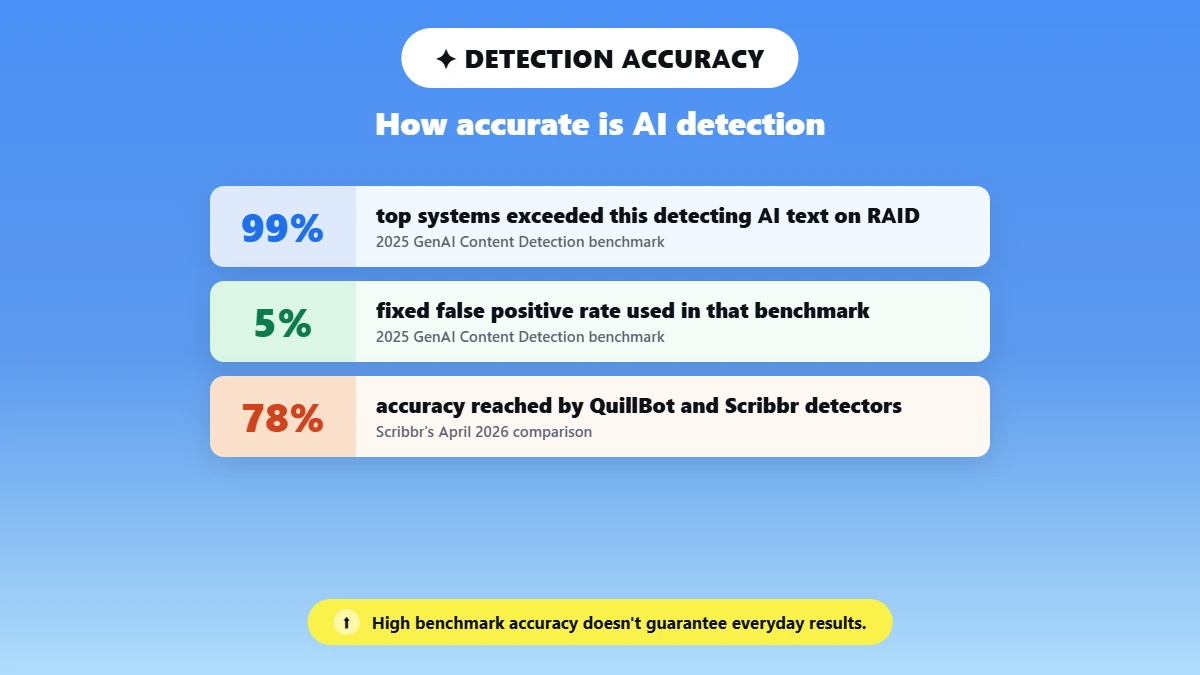
AI text scanners can flag statistical patterns linked to machine-generated writing, but none should be treated as infallible proof of authorship. Turnitin and GPTZero both acknowledge false positives and negatives. Under benchmark conditions, top systems have exceeded 99% detection at a fixed 5% false-positive rate, but real-world accuracy varies by model, domain, and edits.
Turnitin warns that its model can misidentify human-written, AI-generated, and AI-paraphrased text and recommends human judgment alongside the report.
GPTZero describes detection as probability and confidence-based classification rather than certain authorship.
The 2025 GenAI Content Detection benchmark found multiple detectors exceeding 99% accuracy on machine-generated text from RAID at a 5% false-positive rate under benchmark conditions.
That does not guarantee the same performance on everyday writing.
Scribbr’s April 2026 comparison found that QuillBot and Scribbr’s free AI Content Detectors each reached 78% accuracy in its testing, showing that practical results can be more modest.
For a broader look at how accurate AI detectors are, see our comparison of AI detection tools.
The takeaway is that AI detection can provide useful evidence, but no single score should be treated as a final judgment about who wrote a piece of text.
What If Human-Written Text Is Flagged as AI?
If your own writing is flagged, do not panic and do not assume you are guilty. Review the highlighted sections, keep your drafts and version history, confirm your facts and citations, check the relevant policy, and, if challenged, present your authorship evidence. Treat one detector result as a signal, not a verdict.
Some writing patterns can trigger a detector even when text was written by a person. See why an essay gets flagged as AI for common reasons.
If challenged, show evidence of your writing process. Do not chase a particular AI percentage just to make the score lower.
AI Scan vs Plagiarism Scan: What Is the Difference?
An AI scan estimates whether writing resembles AI-generated text by analyzing patterns. A plagiarism scan finds matching text in existing sources. They answer different questions: an AI score does not prove plagiarism, and a similarity score does not prove AI authorship. Turnitin keeps its AI percentage separate from its Similarity Score.
AI Detection | Plagiarism Detection |
|---|---|
Estimates whether writing resembles AI-generated text | Finds textual matches with existing sources |
Pattern and model based | Source-matching based |
Can produce false positives | Similarity still needs human interpretation |
Does not prove plagiarism | Does not determine AI authorship |
Use a free plagiarism checker to check whether your text matches existing sources.
How AI Text Scanners Work
AI scanners do not find a hidden label saying "ChatGPT wrote this." They use statistical and machine-learning models to measure patterns such as predictability, sentence structure, repetition, and variation, then estimate how closely your text matches AI-associated patterns. The output is a probability, which is why results are signals rather than certainties.
Detectors combine several signals rather than relying on one feature.
Predictability can reflect likely word choices, sentence structure looks at sentence length and construction, repetition covers recurring wording, and variation covers differences in rhythm, vocabulary, and sentence length.
These patterns are not exclusive to AI-generated writing. Human writers can naturally produce predictable or highly structured text, so results should be interpreted carefully.
If you want to learn the manual signs people use to detect AI writing, see how to tell if text was written by AI.
Whatever score you get, treat it as a signal and not a verdict. The most useful next step is to read the highlighted lines, keep your drafts, and check the facts.
You can run a free, unlimited scan whenever you want a second read on your own writing.
Frequently Asked Questions
How do I scan text for AI?
Open a free AI detector such as Phrasly, paste or upload your text, start the scan, then read the overall AI score and the highlighted sentences. Treat the result as an estimate to review, not as proof that AI was or was not used.
Can I scan text for AI for free?
Yes. Phrasly offers unlimited free AI scans after signup, with up to 10,000 words per scan. You can paste your text or upload a supported file to check it for potential AI-generated content.
How do I check if text was written by ChatGPT?
Paste the text into an AI detector that covers ChatGPT and GPT-5 output, run the scan, and read the score as a probability. Then apply human review, since a detector estimates likelihood rather than proving authorship.
Can an AI detector tell if text is AI-generated?
It can estimate the likelihood based on writing patterns, but it cannot establish authorship with certainty. Use the score as one signal alongside context, drafts, and your own judgment.
Does 0% AI mean the text was written by a human?
No. A low score means that the detector did not find enough AI-associated signals under its model and threshold. It does not prove human authorship, and another tool may score the same text differently.
Does 100% AI prove someone used ChatGPT?
No. It indicates strong detection under that model, but it does not identify authorship with certainty. False positives happen, so a high score should prompt review, not an automatic conclusion.
How much text do I need for an AI scan?
It depends on the tool. Phrasly currently recommends at least 30 words, while some detectors ask for more. Longer, complete passages generally give more reliable results than a single short sentence.
Can I scan a Google Doc, Word file, or PDF for AI?
Yes. Copy the text into the detector, or use the upload option for files. Check the supported file types on the tool itself, and note that Google Docs does not have its own built-in generative-AI authorship detector.
Is AI detection the same as plagiarism detection?
No. AI detection estimates whether writing resembles AI-generated text, while plagiarism detection finds matches with existing sources. An AI score does not prove plagiarism, and a similarity score does not prove AI authorship.
What should I do if my writing is wrongly flagged as AI?
Review the highlighted sections, keep your drafts and version history, confirm your citations, check the relevant policy, and provide authorship evidence if challenged. See what to do if a detector flags your work for more information. A single detector result is a signal, not a verdict.

Written by
Hasnain
Karachi, Pakistan
I help businesses grow with SEO-friendly blog posts, landing pages, and long-form content. With 3+ years of experience, I deliver clear, original, and well-researched writing that drives results.