
Does Moodle Detect AI? What Students and Teachers Should Know in 2026
Does Moodle detect AI? Not on its own. The core platform lacks built-in detection, but schools can install plugins like Turnitin or Copyleaks to scan submissions. Because these tools flag false positives, students and teachers must know how they really work. Here is the truth about Moodle and AI.
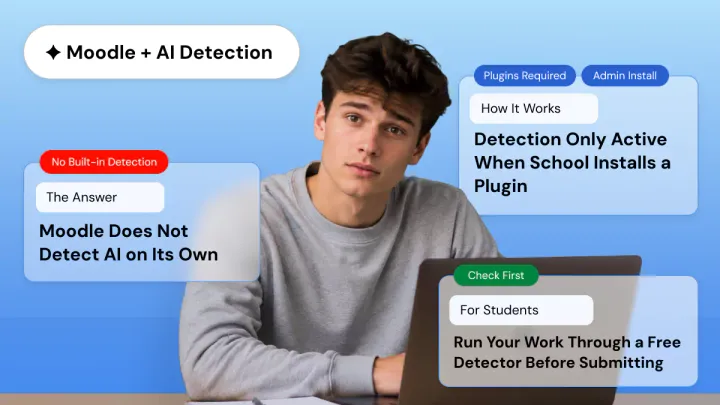
Moodle does not detect AI on its own. Moodle looks for AI-generated text in student submissions only if your school installs a third-party plugin such as Turnitin, Copyleaks, Originality.ai, GPTZero, Pangram, or others.
As a student concerned about Moodle catching you using AI on your assignment, or as a teacher curious about what your school really has, you’ve come to the right place. We provide a simple, truthful answer and don’t attempt to sell you a plugin or workaround.
In this post, we explain Moodle’s true AI detection abilities, common plugins that schools utilize, how detection works, how accurate detection tools truly are, and what students can do prior to submission.
Does Moodle Have Built-In AI Detection?
No! Moodle does not have built-in AI detection. The core platform currently has no feature that analyzes text for AI-generated content. Detection is possible when schools install & configure third-party plugins.
This is intentional, but it also means there is no single standard. Can Moodle detect ChatGPT depends completely on what your school's admin has setup.
One important clarification: Released in 2025, Moodle 5.0 added an official AI subsystem. This, however, refers to content creation tools. Lesson planning help, AI-generated grading suggestions, and recommended personalized learning paths.
It does not include an AI detector. It's easy to see why some people thought the two were the same.
How Does Moodle Detect AI Through Plugins?
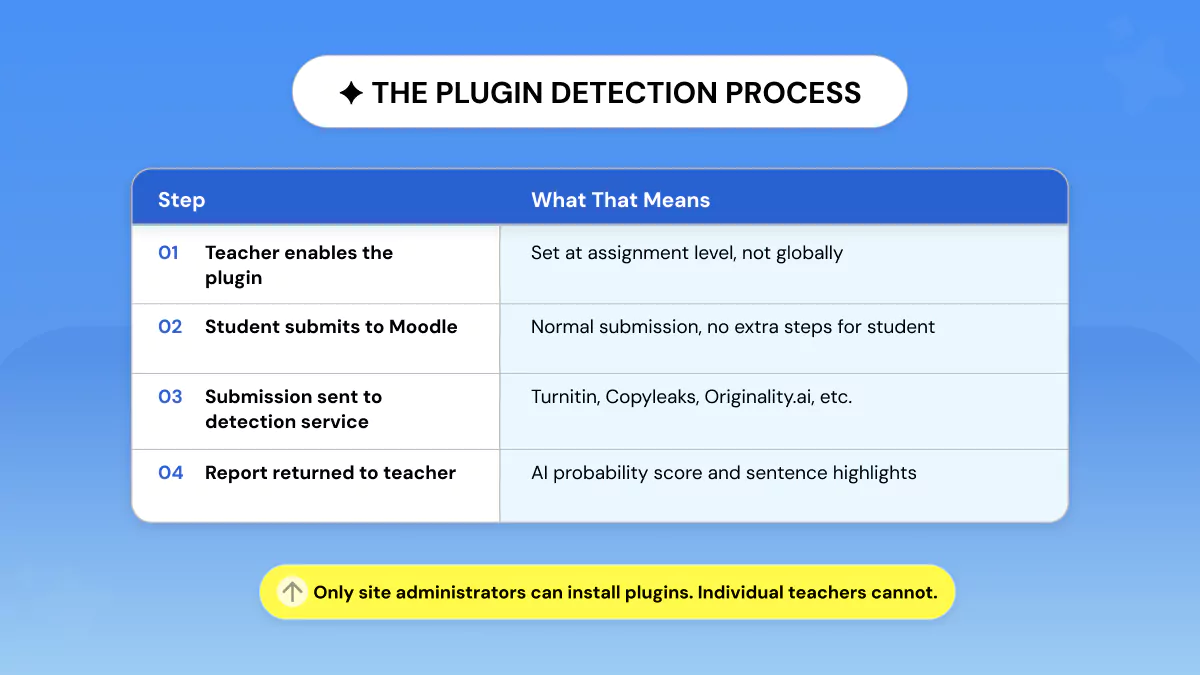
Once a Moodle administrator installs an AI detection plugin, any student submission can be automatically checked. The plugin evaluates the text, produces a probability score, and sends back a detection report to the teacher within Moodle.
Here is how Moodle scans student submissions for AI, step by step:
- The teacher enables the AI detection plugin within a Moodle Assignment.
- The student submits their work through Moodle.
- The report is uploaded to Turnitin, Copyleaks, or an external similarity check tool.
- The tool analyses your text and creates a percentage score. Usually, copied places are highlighted at the sentence level.
- The report gets saved in Moodle, and then the teacher analyses it and determines if any actions are required.
One important detail: Only administrators can install these plugins. Teachers cannot install AI detection plugins themselves.
Teachers can only enable the setting per assignment once the tool has been turned on at the institutional level by an administrator.
Which AI Detectors Does Moodle Use? The 5 Most Common Plugins
The most common AI detectors integrated with Moodle in 2026 are Turnitin (the institutional standard), Copyleaks (multilingual support), Originality.ai (highest claimed accuracy), GPTZero (educator-focused), and Pangram (lowest false positive rate).
When students ask what AI detector does Moodle use, the honest answer is: it depends on your institution. Just as it does with tools like SafeAssign's AI detector on other platforms.
|
Plugin |
Key Strength |
Accuracy Claim |
Languages |
Pricing |
|
Turnitin |
Institutional
standard; universities already use it |
Not
publicly disclosed; integrated into existing Turnitin reports |
Multiple |
Institutional
license |
|
Copyleaks |
Lowest
false positive rate (0.2%); multilingual |
99%+ |
30+ |
Paid
(free tier) |
|
Originality.ai |
Highest
claimed accuracy; official Moodle plugin |
99%+;
<1% false positive rate |
30+ |
Paid |
|
GPTZero |
Educator-focused;
custom institutional integration |
98%+
(claimed) |
English
primary |
Free
+ paid |
|
Pangram |
Near-zero
false positive rate; university-validated |
Validated
by University of Chicago Booth study |
Multiple |
Institutional
license |
How Accurate Are Moodle's AI Detection Plugins?
No AI detector is foolproof. While most Moodle AI detector plugin tools claim 95–99% accuracy rates, testing by third parties has revealed much lower rates of real-world accuracy.
False positives catching legitimate, human-created text as AI-generated continues to be a problem, especially for ESL writers and formal academic prose.
False Positive Risk Is Real
Originality.ai reports that their false positive rate is less than 0.5%, while Copyleaks says 0.2% but how accurate is Copyleaks really? These figures appear quite striking under controlled testing conditions.
In reality, highly structured papers, formal academic tones, and ESL-written texts are hit far harder than others. Non-native English writers and ESL students are disproportionately affected by false AI scores.
No tool, including those accessible via Moodle, can reliably detect when a student who normally writes in a technical, edited style and when a student is using an AI tool.
That's why detection scores should be considered as just one data point, not as evidence beyond a reasonable doubt.
What Detection Scores Actually Tell You?
Instead of a definitive answer, AI detectors generate a probability score. 85% does not mean 85% of the text was written by AI; rather, the detector is 85% sure AI was used somewhere in the document.
Sentence-level flags can also help focus teacher review, but highlights are also only pattern matches, not definitive indicators of misconduct. Teachers should use these as conversation starters, not grounds for academic penalty by themselves.
What Students Should Do Before Submitting to Moodle?
Always run your own work through a free AI detector prior to submission. You’ll see exactly what score of probability your teacher’s plugin would give the paper, and you’ll have the opportunity to go back through flagged areas and revise them in your own voice.
Do this before you turn it in. That’s pre-submission verification, and it’s good scholarly practice, not cheating.
Here is a practical four-step process:
- Run your essay through a free AI detector to see your current score.
- Look at the sentences marked by the checker. Could you honestly say that these sentences are written in your voice?
- Revise flagged sentences, make sure to use your own examples, opinion, and experience.
- Recheck your essay to make sure your score has improved. Then submit.
Phrasly's AI Detector is free, requires no signup, and returns your probability score in seconds. It is the same kind of analysis your teacher's Moodle plugin will run, giving you the chance to review and refine your work first.
Check Your Moodle Submission for AI Free — No Signup Required
What Teachers Should Know About AI Detection on Moodle?
Teachers will need administrative assistance to enable Moodle AI detection. After a plugin is installed at the institutional level, teachers will be able to turn AI scanning on/off per assignment. Results should never be considered irrefutable evidence of cheating.
Practical guidance for educators using AI detection on Moodle:
- Consider AI detection scores as one piece of evidence, never as conclusive evidence on its own. Be sure to triangulate an alerted result with a 1: 1 discussion with the student about their process and intent.
- Be mindful of false positives when it comes to ESL students and overly formal academic writing tones. These groups are currently over-flagged by most detection models.
- Consider using process-based evidence in addition to the probability score. Google Docs version history, drafts you collect in class, and records of revisions can provide stronger evidence than a probability score by itself.
- If you don't already have a plugin at your institution, talk to your IT/LMS administrator about reviewing the options above. Ask for a trial period before purchasing any licenses for your institution.
Does Moodle Track Browser Tabs or Detect Copy-Paste?
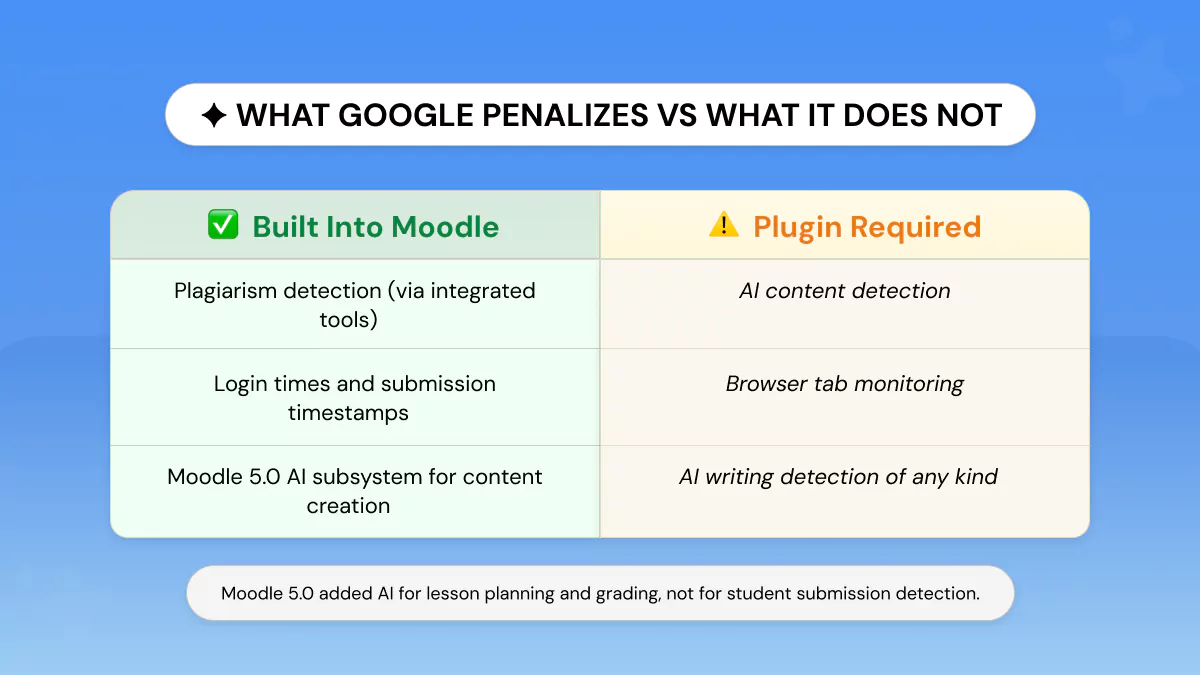
Moodle does not track browser tabs or copy-paste content from outside sources unless configured to do so. Moodle records only the time of login, device identifiers, and time/date information related to submissions.
Copying/pasting from browser tabs or copying/pasting from an external source like Word are invisible to a standard Moodle installation.
Monitoring tab switching or locking down browser behavior requires schools to independently install standalone proctoring applications (e.g., Respondus LockDown Browser) or use the quiz-level restrictions in Moodle settings.
These options are mutually exclusive and not on by default.
The Bigger Picture: Why Moodle's Detection Approach Is Different?
Moodle's open-source nature purposefully leaves detection tools out of the core product.
Schools really can decide what is best for them: privacy-first schools can choose tools with minimal data collection policies; accuracy-first schools can choose tools with proven low false positive rates; and some schools will choose not to deploy detection.
For instance, LMS platforms such as Canvas AI detection or Blackboard operate as closed LMS platforms, progressively incorporating detection capabilities into their core submission processes.
Moodle puts that decision and accountability to the institutional level. Which means there is no simple answer to "Does Moodle detect AI?" The decision is yours to make.
Frequently Asked Questions
Does Moodle detect ChatGPT?
No, by default. Only if your school has enabled a plugin such as Turnitin, Copyleaks, or Originality.ai. These tools can flag AI-generated content that aligns with recognized patterns, such as that produced by ChatGPT.
But remember, no detection tool is 100% accurate.
Does Moodle have built-in AI detection?
No! The core Moodle platform does not include any AI scanning feature. Moodle 5.0's AI subsystem is for content creation, not detection.
Which AI detector is most accurate on Moodle?
Copyleaks and Originality.ai claim the best accuracy (>99%) with the lowest false positives. Pangram has been validated by academic research done at the University of Chicago Booth.
Actual accuracy depends on your writing style, language used, and the origin of the text.
Can my teacher see if I used AI on a Moodle assignment?
Your work will only be scanned for AI if your institution has the detection plugin set up and your teacher has activated it for that particular task. Otherwise, there is no automated AI detection on your work.
Can Moodle detect humanized AI text?
That's a real weakness of all detectors.
A test that has been edited heavily to sound human is more difficult for any detector to catch reliably. This is precisely why checking your own work honestly before you submit it is more valuable than trying to guess what a detector might flag.
How can I check my essay for AI before submitting to Moodle?
Try Phrasly's free AI Detector. No account needed. Paste your paper, and receive a % probability score. See which sentences were flagged. Rewrite those that aren't in your voice. Check again and submit confidently.
Does Moodle 5.0 detect AI?
No! Moodle 5.0 introduced an AI subsystem, but it is built for content creation: lesson planning, grading assistance, and learning personalization. It does not scan student submissions for AI-generated content.
Can Moodle track if I copy-pasted from ChatGPT?
Not through clipboard monitoring. By default, Moodle does not track copy-paste activity. Monitoring can only occur through text analysis after content is submitted, not in real time through browser or clipboard monitoring.


Keep reading

What Are Common Phrases That AI Uses? We Tested 50 Pieces to Find Out
We ran 50 pieces of content through Phrasly's AI Detector to find out what are the common phrases that AI uses.


The Content Strategist's Workflow for AI-Assisted Production
A sound AI content workflow puts humans at the brief and expertise stages, letting AI handle outlining and drafting, then routes every piece through fact-checking, plagiarism, and AI-flatness QA gates before it can be published.