
Copyscape Plagiarism Checker Review (with Pros, Cons and Pricing)
Is the Copyscape plagiarism checker still reliable in 2026? We tested verbatim, paraphrased, and AI content, and broke down real costs and gaps.
Copyscape has been the gold standard for web plagiarism checking since 2004, and for catching copied web content, it still is.
But it has one blind spot that matters more in 2026 than ever: the Copyscape plagiarism checker can't catch AI-rewritten or paraphrased text on its own. That's exactly what most content workflows now run on.
Is Copyscape still reliable in 2026?
We put Copyscape through three real tests, break down what it actually costs, and show where it wins and where it leaves you exposed.
Check Your Work for Plagiarism Here 👇
How Does the Copyscape Plagiarism Checker Work?
Copyscape works by comparing your text against content published across the public internet. It scans the public web only, not academic databases, paywalled journals, or student-submission repositories.
Some sources describe it running its own web crawlers across an index of billions of pages, but Copyscape's official explanation is different: it uses Google as its search provider and applies proprietary algorithms to those results to surface similar text online.
Running a check is simple. You have three ways in through Premium, plus a free option:
- Paste text directly into the search box
- Upload a document (PDF or Word)
- Enter a published URL (the only option on the free tier)
Copyscape then searches existing content indexes for matches. Clicking any result opens a fuller comparison that highlights the overlapping passages, so you can inspect exact, partial, and reworded copies.
That makes it a web-based text originality checker built for duplicate content detection.
One thing worth knowing if you're wondering how Copyscape works: it does not decide whether a match counts as plagiarism, and it won't tell you which page came first. Overlap can come from copying, attributed quotes, shared boilerplate, or pure coincidence.
Copyscape finds the likely online overlap and hands you the evidence. The judgment call stays with you.
Copyscape Free vs Copyscape Premium: What's the Difference?
Copyscape Free and Copyscape Premium both search the web for matching text, but they fit different workflows. Free checks pages that are already published, by URL only, while Premium also checks unpublished drafts through text paste or file upload, and adds batch search, API access, and a private index.
| Feature | Free | Premium |
|---|---|---|
| Input | Public URL only | URL, pasted text, or PDF/Word upload |
| Scans | Limited per site | Unlimited |
| Results shown | Capped (fewer matches) | Full results per check |
| Comparison view | ✅ Highlighted matches | ✅ Highlighted matches |
| Batch search | ❌ | ✅ Up to 10,000 pages |
| API access | ❌ | ✅ |
| Private index | ❌ | ✅ |
| Pricing | Free | Pay per search |
Both versions exist, but most pre-publication checks need Copyscape Premium, because the Copyscape plagiarism checker free service only works on content already live at a public URL.
One thing that trips up new users: a match percentage is not an overall plagiarism score. Premium shows the percentage of a single source page that overlaps with your text, not one document-wide number.
You still have to open the highlighted passages yourself to tell real copying apart from quotes, boilerplate, or coincidence.
Copyscape Pricing Breakdown: How Much Does It Actually Cost?
Copyscape runs on two pricing models.
Copyscape Premium is a pay-as-you-go plagiarism checker, and Copysentry is a monthly monitoring subscription. Premium charges $0.03 for the first 200 words, plus $0.01 for each additional 100 words or part thereof.
There is no fixed monthly fee for Premium. You buy credit in advance, and every search draws down your balance. Copysentry is the exception, since it bills as a recurring monthly subscription.
| Service | What it includes | Official price |
|---|---|---|
| Free | Published-URL searches with usage limits | $0 |
| Copyscape Premium | Text paste, file upload, and batch search | $0.03 / 200 words then $0.01 / extra 100 |
| Premium API | Automated plagiarism and AI checks | Same as Premium |
| Copysentry Standard | Weekly monitoring, up to 10 pages | $4.95 / mo then $0.25 / extra page |
| Copysentry Professional | Daily monitoring, up to 10 pages | $19.95 / mo then $1 / extra page |
So here's the real math. At current rates, a single 1,000-word article costs $0.11, not the $0.15 figure floating around in other reviews. That works out to:
- 20 articles a month: about $2.20
- 50 articles: about $5.50
- 300 articles: about $33.00
That Copyscape cost is hard to beat for occasional users. Agency bills climb in direct proportion to volume, though, and there is no flat-rate unlimited plan to cap them. Worth knowing too: the API costs the same per word as the web interface, not a flat $0.01 per search.
We Tested Copyscape: 3 Real Accuracy Tests
We ran Copyscape through three tests that cover the scenarios content creators actually face in 2026. Each one used the same source, a published Phrasly article titled Does Gradescope Check for Plagiarism?
Test 1: Verbatim Copy-Paste
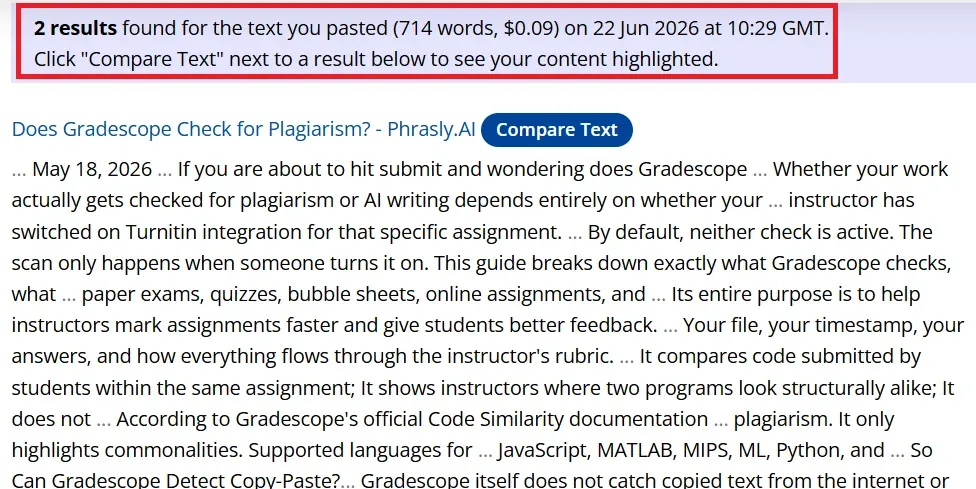
For the first test, we pasted roughly 700 words from the live Phrasly post word for word into Copyscape Premium. This is the job Copyscape was built for, so it should catch it cleanly.
It did. Copyscape returned 2 results found for the text you pasted (714 words, $0.09), dated 22 Jun 2026, with a Compare Text option to view the highlighted overlap against each source. The matches were correct and the source URLs were accurate. For verbatim web duplication, Copyscape is accurate and fast.
Test 2: Paraphrased Content (QuillBot Rewrite)
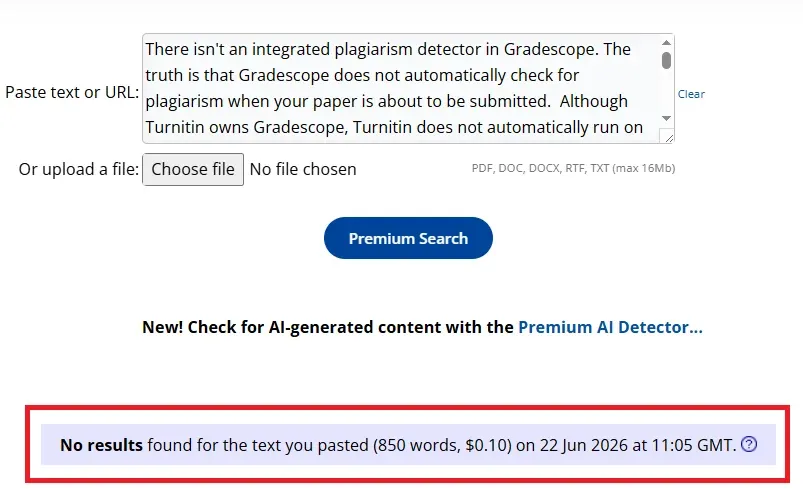
Next we took the same opening and ran it through QuillBot's paraphraser on standard mode, then pasted the rewrite into Premium.
The before opened with "Gradescope does not have a built-in plagiarism checker." The after became "There isn't an integrated plagiarism detector in Gradescope." QuillBot kept every fact intact and only changed the surface, swapping in synonyms, flipping sentences to passive voice, and reordering clauses so the wording no longer matched the original.
Copyscape's verdict: No results found for the text you pasted (850 words, $0.10). It missed the paraphrased content completely. The reason is simple: Copyscape matches strings of text, not meaning, so patchwork plagiarism, mosaic plagiarism, and incremental plagiarism can slip straight through.
This is a known weakness of string-matching tools in general. Academic research on machine-paraphrased plagiarism found that a leading detector flagged as little as 1 to 3% of reworded content, even though it caught fully copied documents reliably.
Test 3: AI-Generated Content (ChatGPT Rewrite)
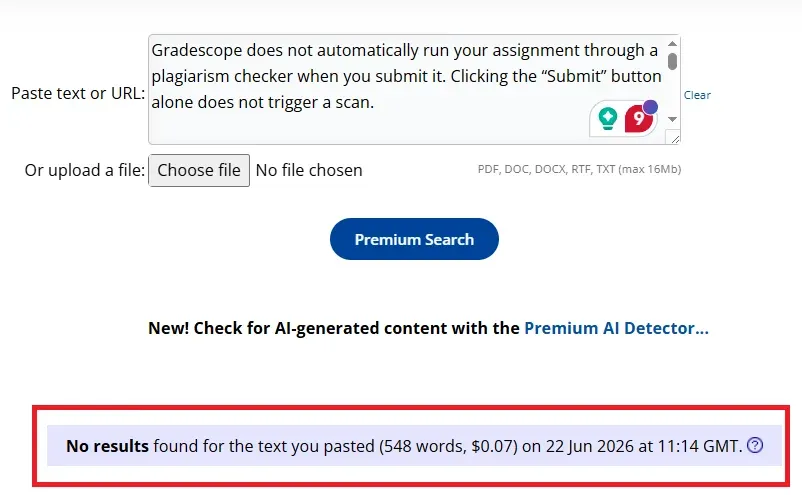
For the final test, we rewrote the same blog with ChatGPT (GPT-5.5) and ran the output through Copyscape's plagiarism checker.
Copyscape's plagiarism checker cannot detect AI-generated content. It only matches text against published web pages, so AI output that has not been published elsewhere returns clean.
That is exactly what happened: No results found for the text you pasted (548 words, $0.07). The AI-generated content was freshly written and indexed nowhere, so the plagiarism scan had nothing to match it against and reported it clean.
Copyscape does offer a separate Premium AI Detector, but it is its own tool, not part of the plagiarism check. A standard plagiarism scan will not flag AI writing on its own, which is a real gap in 2026 since AI-assisted writing is now standard across content teams. To catch both, you would run two separate checks.
This is where a single platform helps. Alongside its plagiarism checker, Phrasly's plagiarism checker also offers a dedicated AI detector, so you can cover both copied text and AI-generated content from one platform.
Test Results at a Glance
| Test | Input type | Copyscape result | Caught? |
|---|---|---|---|
| Test 1 | Verbatim copy-paste | 2 matches found | ✅ Yes |
| Test 2 | QuillBot paraphrase | No results found | ❌ No |
| Test 3 | ChatGPT (GPT-5.5) rewrite | No results found | ❌ No |
What Copyscape Does Well
Copyscape has stayed a respected web plagiarism checker for one reason: it does its main job fast and without clutter. After the tests above, here is where it earns real credit.
- Fast results. Our 2,000-word test finished in under two seconds. Copyscape publishes no official speed figure, so treat this as what we observed, not a guarantee.
- Simple interface. Paste text, upload a supported document, or enter a published URL, then run the check. There is no learning curve.
- Affordable for occasional use. Premium is pay-as-you-go, starting at $0.03 for 200 words, which is hard to beat for a few checks a month.
- Reliable direct-copy detection. It is genuinely good at finding exact and near-exact passages already on the public web.
- Useful publishing integrations. The API supports automated workflows, and the official WordPress plugin checks posts before or after publishing.
- Large-scale checking. Batch Search handles up to 10,000 pages in one run.
- Long-term monitoring. Copysentry watches your published pages and emails you when copies appear.
Together, these Copyscape features make it a strong fit for publishers, bloggers, agencies, and SEO teams managing web content.
Features and Functionality
Copyscape has a focused feature set. It does fewer things than most tools, but its core web-originality features hold up well.
Plagiarism Check
The Copyscape plagiarism checker takes pasted text, published URLs, or supported uploads, searches for similar material online, and returns the matching pages. Text paste and file upload need Copyscape Premium; the free checker only works on content already live at a public URL.
Text Similarity Detection
Copyscape finds exact and near-exact matches from public web pages. Results start as source links and snippets, and opening a full comparison shows the overlapping text plus the similarity score for how much of your content matched that page. Its reporting is less document-centered than the inline highlighting some newer tools offer.
Multiple File Format Support
Copyscape Premium officially supports PDF and Word uploads, so agencies can process finished documents without copying and pasting. It does not officially list RTF or TXT, so do not count on those formats.
Batch Search
Batch Search checks up to 10,000 pages in one run. You supply a URL list, point it at top-level pages, or submit an XML sitemap. It processes in the background and emails you when done, billed at standard Premium rates with no 24-hour delivery promise.
Copysentry: Automated Monitoring
Copysentry scans your published pages on a schedule and emails you when copies surface. Standard is $4.95/month for up to 10 pages checked weekly; Professional is $19.95/month for up to 10 pages checked daily.
It is worth paying for on valuable evergreen, product, and pillar pages that attract scraping, but not for checking drafts, since that is Premium's job.
API Integration
The Copyscape API returns results in JSON, XML, or HTML and connects plagiarism checking to custom editorial systems, with an official WordPress plugin available.
Google Docs, Word, InDesign, and Joomla integrations are not officially documented. API searches cost the same as Premium, starting at $0.03, not a flat $0.01. This mostly serves developers and agencies; solo bloggers can skip it.
How to Read Your Copyscape Results
Copyscape's percentage tells you how much of your submitted content matched a given source, not how much of that source matched you. So "35% matched" means 35% of the text you checked showed up on that page. Reading it backwards is the most common new-user mistake.
Copyscape does not publish official pass-or-fail thresholds, so treat the guide below as an editorial framework, not a hard rule.
| Match per source | What to do |
|---|---|
| Under 5% | Usually low concern, but inspect any distinctive wording |
| 5% to 15% | Review the matched passages and their context |
| Above 15% | Investigate immediately, especially when full original sentences match |
Some matches are normal and not plagiarism: copyright notices, legal boilerplate, attributed quotes, brand names, technical terms, and authorized product descriptions. Do not rewrite these just to push a number down.
When you are deciding whether a result is a real problem, look at the actual matched passages, not the plagiarism percentage alone.
Several copied sentences from your unique introduction matter far more than the same score coming from disclaimers, quotations, or standard product copy.
Three Things Copyscape's Plagiarism Checker Can Still Miss in 2026
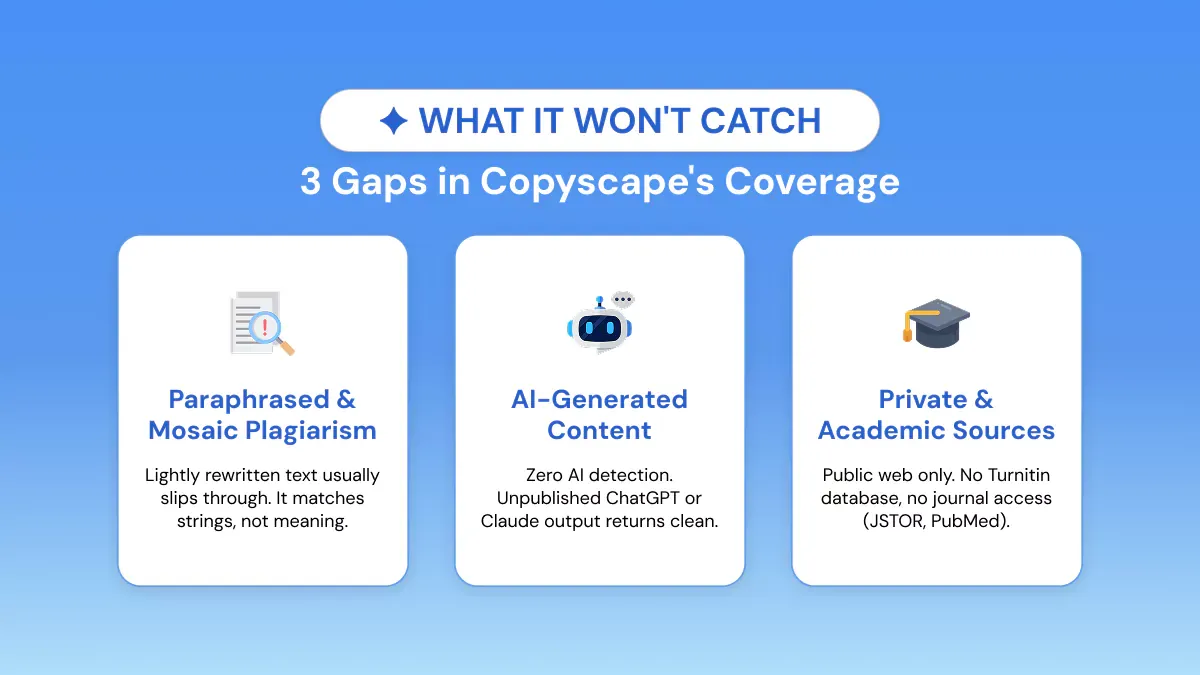
Copyscape is excellent at what it was built for. But three kinds of content still slip past its plagiarism search, and in 2026 all three are more common than ever.
Paraphrased and Mosaic Plagiarism
Copyscape gets shaky once copied ideas are reworded or stitched together from several sources, exactly what we saw in Test 2.
A vendor-run benchmark from Originality.ai reported just 10.5% detection for paraphrased plagiarism and 8.5% for patchwork plagiarism at a 15% threshold. That figure comes from a competitor, so weigh it with that in mind, though it lines up with the independent academic findings cited earlier.
The reason is structural: Copyscape matches strings of text, not meaning, so patchwork plagiarism and incremental plagiarism routinely pass clean. On whether Copyscape detects paraphrasing, the honest answer is rarely, which means content run through a tool like QuillBot will usually clear a check even when the ideas were lifted.
AI-Rewritten Source Material
This is the big one, and it has changed. Copyscape now has a separate Premium AI Detector that returns an overall AI-probability score and highlights passages that look AI-written, and its API supports AI checks too. The old "no AI detection" line is out of date.
The catch is that AI detection and plagiarism detection answer different questions.
The plagiarism scan asks whether your text already exists online; the AI detector estimates whether a machine wrote it. Original AI-generated content sails through the plagiarism check because it matches no indexed page, which is what happened in Test 3.
So Copyscape AI detection exists, but it is a second tool you run on purpose, not something the plagiarism checker does for you. A true AI plagiarism checker in 2026 has to do both jobs.
Private, Academic, or Paywalled Sources
Copyscape searches the public web, plus anything you add to your own private Copyscape index. It does not claim access to Turnitin's student-paper repository or to premium academic journal databases.
For academic submissions, Copyscape's web-only reach misses the sources that actually matter. It can spot copied public-web content, but it is not a substitute for the academic integrity systems universities run, and whether Turnitin would flag a given paper depends on its database and the assignment's settings.
Who Should and Shouldn't Use Copyscape?
Copyscape is the right tool for some workflows and the wrong one for others. Here is the quick split.
Who should use Copyscape
- Bloggers and publishers checking for copied content and monitoring scraping.
- SEO professionals verifying web originality before publishing client work.
- Agencies automating checks through Batch Search, the WordPress plugin, or the API.
- E-commerce teams finding duplicated product descriptions across retailer sites.
- Freelance writers proving to clients that their copy does not duplicate indexed pages.
Who should not rely on Copyscape alone
- Students, since Copyscape cannot replace a university's Turnitin check.
- Academic researchers, whose work needs the journal and student-paper coverage Copyscape lacks.
- Teams chasing paraphrased plagiarism, because meaning-preserving rewrites slip past string matching.
- Anyone wanting one definitive verdict, since a similarity score still needs human judgment and does not prove misconduct by itself.
- Teams checking AI authorship, where Copyscape's own guidance warns against acting on the AI score alone, given possible false positives and negatives.
As a content originality checker for the public web, Copyscape is excellent. As a standalone academic integrity tool, it is the wrong fit.
Copyscape Alternatives: 3 Tools Worth Considering
Copyscape handles web-duplicate detection well. But if you need academic-source coverage, clearer reports, bundled writing help, or plagiarism and AI analysis side by side, these three Copyscape alternatives are worth a look.
Phrasly: Best for Combined Plagiarism and AI Analysis
Best for content creators and teams who want plagiarism checking and AI detection on the same platform.
Phrasly checks your text against a large web index plus academic papers and research databases, returning a similarity score, highlighted passages, and source links, with AI content detection available alongside it. It also claims to catch paraphrased, restructured, and mosaic plagiarism rather than exact wording only.
The checker accepts pasted text and PDF, DOCX, and TXT uploads. Phrasly's plagiarism check is a paid feature, included as an free add-on for users on a Phrasly humanizer subscription rather than sold as a standalone free tool.
That makes it a natural fit if you are already using Phrasly to work with AI-assisted content and want originality and AI checks in the same place.
Quetext: Best for Students and High-Volume Individuals
Best for students, academics, and individuals who want clear reports, citation help, and predictable monthly limits.
Quetext's DeepSearch technology checks web pages, journals, and academic publications, and its ColorGrade report highlights exact and near matches, gives an overall score, and helps generate citations.
The free plan now covers up to 1,000 words for both plagiarism and AI checks, and paid tiers start with a plagiarism-only plan at 50,000 words a month. Quetext also added AI detection, API access, and bulk uploads, so this is a real plagiarism checker for students rather than a stripped-down one.
Grammarly: Best for Editing and Originality Checking
Best for writers who want grammar, plagiarism, and AI detection inside one editing workflow.
Grammarly compares your writing against billions of web pages and ProQuest academic databases, and paid users can run plagiarism and AI checks right inside the editor, Google Docs, and Word while it also flags grammar, clarity, and tone.
The catch is cost: those checks need a paid plan, with Grammarly Pro listed around $30/month or $144/year. It is also less suited to large publishing audits, though a plagiarism API is now in beta. For a solo writer who already edits in Grammarly, it is a convenient plagiarism checker for bloggers.
| Tool | Best for | AI detection | Free tier | Pricing model | Academic sources |
|---|---|---|---|---|---|
| Phrasly | Combined plagiarism and AI review | Yes | Advertised, verify live limits | Free advertised; subscriptions available | Yes (claimed) |
| Quetext | Students and high-volume individuals | Yes | 1,000 plagiarism words | Free plus monthly subscriptions | Yes |
| Grammarly | Editing plus originality | Yes | No real plagiarism checking | Paid subscription | Yes (ProQuest) |
| Copyscape | Web-duplicate detection | Separate Premium AI Detector | Basic URL search | Pay per search | No |
Copyscape vs Phrasly: Side-by-Side Comparison
Copyscape and Phrasly serve overlapping but different needs. Here is how they compare on the features that matter most to content teams in 2026.
| Feature | Copyscape | Phrasly |
|---|---|---|
| Plagiarism detection | Public web plus optional private index | Large web index, academic papers, research databases |
| AI content detection | Yes, separate Premium AI Detector | Yes, available alongside plagiarism |
| Paraphrase detection | Limited in third-party testing | Paraphrase and Mosaic detection |
| Free access | Basic published-URL search | Free Add on for Humanizer users |
| Pricing model | Pay per search, from $0.03 | Subscription options |
| File upload | PDF and Word | PDF, DOCX, and TXT |
| Batch scanning | Up to 10,000 pages | Up to 20,000 words for paid users |
| API | Mature plagiarism and AI API | Business API exists |
| Best for | Bloggers, publishers, SEO teams | Teams wanting plagiarism and AI analysis together |
Choose Copyscape if you mainly need occasional public-web duplicate checks, site monitoring, or large URL-based audits with pay-as-you-go simplicity. Choose Phrasly if you want source matching and AI content detection from one place.
On whether there is a plagiarism checker with AI detection, the answer is yes, and more than one. Phrasly, Quetext, Grammarly, and Copyscape all now offer both, though their databases, reports, and limits differ, with Phrasly's pitch being plagiarism and AI analysis kept close together.
Frequently Asked Questions
Is Copyscape Still Accurate in 2026?
Yes, Copyscape stays reliable for finding verbatim and near-verbatim content on the public web. In our own testing, it correctly flagged a word-for-word paste and returned the matching source pages within seconds.
Accuracy drops once wording changes, though: a competitor-run benchmark reported only 10.5% detection of paraphrased plagiarism at a 15% threshold, and in our test a QuillBot-rewritten version of the same passage passed completely clean. For broader source matching, the Phrasly plagiarism checker is designed to identify copied, paraphrased, and restructured content.
Can Copyscape Detect AI-Generated Content?
Yes, but through a separate tool. Copyscape now offers a Premium AI Detector that gives an AI-probability score and highlights passages that may be AI-written. Its standard plagiarism check does not do this, which is why our ChatGPT-rewritten test passage returned no results. Copyscape also cautions that the detector can produce false positives and negatives and should not be treated as proof on its own.
Is Copyscape Free, or Does It Cost Money?
Copyscape's free checker searches for copies of a page using its public URL. Checking unpublished text, uploading documents, seeing more results, or using advanced features needs Copyscape Premium, which costs $0.03 for the first 200 words plus $0.01 for every additional 100 words. There is no monthly subscription for Premium; you pay per search.
What Is a Good Copyscape Plagiarism Percentage?
Copyscape publishes no official acceptable score. As a working guide, matches below 5% per source are usually of low concern, 5% to 15% is worth a review, and anything above 15% deserves immediate investigation.
Always read the actual wording, since quotations, disclaimers, and common industry phrases can create legitimate matches that are not plagiarism.
Is Copyscape Good for Academic Plagiarism Checking?
It can find material that lives on the public web, but it is not a substitute for an institutional checker. Copyscape does not claim access to Turnitin's repository of past student submissions or its subscription collection of journals and publications, so for university submissions it will miss the sources that matter most.
For another academic-focused option, read our Paperpal Plagiarism Checker review, which covers academic source matching, reports, pricing, and limitations.
What Is the Difference Between Copyscape and Copysentry?
Copyscape Premium runs on-demand originality checks when you submit content. Copysentry monitors your published pages automatically and emails you when new copies appear. Standard costs $4.95/month for up to 10 pages checked weekly (then $0.25/month per extra page), and Professional costs $19.95/month for up to 10 pages checked daily.


Keep reading

Copyleaks Plagiarism Checker: Tested, Rated & Compared
Copyleaks Plagiarism Checker review: we tested verbatim, minor-change, and paraphrased content to see how its 3-layer detection performs. See pricing, AI-detection accuracy (77%-96%), free plan limits, and how it compares to Phrasly in a head-to-head scan before you subscribe.
Does Canvas Have a Plagiarism Checker? What It Uses, How It Works & What Students Should Do
Canvas has no built-in plagiarism checker. It relies on instructor-enabled tools like Turnitin or Copyleaks. Learn how scanning actually works, whether Canvas detects AI writing (ChatGPT, Claude, Gemini), and how to check your paper for plagiarism and AI content before you submit.