How to Connect Phrasly to Claude and ChatGPT and Humanize Text Without Leaving the Chat
Set up the Phrasly connector in Claude.ai, Claude Desktop, Claude Code, or ChatGPT developer mode, then humanize and AI-check your writing in the same conversation you drafted it in.
6 min read
If you draft in Claude, the humanizing step has always meant leaving the conversation: copy the text, open another tab, paste it, wait, copy the result back. The Phrasly connector removes that round trip. Connect it once and you can ask Claude to humanize or AI-check anything, right where you wrote it.
This guide covers what the connector does, how to add it in every Claude app, the prompts that get the best results, and how to fix the few things that can go wrong.
What the connector actually does
Phrasly runs a remote MCP server. MCP is the open standard Claude uses to talk to outside services, and connecting one gives Claude a set of tools it can call on your behalf. The Phrasly connector gives it three:
Tool | What it does |
|---|---|
| Rewrites AI-sounding text into natural human writing, in any language Phrasly supports. Optionally returns a before and after AI score. |
| Scores text with the Phrasly AI detector and reports the verdict, the AI percentage, and how many sentences were flagged. |
| Reports your plan, remaining words, and how much of your daily allowance you have used. |
You never type a tool name. You ask in plain language and Claude picks the right one. Everything runs against your Phrasly account, using your plan and your word balance, and every humanization is saved to your Phrasly document history so you can reopen it on the website later.
The humanizer behind the connector is the same in-house model that powers phrasly.ai, with the same settings. Connecting through Claude changes where you ask from, not what you get back.
Before you start
A Phrasly account. Free accounts work, and paid plans bring their full word balance with them.
A Claude plan that supports custom connectors: Pro or Max for individuals, or Team and Enterprise where an owner adds it for the organization. Claude Code connects on any plan that includes it.
The connector URL is the same everywhere:
https://phrasly.ai/api/mcp
Set it up on Claude.ai or Claude Desktop
Open Settings and go to Connectors.
Click Add custom connector.
Give it a name, paste
https://phrasly.ai/api/mcpas the URL, and click Add.Click Connect. A browser window opens on phrasly.ai.
Sign in to Phrasly if you are not already, then review what the connector is asking for and choose Allow.
You are returned to Claude and the connector shows as connected. That is it.
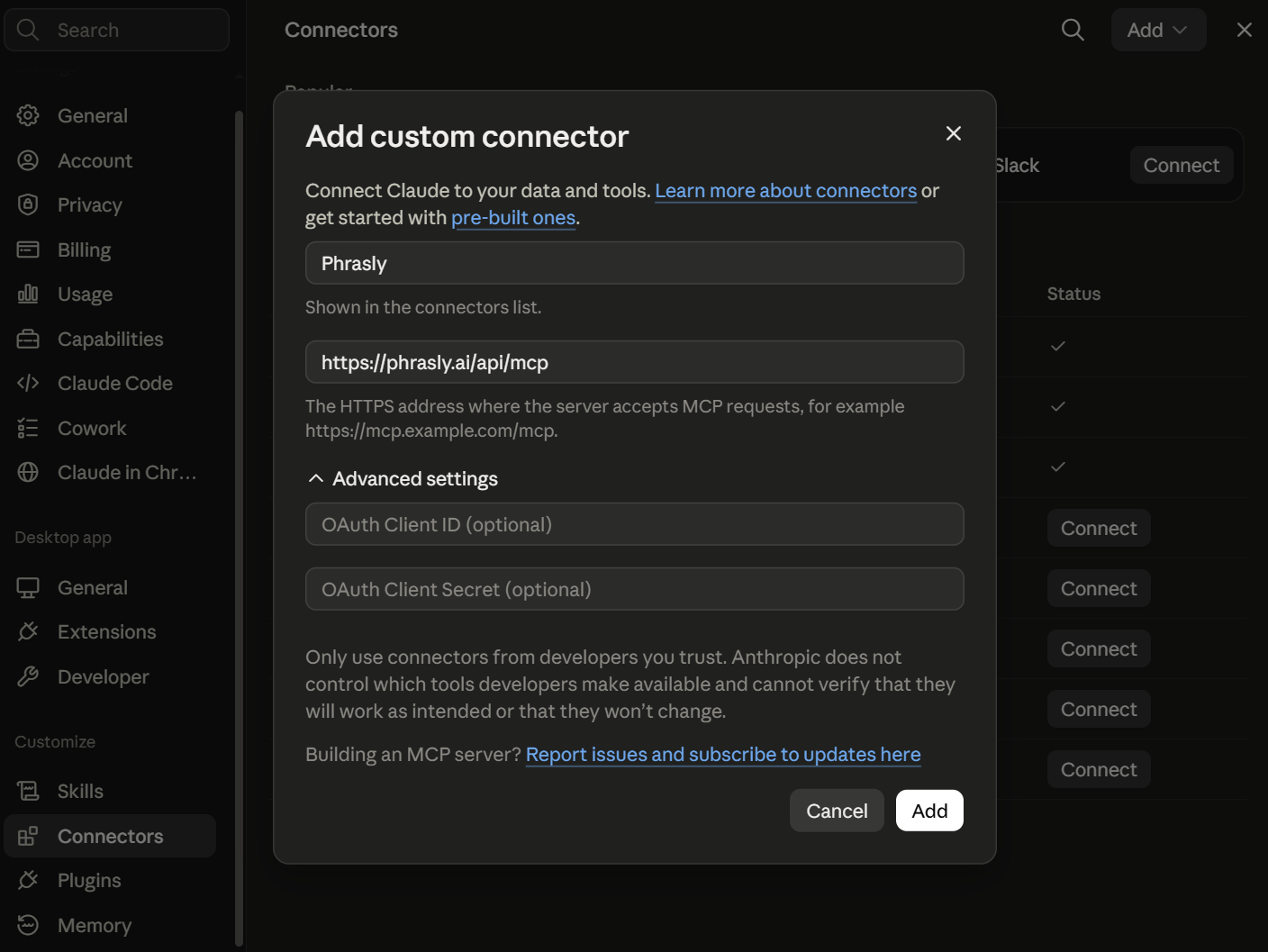
Leave OAuth Client ID and Client Secret blank. Phrasly supports dynamic client registration, so Claude sets those up for you the first time you connect.
On Team and Enterprise, an owner adds the connector once for the organization. Each member still clicks Connect and signs in with their own Phrasly account, so word balances and history never mix between people.
Set it up in Claude Code
One command:
claude mcp add --transport http phrasly https://phrasly.ai/api/mcp
Then start Claude Code, run /mcp, select phrasly, and choose Authenticate. Your browser opens the same approval screen. Once you approve it, the tools are available in that project.
Set it up in ChatGPT (developer mode)
The same connector works in ChatGPT. Custom MCP connectors live behind developer mode, which is available on ChatGPT Plus, Pro, Team, and Enterprise.
Open ChatGPT Settings, then Apps & Connectors, and turn on Developer mode under Advanced.
Click Create to add a custom connector.
Name it Phrasly and paste the server URL:
https://phrasly.ai/api/mcpChoose OAuth for authentication, and leave the Client ID and Client Secret blank. ChatGPT registers itself with Phrasly automatically.
Create the connector, then sign in on the Phrasly approval screen that opens. It is the same screen Claude users see.
The Client ID and Client Secret fields stay empty on purpose here too. Phrasly supports dynamic client registration, so ChatGPT obtains its own credentials the moment you connect. If ChatGPT reports a registration error, you are most likely on a plan without developer mode.
Once connected, everything below works the same in ChatGPT: same prompts, same tools, same word balance, and the same document history on your Phrasly dashboard.
Using it: prompts that work
Ask for what you want in normal language. These all work:
"Humanize this so it does not read as AI: ..."
"Rewrite the intro I just wrote with Phrasly, then show me the AI score before and after."
"Check whether this paragraph reads as AI-written."
"How many Phrasly words do I have left?"
Phrasly also registers three slash commands. In Claude Code they appear as /mcp__phrasly__humanize, /mcp__phrasly__humanize-and-verify, and /mcp__phrasly__check-ai. Each one defaults to the most recent draft in the conversation, so you can write something and humanize it with a single command.
Get proof it passes
Ask Claude to humanize and verify, and the result comes back with a receipt: the AI score before, the score after, and the words charged. It is the fastest way to show a client, an editor, or yourself that the final text reads as human.
Long documents
There is a per-request limit of 800 words on free and trial accounts and 5,000 words on paid plans, so a long piece has to be humanized in chunks. Claude handles this well if you ask it to: "humanize this section by section, keeping the headings intact." Work through a long document a few sections at a time rather than pasting the whole thing at once.
Editing after humanizing
If you want changes to the humanized text, ask Claude for them, then ask it to run the edited version through Phrasly again. This matters more than it sounds: edits written by an AI can reintroduce the patterns detectors look for, so a final pass through the humanizer keeps the text clean.
Troubleshooting
Claude says it needs human verification
Phrasly runs occasional human checks to keep automated abuse off unlimited plans. When one is due, the tool hands back a link to phrasly.ai/human-verification. Open it in your browser, complete the short check, then tell Claude to try again. The check exists to confirm a person is present, so complete it yourself rather than asking Claude to do it. It applies to the website as well, and clearing it in one place clears it in both.
"Out of words" or an upgrade prompt
The connector enforces exactly the same plan rules as the website. If you are out of words, top up or upgrade at phrasly.ai and the tools start working again immediately. Ask Claude for your account status any time to see where you stand.
The connection fails or the tools disappear
Access is renewed automatically in the background, but a connection can expire if it has gone unused for a long time, or if you revoked it. Reconnect from Claude's connector settings and sign in again. Reconnecting also refreshes the tool list, which is worth doing if Phrasly ships new tools.
Text comes back unchanged or too short to process
Humanization needs at least 30 words, and AI detection needs at least 50, because scores on very short passages are unreliable. If Claude reports the text is too short, give it more context or humanize a larger section.
Privacy and control
The connector only ever acts on the Phrasly account you signed in with, and only with the permissions shown on the approval screen.
You can revoke access at any time from your Phrasly account settings. Revoking takes effect immediately.
Humanizations are saved to your Phrasly document history so you can reopen them on the website. If you have turned off document storage in your preferences, that preference is respected here too.
Frequently asked questions
The answers to the most common questions are collected at the bottom of this page. In short: the humanizer is the same one the website uses, your words are billed the same way, your work is saved the same way, and you stay in control of the connection.
Frequently asked questions
Does the Phrasly connector work with ChatGPT?
Yes. Turn on Developer mode in ChatGPT under Settings, Apps & Connectors, Advanced, then add a custom connector with the server URL https://phrasly.ai/api/mcp. Choose OAuth and leave the Client ID and Secret blank: ChatGPT registers itself automatically and you sign in with the same Phrasly account you use everywhere else.
Which Claude plans support the Phrasly connector?
Custom connectors are available to Claude Pro and Max subscribers individually. On Team and Enterprise, an owner adds the connector once for the organization and each member then signs in with their own Phrasly account. Claude Code can connect on any plan that includes it.
Does humanizing through Claude use my Phrasly words?
Yes. Humanizations through Claude draw on exactly the same word balance as the website, at the same rates, with the same per-plan limits. Unlimited plans stay unlimited and free accounts use their free balance.
Is the humanizer in Claude the same one on the website?
Yes. The connector calls the same in-house humanizer model with the same settings as phrasly.ai, so the output quality is identical. Results are also whitelisted with the Phrasly AI detector exactly like humanizations run on the site.
Where do my humanizations go?
Every humanization you run through Claude is saved to your Phrasly document history, just like one you ran on the website. You can open it on phrasly.ai later and keep refining it in the editor.
Why does Phrasly sometimes ask me to verify I am human?
Phrasly runs occasional human checks to keep automated abuse off unlimited plans. When one is due, the tool returns a verification link. Open it in your browser, complete the short check, then ask Claude to retry. It applies to the website too, and clearing it in one place clears it in both.
How do I disconnect Phrasly from Claude?
Remove the connector in Claude, and revoke the connection from your Phrasly account settings. Revoking immediately invalidates the access it was granted, so nothing can act on your account afterwards.
Can I use Phrasly with other AI apps?
Yes. Phrasly runs a standard remote MCP server, so any MCP client that supports OAuth sign-in can connect using the same URL. The tools and limits are identical wherever you connect from.

Written by