
NoteGPT AI Humanizer Review: Does It Actually Improve AI Writing?
NoteGPT AI Humanizer is free and easy to use, but still flags as 100% AI on strict detectors like Originality.ai. Learn its real pros, cons, and top alternatives before you commit.
NoteGPT AI Humanizer is a free tool that takes AI-generated text and makes it sound more natural. Output is consistently human-readable in a variety of tones.
However, when tested with third-party AI detectors, the rewritten text still comes up as AI-written on many of the stricter tests (such as Originality.ai). This is a significant
limitation you should be aware of before using.
We tried NoteGPT’s humanizer on actual ChatGPT text and analyzed 4 features: writing quality, free plan limitations, tone settings, and does it even works?
Below, you’ll learn about NoteGPT’s real pros and cons, as well as the top alternatives available today, so you can decide for yourself.
What Is NoteGPT AI Humanizer?
NoteGPT AI Humanizer is a free online AI rewriting tool that lets you rewrite AI-generated content using custom tone settings. NoteGPT AI Humanizer is part of a growing platform of learning tools.
NoteGPT includes a YouTube summarizer, essay writer, slideshow maker, PDF Analyzer, and homework helper. The NoteGPT AI humanizer is one of the most popular tools by far.
Students, researchers, and content creators around the world search for NoteGPT AI Humanizer when they need a fast way to rewrite text.
Key Features at a Glance
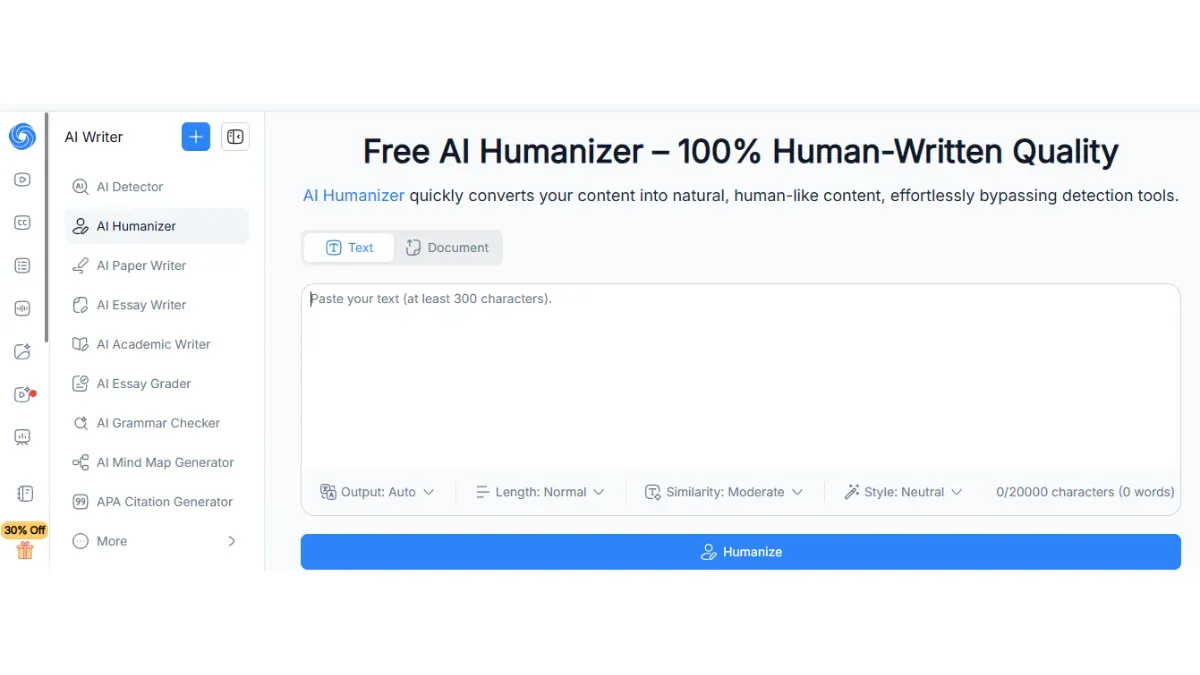
Based on features listed on notegpt.io, NoteGPT AI Humanizer offers:
- 8 writing styles (Academic, Casual, Professional, Creative, and more)
- 3 output lengths and 3 similarity levels for flexible control
- Support for up to 10,000 characters per request
- No account signup required for basic use, plus multilingual support
Disclaimer: Factually speaking, NoteGPT markets the humanizer as something to help your AI text less detectable. This review is purely about what most users care about, though: writing quality and usefulness.
How Good Is the Writing Quality (Live Test)?
NoteGPT generates human-readable output that flows nicely and features logical organization and generally acceptable grammar.
The output often has a consistent rhythm to it and sentence cadences that are detectable as machine-generated by stricter tests. It only increases surface-level fluency.
Output Quality: What the Test Revealed
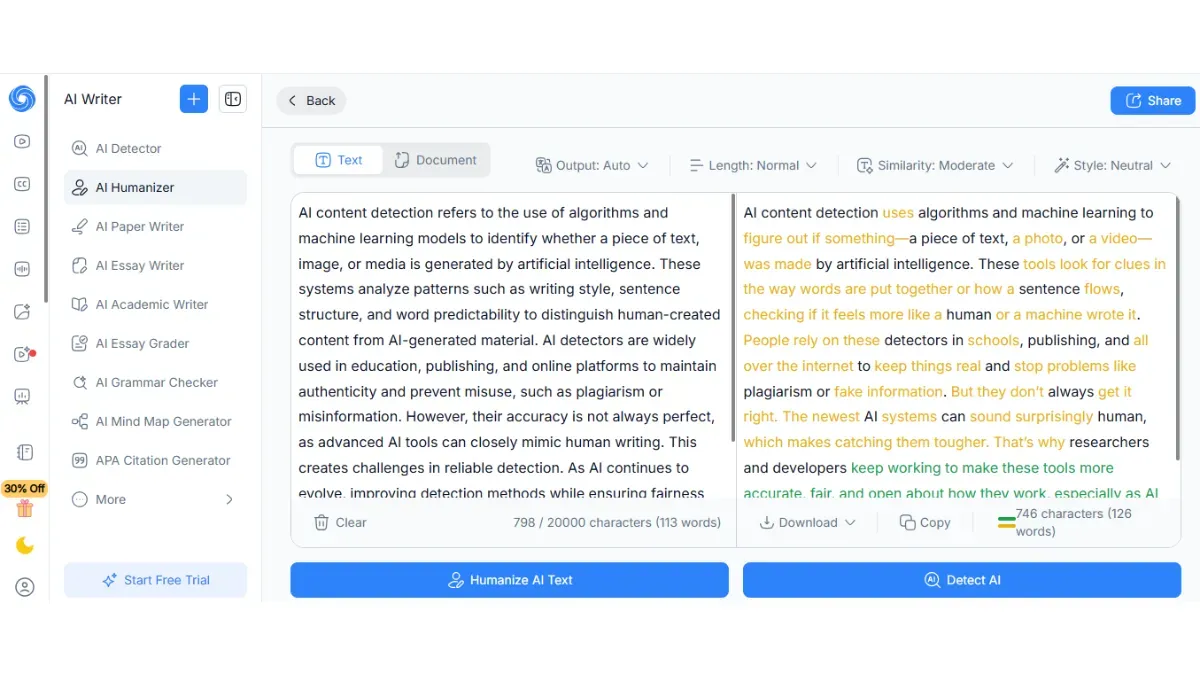
When we pasted a paragraph with 200 words from ChatGPT into NoteGPT using the default settings, here’s what we observed:
The rewritten text flowed more naturally than typical ChatGPT output. The tool mixed up sentence openers, and it didn't repeat some of the awkward transitional phrases that often give AI writing away.
It kept the meaning intact and true to the original. There were no grammar issues that we noticed.
The biggest critique is that the cadence (the rhythm and average sentence length) was similar to the original. An experienced reader would be able to tell it was machine-written.
This is a pattern common across most free tools. If you want to understand why most AI humanizers only fix surface-level writing, the deeper issue comes down to how detectors actually measure text.
However, Originality.ai tested NoteGPT publicly and reported that the humanized text still scored as 100% AI on their site even after the rewrite.
ZeroGPT went down to only 32% AI, which is a significant improvement, but Originality.ai refused to budge from 100%. The difference is important depending on which detector your school or platform partners with.
Tone Options: Does Switching Presets Make a Difference?
NoteGPT includes options for presetting the response tone to Academic, Casual, Professional, or Creative.
We found that in our short side-by-side test, changing NoteGPT’s tone setting from the default option to Casual resulted in slightly shorter sentences and chattier language.
Selecting Academic generated more formal language and lengthier sentences, as you might want when writing an essay.
But overall, the differences were slight: each response shared a similar structural fingerprint. The website provides no obvious guide to what altering the setting does under the hood.
If you want more control over how your AI text sounds, using the right prompts to humanize AI text can give you far more precise results than switching a preset toggle.
Detector Performance: NoteGPT Vs Competing Humanizers
The table below summarizes how NoteGPT humanized output typically performs across leading detectors, based on available third-party testing data:
|
Detector |
Raw ChatGPT |
NoteGPT Humanized |
Phrasly Humanized |
|
Originality.ai |
~99%
AI |
~100%
AI |
Significantly
lower |
|
ZeroGPT |
~90–100%
AI |
~32%
AI |
Lower
across tests |
|
Readability
Score |
Moderate |
Good |
Good–Excellent |
|
Free
Plan Available |
N/A |
Yes |
Yes
— unlimited |
Note: Detector results vary by input text, version, and date. Verify with current testing on publish day.
That gap matters more than ever.
Submitting content that still reads as 100% AI is a genuine risk.
NoteGPT Pricing: Is It Free?
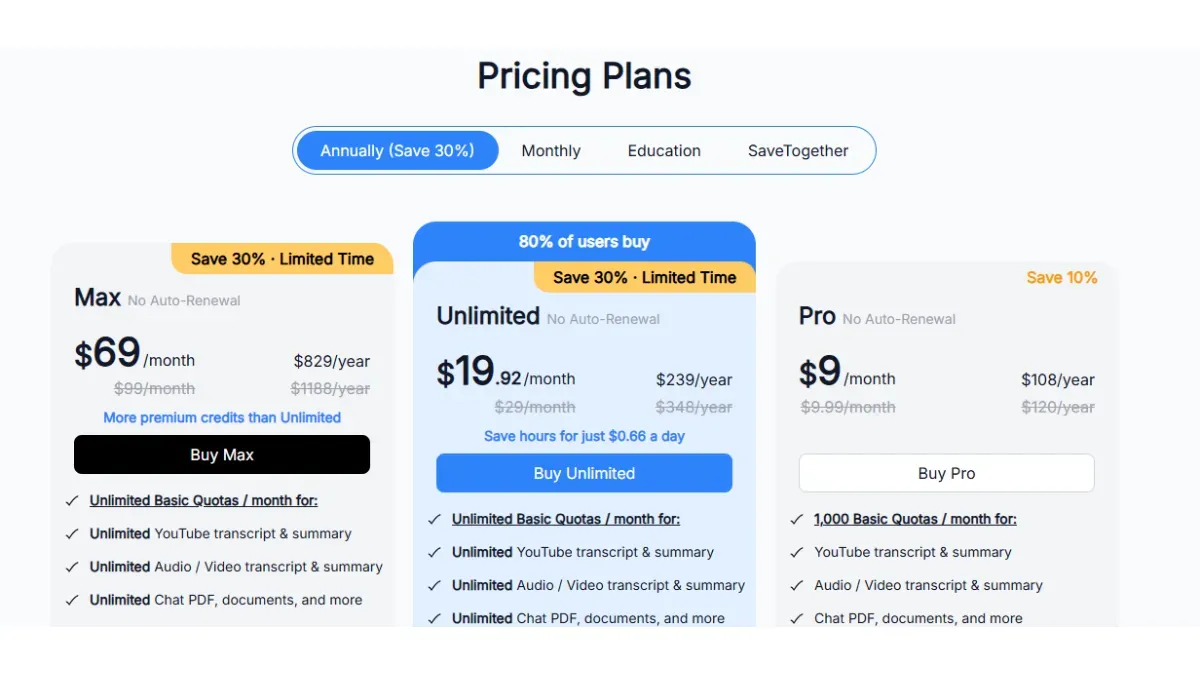
NoteGPT AI Humanizer is completely free to use with limitations on the number of characters you can enter per request. There are no low-query limits per day for non-power users.
Plans for NoteGPT AI Humanizer Unlimited plan are around $14.50/month.
What the Free Tier Gets You?
You can humanize up to 10,000 characters of text per request on the free plan, without signing up.
If you only need to humanize one essay, or a blog post section, or a few paragraphs then the free plan works great. No login and no waiting.
What the Paid Plan Adds?
Unlimited Plan provides access to NoteGPT's entire productivity suite. Including the YouTube summarizer, slideshow maker, AI essay writer, PDF analyzer, and more powerful homework helper tools.
Your reason to upgrade if you only plan on using the humanizer is weak. However, it makes more sense if you plan on using the entire learning platform bundled as one.
Pros and Cons of NoteGPT AI Humanizer
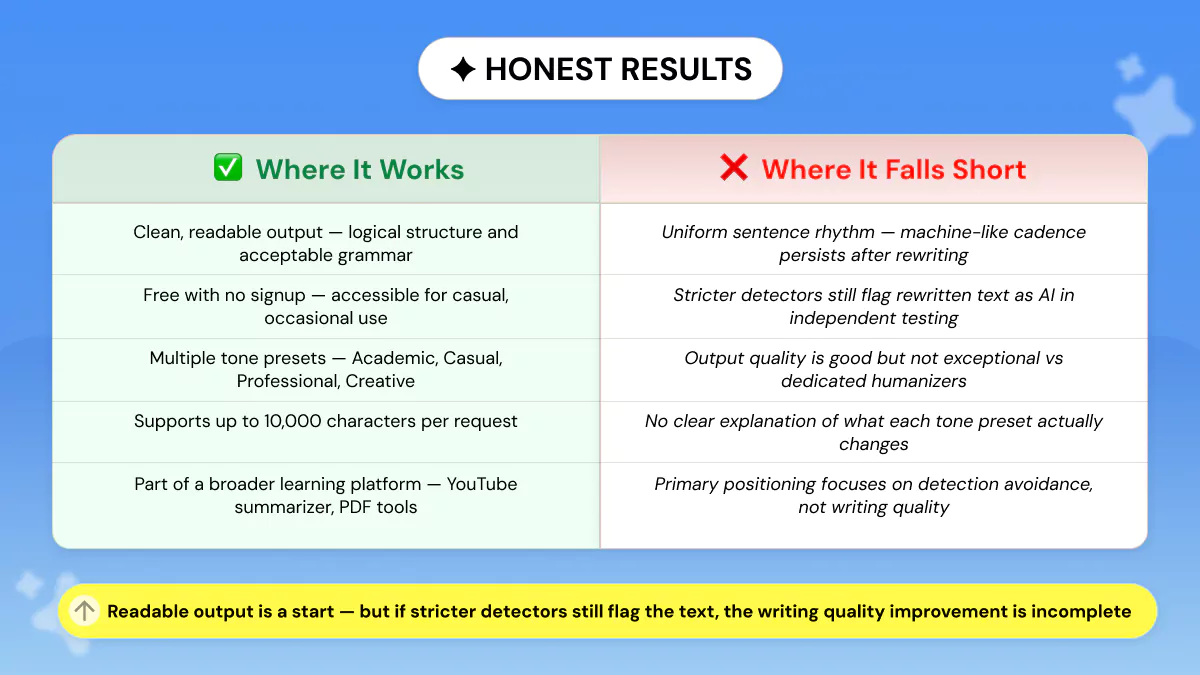
Based on live testing and publicly available third-party review data, here is an honest breakdown:
✅ Strengths Worth Noting
- Free with no signup required for basic use. A rare and genuinely useful combination for occasional users.
- Multilingual support broadens its appeal beyond English-language users.
- Supports up to 10,000 characters per request: generous for a free tool.
- Multiple tone presets (Academic, Casual, Professional, Creative) give users some creative control.
- Integrated with the broader NoteGPT learning platform. Useful for students already using its YouTube summarizer or PDF analyzer.
⚠️ Weaknesses to Consider
- Still flags as 100% AI on Originality.ai after rewriting. The most significant practical limitation based on third-party testing.
- Output quality is readable, but does not match what dedicated humanization tools produce.
- Tone presets lack a transparent explanation. No detail on what each setting actually changes algorithmically.
- Uniform sentence cadence across all outputs remains a tell for trained readers and stricter AI detectors.
🟢 Try Phrasly AI Humanizer Free — Better Writing Quality 👇
Improve your AI-generated writing with Phrasly AI Humanizer. Free, multiple humanization levels, and supports all major AI models including, ChatGPT, Claude, and Gemini.
Phrasly focuses on genuine writing quality improvement, not just surface-level rewording, making it a more reliable choice for content that needs to read as authentically human.
Better Alternatives to NoteGPT AI Humanizer
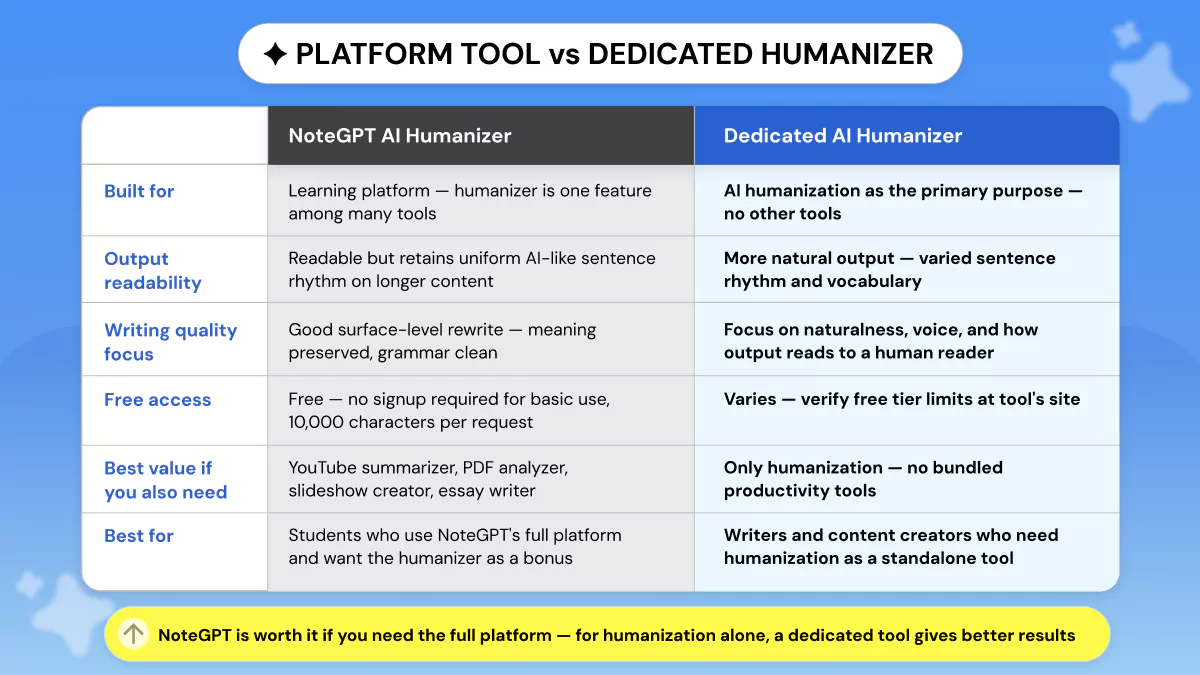
If you desire more humanization and decent writing quality, there are alternatives. Here are our picks:
Phrasly AI Humanizer
Phrasly offers humanization with multiple intensity levels and broad AI model support. Unlike NoteGPT, Phrasly's focus is on writing quality improvement. The output reads more naturally and performs better on strict detectors.
For content writers and SEOs who need reliable output, Phrasly AI Humanizer is the strongest free alternative.
QuillBot
QuillBot is a popular, trusted paraphrasing tool with robust free plan options and several paraphrase modes. Great at sentence-level restructuring and grammar tweaking.
However, if your goal is to make AI text sound genuinely human, there is a key difference. Dedicated humanizers consistently outperform paraphrasing tools like QuillBot when it comes to writing naturalness and detection performance.
Free plans come with word limits per session. Paid subscription unlocks full functionality. Better suited to paraphrasing than true AI humanization.
Scribbr Humanizer
Scribbr's humanizer is free with limitations on word count. It is targeted towards students. Their primary selling point is taking AI-written text and making it sound more like something a student wrote.
The quality of output is good where it matters for students. There are limitations on the free plan. There is no standalone paid plan. Scribbr humanizer is included with Scribbr's general editing services.
Final Verdict: Is NoteGPT Worth Using?
NoteGPT AI Humanizer is a solid free tool if you're just looking to lightly reword stuff now and then. However humanized content won't feel as high-quality or be as detection-resistant as standalone humanizers.
Phrasly writes better-sounding paragraphs if quality is your main concern. In fact, Phrasly ranked as the top AI humanizer in independent testing across five leading tools, consistently producing clean, natural output and passing detection every time.
Otherwise, if you're already paying for NoteGPT's YouTube summarizer, slideshow maker, or PDF scanner, the humanizer is a worthwhile bonus since you're getting a suite of productivity apps.
- Best for: Casual visitors looking for a fast free AI text rewrite and don't want to sign up for an account. Students who already use NoteGPT's learning platform but want humanization occasionally as well.
- Not Recommended for: Professional content creators, SEOs, or students who need genuinely improved writing quality and stronger detector performance.
If you have use cases like that, investing your time in a dedicated humanizer with higher-quality output (such as Phrasly) is a better choice.
FAQs
Is NoteGPT AI Humanizer free?
Yes! NoteGPT AI Humanizer is completely free for casual use with unlimited requests and no account necessary. Submissions are limited to 10,000 characters each.
The full NoteGPT suite of tools is unlocked with the Unlimited Plan ($14.50/month estimated).
How good is NoteGPT's writing quality?
The results produced are pretty human-readable. Flow-wise, they're also nicely coherent. Presets vary tone somewhat. Overall, much more fluent than plain ChatGPT output, but the sentence cadence is still a bit repetitive.
Does NoteGPT humanizer actually work?
It depends on what you consider "work". Keep in mind, NoteGPT AI Humanizer will make your text more surface readable (flows better, nice grammar, etc.).
But Originality.ai tests it as still 100% AI written. It passes the human sight test fine for casual rewriting, but not for hardcore bot detection.
Worth noting: ZeroGPT itself has reliability concerns. If you are relying on it as your benchmark, it helps to understand ZeroGPT's reliability and its significant accuracy limitations before drawing conclusions from its scores.
Is NoteGPT safe to use?
NoteGPT is a real website that has many users. Signing up for the humanizer is not necessary. There is barely any risk to your data from using it. Read NoteGPT's privacy policy here: https://notegpt.io/ to learn more about how they use your data.
What's better: NoteGPT or QuillBot?
NoteGPT AI Humanizer and QuillBot are essentially the same thing if you're only humanizing AI text.
QuillBot excels more at paraphrasing and rewording sentences. NoteGPT has a larger character count for free. Neither of them does as good a job as a true humanizer like Phrasly when you need detection resistance.
If you have outgrown both and need something built specifically for AI-generated content, it is worth exploring QuillBot's core limitations as a humanization tool and what dedicated alternatives actually offer in comparison.
Does NoteGPT support multiple languages?
Yes! NoteGPT's humanizer supports multiple languages. Please check notegpt.io for specific supported languages. This list will be updated as more are supported.
Can NoteGPT humanize long articles?
NoteGPT can only process up to 10k characters per request. So if you wanted to humanize an entire article, you would have to humanize it in chunks. Also, keep in mind there is no one input full article mode on the free tier.
The paid plan allows for more flexibility.
Is NoteGPT worth paying for?
Unless you require access to the entire NoteGPT productivity suite. The NoteGPT Pro version is better because of bundled features: YouTube summarizer, slideshow maker, PDF analyzer, etc.
It's not because you get dramatically better humanized text. If you just want humanization, stick with the free version or use something else dedicated to that task.


Keep reading

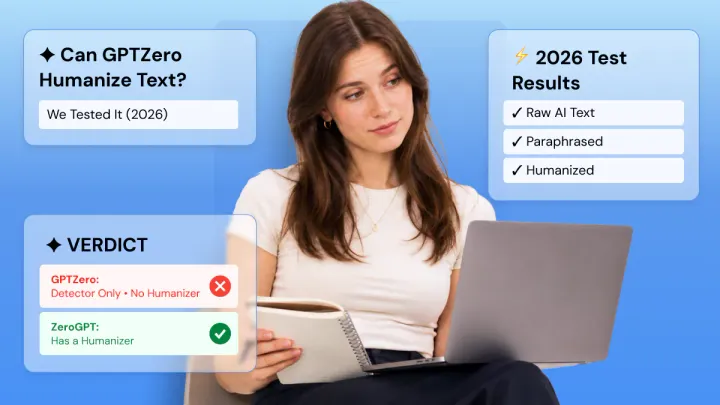
Can GPTZero Humanize Text (+ Can It Detect Humanized Text)
GPTZero doesn't have a humanizer and never has. We tested 5 AI samples raw, paraphrased, and humanized to see what actually beats its detector. Paraphrasing failed almost every time. Properly humanized text scored 98–100% human across the board. Here's exactly what worked.
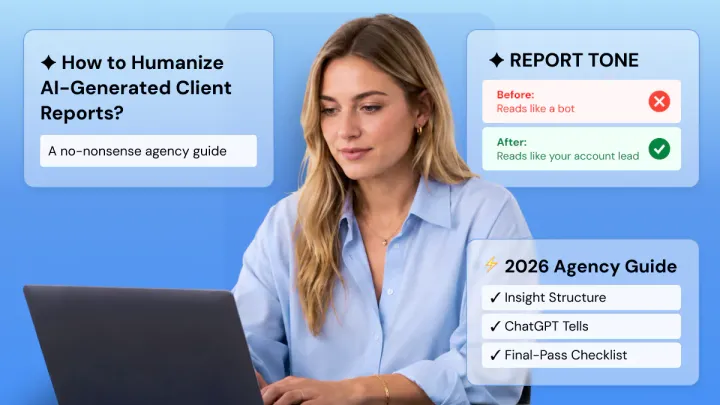
How to Humanize AI-Generated Client Reports (Before They Read as Robotic)
AI reports default to describing the numbers. They default to describing 'traffic increased 12% month over month' without explaining why it happened or what to do about it. That's dumping data and calling it deliverable; spoken in a professional voice.