How to Write SEO Friendly Blog Posts Using AI (Without Sounding Robotic)
15 min read
If you’ve tried having an AI tool write a blog post and ended up with canned advice, unimaginative transitions, and a sprinkle of facts you thought were myths yourself, you know the struggle.
Learning how to write seo friendly blog posts with AI is not a one-prompt fix. It's about running a workflow where the AI writes/drafts/transforms, and a human retains control of the strategy, the sources, and the final judgment.
It’s a step-by-step workflow for bulletproof blogs on how to write blogs for seo: validate intent and create a source-backed brief. Draft with AI and add only what a human can add.
Humanize (without killing your SEO), then optimize and publish. Whether you are a seasoned pro on a content team or googled how to write seo friendly blog posts for beginners, this method works.
The foundations stay the same regardless of experience. You'll receive copy-ready prompts, a lock-vs-edit table, and a checklist you can implement on every blog post.
✅ Do it, and you'll stop obsessing over an SEO score as if it were the finish line.
Already have your keyword, outline, and approved sources? Turn them into a structured first draft with Phrasly AI Writer, then review every claim before you publish.
Can AI Write SEO-Friendly Blog Posts That Rank?
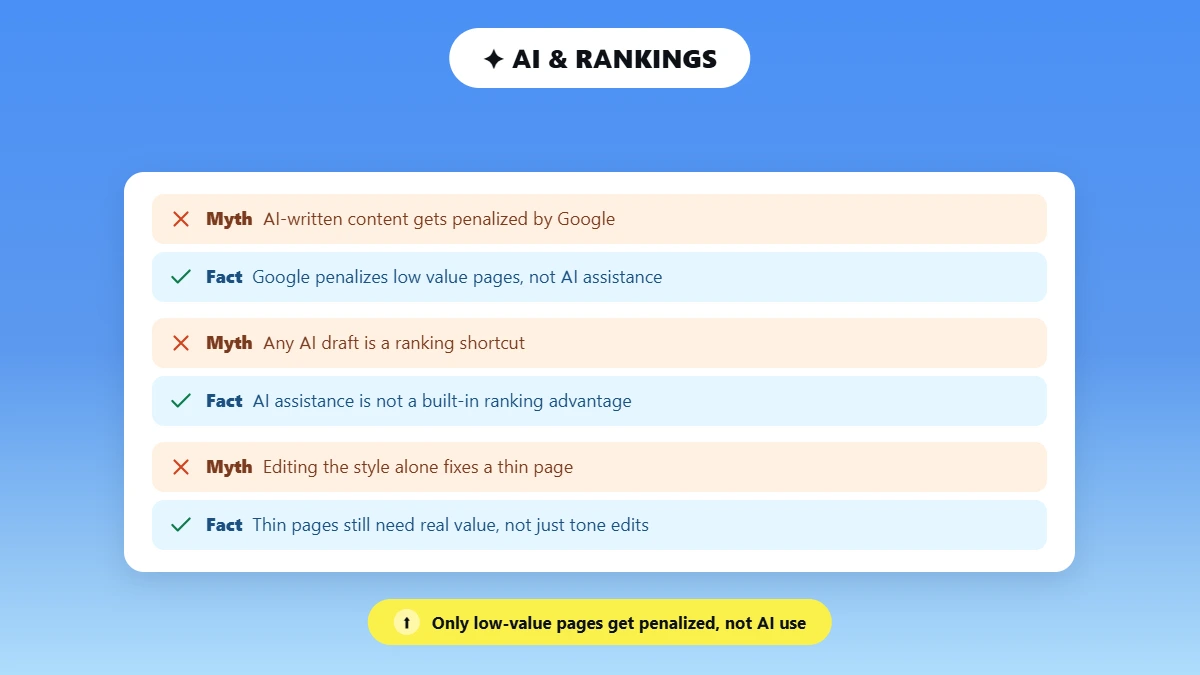
Yes! AI-created blog posts can rank if they meet searcher intent, include unique value, reference authoritative sources, and pass real human editorial review.
Google doesn't penalize a page for having been written with AI assistance. The biggest danger is publishing masses of low-value pages with nothing but rankings in mind.
Google's recommendations for creators using generative AI content state the tool can be helpful when researching a topic and creating an outline for original work.
The guidelines highlight is not whether a person or a bot created the content, but creating a large number of pages were created that required little effort, with little creativity, and offers little to no value for readers.
This is referred to as scaled content abuse by Google, and the documentation makes it clear that it doesn't matter if the content was created by AI or a person, what matters is if the page is useful or not.
AI assistance is not a built-in ranking advantage by itself. The human still has to fact-check, pick sources, contribute real-world experience, and ensure the page matches what the searcher typed.
Skip that step, and even verbatim publication of a fluent AI draft still places the page at risk. Not because AI wrote a sentence, but because no one contributed anything to the page that it does not already say.
❌ To understand more about why editing for style only will not improve a thin page, read to see why AI humanizers don't work.
What Makes a Blog Post SEO Friendly in 2026?
SEO friendly blog post provides an answer to what the reader is actually searching for, with relevant, factual, unique content that's well formatted and easy for both readers and search engines to understand.
It should also satisfy search intent, include descriptive titles and headings, reference reputable sources, link to other relevant pages, be mobile-friendly, and offer the reader a compelling reason to believe and apply the answer.
SEO friendly blogs have the same DNA because quality blog writing for SEO breaks down to intent match, evidence, structure, and technical accessibility.
Good blogs are built around what the reader is trying to accomplish, not a keyword list. Here is a terse summary of when AI can be useful, and when it silently produces nonsense if left unchecked.
Element | What good looks like | Common AI failure |
Search intent | Correct format, depth, and answer | Draft follows the prompt but not the live SERP |
Original value | Experience, example, analysis, or data | Rephrases consensus already on the web |
Accuracy | Claims checked at original sources | Invents or misstates facts and citations |
Structure | Clear H2/H3 hierarchy, answer-first sections | Repetitive list format and padded headings |
On-page SEO | Descriptive title, H1, slug, metadata, links, visuals | Keyword stuffing or missing relationships |
Human voice | Specific, varied, audience-appropriate prose | Formulaic transitions, interchangeable advice |
Google's new guidance document for optimizing for generative AI features, published in July 2020, is just as clear that there's still no ideal page length, and no need to slice your content into small AI-friendly pieces.
Let's say someone googled how to write seo friendly article instead of a blog post. The Workflow is the same; just change the format label. Cover the reader's question completely, then stop.
How to Write SEO Friendly Blog Posts With AI: A 7-Step Workflow
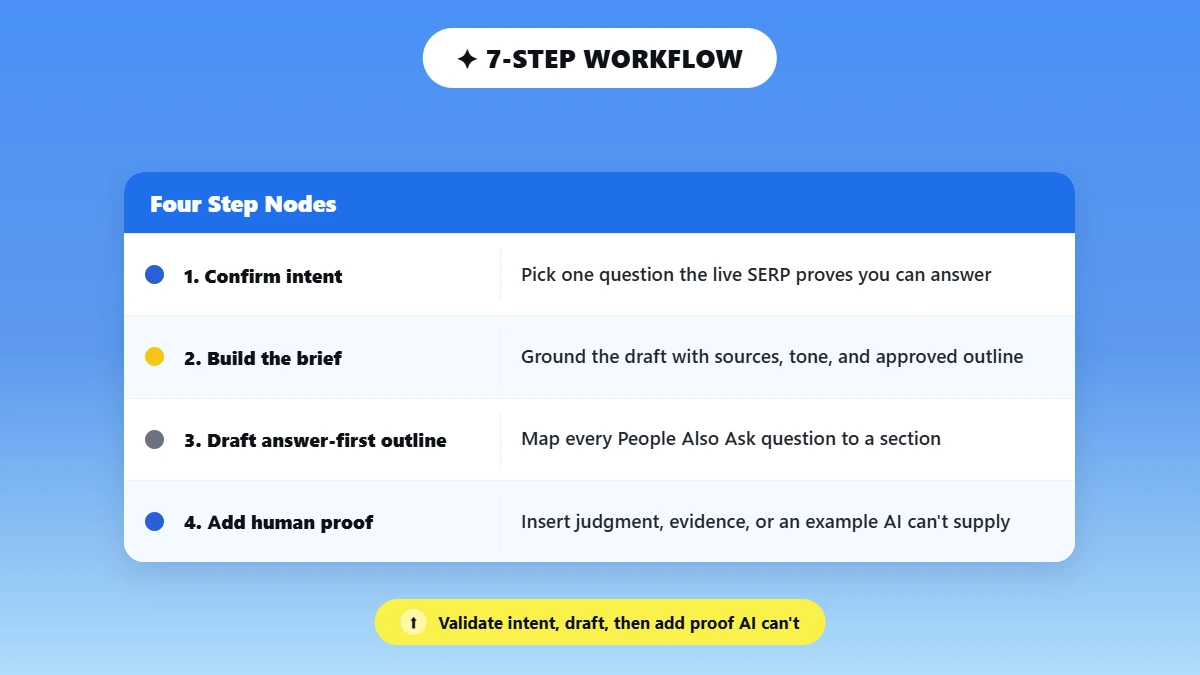
This is the core of the process. This is what differentiates between a page that ranks and a page that sits dormant. Approach this either as how to write blog posts for seo or how to write with search intent first; the steps below remain the same.
Each step explains what you should do, why you should do it, and provides a prompt/input template when necessary.
1. Confirm the Reader, Query, and Search Intent
Select one main question your site can realistically rank for. In this article, that would be how to write seo friendly blog posts, but you will do this for whatever keyword you target next.
Take note of the live SERP: what formats are appearing, what subtopics are repeated, what "people also ask" questions appear, and what freshness /media signals the winners have.
Take note of what the lower- authority pages are doing right. Odds are if a forum post or a microblog is ranking above a large brand, it's because of tight intent match.
State the reader’s circumstance, knowledge level, and call to action.
Leverage AI strictly for grouping your existing keywords or summarizing your pre-existing SERP notes.
Do not request it to fabricate search volume/difficulty/rankings/competitor information that it cannot visually verify in real-time.
Copyable prompt:
"Group these verified keywords and current SERP notes by shared intent. Identify the primary task, supporting questions, and any terms that belong on a separate page. Use only the data I provide. Do not estimate search volume, difficulty, rankings, or competitor performance."
If you are stuck on where the topic idea itself comes from, Phrasly's AI content idea generator can help you cluster raw topic ideas before you commit to one query.
2. Build a Source-Grounded SEO Brief
Don't write "write me a 2000-word SEO article" as your prompt. A complete brief will always outperform that kind of "mega-prompt" because it provides the model with parameters rather than a blank canvas.
Have this ready to go before you open your drafting tool, whether your goal is how to write as seo optimized blog post from scratch or make a shorter revision to an existing article.
Copyable Input Block
Audience:
Primary query:
Search intent:
Article promise:
Desired action after reading:
Approved outline:
Approved primary sources:
Firsthand evidence or examples to add:
Brand tone:
Required product names and links:
Claims that need verification:
Terms or claims to avoid:
Make this your template. Reusing it is most of what separates a consistent content operation from one-off, inconsistent drafts.
3. Create an Answer-First Outline
Each H2 should answer one distinct reader question, with the direct answer in the first sentence or two.
Use H3s only where they genuinely clarify a step or a category, not to pad the outline.
Map every "People Also Ask" question or conversational AI query to an existing section before adding a new heading.
Delete any section that exists only to repeat a keyword variation.
Mini outline prompt:
"Build a step-by-step outline for the query [X] and audience [Y]. For each section, state the reader question, the direct answer, evidence needed, an original example needed, and any claim requiring verification. Do not add sections merely to repeat keyword variations."
4. Generate a Controlled First Draft With AI
Add your approved topic, outline, tone, and sources to Phrasly AI Writer.
Within Phrasly AI Writer, located on the live product page, select your writing style, tone, and citation style, pick AI-suggested topics and citations, or input your own.
It writes the draft for you with options to export to Word, Google Docs, or PDF. Edit one section at a time. Don't try to write and edit the whole article at once. Consider every citation as a citation suggestion.
Phrasly's own FAQ states that citations are provided from search engine results, and you still need to click through to the source to verify that it actually says what is quoted in the draft article.
Phrasly does not verify every citation automatically; you do. Reject any section that just repeats what is already on the top-ranking pages. Keep a running note of exactly where you, the human, need to add proof, experience, or judgment.
Turn the approved brief into a workable first draft. Add your outline, tone, and source inputs to Phrasly AI Writer, then review the output section by section before it moves to editing.
5. Add the Information AI Cannot Supply
Most AI generated posts forget this step, and that’s the top reason they sound just like everyone else. Add at least two of the following.
A named expert's or editor's judgment on a real trade-off.
A real reader or customer question, anonymized where needed.
An original observation from actually running this workflow yourself.
A decision table or template the reader can copy directly.
The difference between information that helps people and an anecdote that's just decoration is one question.
After reading it, can the reader make a decision or complete their task? Or was it just a story intended to make the post feel more "human"? The first applies. The second does not.
Before you publish, it is worth running the finished draft against Phrasly's self-editing checklist for copywriters, which catches a lot of this at the sentence level.
6. Make the AI Draft Sound Natural Without Breaking the SEO
Keep this step focused on the mechanics. Lock what must not change, then humanize what is left.
Lock before editing | Safe to improve |
Verified facts, numbers, and quotations | Sentence length and rhythm |
Source URLs and citation meaning | Repetitive transitions |
Primary keyword and intentional secondary terms | Stiff or generic wording |
Title, H1, heading purpose, and search intent | Paragraph flow |
Product names, internal links, and CTA meaning | Audience-appropriate tone |
Legal or compliance wording | Concrete examples and explanations |
How to Run the Pass?
Lock everything in the left column first, then humanize only the prose in the right column.
Fact-check and finalize the substance before you touch a single word of phrasing; polish language last, always.
After humanizing, confirm the primary keyword, facts, links, and CTA meaning are all still intact, and manually fix anything that shifted.
Judge the pass by clarity, accuracy, specificity, and voice. Never by a detector score. A paragraph that's been humanized to read smoothly but moving away from the facts is far worse than a stiff paragraph that gets the facts correct.
A high "human" score means nothing if the facts moved.
Paste a fact-checked passage and refine formulaic wording. After humanizing, recheck the facts, target terms, links, and CTA before you publish.
⚠️ AI can make mistakes; verify sources and output.
For a deeper version of this step, with more examples of what editable phrasing actually looks like, read: Humanize AI-written SEO content without hurting its structure.
7. Optimize, Verify, and Publish
Confirm the title and H1 accurately promise what the article delivers, and keep the URL short and descriptive.
Write a useful meta description; do not promise Google will display it unchanged in the SERP.
Make sure the main answer lives in crawlable text, not trapped only inside an image or an interactive widget.
Add descriptive internal links to relevant pages, and link factual claims straight to their primary sources.
Add original images or screenshots with descriptive alt text, compressed to keep the page fast.
Check mobile layout, page speed, crawlability, canonical tags, indexability, and structured-data validity.
Use BlogPosting or Article and BreadcrumbList markup, but only where it matches what is actually visible on the page.
Request indexing through your normal workflow, then monitor queries, clicks, CTR, and conversions in Search Console.
Google's guidance on generative search features says AI Overviews and AI Mode run on the same foundational SEO systems as regular search. No special technical requirements beyond being indexed and eligible for a snippet.
There is no shortcut tag that guarantees inclusion.
Google made the same point in its resource for optimizing for generative AI in Search: conventional SEO still applies, and unique content is what earns eligibility.
If you are relying on a free plan for any of these drafting or editing tools, Phrasly's roundup of best AI text enhancers is worth a look before you commit to a paid tier.
What Should AI Do, and What Should the Human Keep?
Use AI for organizing, transforming, and first-pass drafting. The human maintains ownership of intent, evidence, originality, judgment, and the publish decision. Approach the split as a division of labor, not a handoff.
The human responsibility does not diminish just because AI improves at drafting.
Stage | AI can assist | Human must own |
Keyword work | Cluster supplied terms, summarize supplied metrics | Choose opportunity, intent, and page ownership |
Research | Summarize approved sources and flag gaps | Select sources, open them, verify claims, interpret |
Outline | Organize questions, propose section order | Decide angle, promise, omissions, information gain |
Draft | Produce a first pass from the approved brief | Add experience, examples, reasoning, accountability |
Editing | Suggest clearer or more natural wording | Protect meaning, facts, voice, links, legal claims |
Optimization | Draft title and meta variants, and a checklist | Approve the final page; diagnose performance |
Notice what isn’t listed anywhere in the “AI can assist” column: choosing what to say, or deciding it is true. This is the line.
If you want a deeper look at keeping your own voice recognizable across a whole content calendar rather than just one post, make AI marketing copy sound human covers the brand-voice side of this same division.
Final SEO and Human-Quality Checklist
Run through this checklist before you publish. It's divided into four sections so you can skim it quickly, and all boxes should be checked prior to publishing, not afterwards.
Search Intent and Usefulness
✅ Does the page complete the task the query promised?
✅ Is the format right, a tutorial, not a tool roundup dressed up as one?
✅ Does it add something competitors do not already provide?
Accuracy and Trust
✅ Was every number, quote, date, product claim, and citation opened and checked at the source?
✅ Are firsthand claims specific and supported, not vague filler?
✅ Is a qualified author or reviewer, plus an updated date, visible on the page?
On-Page SEO
✅ Is the primary keyword present naturally in the title, H1, intro, and one workflow heading?
✅ Are headings descriptive and non-repetitive, and are internal links descriptive and crawlable?
✅ Are images compressed, original where possible, and accurately described?
Natural Writing and Technical
✅ Are generic transitions, vague claims, and empty conclusions removed?
✅ Are real examples, clear opinions, and concrete language present?
✅ Did the humanizing pass preserve facts, keywords, links, and CTA meaning?
✅ Are canonical tags, indexability, structured data, mobile rendering, and page experience all correct?
Common AI SEO Blog-Writing Mistakes
Kill these habits before they cost you rankings.
❌ One-line prompts. ✅ Fix: supply a verified brief, sources, tone, and original evidence, every time.
❌ Letting AI infer the live SERP. ✅ Fix: provide current data yourself, and reject any fabricated metric or competitor claim.
❌ Copying the consensus. ✅ Fix: add a real example or judgment that changes what the reader can actually do next.
❌ Publishing citations without opening them. Fix: verify every claim at its original source before it goes live.
❌Stuffing every related keyword. Fix: organize around reader questions, not around every variant in your keyword list.
❌ Humanizing before the facts are final. Fix: lock accuracy and structure first, polish the language last.
❌ Letting a rewrite alter locked SEO elements. Fix: compare the final version against the approved brief before publishing.
❌ Scaling weak pages. Google's spam policy applies to low-value scaled content whether AI or a human produced it. Fix: publish fewer, stronger pages.
Most teams fail here not because they lack a tool, but because they lack a rewrite discipline. Want more detail on the specific tools that actually stand up to testing?
Check out best AI humanizer tools for what to look for beyond a marketing page.
Frequently Asked Questions:
Can AI write SEO-friendly blog posts?
Yes! Definitely as an assistant. If you Google either "how to write seo friendly blog post" or "how to write SEO-friendly blog posts," you'll see that AI can assist by quickly generating a structure and first-pass copy.
However, the post will still require verified search intent, sourced information you can trust, original value, and human editing before it's safe or useful to publish.
Does Google penalize AI-written blog posts?
No! Just because it was created with AI. Google's core guidance advocates for useful, trustworthy, people-centric content no matter the author.
It's opposed to low-quality content generated at scale to manipulate rankings. Safe, human-reviewed AI assistance falls clearly on the other side of that target.
How do I make an AI-written blog post sound less robotic?
Write your first draft with real-world experience and an opinion, then focus on cadence, sentence transitions, and repetitive wording second.
Ensure all of your facts, keywords, headings, links, and CTA texts are finalized prior to editing so you don't inadvertently change them. See how to humanize AI text for the full method.
How do I make an AI-written blog post sound less robotic?
There's no universal prompt for how to write an seo optimized blog post. The best input is a complete brief.
Audience, main question, intent, promise, approved outline, approved sources, unique data, voice, and explicit guidelines for what to fact check and what not to mention. Context beats a clever one-line request every time.
How many keywords should an SEO blog post target?
Focus on one main intent cluster per page, and legitimately related supporting queries. Don't try to stuff random keywords to hit an arbitrary number or keyword density percentage.
Structure your page around what your reader is asking, and related terms like seo friendly post or blog writing tips for SEO will naturally come up as you address those questions.
How long should an SEO-friendly blog post be?
Long enough to complete the reader's task without padding, and no longer.
Google says there's no perfect page length. You don't need to carve pages into smaller pieces either. Answer the user's question fully with actual information. Then stop writing. Period, no matter what your word-count goal says.
Can I use a free AI writer for blog posts?
Yes, when creating outlines and first drafts. Free tools differ in what citation options they have, contextual limitations, and output features. Regardless of what tool you choose, double check your sources and proofread before publishing.
Confirm the current free-versus-paid details on the live product page, since access and limits change over time.
How do I optimize a blog post for AI Overviews?
Follow foundational SEO. Publish unique, useful content. Put the key answer in visible text. Use clear structure and descriptive internal links, and keep the page crawlable and indexable.
Google says AI Overviews run on the same core systems as regular search. Inclusion is never guaranteed.
Conclusion
Automate things that should actually be done fast and iteratively: Outlining, first-pass creation, and repetitive language polishing. Leave search intent, research, expertise, facts, and sign-off to a human.
Write once the brief is approved, include info that a competitor can't copy, and humanize after you've built the SEO scaffolding and gotten all the facts correct.
That's the difference between writing blog posts for SEO purposes and just writing blog posts.
✅ Your next post is the actual test: run it through the checklist above and see what changes.

Written by
Muhammad Usman Ali
Pakistan
Muhammad Usman Ali is an experienced SEO content writer with 3+ years of professional writing experience. He specializes in AI tools, AI detection technologies, and search engine optimized content.