How to Make ChatGPT Sound More Human Without Losing Your Voice with an AI Humanizer
18 min read
Updated August 2026 and reviewed against current ChatGPT personalization settings.
To make ChatGPT sound more human, give it specific examples, real-life context, and clear information about your audience and purpose. Use focused prompts and adjust the tone to match your natural writing style. Then review and edit the response yourself, adding your own voice, perspective, and details while checking the final content for accuracy and clarity.
Make ChatGPT Sound More Human with the Free Phrasly Humanizer
Why ChatGPT Writing Can Still Sound Robotic
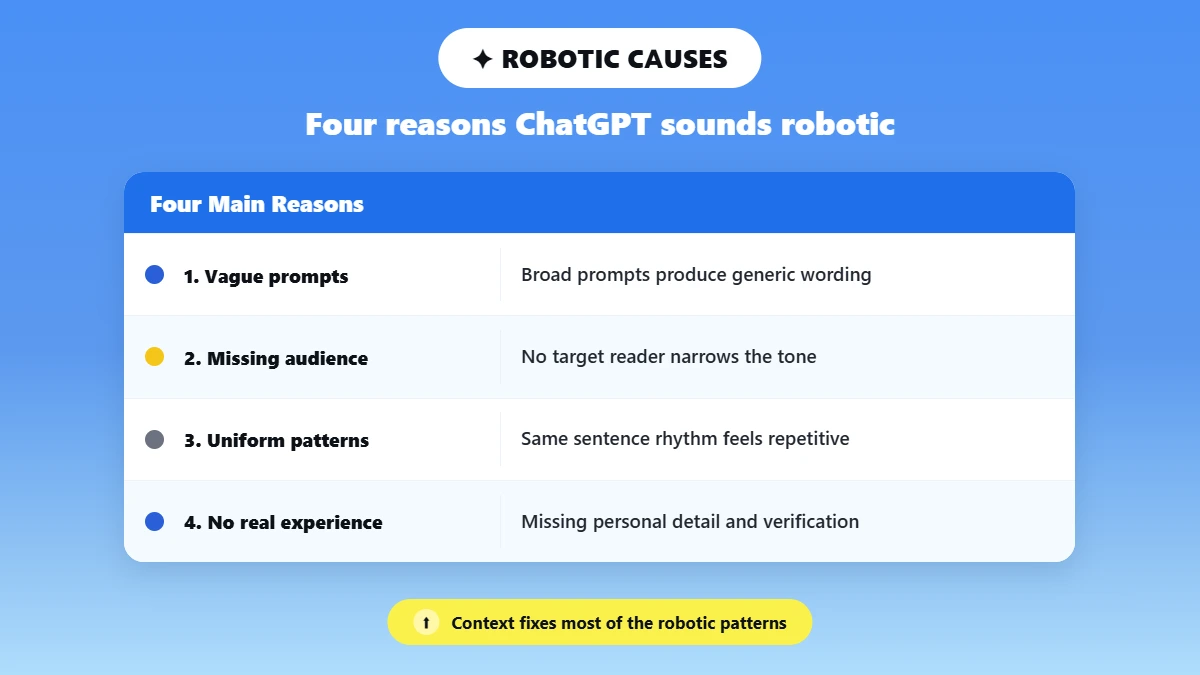
ChatGPT can sound robotic when it lacks clear context about the audience, purpose, voice, or details behind a piece of writing. Without that information, it may default to safe, generic wording and predictable sentence patterns.
To better understand why this happens, let's break it down into four main reasons.
1. Vague Prompts Produce Generic Wording
ChatGPT cannot automatically fill in details you have not provided. If your prompt is broad, the response may also be broad and generic.
For example, asking ChatGPT to “write an essay about human behavior” gives it very little direction. Asking for a 300-word essay about human behavior that explains three common types of behavior gives it a clearer task and is more likely to produce a focused response.
2. Missing Audience and Purpose
ChatGPT also needs to know who the writing is for and what it is supposed to achieve. The audience affects the language, tone, and level of explanation, while the purpose helps determine what the writing should accomplish.
For example:
Write a 300-word essay about human behavior for high school students. Explain three common types of human behavior using simple language and real-life examples.
This gives ChatGPT more context about both the reader and the purpose, making the response more targeted.
3. Uniform Sentence and Paragraph Patterns
Even with a clear topic, audience, and purpose, ChatGPT can still sound robotic when sentences and paragraphs follow the same predictable pattern. If every sentence has a similar structure or length, the writing can start to feel repetitive.
You can give ChatGPT clearer style instructions, such as:
Use a natural mix of shorter and longer sentences where appropriate. Avoid repetitive sentence openings and overly polished transitions.
This will not automatically make the writing genuinely human, but it can help reduce overly uniform patterns.
4. No Access to the Writer's Real Experiences, Opinions, or Verified Details
Even with a detailed prompt, ChatGPT does not know your personal experiences, opinions, knowledge, or the specific context behind your writing unless you provide them. It can generate examples, but those examples are not your genuine experiences or perspective.
Add your own real observations, knowledge, or analysis where relevant, and verify any factual claims before keeping them in the final draft. A better prompt can create a stronger starting point, but you are still responsible for the final accuracy and meaning.
A June 2026 study published in Digital Scholarship in the Humanities analyzed 4,346 paired human-written and ChatGPT-generated essays and found that the ChatGPT texts were more stylistically uniform, while human-written essays showed greater variation and individuality. However, the study used GPT-4o mini with a standardized prompt and did not test heavily edited human-AI hybrid drafts.
Signs Your ChatGPT Writing Sounds Robotic and How to Fix It
Sign | How to Fix It |
The writing feels broad or generic | Add more specific instructions, context, and details to your prompt. |
The tone does not fit the reader | Clearly tell ChatGPT who the content is for and what purpose it should serve. |
Sentences and paragraphs follow the same pattern | Ask for a more natural structure, then manually edit repetitive sections. |
The examples could apply to almost anyone | Add your own experiences, observations, opinions, or specific examples. |
The writing sounds polished but does not sound like you | Review the draft and rewrite parts using your own vocabulary and voice. |
The text includes facts you cannot explain or verify | Check the original sources before keeping those claims in the final version. |
If you want a broader look at the techniques behind how to have AI write like humans, see our complete guide on how to humanize AI text.
Set Up ChatGPT Before You Start Writing
Before you start writing, set up ChatGPT to better match your preferred communication style. Choose a suitable base style and tone, adjust characteristics such as warmth and formatting, and save recurring preferences in Custom Instructions. For ongoing work, Projects can keep related chats, files, and instructions together, although each task still needs clear, specific instructions.
1. Adjust Your Base Style and Characteristics
In ChatGPT's Personalization settings, you can choose a base style and tone and adjust characteristics that affect how responses are presented, such as warmth, enthusiasm, headers and lists, and emoji use.
These settings can help shape the general feel of ChatGPT's responses. However, they do not replace task-specific instructions. You still need to explain who the content is for, what you want it to achieve, and what information should be included.
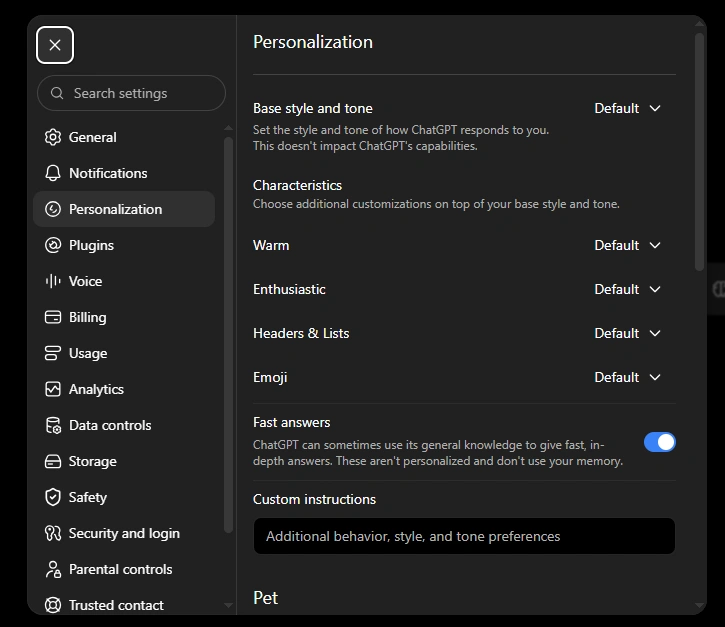
ChatGPT's Personalization settings, including Base style and tone, Characteristics, and Custom Instructions. Screenshot captured September 2026.
2. Save Your Recurring Preferences in Custom Instructions
If you regularly want ChatGPT to follow the same writing preferences, Custom Instructions can save you from repeating them in every conversation.
For example, you might set preferences for:
Direct and clear language
A conversational or professional tone
Short paragraphs
Specific formatting preferences
Phrases or expressions to avoid
These preferences provide a useful starting point, but you should still give clear instructions for each individual article, essay, email, or assignment.
3. Use Projects for Recurring Work
If you regularly work on similar content, ChatGPT Projects can keep related chats, files, and instructions together.
For example, you could store a voice guide, audience notes, writing examples, and relevant files in one Project to maintain better context across ongoing work. However, you should still explain what you want ChatGPT to do for each specific piece of writing.
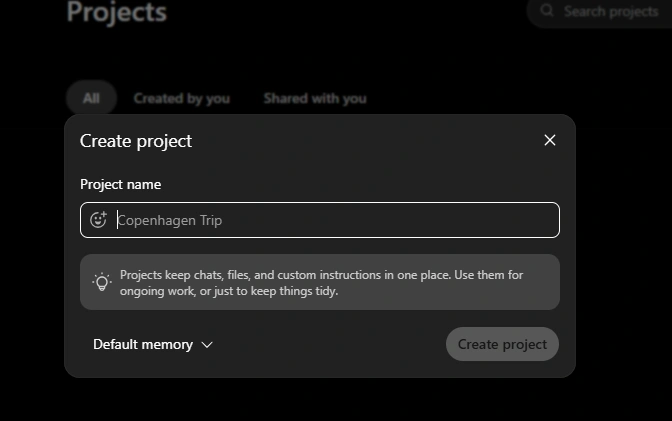
Creating a ChatGPT Project. Projects can keep chats, files, and custom instructions together for ongoing work. Screenshot captured September 2026.
These settings provide a useful starting point, but clear, task-specific instructions about your audience, purpose, and preferred style are still important.
What to Tell ChatGPT to Make It Sound Human
To make ChatGPT sound more human, tell it who the reader is, what the piece is for, and provide a short sample of your own writing to guide the tone and rhythm. Ask it to preserve facts and citations, remove generic openings and filler, and flag any claims that need verification.
Simply asking ChatGPT to “make this sound human” is too vague. Give it clear instructions about who the content is for, what it should achieve, what style to follow, and what must remain unchanged. A short sample of your own writing can also help guide the tone and sentence rhythm.
Try This Prompt
“Rewrite the draft below for [audience] and [purpose]. Match the tone and sentence rhythm of my writing sample without copying it exactly. Preserve every fact, quotation, citation, technical term, and core argument.
Remove generic openings, unnecessary filler, inflated transitions, and repeated sentence patterns. Use clear language, specific verbs, and natural variation in sentence length where appropriate.
Do not invent personal experiences, evidence, quotations, facts, or sources.”
Return:
1. The revised draft
2. A short list of any factual claims I should verify
Writing sample:
[Paste a short example of your writing here]
Draft to revise:
[Paste your draft here]
This prompt gives ChatGPT both positive instructions about what you want and clear boundaries about what it should preserve. However, you should still review the final version yourself. Even a well-written prompt cannot guarantee that every rewritten sentence is accurate or that the result genuinely reflects your own thinking.
If you want more options for different situations, see our copy-and-paste prompts to humanize AI text.
Nine Practical Fixes for AI-Sounding Writing
These nine practical fixes target the habits that can make ChatGPT writing sound overly polished or machine-written, including generic openings, vague claims, uniform sentence patterns, inflated wording, canned transitions, and missing analysis. Apply them as an editing pass to your own draft while keeping the original meaning, facts, quotations, and citations intact.
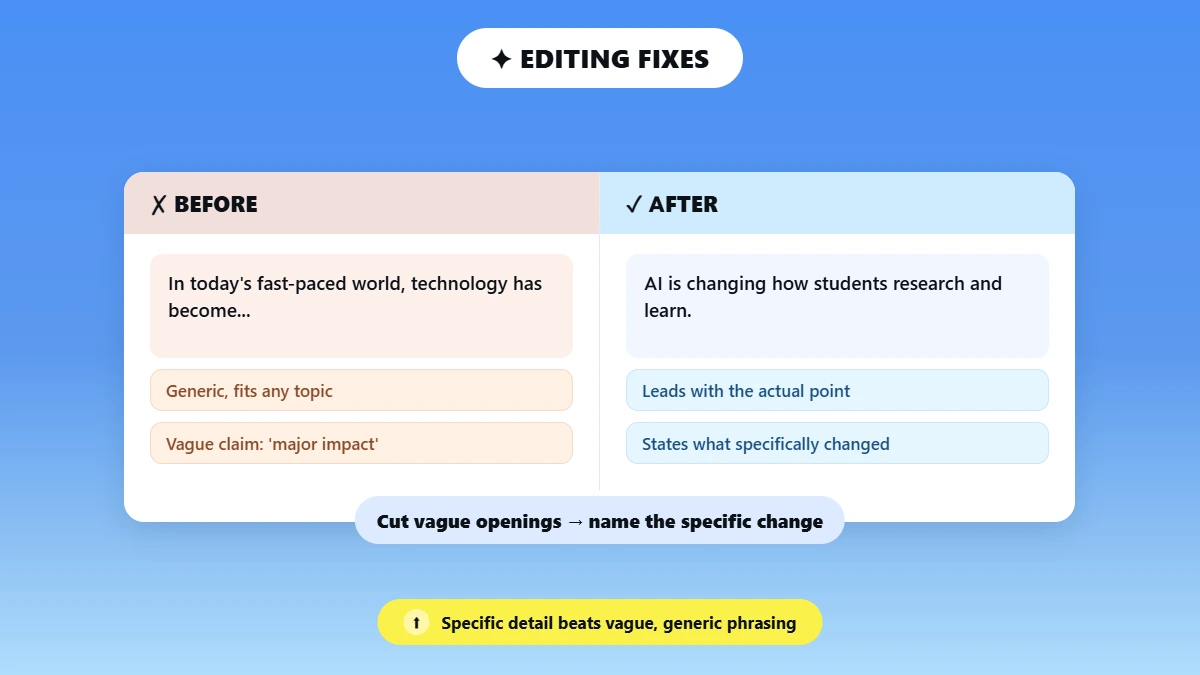
1. Delete the Generic Opening and Lead With the Actual Point
Symptom: AI-generated writing often starts with broad phrases such as “In today's fast-paced world” that could introduce almost any topic.
What to do: Cut the warm-up and lead with the specific idea, problem, or argument.
Before: In today's fast-paced world, technology has become an increasingly important part of our daily lives. When it comes to education, artificial intelligence is changing the way students learn.
After: Artificial intelligence is changing how students research, learn, and receive feedback.
Ask yourself: Could this opening introduce almost any article? If yes, replace it with the actual point.
2. Replace Vague Claims With Verified Specifics
Symptom: Phrases such as “this had a major impact” or “results improved significantly” can sound meaningful without explaining what actually changed.
What to do: Replace broad claims with specific, relevant details you can verify.
Before: The new policy had a major impact on the company.
After: The new policy changed how employees submitted expenses and reduced the number of manual approvals required.
The revised version explains what the impact was instead of simply calling it “major.” Ask: What specifically do I mean, and can I verify it?
3. Give ChatGPT a Real Sample of Your Voice
Symptom: Even with clear instructions, ChatGPT may still produce writing that sounds unlike you.
What to do: Provide a short sample of your genuine writing and ask ChatGPT to use its tone and rhythm as a style reference without copying it.
Before:
Make this article sound more human and natural.
After:
Rewrite this article for my audience and match the tone and sentence rhythm of the writing sample below. Use it as a style guide only. Preserve the facts and meaning, and do not invent personal experiences.
Important: Use a genuine sample of your own writing. Do not use ChatGPT to fabricate experiences, opinions, quotations, evidence, or sources.
4. Vary Sentence Length by Meaning, Not Randomly
Symptom: Similar sentence lengths, structures, or openings can make a paragraph feel repetitive.
What to do: Use shorter sentences for emphasis and longer ones when explanation or detail is needed. Check for repeated openings rather than changing sentence length randomly.
Before:
Artificial intelligence can help students complete tasks more quickly. Artificial intelligence can also provide feedback on their work. Artificial intelligence can support research and brainstorming activities.
After:
Artificial intelligence can help students complete some tasks more quickly, from brainstorming ideas to receiving feedback on early drafts. It can also support research. The key is knowing when its suggestions need to be checked.
Avoid: Do not add variation just to make the writing look less predictable. The goal is natural flow and clarity.
5. Replace Inflated Nouns With Clear Verbs
Symptom: AI writing can rely on formal phrases such as “the implementation of” or “the improvement of.”
What to do: Look for abstract, noun-heavy phrases and replace them with direct verbs where possible.
Before:
The implementation of the new process resulted in an improvement in employee productivity.
After:
The team introduced a new process that improved employee productivity.
Direct verbs make the action clearer and easier to follow.
Avoid: Do not simplify technical writing so much that it loses necessary precision.
6. Remove Canned Transitions and Connect Ideas Logically
Symptom: Repeated transitions such as “Furthermore,” “Moreover,” and “In addition” can make writing feel formulaic.
What to do: Remove transitions that add no meaning and make the relationship between ideas clear through the sentence itself.
Before:
Moreover, artificial intelligence can provide students with feedback. Furthermore, it can help them brainstorm ideas.
After:
Artificial intelligence can provide students with feedback and help them brainstorm ideas.
Avoid: Do not remove useful transitions such as “however,” “for example,” or “therefore” when they genuinely clarify the relationship between ideas.
7. Add Genuine Analysis or Experience, Never Invented Anecdotes
Symptom: AI-generated writing can explain a topic clearly while still feeling detached or generic.
What to do: Add your own genuine analysis, observation, knowledge, or experience where it improves the piece.
Before:
Remote work offers several benefits, including greater flexibility and improved work-life balance.
After:
Remote work can offer greater flexibility, but in my experience, that flexibility also makes it easier for work to spill into personal time unless clear boundaries are in place.
Important: Only include experiences and opinions that are genuinely yours. Never ask ChatGPT to invent anecdotes, quotations, evidence, or sources.
8. Use Active Voice When the Actor Matters
Symptom: Passive constructions can hide who performed an action.
What to do: Use active voice when naming the person, team, or organization makes the meaning clearer.
Before:
Several mistakes were made during the project.
After:
The project team made several mistakes during the project.
Avoid: Active voice is not always better. Passive voice can be appropriate when the actor is unknown, unimportant, or when the genre requires it, including some academic and research writing.
9. Read Aloud, Fact-Check, and Compare the Revision With the Original Meaning
Symptom: A revised draft can sound smoother while still containing awkward phrasing, factual errors, or subtle changes in meaning.
What to do: Read the draft aloud, verify important facts and sources, then compare it with the original.
Before:
The revised draft sounds more natural, so it is ready to publish.
After:
Before publishing, read the revised draft aloud, verify important claims and sources, and compare it with the original to make sure the editing has not changed its meaning.
Avoid: Do not treat an AI detector as the final test of whether writing is good or genuinely yours. Focus on clarity, accuracy, and whether the final draft still represents what you mean.
A Complete Before and After Editing Example
Here is how several of these fixes can work together without changing the core meaning.
Before:
In today's fast-paced world, the implementation of artificial intelligence technologies has had a significant impact on the way students approach their educational responsibilities. Furthermore, it is important to note that AI can provide a wide range of benefits, including the improvement of productivity and the enhancement of learning outcomes. However, it should be acknowledged that careful consideration must be given to the responsible utilization of these technologies.
After:
Artificial intelligence can help students brainstorm ideas, receive feedback, and complete some tasks more efficiently. These benefits do not remove the need for careful judgment, though. Students still need to check the information AI provides and use the technology responsibly.
What changed:
Generic opening removed: The paragraph now starts with the actual point.
Vague claims made specific: Broad claims about AI's “impact” and “benefits” were replaced with concrete examples.
Inflated wording simplified: Noun-heavy phrases were replaced with clearer verbs.
Canned transitions removed: The ideas now connect naturally.
Meaning preserved: AI can be useful, but students still need to use it responsibly.
The goal is simple: make the writing clearer and more natural without changing the facts or inventing a new message.
Want a faster first pass? Humanize your ChatGPT draft with Phrasly.
A Five-Minute Humanization Workflow
A fast humanization pass takes about five minutes: define the audience and tone, add a short voice sample, generate or revise the draft, run a manual or Phrasly pass, restore citations and technical terms, then read aloud and verify every factual claim. Treat detector results only as a signal.
You do not need to rewrite everything from scratch. Use this quick workflow to improve the draft while keeping the meaning and important details intact.
1. Identify the Audience and Tone
Decide who will read the content, what it needs to achieve, and how it should sound. A blog post, university assignment, technical article, and business report may all require different language and levels of formality.
2. Add a Short Voice Sample
Provide a short sample of your genuine writing if you want the draft to better match your tone, vocabulary, and sentence rhythm. Use it as a style reference only, never to invent experiences or opinions that are not yours.
3. Generate or Revise the Draft
Create the draft or revise an existing one using clear instructions. Tell ChatGPT what must stay unchanged, including important facts, quotations, citations, technical terms, and the main argument.
4. Run a Humanization Pass
Review the draft manually or use Phrasly for a faster first pass. Look for generic openings, vague claims, repetitive patterns, filler, and overly formal wording, then improve the flow without losing your voice.
5. Restore Important Details
Check that citations, quotations, names, technical terms, and other deliberate wording remain accurate. A smoother sentence is not an improvement if it changes the facts or weakens the argument.
6. Read Aloud and Verify the Facts
Read the final draft aloud to catch awkward or repetitive phrasing. Then verify important claims, statistics, quotations, and sources before publishing or submitting it.
7. Treat Detector Results Only as a Signal
A detector score is one review signal, not proof of authorship or a final judgment about the writing. Focus on whether the final draft is clear, accurate, natural, and genuinely represents what you mean.
How to Make an AI Essay Sound More Human
To humanize an AI-assisted essay, keep the formal register instead of forcing slang, preserve every citation and technical term, and add your own genuine interpretation rather than invented anecdotes. Verify all quotations and statistics, and follow your institution's AI-use and disclosure rules before submitting.
Before submitting, verify important facts, quotations, and sources, and follow your institution's rules on AI use and disclosure. The goal is not to disguise AI use, but to make sure the final essay is accurate, academically appropriate, and genuinely reflects your own understanding of the subject.
Manual Editing vs an AI Humanizer
Edit manually for short, high-stakes messages and drafts that need only light polish. Use one of the best AI humanizer tools for long, repetitive drafts, then review the result. For academic or technical writing, choose a conservative rewrite and re-check every citation and specialized term afterward.
Situation | Best Approach |
Short, high-stakes message | Manual edit |
Strong draft that needs light polish | Manual edit or Easy mode |
Long, repetitive ChatGPT draft | Humanizer, then manual review |
Academic or technical writing | Conservative rewrite + citation check |
Writing that must closely match a personal voice | Voice sample + manual final pass |
If your draft is still repetitive or overly formal, try Phrasly's AI Humanizer, then use the checklist above to make sure the final version still represents your ideas and voice.
Human-Sounding Does Not Mean “Guaranteed Undetectable”
Writing that reads as human is not the same as writing guaranteed to pass every AI detector. Detectors, including Turnitin, can produce false positives, so treat any detector result as one signal rather than proof of authorship. Focus on genuine quality, accuracy, and honest disclosure.
Turnitin itself acknowledges that false positives are possible. Its current guidance says that results below 20% are treated as less reliable, and scores in the 1% to 19% range are not shown as exact percentages to reduce the risk of misinterpretation. Turnitin also states that its AI writing score should not be used as the sole basis for decisions about academic misconduct.
Instead of trying to make writing “undetectable,” focus on making it genuinely better. Check that the writing is clear, accurate, and appropriate for its audience. Preserve facts and citations, add your own genuine analysis where relevant, and follow any AI-use or disclosure requirements that apply to your work.
For another review signal, you can check your draft with Phrasly's AI Detector, then use the result alongside your own editing and fact-checking process.
Want to Start with a Better Draft? Use an AI Writer
Phrasly's AI Writer can help you create a structured first draft based on your topic, instructions, preferred style, and, where needed, citations.
Treat the output as a starting point rather than the finished version. Review the facts and citations, then edit the draft to make sure the final version accurately reflects your ideas and voice.
Make AI Content Sound Like You with Phrasly
Writing assignments pile up. Deadlines close in. When you need quality content fast, Phrasly gives you the edge without the risk.
These seven fixes work wonders on their own, but why struggle manually when our tools can do the heavy lifting? With Phrasly, you get three powerful solutions working together:
Our AI Writer creates structured first drafts that already sound more natural than typical AI text. Our AI Humanizer transforms content to match your personal writing style. And our AI Detector gives you peace of mind, confirming your work will pass any scrutiny.
What makes us different? While other services use standard AI models with built-in limitations, we've developed proprietary technology with unlimited word counts and no hidden watermarks that detection tools can flag.
Thousands of students trust us when grades are on the line. Writers count on us to meet client expectations without compromising quality.
Ready to write with confidence? Get started for free today!
Frequently Asked Questions
How do I make ChatGPT sound more human?
Give ChatGPT an audience, a purpose, and a short sample of your writing, then use a focused rewrite prompt. You can also try ChatGPT prompts for professionals for more examples. Finish with a manual pass: cut generic openings, vary sentence length by meaning, add your own analysis, and verify every fact. Setup options such as personality and Custom Instructions can also help shape drafts before you start.
What should I tell ChatGPT to make it sound human?
Tell it who the reader is and what the piece is for, and ask it to match the tone and rhythm of a pasted writing sample. Instruct it to keep every fact and citation, remove filler and canned transitions, and never invent experiences or sources. Ask it to flag claims you should check before publishing or submitting the final draft.
Can ChatGPT learn and match my writing style?
ChatGPT does not permanently learn your style from a single conversation, but you can steer it. Save recurring preferences in Custom Instructions, adjust personality settings, and store a voice guide and writing samples in a Project. For a single piece, pasting a short sample and asking ChatGPT to match its tone and rhythm usually provides a clearer style reference.
Why does AI writing sound too formal or robotic?
It can default to safe, generic wording and uniform sentence patterns, especially when it has little context about the audience, purpose, or voice. It also does not automatically know your real experiences or verified details. The fix is a specific prompt plus manual edits that add concrete detail, vary sentence rhythm, and cut inflated wording and stock transitions.
How can I make AI text more conversational without changing its meaning?
Edit the delivery, not the substance. Shorten some sentences where appropriate, lead with the main point, swap inflated nouns for clearer verbs, and remove unnecessary filler. Keep every fact, citation, quotation, and technical term intact, then read the result aloud. If you use a humanizer, compare the output with the original to confirm the meaning remains unchanged.
Does human-sounding writing guarantee it will not be flagged by an AI detector?
No. Natural writing is not guaranteed to receive the same result from every AI detector, and detection tools can produce false positives. A detector score should be treated as one signal rather than proof of authorship. If you're comparing different detection tools, our guide to Best Free AI Detector Tools for Academic Writing can help you understand the available options. Focus on genuine quality, accurate facts, your own analysis, and following any relevant AI-use or disclosure requirements.

Written by