Phrasly · Chat With Videos

Free YouTube Transcript Generator: Transcribe, Summarize & Chat With Any Video

Paste a YouTube link or upload a video or audio file to get an accurate, timestamped transcript in seconds. Then summarize it in one click, or chat with the content to get instant answers that link straight to the moment they were said. Free to start, no sign-up, and it works even when a video has no captions.

person1person2person3

Join 3,000,000+ people using Phrasly

Your content is transcribed and analyzed automatically — no extra steps needed.

Trusted by Students & Creators Around the World
Image 0
Image 1
Image 2
Image 3
Image 4
Image 5
Image 6
Image 0
Image 1
Image 2
Image 3
Image 4
Image 5
Image 6

Used by Students at Top Universities Worldwide

Phrasly is trusted by students, researchers, and creators around the world who need fast, accurate transcripts they can search, summarize, and chat with.

People using Phrasly
2,000,000+
Transcripts generated
4,000,000+
Hours saved
600,000+

Join more than two million students, researchers, and creators who rely on Phrasly to turn videos into accurate, searchable transcripts.

Features

Everything You Need for Accurate Transcripts

From clickable timestamps to one-click summaries and exports — every tool you need to turn spoken content into usable text.

Accurate AI Transcription, Even Without Captions

Phrasly transcribes the audio with AI, so you get a clean transcript even when a video has captions disabled or none at all.

Clickable Timestamps

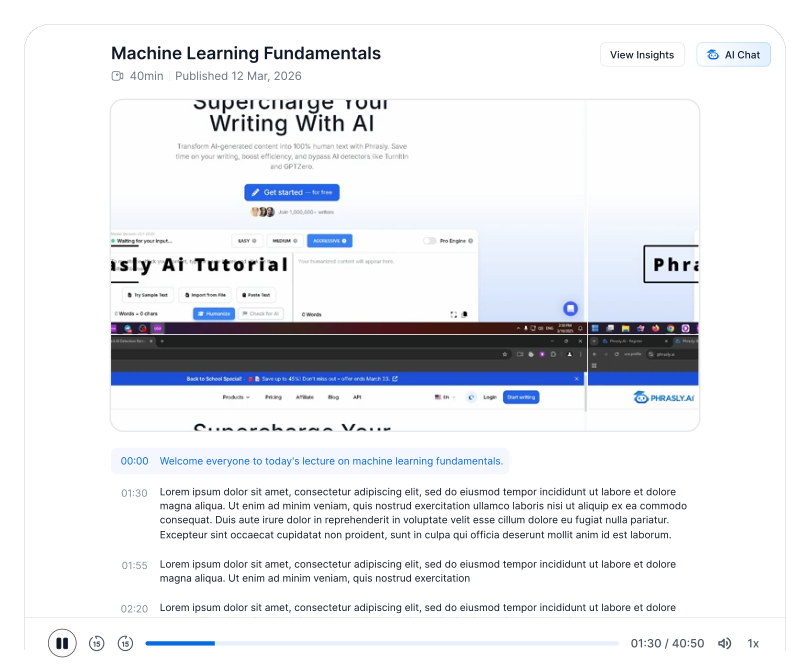
Every line is timestamped. Click any line to jump to that exact moment in the video.

100+ Languages & Translation

Transcribe in over 100 languages with automatic language detection, and translate the result for a faster read.

One-Click AI Summaries & Key Points

Turn an hour-long video into a short summary with key takeaways. No scrubbing required.

Export to TXT, SRT, PDF & DOCX

Download your transcript as plain text, SRT subtitles, or a formatted PDF or Word document.

Built for Long Content

Process long lectures, podcasts and webinars and get results in minutes, not hours.

Transcribe From Any Source: YouTube, Video or Audio

One tool for every format. Phrasly turns spoken content into clean, searchable text.
Youtube URL
Youtube URL
03:30 / 40:52

YouTube Videos & Links

Paste any public YouTube URL and get the full transcript in seconds. No download and no extension.

MP3 fileAudio File
Audio File
01:30 / 10:50

Audio Files & Podcasts

Upload your audio recordings and turn podcasts, lectures, interviews and voice notes into text.

MP4 fileVideo File
Video File
12:30 / 50:52

Video Files

Upload MP4, MOV or WebM files and convert them to accurate text, complete with timestamps.

See It In Action

Upload your content and watch Phrasly turn it into an accurate, searchable transcript with AI-powered answers and clickable timestamps.
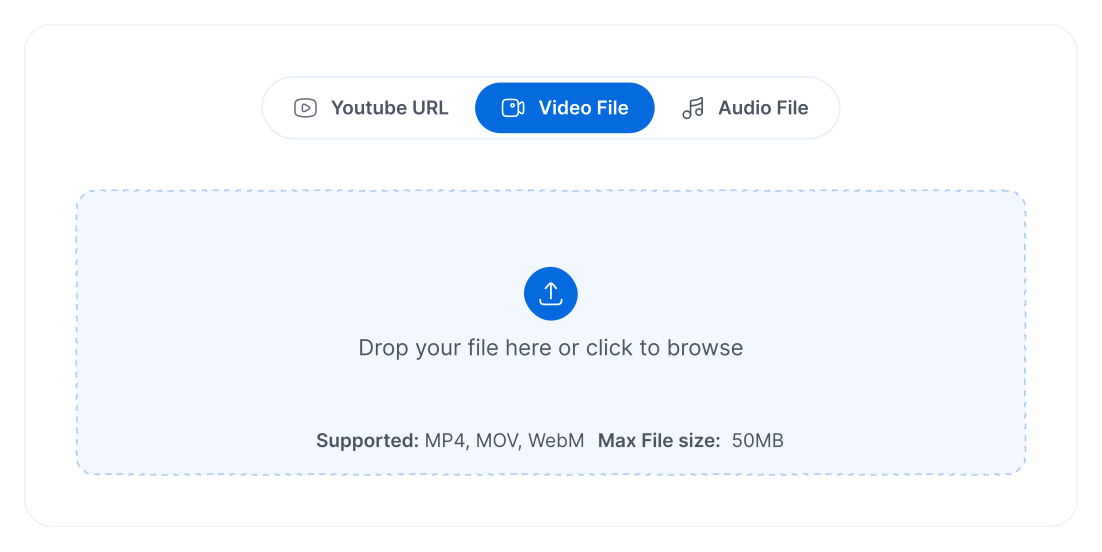
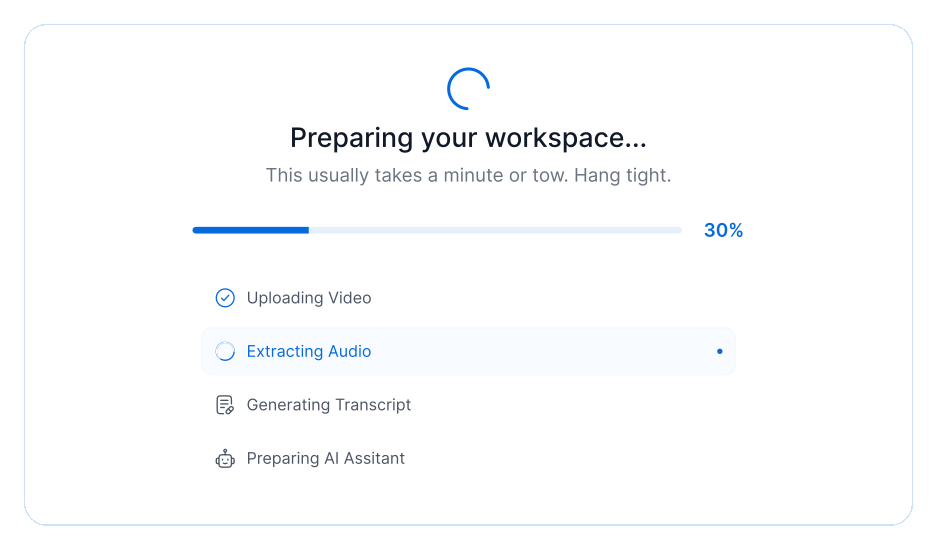
Step 1
Add your source
Step 2
Phrasly builds your workspace
Step 3
Read, summarize and chat
Add your source
Phrasly builds your workspace
Read, summarize and chatRead, summarize and chat
Chat With Videos

Don't Just Read It. Chat With Your Video.

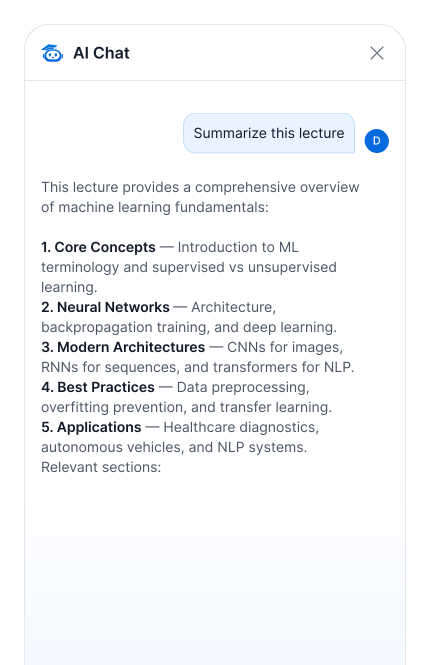
Phrasly is more than a transcript generator. Once your transcript is ready, ask questions in plain language and get answers grounded in the video, each one linked to the exact timestamp so you can verify it.

Ask Questions, Get Answers With Timestamps

Ask things like "What did they say about pricing?" or "Summarize the three main arguments." You get a direct answer and can click through to the moment it was said.

Summaries & Key Takeaways in One Click

Generate a structured summary, key points, or study notes from any video. Ideal for revising, research and repurposing content.

Phrasly vs. YouTube Captions vs. a Generic AI Chatbot

See how Phrasly compares for accurate, timestamped transcripts you can summarize and chat with.

CapabilityPhraslyYouTube auto-captionsGeneric AI chatbot
Accurate transcript with timestampsPartial
Works when the video has no captions
Upload your own video and audio filesLimited
One-click summary and key points
Chat and ask questions with timestamped answersRarely
Export TXT, SRT, PDF, DOCXLimited
100+ languagesVariesVaries
No sign-up to startn/aVaries

Who Uses Phrasly's Transcript Generator

From lecture halls to newsrooms, Phrasly turns hours of video and audio into searchable, shareable text.

Students & Researchers

Turn lectures and interviews into searchable notes, and quote sources accurately with timestamps.

Content Creators & Podcasters

Repurpose one video into blog posts, show notes, captions and social clips.

Marketers & Teams

Pull insights from webinars and competitor videos, and build documentation from recordings.

Journalists & Interviewers

Transcribe interviews fast and jump to exact quotes with one click.

Supported Formats & Languages

One workspace for every source, export and language.

Sources

YouTube links, video uploads (MP4, MOV, WebM), and audio uploads.

Exports

TXT, SRT, PDF, DOCX.

Languages

100+ with automatic detection and translation.

How to Get a YouTube Transcript in 3 Steps

No software and no sign up. If you can paste a link, you can get a transcript.

01

Add Your Source

Paste a YouTube URL, or upload a video file (MP4, MOV, WebM) or an audio file. Lectures, podcasts, interviews and webinars all work.

02

Phrasly Builds Your Workspace

Phrasly uploads your file, extracts the audio, generates an accurate transcript, and prepares your AI assistant. This usually takes about a minute.

03

Read, Summarize & Chat

Read the transcript with clickable timestamps, generate a one-click summary, or ask the AI a question and jump straight to the answer. Export whenever you are ready.

What People Say About Phrasly

Students, creators, and professionals use Phrasly to turn hours of video and audio into accurate, searchable transcripts they can summarize and chat with.

“I transcribe every interview I record now. What used to take me an afternoon is done in a couple of minutes, and the text is clean enough to quote directly.”

M
Maria G.
Real review

“The chat feature is unreal. I paste a long webinar, ask what was said about pricing, and jump straight to that moment. The one-click summary saves me even more time.”

J
James T.
Real review

“It handles accents and even non-English lectures better than anything else I've tried. The transcripts come out accurate with barely any cleanup.”

A
Aisha N.
Real review

“The transcription accuracy is incredible. I drop in a lecture recording and get clean, editable text in minutes. It's saved me hours every single week.”

S
Sarah K.
Real review

“Being able to paste a YouTube link and instantly chat with the transcript is a total game changer for my research workflow.”

D
David L.
Real review

“I transcribe every interview I record now. What used to take me an afternoon is done in a couple of minutes, and the text is clean enough to quote directly.”

M
Maria G.
Real review

“The chat feature is unreal. I paste a long webinar, ask what was said about pricing, and jump straight to that moment. The one-click summary saves me even more time.”

J
James T.
Real review

“It handles accents and even non-English lectures better than anything else I've tried. The transcripts come out accurate with barely any cleanup.”

A
Aisha N.
Real review

“The transcription accuracy is incredible. I drop in a lecture recording and get clean, editable text in minutes. It's saved me hours every single week.”

S
Sarah K.
Real review

“Being able to paste a YouTube link and instantly chat with the transcript is a total game changer for my research workflow.”

D
David L.
Real review

“I transcribe every interview I record now. What used to take me an afternoon is done in a couple of minutes, and the text is clean enough to quote directly.”

M
Maria G.
Real review

“The chat feature is unreal. I paste a long webinar, ask what was said about pricing, and jump straight to that moment. The one-click summary saves me even more time.”

J
James T.
Real review

“It handles accents and even non-English lectures better than anything else I've tried. The transcripts come out accurate with barely any cleanup.”

A
Aisha N.
Real review

“The transcription accuracy is incredible. I drop in a lecture recording and get clean, editable text in minutes. It's saved me hours every single week.”

S
Sarah K.
Real review

“Being able to paste a YouTube link and instantly chat with the transcript is a total game changer for my research workflow.”

D
David L.
Real review
Support

YouTube Transcript Generator FAQ

Will my files and transcripts be stored online?

We take your privacy seriously. Your uploads are processed securely and are only used to generate your transcript and power your AI chat. We never sell your files or share them with third parties, and you can delete your transcriptions from your dashboard at any time.

We take your privacy seriously. Your uploads are processed securely and are only used to generate your transcript and power your AI chat. We never sell your files or share them with third parties, and you can delete your transcriptions from your dashboard at any time.

What can I transcribe with Phrasly?

You can transcribe in three ways: paste a YouTube URL, upload a video file, or upload an audio recording. Phrasly automatically extracts the audio, generates an accurate transcript, and prepares an AI assistant so you can chat with the content and jump to any moment using clickable timestamps.

You can transcribe in three ways: paste a YouTube URL, upload a video file, or upload an audio recording. Phrasly automatically extracts the audio, generates an accurate transcript, and prepares an AI assistant so you can chat with the content and jump to any moment using clickable timestamps.

How accurate is the transcription?

Phrasly uses advanced speech-to-text models that deliver industry-leading accuracy, even with multiple speakers, accents, and background noise. Clean audio with clear speech produces the best results. You can always edit the transcript afterward to fix names, acronyms, or technical terms.

Phrasly uses advanced speech-to-text models that deliver industry-leading accuracy, even with multiple speakers, accents, and background noise. Clean audio with clear speech produces the best results. You can always edit the transcript afterward to fix names, acronyms, or technical terms.

Which file formats are supported?

Phrasly supports all major video formats (including MP4, MOV, and WebM) and audio formats (including MP3, WAV, and M4A). You can also skip uploads entirely by pasting a YouTube link and importing the video directly.

Phrasly supports all major video formats (including MP4, MOV, and WebM) and audio formats (including MP3, WAV, and M4A). You can also skip uploads entirely by pasting a YouTube link and importing the video directly.

How many languages can Phrasly transcribe?

Phrasly transcribes content in over 100 languages with automatic language detection, so you usually don't need to specify the language yourself. This makes it ideal for lectures, interviews, and meetings in any language.

Phrasly transcribes content in over 100 languages with automatic language detection, so you usually don't need to specify the language yourself. This makes it ideal for lectures, interviews, and meetings in any language.

How do I transcribe a YouTube video?

Just copy the YouTube video link, paste it into the YouTube URL tab, and click Import. Phrasly fetches the video, transcribes the audio, and gives you a full, searchable transcript along with an AI assistant you can ask questions about the video.

Just copy the YouTube video link, paste it into the YouTube URL tab, and click Import. Phrasly fetches the video, transcribes the audio, and gives you a full, searchable transcript along with an AI assistant you can ask questions about the video.

Is there a limit on file size or video length?

Each upload can be up to 25MB, which comfortably covers most lectures, podcasts, and meeting recordings. To get the most out of larger content, you can:Compress your video or export audio-only before uploadingPaste a YouTube link instead of uploading the raw fileSplit very long recordings into shorter segmentsIf you frequently work with longer files, signed-in users get the smoothest experience.

Each upload can be up to 25MB, which comfortably covers most lectures, podcasts, and meeting recordings. To get the most out of larger content, you can:

  • Compress your video or export audio-only before uploading
  • Paste a YouTube link instead of uploading the raw file
  • Split very long recordings into shorter segments

If you frequently work with longer files, signed-in users get the smoothest experience.

What export formats are available?

Once your transcript is ready, you can download it in the format that fits your workflow:PDF for sharing and archivingDOCX for editing in Word or Google DocsTXT for clean, plain-text notesSRT for subtitles and captionsThis makes it easy to repurpose your transcripts into articles, study notes, captions, or documentation.

Once your transcript is ready, you can download it in the format that fits your workflow:

  • PDF for sharing and archiving
  • DOCX for editing in Word or Google Docs
  • TXT for clean, plain-text notes
  • SRT for subtitles and captions

This makes it easy to repurpose your transcripts into articles, study notes, captions, or documentation.

Can I chat with my transcript and ask questions?

Yes. After transcription, Phrasly prepares an AI assistant that understands the full content of your video or audio. You can:Ask for a quick summary of the key pointsFind specific moments and jump to them with clickable timestampsExtract action items, quotes, or definitionsTurn the content into notes, an outline, or a study guideIt's like having a researcher who has watched the entire video for you.

Yes. After transcription, Phrasly prepares an AI assistant that understands the full content of your video or audio. You can:

  • Ask for a quick summary of the key points
  • Find specific moments and jump to them with clickable timestamps
  • Extract action items, quotes, or definitions
  • Turn the content into notes, an outline, or a study guide

It's like having a researcher who has watched the entire video for you.

What are clickable timestamps and how do they help?

Every part of your transcript is linked to the exact moment it was spoken. Clicking a timestamp jumps the player straight to that point, so you never have to scrub through the whole recording to find what you need.This is especially useful for reviewing lectures, locating a quote in an interview, or revisiting a decision made during a meeting. Combined with the AI assistant, you can ask a question and go directly to the relevant moment in the media.

Every part of your transcript is linked to the exact moment it was spoken. Clicking a timestamp jumps the player straight to that point, so you never have to scrub through the whole recording to find what you need.

This is especially useful for reviewing lectures, locating a quote in an interview, or revisiting a decision made during a meeting. Combined with the AI assistant, you can ask a question and go directly to the relevant moment in the media.

How does the transcription process work?

When you upload a file or paste a YouTube link, Phrasly extracts the audio, runs it through a speech-to-text model to generate a time-aligned transcript, and then prepares an AI assistant on top of that transcript. The whole process is automatic — no extra steps needed — and usually takes just a minute or two.

When you upload a file or paste a YouTube link, Phrasly extracts the audio, runs it through a speech-to-text model to generate a time-aligned transcript, and then prepares an AI assistant on top of that transcript. The whole process is automatic — no extra steps needed — and usually takes just a minute or two.

How long does transcription take?

Most files are transcribed in minutes, often faster than real-time playback. Processing time depends on the length of the content and the current load, but you'll see live progress while Phrasly uploads, extracts audio, and generates your transcript.

Most files are transcribed in minutes, often faster than real-time playback. Processing time depends on the length of the content and the current load, but you'll see live progress while Phrasly uploads, extracts audio, and generates your transcript.

Can Phrasly handle accents and multiple speakers?

Yes. Phrasly's speech recognition is trained on a wide range of accents and speaking styles and handles conversations with multiple speakers. As with any transcription tool, clearer audio leads to better accuracy, and you can quickly edit the transcript to correct any misheard words.

Yes. Phrasly's speech recognition is trained on a wide range of accents and speaking styles and handles conversations with multiple speakers. As with any transcription tool, clearer audio leads to better accuracy, and you can quickly edit the transcript to correct any misheard words.

Can I edit the transcript after it's generated?

Absolutely. Your transcript is fully editable, so you can fix names, technical terms, or punctuation before exporting. Edits are saved with your transcription, and you can export the cleaned-up version in any supported format whenever you're ready.

Absolutely. Your transcript is fully editable, so you can fix names, technical terms, or punctuation before exporting. Edits are saved with your transcription, and you can export the cleaned-up version in any supported format whenever you're ready.

Is Phrasly's transcriber free to use?

You can get started for free and transcribe your first content without any cost. Signing in unlocks the smoothest experience, lets you save your transcriptions to your dashboard, and gives you access to the AI assistant and export options.

You can get started for free and transcribe your first content without any cost. Signing in unlocks the smoothest experience, lets you save your transcriptions to your dashboard, and gives you access to the AI assistant and export options.

What can I use the transcriber for?

Phrasly is perfect for turning lectures, podcasts, interviews, webinars, YouTube videos, and meeting recordings into searchable, editable text. Students use it to create study notes, researchers to analyze interviews, and teams to capture meeting takeaways — all with AI-powered answers and clickable timestamps.
Phrasly is perfect for turning lectures, podcasts, interviews, webinars, YouTube videos, and meeting recordings into searchable, editable text. Students use it to create study notes, researchers to analyze interviews, and teams to capture meeting takeaways — all with AI-powered answers and clickable timestamps.
Turn Any Video Into Text, Summaries & Answers

Paste a link or upload a file. Your transcript is seconds away.

Phrasly is not affiliated with, endorsed by, or sponsored by YouTube or Google. YouTube is a trademark of Google LLC. Your uploads and transcripts are processed securely, are never sold or shared, and can be deleted from your dashboard at any time.