Does the Common App Check AI in the Activities Section? Here's the Truth
Common App doesn't scan for AI, but using it still violates their fraud policy. Here's exactly what they check, what individual colleges do separately, and how to write activity descriptions that are genuinely yours.
You spent hours on your Common App activities section, then used AI to help tighten it up. Now you're staring at the submit button, wondering: Does Common App check AI in the activities section?
It's one of the most searched questions in college admissions right now, and the answer is more nuanced than a simple yes or no.
It’s a high-stakes question. According to 2025 search data from EAB, 46% of high school students are now using AI tools like ChatGPT to assist in their college search and application process, nearly double the 26% reported just a year earlier.
This article breaks down exactly what Common App scans for, what their fraud policy actually says, what individual colleges do on their end, and what to do if you've already used AI.
Does the Common App Check AI in the Activities Section? Here's the Truth
No, Common App does not run your activities section or essays through AI detection software. In December 2025, they made this crystal clear in an official Instagram reel: "We don't scan your essays through AI detectors. Period."
Using AI to write your activities section still puts you at real risk. Not because a machine will flag you, but because Common App's fraud policy explicitly treats AI-generated content as fraud. And the consequences are serious: written notice, application invalidation, and potential account termination.
So here's the tension you need to understand: no automated scan, but a very real policy violation. The danger isn't a detection algorithm, it's a human admissions officer reading your 150-character activity description and immediately sensing it didn't come from you.
No Automated Scan — Common App's Own Statement
Common App's position is public and direct: they do not use AI detection tools to validate applications. That Instagram statement wasn't buried in fine print, it was their official, on-record answer to students asking exactly this question.
It's also worth knowing just how short the activities section actually is. Common App gives you 50 characters for your position or leadership title, 100 for the organization name, and only 150 characters for your actual activity description and accomplishments. That's less than a tweet to describe something that could define your application. Every single word carries weight.
What Is Common App's AI Policy — And What Counts as Fraud?
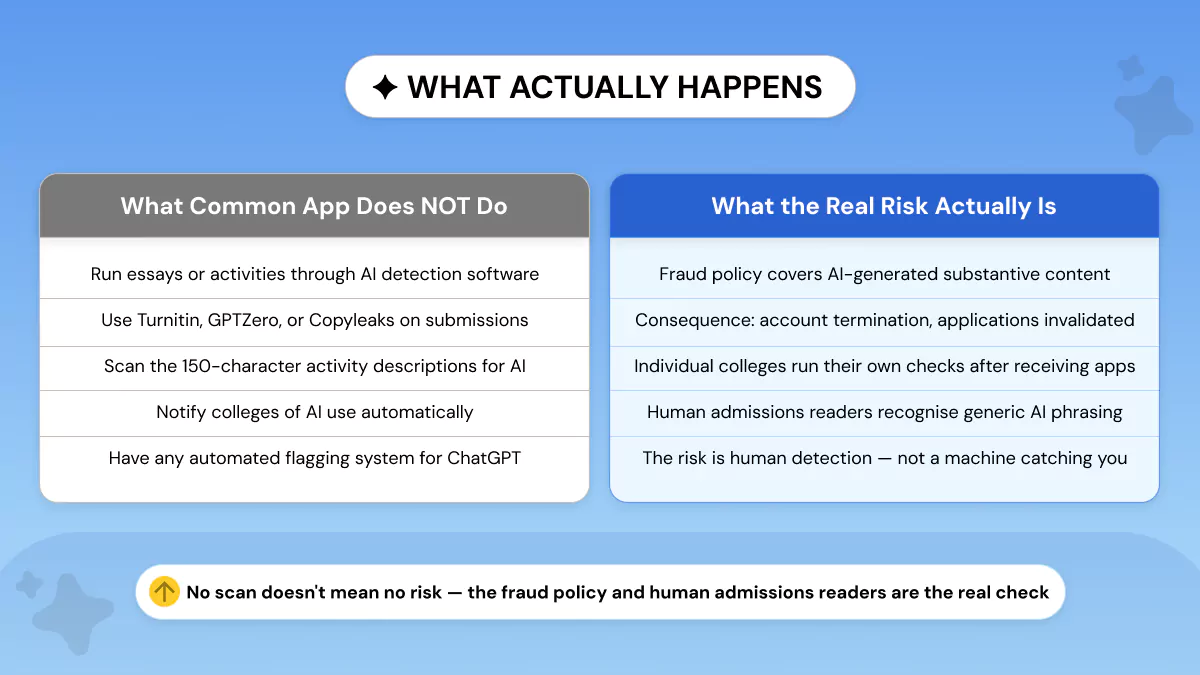
Common App doesn't publish a rulebook with a clear "this much AI is okay, this much isn't." Common App fraud policy works differently, and that vagueness is actually part of what makes it risky.
Here's the exact language from their official policy: fraud includes
Notice what's missing: no percentage threshold. No detector score. No definition of "how much" AI is too much. The entire framework is built around one question, is this content honestly yours?
That deliberate vagueness puts the burden entirely on you. And it means there's no technical workaround that makes AI-written content "safe" to submit.
What Counts as Fraud
The clearest case is straightforward: if you used AI to write your activity descriptions from scratch and submitted them as your own work, that fits directly inside the fraud definition. Substantive AI-generated content presented as yours, that's exactly what the policy covers.
The murkier territory is using AI only to brainstorm ideas, then writing every word of the final description yourself. The policy focuses on whether the submitted text is genuinely yours, which suggests brainstorming alone carries lower risk. But Common App publishes no formal safe-use rule, and that lower risk is an inference from the policy language, not an explicit permission. There's no official statement anywhere that says brainstorming with AI is permitted.
The key distinction the policy draws is simple: did AI do the writing, or did you?
The Line Between Acceptable AI Use and Fraud
If AI drafted the text and you submitted it, that's the problem. If AI gave you a rough idea and you rewrote everything in your own words, you're in safer territory, but you're still working without an explicit rulebook, and the burden of proof sits entirely with you.
What Happens If a Fraud Report Is Filed
First, it's worth being accurate about how this actually works, because a lot of misinformation is circulating online, and Common App addressed it directly.
That means a vague suspicion, even from a college, doesn't automatically put your account at risk.
Here's how the process actually works if a report is filed, as explained in that same video: the allegation must come with evidence, submitted by a registered user, a member college, or a third party through Common App's official Fraud Allegation Form. From there, Common App runs a full review. Students are notified, involved in every step, and given the opportunity to appeal before any decision is made. Only after that full process, if fraud is confirmed, could an account be closed.
That's meaningfully different from what's been spreading online. The consequences are real if fraud is confirmed. But the process has protections built in, and Common App was explicit that students deserve accurate information about how it works.
Does Common App Check AI? Check Your Activities Section with Phrasly First
Common App doesn't run an automated scan, but admissions officers do read every word for authenticity. Before you submit, it's worth knowing how your activities section actually reads.
Paste your activity descriptions into Phrasly AI Detector and check your score before submitting. Not to game a number, but to see exactly how your writing comes across, so you can make any changes in your own voice while you still have time.
How to Write Your Activities Section Without AI Risk
Here's what most guides miss: the activities section isn't just a shorter essay. It's a completely different format, and that changes everything about how AI-generated writing gets spotted.
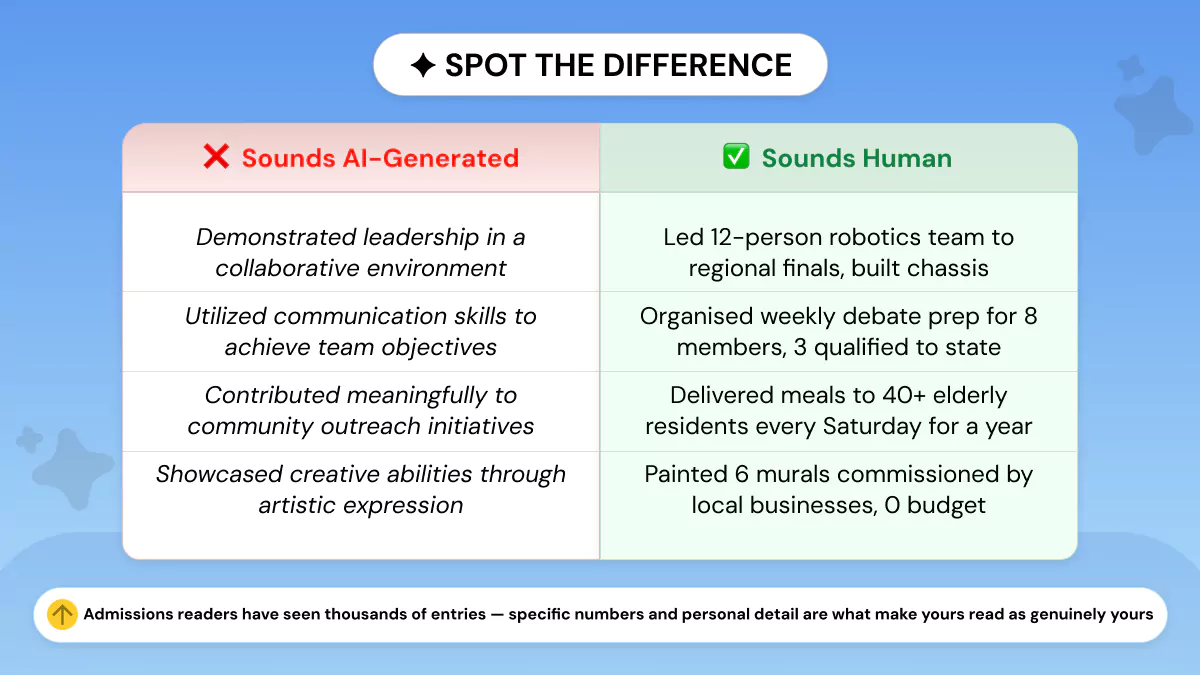
You have 150 characters for your activity description. That's it. At that length, there's no room for nuance, storytelling, or filler. And that's exactly the problem with AI-written entries, when forced into 150 characters, AI defaults to buzzwords. "Demonstrated leadership." "Collaborated with peers." "Showed commitment to community service."
Admissions officers read thousands of these. They know what genuine compression looks like versus what happens when a language model tries to summarize a human experience it knows nothing about. The difference is obvious, and it's not subtle.
Common App's own activities guide actually spells out the goal: preserve the important details, cut the filler, and abbreviate where needed. The point isn't polished prose. It's a tight, honest record of what you did.
What Authentic Activity Descriptions Look Like
The formula for a strong activities entry is simple: action + context + result. Every word has to earn its place inside 150 characters, which means no vague claims, no filler verbs, and nothing a stranger could copy and paste onto their own application.
Here's what that looks like across six common activity types:
Sports & Athletics
Community Service
School Newspaper / Writing
Music & Performing Arts
Part-Time Work
Independent Research or Projects
The rule is simple: if someone else could write that sentence about themselves without changing a single word, it's too generic. Use numbers, titles, time frames, and outcomes that are genuinely yours.
One more thing worth knowing: you don't need a dramatic outcome to write a strong entry. Admissions officers want to understand how you made a difference, not just that you were present. Even a straightforward job or low-key club entry becomes compelling when you name your actual role and attach a real number to it.
How to Write Your Activity Descriptions: A Step-by-Step Process
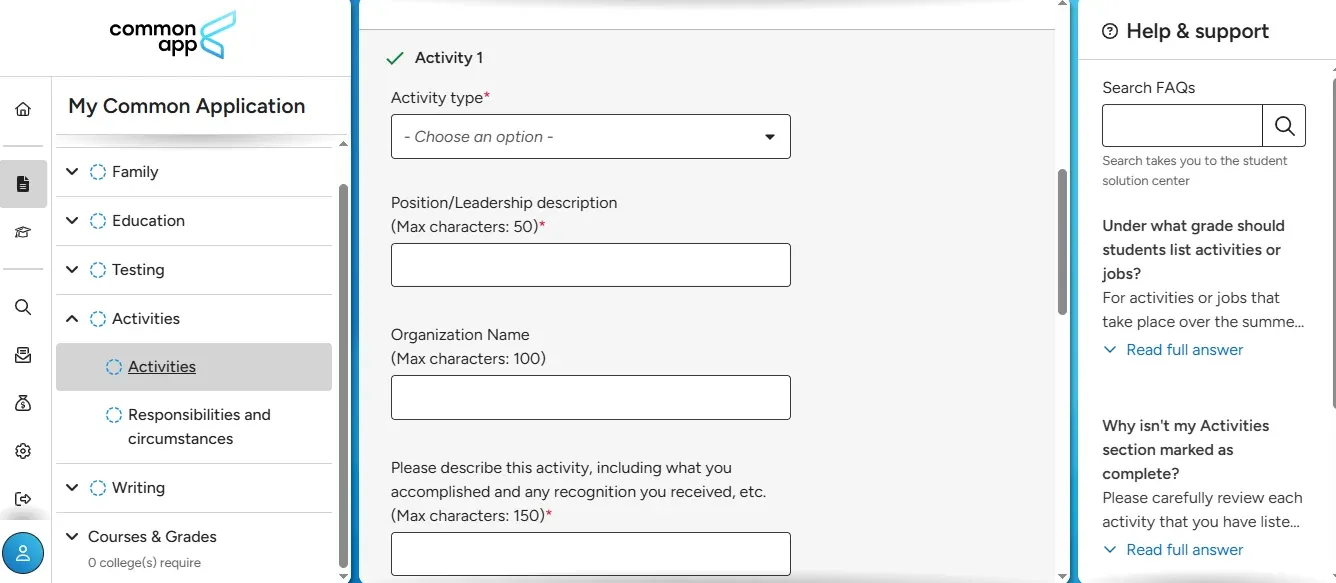
Step 1: Don't start in the description box
Before you touch the 150-character field, answer these four questions about each activity:
- What exactly did I do (not just attend)?
- What was my specific role or responsibility?
- What changed, improved, or was created because of me?
- Is there a number, award, or outcome I can attach to this?
Write your answers out freely, no character limit yet. This is your raw material.
Step 2: Use your position and organization fields first
Put your position title and organization name in their own fields, don't repeat them in the 150-character description box. That wastes precious characters. If you're the president of Student Council, "President" goes in the position field and "Student Council" goes in the organization field, so your description can focus entirely on what you actually did.
Step 3: Write in resume style, not essay style
The 150-character limit isn't enough space for full sentences. Write in short, direct phrases instead. "Organized weekly debate meetings; coordinated 15 members" communicates the same information as "I was responsible for organizing meetings for the debate club every week", in half the characters.
Start each description with a strong action verb. Words like led, built, launched, trained, managed, founded, coordinated, raised, designed, and taught immediately show you doing something, not just being present.
Step 4: Add a number wherever you can
Numbers give scale and clarity. "Led 5 blood drives (300+ units); recruited 50 volunteers; managed promotion and logistics" tells admissions exactly how big your impact was. Vague descriptions of the same activity don't.
If you don't have a competition result or award, other numbers work just as well: hours per week, number of people you trained, amount raised, members in your group, years of involvement.
Step 5: Read it back and ask one question
Could a stranger copy this sentence and apply it to their own life without changing anything?
If yes, it's too generic. Rewrite it with one specific detail only you would know.
Here's what that looks like in practice:
The left column describes a vibe. The right column describes a person.
I Already Used AI on My Common App Activities Section — What Do I Do Now?
First: don't panic. This is fixable, but how you fix it depends on where you are in the process.
If You Haven't Submitted Yet, you're in the best position. Go back through every entry and rewrite anything AI drafted so the final wording is genuinely yours.
Cornell's guidance draws a clear line: brainstorming and grammar review are acceptable uses of AI, but drafting or writing the application text is not. So the goal isn't to scrub your browser history, it's to make sure what you submit is actually your writing.
Here's a step-by-step process that works:
- Read each entry aloud. If it sounds like a summary someone could write about almost anyone, it's too generic.
- Identify the vague phrases. Words like "demonstrated," "collaborated," "contributed," and "developed" are red flags, they describe a vibe, not an action.
- Replace with specifics only you would know. Names, counts, results, deadlines, responsibilities. One concrete detail that puts you in the room.
- Check how it reads with Phrasly AI Detector. See how your rewritten entries score before you submit.
- Rewrite anything that still reads flat until it sounds like something you'd actually say out loud.
If You Already Submitted to Some Schools
Don't try to send a polished rewrite to schools you've already submitted to. Changing the substance of what you originally submitted, unless the college's process explicitly allows updates, can create more problems than it solves.
The priority now is making sure any future submissions are clean. Use the remaining applications to write more personally, more specifically, and less generically. Every new entry you write from here is an opportunity to get it right.
How to Rewrite AI Descriptions to Sound Human
The fastest way to identify a generic entry: ask yourself if you could defend every word in a conversation. If a phrase is too polished to sound like you, or makes a claim you'd struggle to back up, rewrite it.
The rewrite pattern is the same every time; role, action, result:
The first version confirms you showed up. The second tells admissions exactly what you did there, how much, and that someone trusted you enough to give you more responsibility. That's the difference.
One pattern to watch in your own entries: if your description contains the words demonstrated, contributed, participated, helped, or developed, that's your signal to rewrite. Those words describe proximity to an activity, not ownership of it.
After rewriting, run a quick self-check on each entry: Does it use your real role? Does it include at least one number or concrete outcome? Does it still sound like something you'd actually say? If yes to all three, you're ready to check how it scores.
What About False Positives? I Wrote Everything Myself But I'm Worried
This is a legitimate concern, and it's worth understanding why it happens, especially for the activities section specifically.
AI detectors aren't perfect. Turnitin openly acknowledges that false positives are possible.
Your activities descriptions are 150 characters. That's nowhere near the threshold Turnitin needs to produce a reliable result. In other words: even the tools colleges use are built for essays, not activity fields.
Why AI Detectors Fail on Short Text
Detectors work by analyzing patterns across a larger body of text. The shorter the input, the less evidence there is to work with, and the less reliable the output. Turnitin's own documentation confirms this: the AI Writing Report is built for long-form prose and doesn't reliably handle short-form writing.
That's why a compressed, well-written activities entry can look "suspicious" to a detector even when every word came from the student.
Why Formal Writing Gets Flagged
Neat, polished writing can read as machine-like, even when it isn't. False positives are especially common in shorter submissions, multilingual writing, and anything that follows a rigid template. The recommendation is to look at writing patterns and process evidence, not rely on a single scan.
Common App's activities section fits this exactly. The format is compressed and template-driven by design, which means even natural student writing can look flatter than it really is.
How to Know If Your Writing Is Actually Yours
Simple test: can you explain every line from memory? If a phrase is too polished to sound like something you'd say, rewrite it. If it makes a claim you'd struggle to back up in a conversation, rewrite it. Cornell and Swarthmore both frame authenticity around voice and authorship, not on whether AI was ever part of the process. What matters is whether the submitted writing is genuinely yours.
If you want to check how your entries read before submitting, run them through Phrasly AI Detector. At 150 characters, a detector score alone won't tell the whole story, but it gives you a useful starting point for spotting entries worth revisiting.
Do Individual Colleges Check for AI Separately?
Yes, individual colleges may check for AI separately. Common App not running an AI scan doesn't mean the colleges receiving your application follow the same standard. Every school sets its own application integrity rules. Some prohibit AI-written text entirely. Some allow limited AI help but require the final submission to be your own work. Some say they don't use AI tools in admissions decisions but still hold applicants to strict authorship standards.
That applies to both essays and activities materials.
Do Colleges Use AI Detection Tools on Applications?
Some do. Turnitin, GPTZero, and Copyleaks all market AI detection products specifically for educational settings, and colleges have access to them. Whether a specific admissions office uses them isn't always public, but the tools exist and some schools are already using them.
More consistent, and more relevant to you, is what schools have actually written in their policies.
Three schools. Three different policies. None of them say a clean detector score makes you safe.
The activities section is where generic AI phrasing is easiest to spot — not hardest. There's no surrounding context, no narrative arc, no 650 words to carry a reader through. It's one line. And if that one line could belong to any student at any school, it raises a question that admissions officers and integrity policies give colleges every reason to follow up on.
Common App won't catch you with a scanner. But the person reading your application will know. And when you hit submit, you're signing your name to every entry across every college simultaneously. Write it yourself. Make it specific. Make it yours.
Frequently Asked Questions
Can the Common App detect ChatGPT?
No. Common App has confirmed it does not scan applications through AI detection software, including content written with ChatGPT. But submitting ChatGPT-generated text as your own still violates their fraud policy, and human admissions officers can spot AI-compressed language without any tool.
Do colleges check for AI in application essays?
Some do, independently of Common App. Turnitin, GPTZero, and Copyleaks are all marketed to educational institutions, and schools including Caltech, Swarthmore, and UC Davis have published policies that prohibit AI-drafted content and reserve the right to verify authorship. For a closer look at how accurately these tools perform, the results vary more than most students expect.
What happens if my Common App essay is flagged as AI?
Less automatically than most students think. In their official December 2025 Instagram video, Common App clarified that a fraud review requires a detailed allegation with evidence, an admissions officer suspecting AI use isn't enough to trigger the process. If a report is filed, students are notified, involved in the full review, and can appeal before any decision is made. Only after that process, if fraud is confirmed, can an account be closed. If you're already in that situation, here's a step-by-step guide on what to do if your essay is flagged.
Can I use AI at all for my Common App application?
Brainstorming, grammar checks, and readability edits are generally lower risk. The line is authorship, if AI drafted the final text you submitted, that falls under Common App's fraud definition. Whatever AI touched, rewrite in your own words before submitting.
Do top schools check for AI in applications?
Policies vary. Caltech requires applicants to review its ethical AI guidelines before submitting. Duke stopped assigning numerical essay ratings partly due to AI concerns. The safest assumption across every school: you are held to a strict authorship standard regardless of whether a detection tool is used.
Does submitting through Common App mean I'm certifying my work is my own?
Yes. When you submit, you are legally attesting that the work is yours, across all 1,000+ member colleges simultaneously. AI-written content isn't just an integrity issue at one school. It's a platform-wide risk that affects every application you submit at once.