Writesonic AI Humanizer Review: Does It Actually Improve Your Writing?
10 min read
If you're looking for a way to make AI-generated content sound more natural, Writesonic's AI Humanizer is probably on your list. But does it actually improve your writing, or is it just another tool that promises more than it delivers?
That's what we tested. Real content, real output, no guesswork.
This review covers what the tool actually does, where it holds up, where it falls short, and whether it's worth using as part of your writing workflow.
Already looking for a dedicated humanizer? Phrasly AI Humanizer is built specifically for that job. Free to try, no commitment 👇
What Is Writesonic's AI Humanizer?
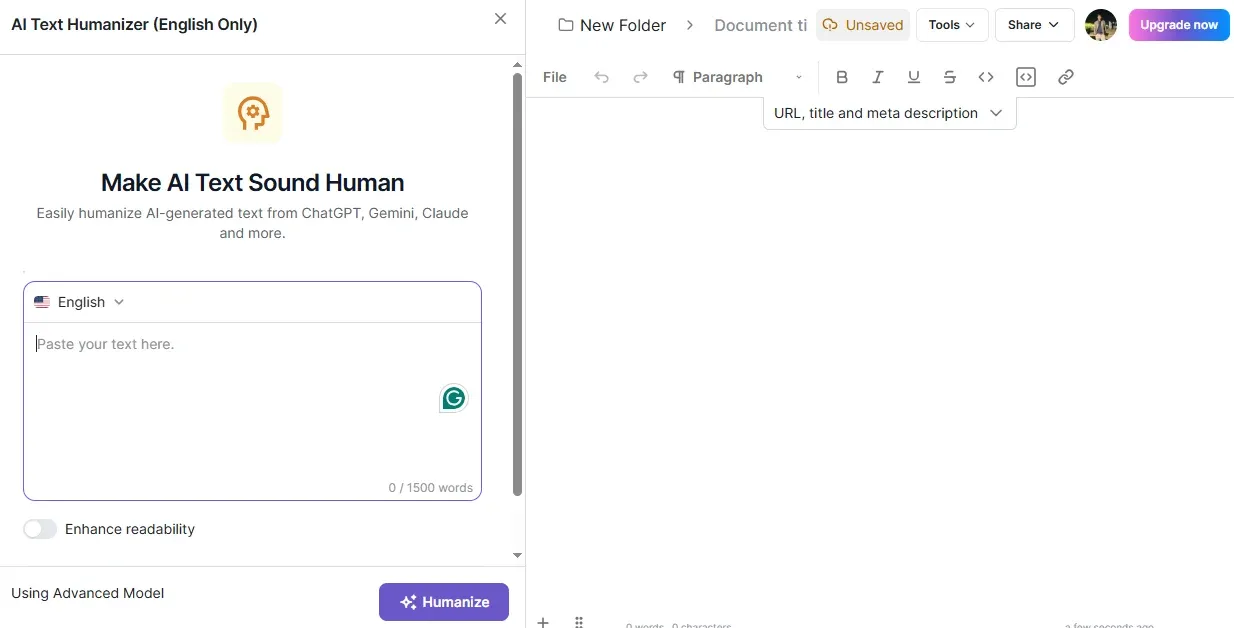
Writesonic's AI Humanizer is a built-in rewrite tool inside the Writesonic platform. You paste in AI-generated text, it rewrites it to sound more natural, and there's an optional Enhance Readability toggle to smooth things out further.
It's not a standalone product — and the way you get to it makes that clear. You sign in, select Optimize Existing Content, and the humanizer appears on the right side of the editor. It's tucked into the workflow rather than front and center, which is worth knowing before you go looking for it.
A bit of background: Writesonic is a Y Combinator-backed AI platform built around content creation, SEO, and AI search visibility. The humanizer is one feature inside that broader suite.
What it actually does to your text: it takes AI-generated content and rewrites it to read more like a human wrote it. Once you're signed in, you get up to 1,500 words per scan, which is enough headroom for most blog sections or short-form pieces.
If you want a broader look at how to humanize AI text and what the process actually involves, that guide covers the full picture.
Who it's built for: existing Writesonic users who are already drafting content inside the platform and want a quick rewrite pass before deeper editing. If you're already in the Writesonic ecosystem, the humanizer is a convenient extra step. If you're coming in purely for humanization and nothing else, the navigation alone will slow you down.
How Well Does Writesonic's Humanizer Improve Writing Quality?
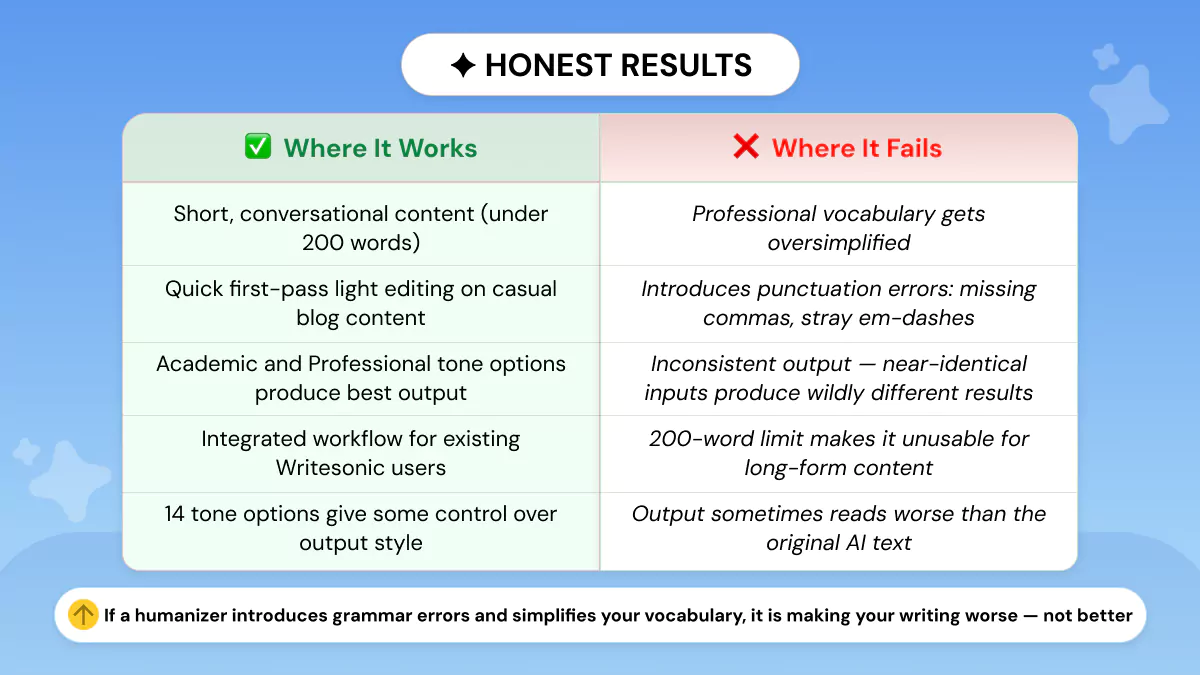
The short answer: it depends heavily on what you put in and which tone you select. For some content types it produces a cleaner result with minimal effort. For others, particularly professional or technical writing, the output reads worse than what you started with.
We tested the tool live across three content types: a short conversational blog intro, a professional paragraph on an environmental topic, and a near-identical repeat to test consistency. Here's exactly what came back.
Where It Works
Our input:
Social media has changed the way brands communicate with their audience. Instead of one-way messaging, companies now engage in real conversations with their customers online. This shift has created new opportunities for businesses of all sizes to build genuine relationships and grow their presence without a massive advertising budget.
Writesonic's output:
Social media has caused a revolution in the way brands communicate with their audience. Instead of one-way messaging, companies now engage in real conversations with their customers online. This shift has created new opportunities for businesses of all sizes to build genuine relationships and grow their presence without a massive advertising budget.
What changed: One swap across three sentences, "has changed" became "has caused a revolution in." Everything else came back identical.
The swap itself is actually worse than the original. "Caused a revolution in the way brands communicate" is wordier and more formal than "changed the way brands communicate", the opposite of what conversational content needs. The tool barely intervened, and where it did, it made the sentence heavier, not lighter.
Where It Fails
Our input:
Carbon capture technology has emerged as a critical component of climate mitigation strategies. By extracting CO₂ directly from the atmosphere and storing it in geological formations, these systems offer a potential pathway to reversing decades of industrial emissions. However, the energy demands and infrastructure costs associated with large-scale deployment remain significant barriers to adoption.
Writesonic's output:
Carbon capture technology has become a key part of climate mitigation strategies. By pulling CO₂ straight from the atmosphere and storing it in geological formations, these systems offer a potential pathway to reversing decades of industrial emissions. However, the energy demands and infrastructure costs that come with large-scale deployment remain significant barriers to adoption.
What changed — and why it matters:
Original | Humanized | Problem |
has emerged as a critical component of | has become a key part of | Loses the sense of development over time. "Critical" replaced with "key", weaker and more generic |
extracting CO₂ directly from the atmosphere | pulling CO₂ straight from the atmosphere | "Extracting" is the standard term in climate science. "Pulling" reads as imprecise to any professional reader |
associated with large-scale deployment | that come with large-scale deployment | Minor, acceptable |
The first two swaps are a genuine writing quality problem. "Pulling CO₂ straight from the atmosphere" is general-audience phrasing, not professional content on climate technology. Replacing the standard field term with an informal verb doesn't make the sentence more human, it makes it less credible.
If you want to see how a humanizer should handle this kind of rewrite, our guide on how an AI humanizer should rewrite a sentence for better clarity and impact breaks down exactly what good looks like.
The Inconsistency Problem
We ran a near-identical paragraph through immediately after Test 2 to check reliability.
Our input:
Carbon capture methods have become a key part of climate response planning. By removing CO₂ directly from the air and storing it underground, these approaches offer a possible route to offsetting years of industrial pollution. Yet the energy requirements and cost of building this infrastructure at scale remain major obstacles to widespread use.
Writesonic's output:
Carbon capture methods have become a key part of climate response planning. By removing CO₂ from the air and storing it underground, these approaches offer a possible route to offsetting years of industrial pollution. Yet the energy requirements and cost of building this infrastructure at scale remain major obstacles to widespread adoption.
What changed: Two edits, "directly" removed, "widespread use" became "widespread adoption."
Test 2 received three substantive vocabulary swaps including a technical term replacement. This near-identical paragraph came back almost completely untouched. And notably, "adoption" is more formal than "use", the opposite direction to what a humanizer should be moving.
Same content type, same tool, same settings, dramatically different intervention between runs. You have no way of knowing in advance which version you're going to get.
Already seeing the problem? Phrasly AI Humanizer gives you three rewrite strength settings (Easy, Medium, and Aggressive) so you control exactly how much changes. Free to try, no commitment 👇
What AI Detectors Say About Writesonic's Humanized Output
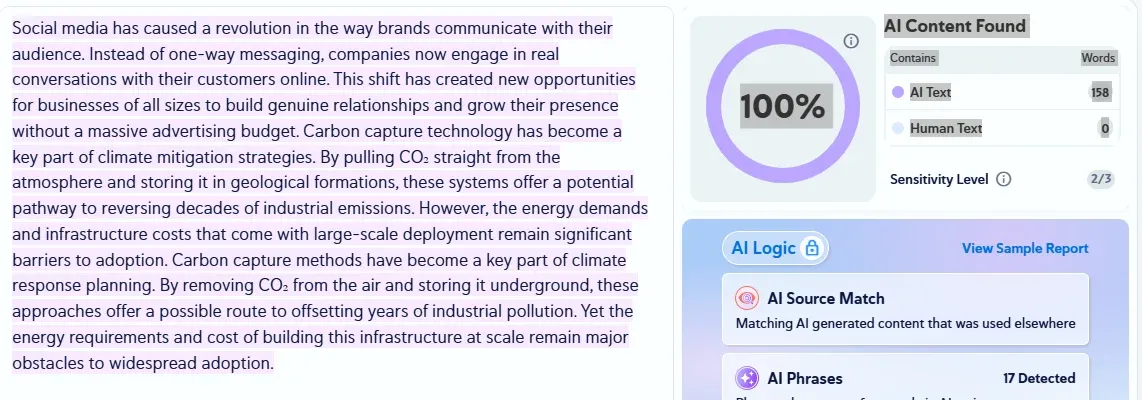
To give a complete picture of how much the humanizer actually changes the text, we ran all three humanized outputs through four leading AI Checkers. The results were consistent across the board.
Detector | Result |
Originality AI | 100% AI-generated |
Copyleaks | 100% AI Content, 158 AI words, 0 human words |
QuillBot AI Detector | 91% AI-generated, 9% human-written |
ZeroGPT | 100% AI/GPT Generated |
The humanizer made minimal changes to Test 1, one or two edits to Test 3, and three vocabulary swaps to Test 2. When a tool intervenes that lightly, the underlying text structure remains largely unchanged, which is exactly what the detectors are responding to. The writing didn't change enough to read differently, whether to a human reader or a detection model.
This matters from a writing quality standpoint: if the output is nearly identical to the input, the humanizer isn't doing meaningful work. The detection scores here are simply a secondary confirmation of what the before-and-after comparisons already showed, Writesonic's humanizer makes surface-level edits, not substantive ones.
How Does Writesonic's AI Humanizer Compare to Dedicated Alternatives?
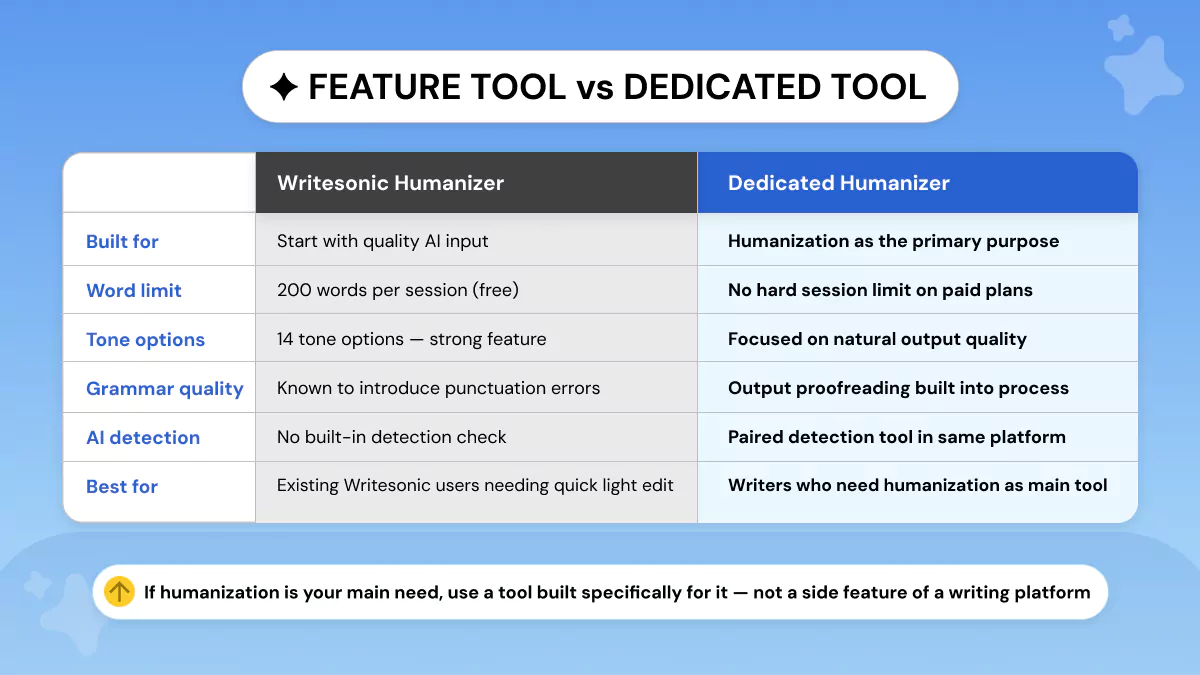
Writesonic is a content platform that includes a humanizer. Phrasly is built around humanization as its core job. That difference in product design is what this comparison really comes down to.
Where Writesonic has the edge
For users already inside the Writesonic ecosystem, the humanizer is genuinely convenient. You're already drafting content in the AI Document Editor — the humanizer is right there, no switching tools, no extra steps. For a quick first-pass rewrite on short content, that workflow integration is a real advantage.
Where Phrasly has the edge
Phrasly is built specifically for humanization, and the product reflects that. To better understand what an AI humanizer is and how it improves your content, it's worth seeing how a dedicated tool approaches the job differently from a suite feature.
You get three humanization strength settings (Easy, Medium, and Aggressive) so you control how much the text gets rewritten. The platform also pairs the humanizer directly with an AI Detector, meaning you can humanize and check the output in the same place without jumping between tools.
On pricing, Phrasly's free plan includes 550 AI humanization words, and the Unlimited plan removes that cap with up to 5,000 words per process. For writers who need humanization as a regular part of their workflow, that structure makes more practical sense than paying for a full Writesonic subscription just to access one feature.
The honest summary
If you're already a Writesonic user, the humanizer is a useful bonus, use it. If humanization is your primary need and you're not already invested in the Writesonic platform, a dedicated tool like Phrasly AI Humanizer gives you more control and a cleaner workflow for less cost.
See the difference yourself
Not sure what a proper humanization pass actually looks like? Paste any AI-generated paragraph below and see how Phrasly AI Humanizer rewrites it. Choose your strength setting, copy the output, and check it against what Writesonic gave you.
Privacy — What Happens to Your Content on Writesonic's Free Tier?
Most reviews skip this entirely. It's worth knowing before you paste anything real into the tool.
Here's what the policy actually says
Writesonic's current privacy policy states that free-tier content, your inputs, prompts, and outputs, may be used to improve, train, and secure its AI models and systems. That's not just passive storage. It explicitly covers model training, product improvement, security, and service-quality enhancement.
What that means in practice
If you're pasting any of the following into the free tier, you should pause:
Client work or agency copy
Unpublished drafts or proprietary research
Sensitive business content
Anything covered by a confidentiality agreement
The free tier is convenient. It is not a confidential drafting space.
Paid accounts work differently
Under Writesonic's Data Processing Agreement, customer data is processed only to provide the service and according to customer instructions, with additional restrictions under California Privacy Law. The free tier and paid plans are not the same from a privacy standpoint, and it's worth knowing which one you're on.
For general blog drafts or non-sensitive copy, this is a minor concern. For anything commercially sensitive or client-facing, either use a paid plan or work somewhere else. Not a reason to avoid Writesonic, just something most writers never check.
So, is Writesonic's AI Humanizer worth it? Writesonic's AI Humanizer is a solid lightweight option if you're already inside the Writesonic platform. For a quick rewrite pass on short content, it works.
It's not the right tool if humanization is a regular part of your workflow. The vocabulary oversimplification, inconsistent output, and lack of control over the rewrite make it a poor fit as a primary humanization tool.
If you need a dedicated AI humanizer, Phrasly is built specifically for that job. Adjustable strength settings, a built-in AI Detector, and a free plan to get started. 👇
FAQs
Is Writesonic AI humanizer free?
Yes, Writesonic’s AI humanizer is available through the platform’s free plan, but it isn’t a standalone free tool. Access comes with usage limits, and extended humanization requires a paid Writesonic subscription.
How good is Writesonic's AI humanizer?
Writesonic’s AI humanizer works best for light editing and improving readability of short AI-generated text. It’s helpful for quick polishing, though results can vary depending on content complexity and tone selection. . For a full breakdown of how it stacks up against dedicated options, see our best AI humanizer tools comparison for 2026.
What are the limitations of Writesonic's free AI humanizer?
The free version has restricted usage and currently operates inside Writesonic’s editor workflow rather than as a dedicated tool. It also focuses on simple rewrites, which can sometimes oversimplify professional or technical language.
Is Writesonic good for humanizing AI text?
It’s a solid option for existing Writesonic users who want quick revisions without leaving the platform. Writers who need consistent, high-quality humanization as a primary workflow may prefer specialized tools.
What is the best alternative to Writesonic's AI humanizer?
Dedicated humanization tools like Phrasly focus specifically on improving writing quality rather than serving as one feature inside a larger AI platform. They typically offer stronger control over tone consistency and editing depth.Learn more about 7 ways to craft better AI-generated content that passes detection to get the most out of whichever tool you choose.
Does Writesonic's humanizer work for long-form content?
It can be used on long articles, but content usually needs to be processed in smaller sections. This makes it more practical for paragraph-level editing than full long-form rewriting in one pass.

Written by
Obaid Ahsan
Content Lead · Pakistan
Obaid Ahsan is a Content Lead with 5+ years of experience in SEO, content strategy, and AI-focused publishing. At Phrasly, he leads content development with a focus on accurate research, search performance, and useful, trustworthy information for readers.