
Formalizer vs ChatGPT: Which AI Tool Actually Delivers Polished Professional Writing?
Formalizer vs ChatGPT: which actually delivers polished writing? Phrasly Formalizer gives one-click, preset-based tone shifts: no prompting needed. ChatGPT offers more flexibility and thoroughness, but only with well-crafted prompts. We tested both head-to-head on real emails to find out.
The typical professional doesn't want to bother with an AI writing tool that demands a detailed guide on prompt engineering. They're looking for concise, formal output every time.
So here’s the actual question we should be asking with Formalizer vs ChatGPT for professional writing. If you copy and paste your casual draft into each tool, which one gives you something you can confidently send back?
This piece compares features, then does an actual head-to-head test with the same email draft and gives a clear verdict to see which one is best for you if you're deciding between Formalizer vs ChatGPT writing.
Quick Comparison: Phrasly Formalizer Vs ChatGPT
Phrasly Formalizer is a purpose-built Formalizer AI tool. It is designed to do one job extremely well. Adjust tone and register on command.
ChatGPT is fine-tuned for conversational abilities, and yes, it can generate formal writing, but it demands more of the user to consistently produce that quality of content.
|
Feature |
Phrasly
Formalizer |
ChatGPT |
|
Primary Purpose |
Purpose-built
tone formalization for professional writing |
General-purpose
AI language model |
|
Tone Presets |
Professional
(Aggressive), Friendly (Medium), Concise (Easy) |
None, requires
prompting for each tone shift |
|
Tone Strength
Control |
✅ Yes; light touch-up to full
rewrite |
❌ No, controlled entirely through
prompt phrasing |
|
Output Versions
Per Request |
5 versions
returned per conversion |
1 output per
prompt (can re-run manually) |
|
Ease of Use
(Non-Technical) |
✅ One-click formalization, no
prompting needed |
❌ Requires crafted prompts for
consistent formal tone |
|
Output
Consistency |
✅ High same input, same tone
setting, same result |
⚠️ Variable,
depends on prompt quality and session |
|
Context-Aware
Rewrites |
✅ Yes; preserves industry
terminology through tone shifts |
✅ Yes; but varies by prompt and
context window |
|
Use Cases
Covered |
Emails, Slack
messages, reports, proposals, HR communications |
Emails, reports,
and more with per-use-case prompting |
|
Data Privacy |
Text not used to
train models, not stored beyond delivery |
OpenAI data
policy applies. Review at openai.com |
|
Free Tier |
300 words free;
550-word 1-day trial; unlimited plan available |
Free tier
available (verify current limits) |
|
Best For |
Professionals
needing reliable formal output, minimal effort |
Users
comfortable with prompt engineering and iteration |
What Does Phrasly's AI Formalizer Actually Do?
Phrasly Formalizer is not a chatbot with a formality plugin added to it. Phrasly Formalizer is an AI formalizer for professional writing. It’s built with presets, not prompts.
A specialized formalizer offers tone formalization at the click of a button and a saved preset.
ChatGPT requires you to specify a tone via a new prompt every time you use it. That difference in structure explains why one tool consistently delivers the same quality, while the other doesn't.
How Does Phrasly Formalizer Work?
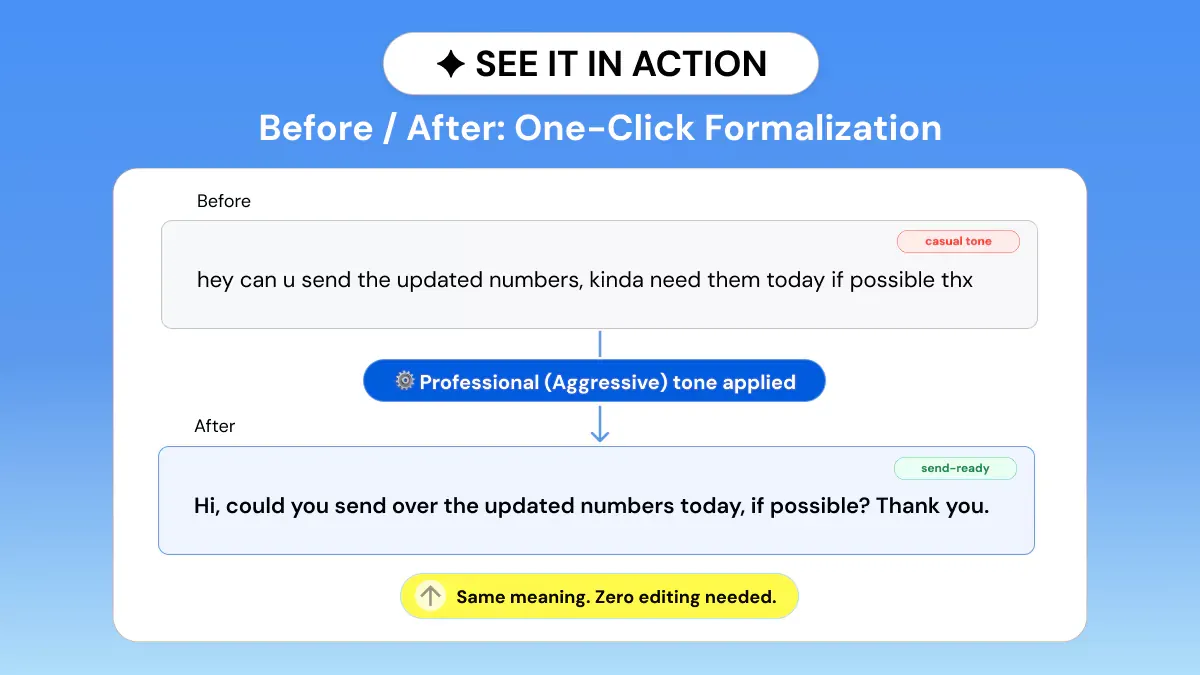
Phrasly Formalizer doesn't just replace the writing register of a message with a few formal synonyms. It reformats sentences, removes slang, and adapts tone to whatever setting you choose while maintaining the intended message.
Three-tone presets will cover the majority of professional writing situations. Professional (Aggressive) suits client-facing and executive communication.
Friendly (Medium) suits internal messages that still need polish. Concise (Easy) strips a message down to the point fast.
Tone strength control ranges from mild editing to heavy rewriting.
Five output versions are returned per request, so you are never locked into a single phrasing. These context-aware rewrites allow industry jargon and technical language to typically remain intact through a tone shift.
Who Uses Phrasly Formalizer?
- Managers and team leads communicate updates, feedback, and requests with professionalism so messages read as clear, calm, and in control even when they're short on time.
- Client-facing roles, including sales, account management, and customer success, rely on Formalizer to keep every client touchpoint polished and consistent.
- HR and People teams manage delicate information, whether it's communicating policy changes or having tough conversations. They strike the perfect balance of empathy and professionalism.
- Executive and cross-functional communicators craft speedy notes into status updates that sound confident even when multiple teams are involved in the thread.
Why Do Non-Technical Professionals Prefer a Dedicated Formalizer Over ChatGPT?
If you are bad at prompt engineering, the Formalizer AI tool takes away an entire skill set from you. No system prompt to write, no guesswork for getting the tone. You paste your draft, select a preset, and text polishing is applied automatically.
That speed matters most for executive communication, where there's no time to iterate. It also helps keep writing clarity intact. The tool is designed to shift register, not rewrite your thoughts for you.
What Does ChatGPT Bring to Professional Writing?
The question isn’t whether ChatGPT can generate quality ChatGPT professional tone responses. Can it do so consistently, by default, without additional configuration?
Can ChatGPT do professional writing? Yes, if given a clear and detailed prompt and preferably a saved system instruction. Otherwise, the quality and formality of its output will sometimes vary greatly between sessions.
ChatGPT's Strengths for Professional Writers
- Versatile: Manages email, reports, proposals, and long-form documents all in one place with no tool switching.
- Context retention: Retains an entire document in context and edits it iteratively throughout a conversation. Useful for complex, long documents.
- Prompt flexibility: Using an appropriately designed system prompt, ChatGPT for professional writing can achieve truly instantaneous and uniformly well-polished super formal output when needed.
- Personalized instructions: Allow you to save a "professional writing persona", allowing for more consistent results between sessions, but require initial creation.
Where ChatGPT Falls Short for Formal Writing
- Inconsistent sessions: if you don't save a system prompt, the formality of output changes between sessions. This can be an issue for groups who require consistent outputs.
- Prompt dependency: Output consistency depends heavily on the prompt given. Non-technical users often receive subpar output and don't know how to fix it.
- Over-formalization risk: If you force ChatGPT to be formal, it will write rigid sentences that sound unnatural and don't flow with your voice.
- Lacks tone selector: There isn't an easy UI control for the level of formality. Every submission forces you to retype the instructions.
Why Does ChatGPT Require Prompt Engineering to Reliably Formalize Writing?
ChatGPT is a large language model (LLM) trained specifically to chat with open-ended user input. It's not a tailored formal tone adjustment tool.
To get consistent formal tone adjustment out of it, you need to translate your needs into encoded natural language processing (NLP).
Commands it can follow reliably: define your audience, register, and constraints. Otherwise, your output consistency will vary widely from message to message.
Head-to-Head Test: Same Text, Both Tools
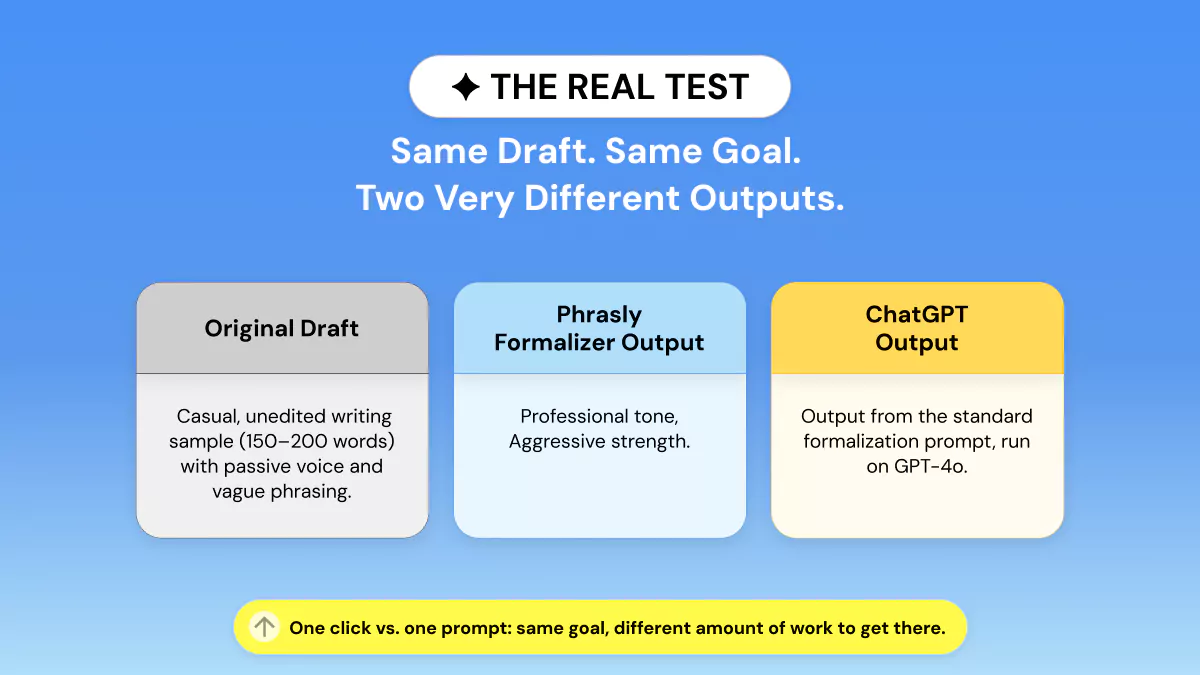
The Test Setup
We tested this with a 150–200-word professional email draft, filled with common problems found when someone emails a first draft without editing: Colloquialisms, passive voice, ambiguous wording, and shifting tones.
To use Phrasly Formalizer: go to https://phrasly.ai/ai-humanizer, paste the draft, click on the Professional (Aggressive) preset, click Formalize, and copy the first response.
Allow ChatGPT to rephrase an email to sound professional by using this prompt:
“ChatGPT-Style” Output: Dear Team,
The marketing team completed the report yesterday; however, I have some concerns regarding the accuracy of several figures. In particular, the Q3 growth statistic appears significantly higher than what we discussed during last week's review.
Before the report is shared with the client, I recommend that we validate these figures to ensure their accuracy. Given the client's concerns following last month's delay, it is important that we deliver a thoroughly reviewed and reliable report.
Could someone please verify the revenue breakdown as well? I was unable to complete a comprehensive review of that section.
As a reminder, the presentation deck is scheduled to be sent to the client by Friday. If we could complete all necessary revisions and validations by Wednesday, we would have sufficient time for a final review before submission.
Thank you all for your efforts and for pulling this together on short notice. Your hard work and commitment are greatly appreciated.
Kind regards,
What the Results Show: Looking at the two outputs side by side, the speed difference is exactly what you'd expect. Phrasly Formalizer took one click and returned a usable draft in seconds, with no prompt required.
ChatGPT needed a carefully worded instruction to get there.
Phrasly's output cleaned up the structure and swapped some casual phrasing. It left several colloquialisms intact, such as "anyway," "by the way," "we'll be golden," and didn't add a salutation or sign-off.
ChatGPT's output, working from a detailed prompt, was the more consistently formal of the two: full letter structure, no leftover slang, and an even register from the opening line to the close.
Phrasly's one click gets you 80% of the way with near-zero effort. Paste-and-go, Phrasly is faster. Prompted well, ChatGPT was more thorough in this test.
Which AI creates better professional writing? Given a single paste-and-go request with zero prompt iterations, Phrasly Formalizer's output generally requires less human cleanup prior to sending.
ChatGPT can produce output that matches or exceeds Phrasly's quality, but often requires prompt refining or iterating on the initial response from the user.
Client Proposal
ChatGPT output: Dear [Recipient],
Please find attached the preliminary plan for the redesign project.
The proposed timeline begins with the research phase during the first week, followed by wireframing in the subsequent weeks. Provided the project progresses as planned, we anticipate delivering the first draft by the end of Week 4.
The estimated project cost is approximately $18,000. Please note that this estimate may be adjusted based on the number of revision rounds required throughout the project.
We welcome your feedback on the proposed plan. If you would prefer to discuss the details in person, I would be happy to arrange a call at your convenience.
Kind regards,
[Your Name]
What the Results Show: Phrasly's one-click pass cleaned up the obvious casual markers: "basically," "you guys," "cost-wise" and tightened the sentence structure, but it kept the conversational opener and a slightly loose tone in places like "the project's looking at around $18k."
The result reads like a well-edited email rather than a document built to stand on its own, which fits how the tool is meant to be used: fast, low-effort polish on an existing message.
ChatGPT, working from a detailed prompt, went further and reshaped the draft into an actual proposal letter: formal salutation, structured paragraphs, and a closing, with placeholders ready to be filled in.
That extra structure is the real difference here. It's not just a more formal tone, it's a different document shape. One suited to being sent or filed as-is rather than read as a quick note.
Slack / Internal Message
ChatGPT output: Hi team,
A quick update: I'm seeing intermittent 500 errors on the checkout API endpoint. I'm not yet certain whether this issue is isolated to my environment or affecting others as well.
I'm investigating the problem now. If anyone has availability to assist, I'd appreciate another set of eyes to help diagnose the issue before the end of the day.
Thank you!
What the Results Show: Phrasly's pass kept the message short and conversational, in line with the channel it's written for.
It swapped out a few casual markers ("gonna," "lmk") but left "hey guys," "FYI," and "EOD" untouched, so the result still reads like something posted in Slack rather than sent as a formal note.
ChatGPT's version, by contrast, reshaped the message into something closer to an email: a greeting, a sign-off, and fuller sentence structure throughout. That's arguably more polish than a Slack thread needs.
Status Report
ChatGPT output: This week delivered mixed results across the project.
The development team successfully completed the majority of the planned backlog items, representing solid progress against the sprint objectives. However, the QA team identified several unexpected defects within the payments workflow. As a result, the planned release is likely to be delayed by approximately one week while these issues are addressed and thoroughly validated.
On a positive note, the design team completed the new onboarding flow ahead of schedule, reducing project risk and allowing the team to focus on higher-priority tasks.
Overall, the project remains on track, although the payments workflow is currently the primary area requiring close attention. Resolving these issues will be critical to maintaining the revised release timeline.
What the Results Show: Phrasly trimmed the casual phrasing ("kind of a mixed bag," "gonna") but kept the report conversational in structure and length.
ChatGPT expanded the same content into a fuller document. Added context for why each item matters ("representing solid progress against the sprint objectives," "reducing project risk"), and closed with a forward-looking line about what resolving the payments issue means for the timeline.
For a report that's only going to the immediate team, Phrasly's version covers the same ground with less reading. For one that might get forwarded up or archived, ChatGPT's added framing does more of the interpretive work a reader outside the team would need.
HR Communication
ChatGPT output: Dear Team,
I would like to inform you of an upcoming change to our Paid Time Off (PTO) request process, effective next month.
Going forward, PTO requests should be submitted through the new employee portal rather than by emailing your manager directly. While we understand that transitioning to a new system may require a brief adjustment period, this change is intended to streamline the approval process and improve overall efficiency.
If you have any questions or would like assistance navigating the new portal, please don't hesitate to reach out. We would be happy to provide guidance and support throughout the transition.
Thank you for your cooperation and understanding.
What the Results Show: Phrasly kept the note brief and close to the original in length and register. It dropped "Lmk" and "kind of annoying" but left "FYI" in place, so the result still reads like a quick note from a manager rather than an official notice.
ChatGPT built out a full announcement: a greeting, expanded reasoning for the change, and a closing line of appreciation, which is closer to what a company-wide policy update from HR would typically look like.
The trade-off is tone rather than accuracy. Phrasly's version keeps more of the original's casual reassurance. ChatGPT's reads as more institutional and slightly more distant.
This tone may or may not fit the sender's intent depending on how the change is meant to land.
What the Test Reveals About Each Tool's Philosophy
Phrasly Formalizer is built for zero-effort consistency. It doesn't try to guess your intent from a prompt. It applies a fixed preset. That's a strength for speed and predictability.
This test shows Phrasly won't catch everything a more detailed prompt would. Some casual phrasing can survive the pass if it doesn't fall cleanly under the preset's rules.
ChatGPT is built the opposite way. Given a specific, well-written prompt, it can produce a more thoroughly formal result than a one-click preset. The quality of the output tracks the quality of the instruction.
So the real question isn't "which tool sounds more formal." It's "Do you want something that just works with one click, or something that can do even better if you're willing to put in the effort?"
Who Should Use Which Tool?
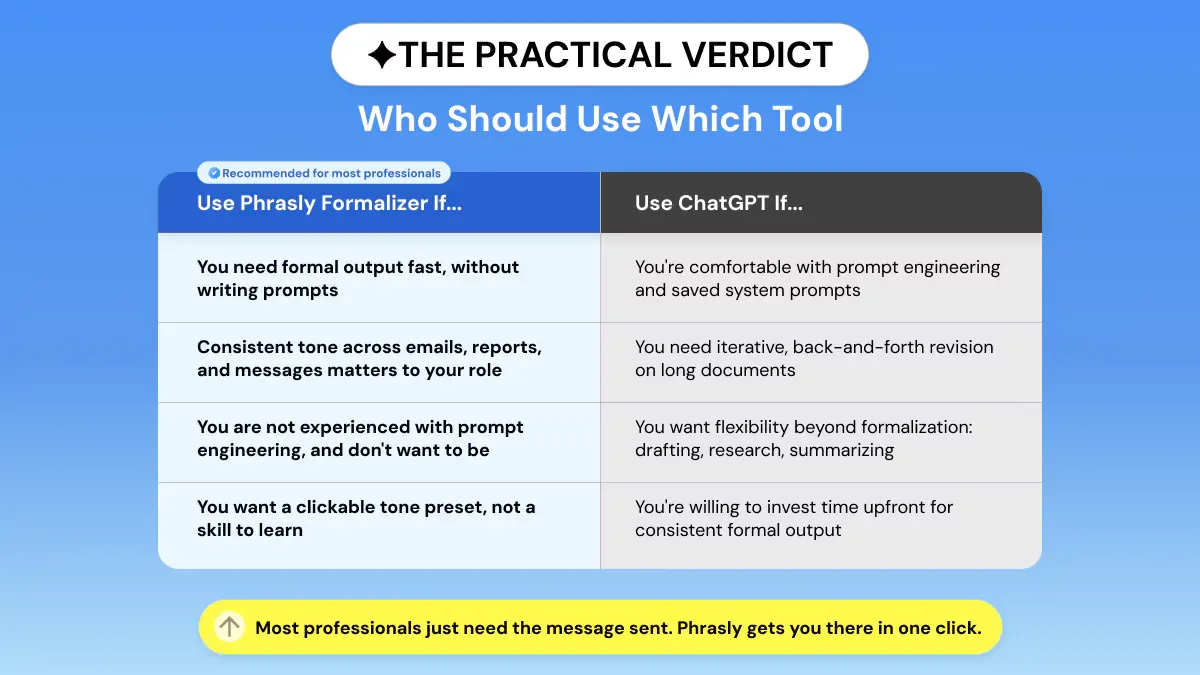
Which AI tool should someone use who is not technical and just wants well-written business content?
Unless you're technical, a standalone formalizer AI tool that requires no prompt-writing gives a usable, polished document faster than ChatGPT.
If you're already adept at editing prompts and iterating on drafts, ChatGPT is still your better choice. Heavier users of AI writing tools also tend to report greater time savings.
Use Phrasly Formalizer If You
- Want professional looking results instantly without prompts or iterations: paste, pick a tone, done.
- Be employed in a position that requires you to uphold a professional writing standard throughout emails, messaging, reports, etc.
- Do not have any experience with prompt engineering and don't want to learn as part of your workflow.
- Would like the option to select Professional, Friendly, or Concise as a clickable preset instead of a skill.
Use ChatGPT If You
- Are familiar with prompt engineering, and already have created saved system prompts for your use case.
- Collaborate on lengthy documents involving iterative revision/refinement.
- Looking for something more flexible than formalized writing? Outline, research, summarize, and more.
- Are willing to spend time initially to receive predictable formal output via prompt iteration.
Either way, the decision usually comes down to how much friction you are willing to accept before you hit send. If reliable, ready-to-send formality is the priority, that is exactly what Phrasly Formalizer is built for.
Linguists have studied this exact trade-off for decades under the umbrella of register. The way language shifts based on audience, purpose, and setting.
Formality is not a single on/off switch. It is a spectrum, and getting it wrong in either direction (too stiff or too casual) undermines credibility before a reader even reaches your argument.
Register theory, going back to Halliday's work on field, tenor, and mode, treats formality as one of several dimensions speakers and writers adjust based on their relationship to an audience.
FAQs
What is an AI formalizer tool, and how is it different from ChatGPT?
An AI formalizer is a tone tool that transforms your text into a more professional, friendly, or concise tone. The reader still understands your original meaning.
ChatGPT is a generalized model that requires a prompt to achieve the same outcome.
Is Phrasly Formalizer free to use?
Free accounts can formalize up to 300 words. A 1-day trial raises that limit to 550 words. And an unlimited plan is available for regular use.
Can ChatGPT write consistently formal emails without a system prompt?
Not really! Output varies between sessions and depends heavily on prompt quality. The same request can come back more or less formally, depending on the day.
How do I make ChatGPT write more formally every time?
Save a system prompt outlining who you're talking to, tone, etc, and any formatting constraints you require. It does work; it just means there's an extra step in setup that a dedicated formalizer bypasses entirely.
Which AI tool is best for professional writing in 2026?
For tone-specific, low-effort formal output, Phrasly Formalizer is the clear choice among tools built for this exact job. See this wider roundup of the best AI text enhancers for tools suited to other writing tasks.