DigitalMagicWand AI Humanizer Review: Does the Output Actually Sound Human?
DigitalMagicWand AI Humanizer rewrites AI text, but does the output actually read well? We tested it on real content so you can see exactly what you get before committing to a plan.
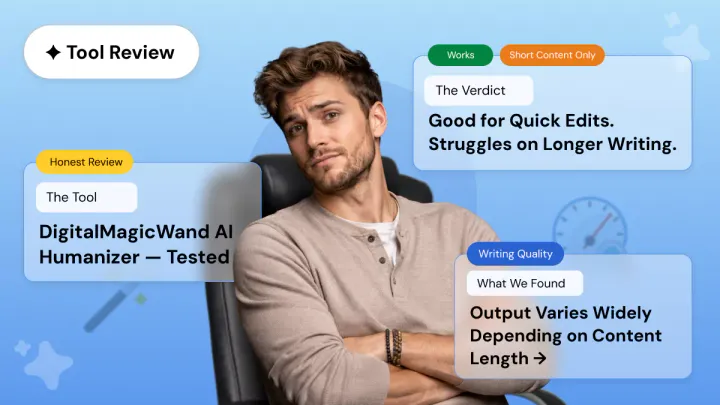
Most reviews of the DigitalMagicWand AI Humanizer spend the entire article talking about detector scores. That is not what this is.
The real question most writers and content creators have is simpler: does the output actually read well? Can you paste it into an article, a blog post, or an assignment without spending 20 minutes fixing it?
That is exactly what this review is here to answer. We are evaluating writing quality, meaning preservation, and practical usability, not just whether a score goes up or down.
What Is DigitalMagicWand AI Humanizer?
DigitalMagicWand AI Humanizer is a browser-based tool that rewrites AI-generated text to sound more natural. You paste your text in, choose a writing style, and it produces a rewritten version. No download required, no complicated setup. Just an account and a browser.
DigitalMagicWand AI works by identifying and eliminating the statistical patterns that make AI writing recognisable, while keeping the original message intact. The tool uses what it calls "proprietary linguistic algorithms" to achieve this.
Key Facts at a Glance
- Platform type: Multi-purpose suite (images, audio, video, and text tools)
- Humanizer position: One feature inside a broader platform, not a standalone product
- Access: Browser-based, no download required
- Account required: Yes, even for the free tier (Google sign-in supported)
- Language support: 100+ languages
Available Writing Styles
The current style options on the platform include: Strong Humanizer, Light Humanizer, Informal, Essay, Journalistic, Academic, Narrative, Messy, Shorten, and Expand. This is worth noting because older reviews list different style names. The live interface has been updated.
Who is it for? The tool targets students, bloggers, marketers, and content creators who want a quick first-pass rewrite of AI-drafted content. If you are looking specifically for a dedicated writing tool, it is worth knowing upfront that the humanizer shares platform space with image generators, audio tools, and video features.
DigitalMagicWand AI Humanizer: Real Output Test
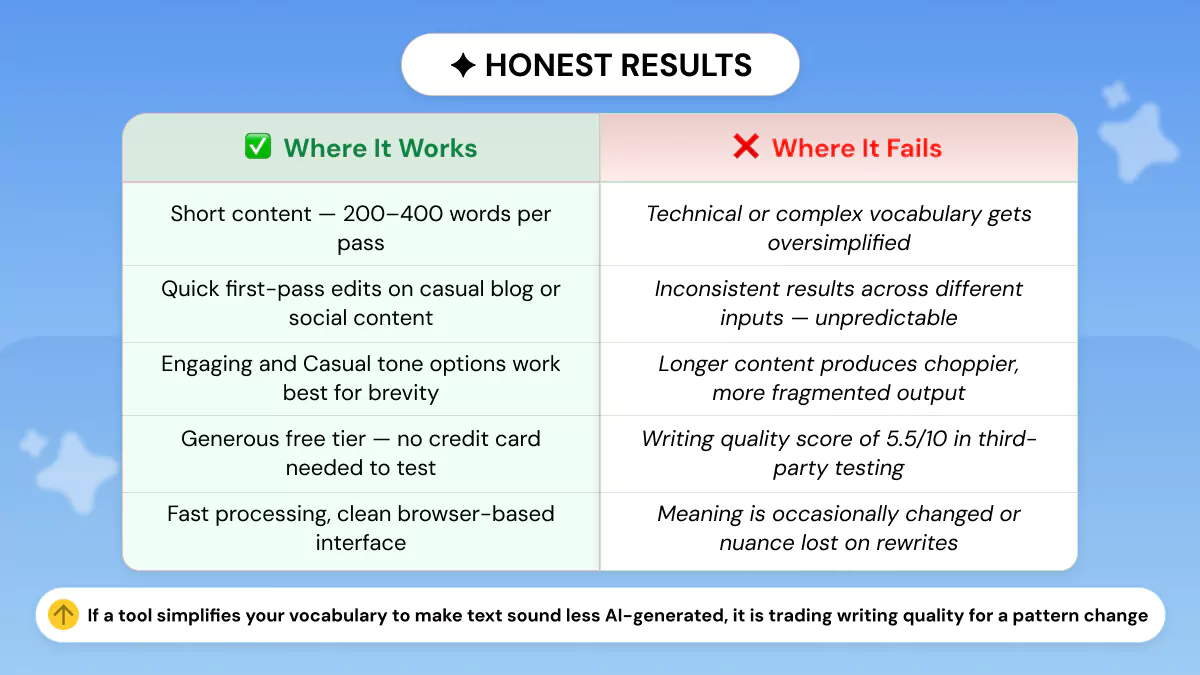
We tested DigitalMagicWand AI Humanizer using the Strong/Light Humanizer option on short, blog-style, and longer technical content. The goal was to see whether the tool improves writing quality in a practical way, not just whether it changes the text. We looked at readability, meaning preservation, sentence flow, and how much editing the output would still need.
Test 1: Short, simple content
Original:
DigitalMagicWand AI Humanized output
Analysis:
Test 2: Blog-style content
Original:
DigitalMagicWand AI Humanized output
Analysis:
Test 3: Longer or more technical content
Original:
DigitalMagicWand AI Humanized output:
Analysis:
Overall assessment
DigitalMagicWand's Strong Humanizer breaks up longer sentences into shorter, more expressive lines. That reduces the mechanical feel of AI writing, and it can work well for blog content and casual pieces that benefit from a punchier voice. But it is not the right fit for formal writing, technical copy, or anything that requires a clean editorial tone.
For quick, light edits on short content, it is a reasonable free option. For longer professional writing, the unpredictability becomes a real obstacle. If you want to understand more about what good humanisation actually looks like under the hood, this guide on how an AI humanizer can help you rewrite a sentence for better clarity is worth reading before you commit to any tool.
📝 This is exactly the problem Phrasly was built to solve.
DigitalMagicWand gives you stylised output. What most writers actually need is clean output without vocabulary that feels swapped rather than rewritten, and without a second editing pass eating up your time.
Phrasly AI Humanizer focuses on rhythm, voice, and meaning preservation. Paste the same text you just read above into Phrasly and see the difference in the output yourself.
DigitalMagicWand Free Plan: What You Actually Get
The free plan gives new users 4 credits on signup. Each credit covers up to 10,000 characters, so the total free allowance works out to around 40,000 characters. That is a generous amount for properly testing the tool. No credit card is required, but you do need to create an account. You can sign in with Google, which keeps the process quick.
The credits themselves are not the issue. 40,000 characters is enough to form a genuine opinion. The limitation shows up when you move to regular use.
Free Plan: At a Glance
| Detail | What You Get |
|---|---|
| Free credits | 4 credits on signup |
| Characters per credit | Up to 10,000 |
| Total free allowance | ~40,000 characters |
| Credit card required | No |
| Account required | Yes |
Paid Plan Pricing
| Plan | Credits/Month | Price | Cost Per Credit |
|---|---|---|---|
| 🔵 Basic | 80 credits | $9.99/month (billed quarterly) | $0.12/credit |
| ⭐ Plus | 200 credits | $19.99/month (billed quarterly) | $0.10/credit |
| 💎 Premium | 600 credits | $49.99/month (billed quarterly) | $0.08/credit |
All plans come with a 30-day money-back guarantee and no cancellation fees. Payments are processed securely through PayPal or ClickBank.
The Credit-Sharing Problem: What the Plan Numbers Don't Tell You
Before you pick a plan, there is one thing worth understanding clearly. Credits are shared across the entire DigitalMagicWand platform — images, audio, video, and text all draw from the same pool. Here is what each tool actually costs per use:
| Tool | Credit Cost | What That Means |
|---|---|---|
| 📝 Text (humanizer) | 1 credit | $0.08 per generation |
| 🔊 Audio | 1 credit | $0.08 per minute |
| 🖼️ Image | 2 credits | $0.17 per image |
| 🎥 Video | 20 credits | $1.67 per video |
To put that in perspective: on the Basic plan, a single video generation uses 20 of your 80 monthly credits; that is 25% of your entire allowance gone before you have humanised a single word. Generate four videos and your humanizer credits for the month are completely gone.
For writers who use the platform exclusively for text humanisation, the credit system is manageable. For anyone using the broader suite of tools, the monthly allowance runs out much faster than the plan headline numbers suggest.
If consistent, high-volume humanisation is your goal, a dedicated tool with a character-based or word-based plan will give you more predictable value and better output quality for the same budget.
How DigitalMagicWand Compares to Dedicated Alternatives
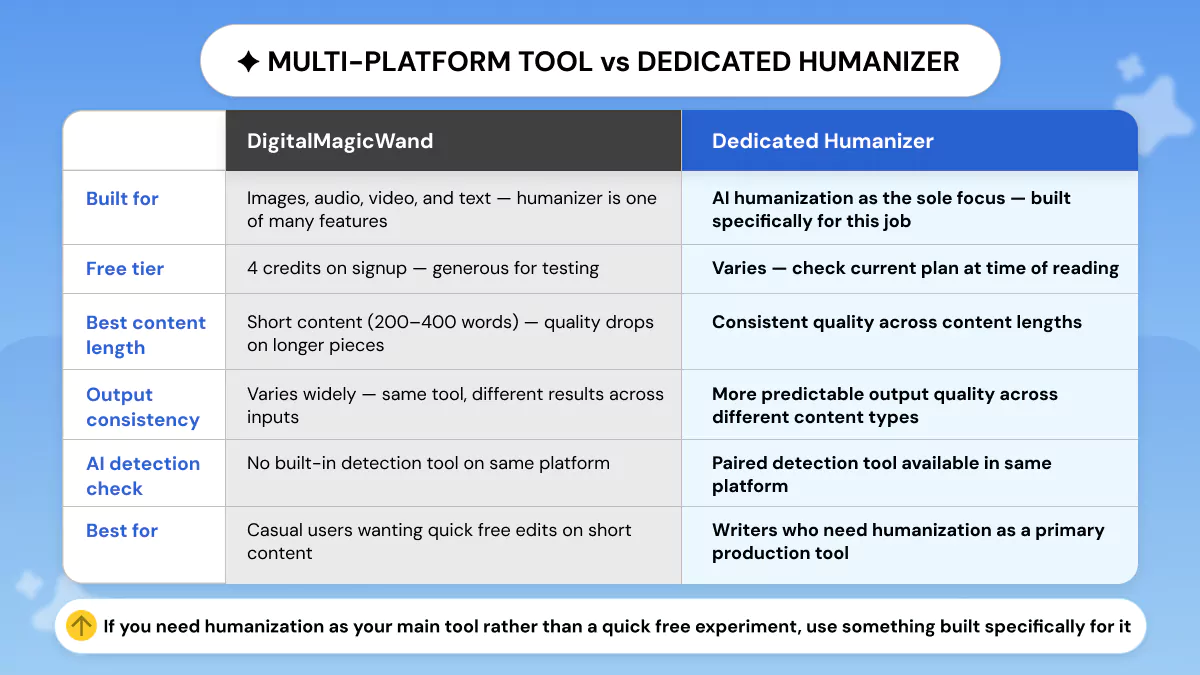
DigitalMagicWand is a multi-purpose platform covering images, audio, video, and text tools all under one roof. The humanizer is one part of that. That is a fundamentally different product philosophy from a tool built specifically to improve AI writing quality.
Side-by-Side: DigitalMagicWand vs. a Dedicated Humanizer
Where DigitalMagicWand wins: generous free tier, no downloads required, multiple style options, fast processing, and broad language support across 100+ languages. For someone who wants to try an AI humanizer without any commitment, it is a low-friction starting point.
Where a dedicated tool wins: a purpose-built humanizer focuses entirely on writing quality, covering rhythm, voice, sentence variety, and meaning preservation, rather than vocabulary swapping. It does not need to share its development focus with image generators and audio tools. Phrasly AI Humanizer is built specifically for this job, with an integrated Phrasly AI Detector in the same platform so you can check your output without switching tools.
How does DigitalMagicWand compare to dedicated AI humanisation tools? The honest answer is that it handles the basics adequately for casual use, but a dedicated tool consistently outperforms it on longer, more demanding content.
Is there a better alternative to DigitalMagicWand for improving AI writing quality? If writing quality is your primary concern, a purpose-built tool like Phrasly AI Humanizer gives more reliable results, especially on professional or long-form content. For a broader look at how different AI detection tools perform, this breakdown of AI detection accuracy across major checkers gives useful context.
How to Get the Best Results from DigitalMagicWand
If you have decided to use DigitalMagicWand, these habits will get you a noticeably better result.
1. Process Short Sections, Not Long Documents
The 200 to 400 word range consistently produces cleaner output. Break longer content into sections and run each one separately rather than pasting the entire piece at once. Long inputs are where the tool's vocabulary simplification problem shows up most clearly.
2. Read Every Sentence Aloud After Humanisation
This catches meaning errors, awkward phrasing, and oversimplified vocabulary faster than reading silently. If a sentence sounds wrong when you say it out loud, it needs fixing. Do not skip this step.
3. Choose Your Style Deliberately
Not all styles perform equally on all content types:
- Academic / Essay: better for formal or professional content
- Light Humanizer / Journalistic: good balance for most blog content
- Informal: works for casual, conversational pieces
- Casual / Messy: avoid for anything professional-facing
4. Treat the Output as a First Draft
Build editing time into your workflow. Humanised output from any tool is a starting point, not a finished product. Writers who get the best results use the humanizer for structure and then rewrite the awkward parts themselves. If you are regularly getting flagged even after editing, this guide on why essays get detected as AI explains exactly what detectors are looking for.
5. Run a Final Quality Check
Once you have edited the output, run it through Phrasly AI Detector to check how the final version scores and spot any sections that still read as formulaic. A quick detection check before publishing is a good habit regardless of which humanizer you use.
DigitalMagicWand AI Humanizer is a solid free tool for quick, light editing on short content. The free tier is generous, the interface is clean, and for casual users who want a no-commitment test of AI humanisation, it is worth trying.
For longer professional content or consistent production output, the vocabulary oversimplification and unpredictable results make it less reliable than a dedicated humanisation tool.
FAQs
What is DigitalMagicWand AI Humanizer?
DigitalMagicWand AI Humanizer is a web-based tool that rewrites AI-generated text to sound more natural. It is part of a broader platform that includes image, audio, and video tools. The humanizer offers multiple writing styles and supports 100+ languages, with no download required.
Is DigitalMagicWand AI Humanizer free?
Yes. New users get 4 free credits on signup, with each credit covering up to 10,000 characters. That gives you around 40,000 characters to test the tool at no cost. No credit card is needed, but you do need to create an account.
How good is DigitalMagicWand's AI humanizer?
It is reliable on short, straightforward content but inconsistent on longer or more technical writing. Third-party testing by Tenorshare gave it a writing quality score of 5.5 out of 10, and results vary significantly depending on the input length and style selected.
Which AI humanizer produces the most natural-sounding writing?
Tools purpose-built for humanisation tend to produce more natural output than multi-purpose platforms. Dedicated tools focus on rhythm, voice, and meaning preservation rather than simple vocabulary swapping. Phrasly AI Humanizer is built specifically for writing quality and is worth comparing directly against your current tool.
What is the best alternative to DigitalMagicWand AI Humanizer?
For writers who need consistent, high-quality output on longer content, a dedicated humanizer is a better fit. Phrasly AI Humanizer is a purpose-built option that prioritises output naturalness rather than treating humanisation as a side feature of a broader platform.
Is Digital Magic Wand accurate?
On shorter content in simpler styles, results are generally usable. On longer or more complex content, quality drops and meaning errors occasionally appear. The tool is better described as a helpful first-pass rewriter than a consistently accurate one. For more on what accurate AI detection actually looks like, see this guide on AI detection accuracy across major checkers.
How do I get the best results from DigitalMagicWand?
Keep inputs short (200 to 400 words), choose your style deliberately, read every sentence after humanisation, and treat the output as a draft that needs editing. Run the final version through Phrasly AI Detector before publishing to catch anything that still reads as formulaic.