Phrasly Docs

The AI Document Editor for Students & Professionals

Phrasly Docs is the only AI document editor where you write, humanize, cite, and collaborate without switching a single tab.

person1person2person3

Used by over 3 million students and professionals

A preview of the Phrasly AI document editor

Used by Students & Professionals Around the World

Image 0
Image 1
Image 2
Image 3
Image 4
Image 5
Image 6
Image 0
Image 1
Image 2
Image 3
Image 4
Image 5
Image 6
Overview

What Is an AI Document Editor?

An AI document editor is a writing workspace that uses artificial intelligence to help you draft, edit, refine, and organize documents in one place.

Unlike a traditional editor like Google Docs, which mainly gives you a blank canvas and formatting tools, an AI-powered document editor builds intelligence directly into the page, so you can rewrite, research, cite, and polish your work without switching between separate tools.

Phrasly Docs goes further by bringing humanization and AI detection into that same workspace, alongside AI-assisted writing, citations, and real-time collaboration.

The result is a single document editor where students and professionals write, cite, humanize, and refine their work together.

Features

A Smarter Google Docs Alternative with AI Built In

AI Editor with Built-in Humanizer and AI Detector

Humanize AI-generated text to avoid false positives, or check your writing for AI with our highly accurate detector.

AI Chat Agent

Chat with our AI agent to brainstorm ideas, refine your writing, and get personalized feedback. Web search supported.

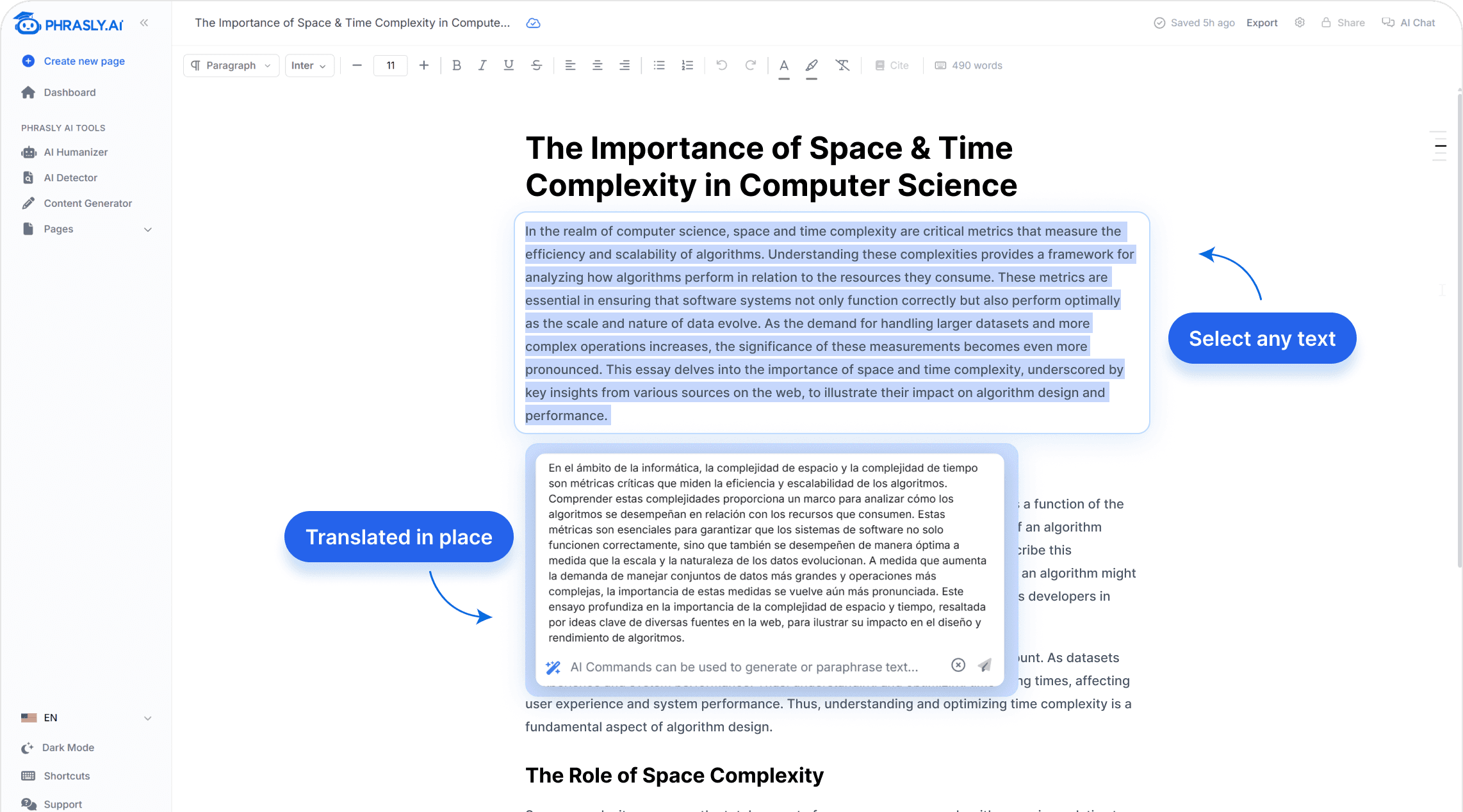
AI Commands

Built-in preset commands like Detect AI, Summarize, and more to speed up your workflow, plus the ability to run custom commands.

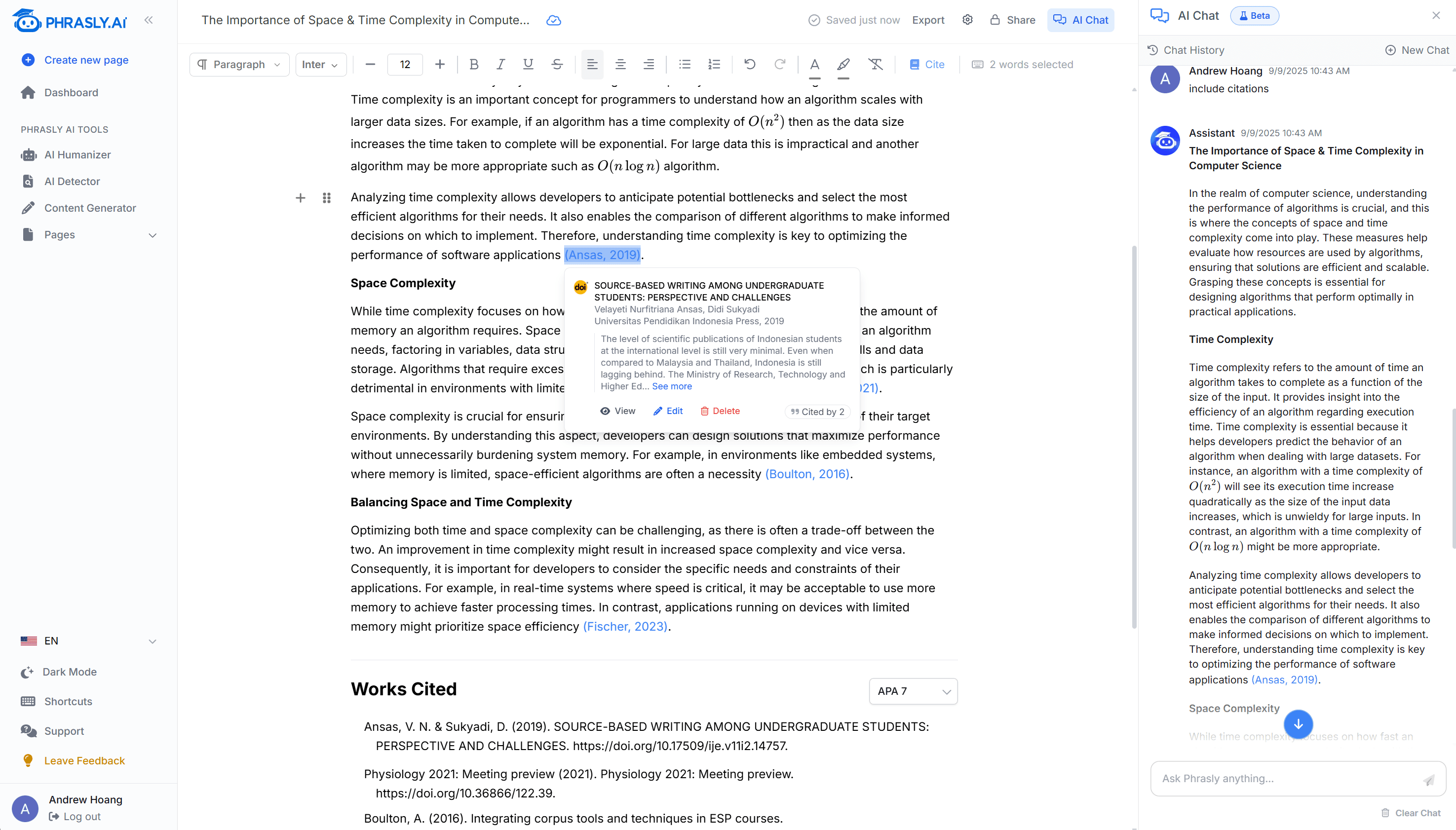
AI Writing Tool with Automatic Citation Generator

Access millions of academic and web sources directly from your editor, with instant citing supporting thousands of styles.

AI Document Editor with Smart Autocomplete

AI Autocomplete

Avoid writer’s block with the press of the Tab key to complete your next sentence.

Quick Export

Easily export your documents in PDF or Word formats for seamless sharing and submission.

Dark Mode

Reduce eye strain and write comfortably with a beautiful dark mode interface.

Outline Builder

Organize your ideas and structure your documents with an intuitive outline builder.

Multiple Citation Styles

Support for APA, MLA, Chicago, and more citation styles.

Table of Contents

Automatically organize your documents as you insert headings in your document.

How to use

How to Use Phrasly as Your AI Document Editor

Here's how to edit a document with AI from first draft to finished file, all inside one editor.

  1. Step 1

    Start with a prompt or blank document

    Tell Phrasly what you're writing, then pick No Outline, Standard Headings, or Creative Headings. Already have a draft? Paste it straight into the editor.

  2. Step 2

    Write and edit with AI

    Press Tab to autocomplete your next line. Use AI Commands or the Chat Agent to rewrite, summarize, or refine any passage without leaving the page.

  3. Step 3

    Humanize and review

    Run robotic passages through the Humanizer, then check the revised text with the built-in AI Detector. Review the score and highlighted sections, and edit until it reads right.

  4. Step 4

    Add citations and export

    Find academic and web sources, insert citations in your required style, then export the finished document as Word or PDF.

Extras

Collaborative AI Document Editor for Teams

Support multilingue

Phrasly prend en charge plus de 30 langues, vous permettant d'écrire pour un public mondial.

Phrasly prend en charge plus de 30 langues, vous permettant d'écrire pour un public mondial.

Sauvegarde automatique & synchronisation hors ligne

Votre progression est sauvegardée même lorsque vous êtes hors ligne. Lorsque vous revenez en ligne, vos modifications seront resynchronisées.

Votre progression est sauvegardée même lorsque vous êtes hors ligne. Lorsque vous revenez en ligne, vos modifications seront resynchronisées.

Collaboration en temps réel

Invitez vos partenaires à collaborer sur un document en temps réel pour augmenter l'efficacité.

Invitez vos partenaires à collaborer sur un document en temps réel pour augmenter l'efficacité.
Who it's for

Who Is Phrasly Docs Built For?

Students & Academics

Phrasly is built to be the best AI writing tool for students. Write essays and research papers end to end: outline the paper, draft and refine it, pull in academic sources, and cite in APA, MLA, or Chicago. Review AI-assisted passages with the built-in AI detector before you submit. Trusted by students at Oxford, MIT, and Stanford.

Professionals & Content Writers

Content writers, marketers, and copywriters use Phrasly as an AI writing assistant for professionals. Draft an article, research and cite sources, refine tone, then export a finished document, without moving work between separate tools. As an AI document editor for business teams, it also lets colleagues write and edit together in real time.

Used by Top Writers Worldwide

Phrasly is trusted by writers and professionals around the world who need to ensure their writing sounds natural, authentic, and meets academic standards.

Writers using Phrasly
3,000,000+
Projects completed
4,000,000+
Hours saved writing
600,000+

Join more than 3 million+ who rely on Phrasly to make their writing clear, engaging, and authentically human.

Support

Frequently Asked Questions

Why not just use Google Docs?

Phrasly is the only AI-powered writing tool that combines an advanced AI detector, AI humanizer, AI chat agent, and built-in citations library all in one place. Unlike Google Docs, Phrasly is designed to help you write faster and more efficiently with the power of AI.

Are there any limits?

Currently, limits are based on how many users are using the system at a given time. If you're on the paid plan, everything is fully unlimited as always.

Can I generate citations?

Our in-house AI agent crawls the web in real-time to find relevant sources for your writing. Our models then automatically include these sources directly in your document, with support for many citation styles including APA, MLA, Chicago, and more.

How do I cite Phrasly in academic papers?

To cite Phrasly's AI Detector in academic papers, you can use the following format: Author Name (Year). 'Title of the Software: Phrasly AI Detector.' Publisher, Version.

What is an AI document editor?

An AI document editor is a writing workspace where AI helps you draft, edit, refine, research, and cite documents directly inside the editor, instead of switching between separate tools. Phrasly Docs combines document editing with an AI assistant, humanizer, AI detector, citations, and real-time collaboration in one place.

How do I use AI to edit a document?

In three steps. First, start with a prompt or blank document, or paste an existing draft. Second, use Tab autocomplete, AI Commands, or the AI Chat Agent to rewrite, summarize, or refine your text. Third, humanize and review with the built-in AI detector, add citations, and export to Word or PDF.

Is Phrasly a free AI document editor?

Yes. You can get started with Phrasly Docs for free. Free access may come with usage limits, and a paid plan removes those limits for unlimited writing, editing, and citations.

Can Phrasly detect AI-generated content inside the editor?

Yes. Phrasly is a document editor with a built-in AI detector, so you can check your writing without copying it into another tool. The detector gives an AI likelihood score and highlights specific passages, which you can review and edit before submitting.

Does Phrasly work like Google Docs?

Yes. Phrasly is a Google Docs alternative with AI built in. You get a familiar document-editing and real-time collaboration experience, plus an AI humanizer, AI detector, automatic citations, AI Commands, and an AI writing assistant, all inside the same editor.

What citation styles does Phrasly support?

Phrasly supports thousands of citation styles, including APA 7, MLA 9, Harvard, Chicago, and IEEE. Select any text, click cite, and Phrasly finds the best source and inserts a fully formatted citation in one click.

Try Phrasly for free today

Join 3,000,000+ students and writers who use Phrasly's AI content tools to write faster and more efficiently.